

BSCP Certification: Review
Reviewing the Burp Suite Certified Practitioner (BSCP) exam. Learn the best strategies for using Burp Suite Professional to pass this rigorous web cert exam.

I recently passed the OSCP certification with 100 points in just 7 hours, and I wanted to share my preparation strategy and exam experience to help others on their OSCP journey. While OSCP is well-known in the industry, I’ll be honest about my experience with the course material and what you can realistically expect. The OSCP course material, in my opinion, doesn’t quite match the standard set by more comprehensive certifications like CPTS. That said, there are some unique aspects worth noting - particularly the AWS section and the Challenge Labs which are also very interesting to complete.
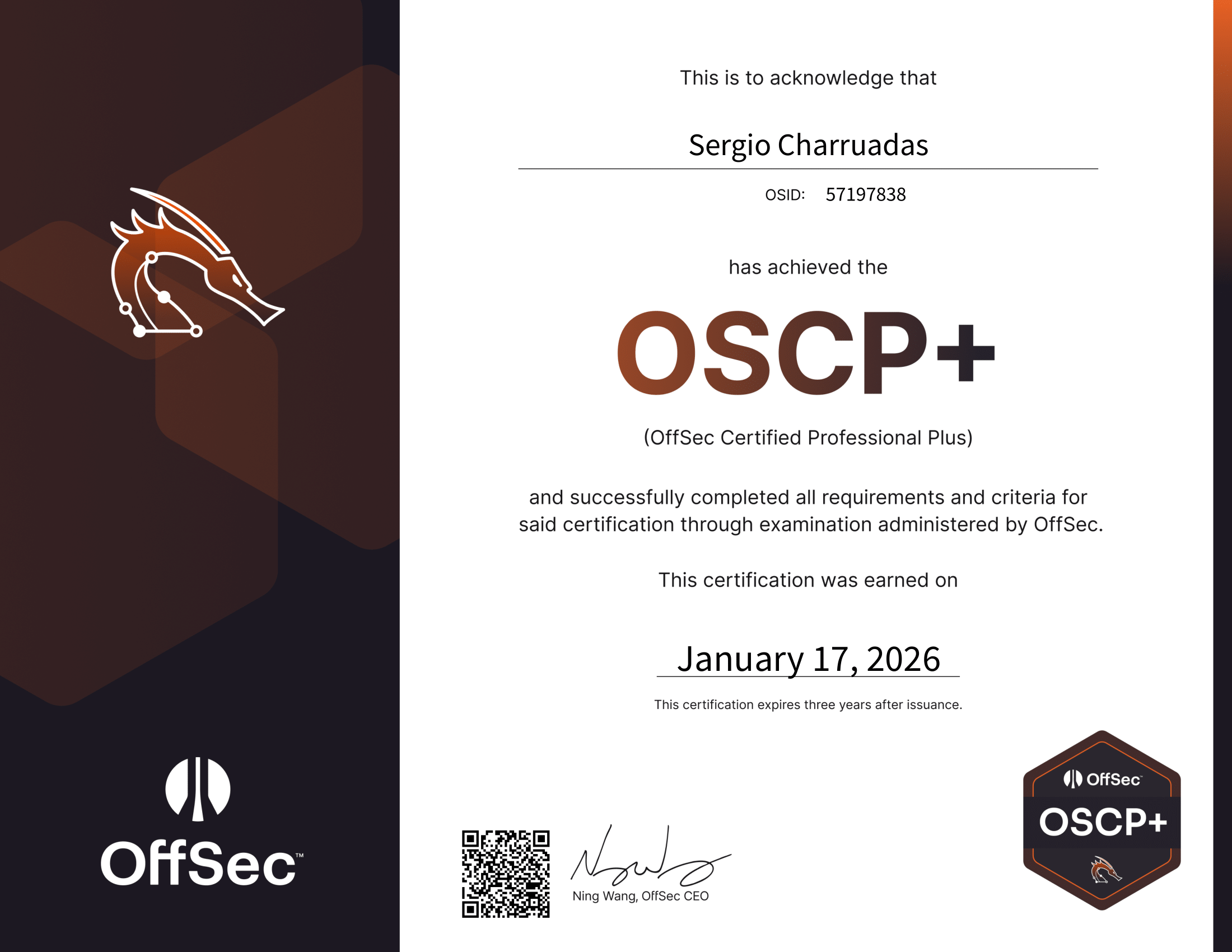
Before diving into my preparation strategy, I should mention my background. I have 3 years of cybersecurity experience, with 2 of those years working as a penetration tester. I also hold several certifications including CWES, BSCP, ASCP, and a few others. This foundation certainly helped, but the OSCP required dedicated preparation regardless of prior experience.
My preparation was methodical and focused. Rather than trying to cover everything superficially, I concentrated on building deep practical skills through hands-on practice with machines and labs that closely mirror the exam environment.
The cornerstone of my preparation was completing 60 machines, most of them from Proving Grounds platform. I tracked my progress meticulously in a spreadsheet, documenting each machine, its difficulty level, and key techniques used.
You can see my full machine tracking spreadsheet HERE - feel free to make a copy for yourself and track your own progress.
Beyond individual machines, I completed all Challenge Labs except for Relia and Skylark. These challenge labs were particularly valuable because they simulate the multi-machine Active Directory scenarios you’ll encounter in the exam. The AD portion of the exam is not something you want to face unprepared.
Even if you’re very experienced, know everything in the syllabus, and are comfortable completing machines on HTB or other platforms, you might struggle with the OSCP exam if you’re oblivious to the “OffSec way” of building boxes. OffSec has a very particular methodology and style that differs from other platforms. Their machines often require specific enumeration patterns and exploitation approaches that you won’t encounter elsewhere. I cannot stress enough the importance of actually completing Proving Grounds boxes before attempting the exam. Experience from other platforms, while valuable, is not a direct substitute for familiarizing yourself with how OffSec structures their challenges.
Pro Tip: Create a tracking system for your practice machines. Document what you learned from each one, the techniques that worked, and those that didn’t. This creates a personalized knowledge base you can review before or during exam day.
Having well-organized templates made a significant difference in my exam performance. I created and refined several templates throughout my preparation:
Standalone Machine Templates:
Active Directory Set:
In addition to these templates, I maintained my own personal notes that I’ve been building throughout my cybersecurity journey. These notes contained specific commands, common pitfalls, and lessons learned from real penetration testing engagements, studies and other certifications.
The templates weren’t just static documents – I continuously updated them as I practiced, adding new techniques and refining my methodology. By exam day, these templates were finely tuned to my working style.
I approached the exam with a detailed schedule to maintain structure and ensure I took proper breaks. Mental fatigue is real, and planning breaks in advance helped me stay sharp throughout the day.
My Scheduled Battle Plan:
| Time | Activity |
|---|---|
| 08:00 - 10:30 | PUSH |
| 10:30 - 10:45 | SNACK |
| 10:45 - 13:00 | PUSH |
| 13:00 - 13:45 | LUNCH |
| 13:45 - 16:00 | PUSH |
| 16:00 - 16:15 | BREAK |
| 16:15 - 19:30 | PUSH |
| 19:30 - 20:00 | DINNER |
| 20:00 - 22:00 | PUSH |
| 22:00 - 22:30 | SNACK |
| 22:30 - 00:00 | PUSH |
| 00:00 - ??:?? | SLEEP |
| ??:?? - 07:30 | FINAL PUSH |
Sleep Schedule (Conditional):
Having predetermined break times prevented me from either burning out or getting lost in rabbit holes without taking necessary breaks.
I used Obsidian for note-taking during the exam, with a carefully structured directory system that kept everything organized and easily accessible:
+---1. EXAM
|   |   Notes.md
|   |
|   +---ACCESS
|   |       ACCESS.md
|   |       INFO.md
|   |
|   +---ACTIVE DIRECTORY
|   |   |   CHECKLIST.md
|   |   |
|   |   +---DC01
|   |   |       DC01.md
|   |   |       Nmap.md
|   |   |
|   |   +---MS01
|   |   |       MS01.md
|   |   |       Nmap.md
|   |   |
|   |   \---MS02
|   |           MS02.md
|   |           Nmap.md
|   |
|   +---CREDS
|   |       GATHERED_HASHES.md
|   |       GATHERED_PASSWORDS.md
|   |       GATHERED_USERNAMES.md
|   |
|   \---STANDALONES
|           CHECKLIST.md
|           Template Windows.md
|           Template Linux.md
This structure allowed me to quickly navigate between machines, track discovered credentials across the environment, and maintain separate checklists for different exam components. The CREDS folder was particularly valuable for the AD portion, where password reuse and credential gathering are crucial.
I went into the exam with a clear strategy that had worked well for me during practice:
Initial Reconnaissance (0-30 minutes): I started with quick nmap scans on all standalone machines. The goal wasn’t deep enumeration but rather identifying any low-hanging fruit or services I was particularly comfortable exploiting. This strategy paid off immediately – I compromised my first machine just 25 minutes into the exam because I spotted a vulnerability I had encountered multiple times during practice.
Active Directory Assault (30-85 minutes): Feeling confident after the quick win, I pivoted to the Active Directory set. This is where my dedicated practice with the OSCP Challenge Labs proved invaluable. I achieved Domain Admin in just 55 minutes total. The AD portion can be intimidating, but methodical enumeration and following a proven checklist made it manageable.
Remaining Standalones (85 minutes - 7 hours): With Domain Admin secured, I only needed 10 more points to pass. I took a substantial break to decompress and reset mentally. This break helped me approach the remaining machines with fresh eyes. I then tackled the remaining standalones one by one, prioritizing the machine where I felt I had the strongest chance based on initial enumeration.
I secured the remaining four flags approximately 5 hours after achieving Domain Admin. With 16 hours of exam time remaining, I was able to complete and submit my report before going to bed.
Hour 0-1: Initial Assault
Hour 1-2: Active Directory
Hour 2-3: Strategic Break
Hour 3-7: Cleanup
Hour 7-15: Report Writing
Based on my experience, here are the most important factors that contributed to my success:
1. Don’t Skip the Challenge Labs
The Active Directory Challenge Labs (OSCP A, B, C) are equally difficult to the exam AD set. Skipping these is a massive mistake. They teach you the methodology, enumeration techniques, and lateral movement skills you’ll absolutely need on exam day.
2. Build Strong Templates
Create and refine templates for both Windows and Linux machines. Include your go-to enumeration commands, common privilege escalation checks, and exploitation techniques. During the exam, you don’t want to waste time remembering syntax.
3. Practice Proving Grounds Machines
The standalone machines on the exam are very approachable if you’ve been consistently practicing with Proving Grounds Play and Practice machines. Don’t just do them once – revisit machines and try different exploitation paths.
4. Organize Your Notes
Whether you use Obsidian, CherryTree, or another tool, have a clear organizational system. Being able to quickly reference your findings across multiple machines is crucial, especially for the AD portion.
5. Schedule Breaks
Mental fatigue is real. Plan your breaks in advance and stick to them. I scheduled breaks every 2-3 hours, and this kept me sharp throughout the exam.
The OSCP exam format gives you 24 hours to compromise the machines and another 24 hours to write your report. While some people like to criticize OffSec and the OSCP, this exam is not a pushover - I can easily see how people get caught out if they’re not properly prepared.
The Active Directory portion was exactly as difficult as the Challenge Labs, which reinforces the importance of not skipping any practice opportunities. The standalone machines were approachable, assuming you’ve put in the practice time with similar machines.
One pleasant surprise was the turnaround time for results. The agreement states 10 business days, but I received my results in less than 48 hours on a Sunday - good job on that front, OffSec.
Success in OSCP comes down to preparation, methodology, and staying calm under pressure. If you’ve done the work - completed the practice machines, mastered the Challenge Labs, and built solid templates - you’ll be well-equipped to pass.
Practice Machine Tracking:
Templates:
Reviewing the Burp Suite Certified Practitioner (BSCP) exam. Learn the best strategies for using Burp Suite Professional to pass this rigorous web cert exam.
A deep dive into the Hack The Box CBBH, now CWES certification. Explore my preparation strategy, exam difficulty review, and advice for aspiring web testers.
My comprehensive review of the SecOps Group CAPenX certification. I share my exam experience, study resources, and essential tips for passing on your first try.